
1. Product Overview
The TOPDON ArtiDiag600 Elite is a powerful and comprehensive OBD2 scanner designed for full-system vehicle diagnostics. It offers a wide range of functions, including reading and clearing Diagnostic Trouble Codes (DTCs), analyzing real-time data, and accessing Electronic Control Unit (ECU) information across all major vehicle systems such as Engine, ABS, Transmission Control Module (TCM), Steering Angle Sensor (SAS), Tire Pressure Monitoring System (TPMS), and Supplemental Restraint System (SRS).
This diagnostic tool is an upgraded version of previous models like the AD500, AD600S, and AD600 Pro, featuring enhanced hardware and software for a smoother and faster diagnostic experience. It supports over 70 car brands and 10,000 vehicle models, including compatibility with FCA Gateway for newer Chrysler, Jeep, Dodge, and Fiat vehicles (2017 onwards), and CAN-FD protocol for 2024 models like GM's Blazer and Cadillac CT series, and Chrysler's Grand Cherokee and Grand Wagoneer.

Figure 1.1: The TOPDON ArtiDiag600 Elite diagnostic tool, showcasing its compact design and user interface.
2. Package Contents
Upon unboxing your TOPDON ArtiDiag600 Elite, please verify that all components listed below are present and in good condition:
- ArtiDiag600 Elite Diagnostic Tool x 1
- OBD 16 Pin Diagnostic Cable x 1
- Type-C USB Cable x 1
- Quick User Guide x 1
- User Manual x 1
- Carrying Case x 1

Figure 2.1: All items included in the ArtiDiag600 Elite package, neatly arranged within the carrying case.
3. Setup and Initial Use
3.1 Charging the Device
Before first use, ensure the ArtiDiag600 Elite is fully charged. Connect the provided Type-C USB cable to the device and a suitable power adapter. The device features a built-in Lithium Ion battery.
3.2 Powering On and Initial Configuration
Press and hold the power button to turn on the device. Follow the on-screen prompts to complete the initial setup, which includes selecting your preferred language (12 languages supported) and connecting to a Wi-Fi network for updates.
3.3 Software Updates
The ArtiDiag600 Elite comes with 2 years of free software and vehicle coverage updates. It is highly recommended to perform a one-click update upon initial setup to ensure you have the latest features and vehicle compatibility. Regular updates keep your tool current with new vehicle models and diagnostic capabilities.

Figure 3.1: The device screen showing the update interface, highlighting the 2-year free update feature.
4. Operating the ArtiDiag600 Elite
4.1 Connecting to the Vehicle
Locate your vehicle's OBD2 port, typically under the dashboard on the driver's side. Connect the OBD 16 Pin Diagnostic Cable from the ArtiDiag600 Elite to the vehicle's OBD2 port. Turn the vehicle's ignition to the 'ON' position (engine off).
4.2 Smart AutoVIN Identification
The ArtiDiag600 Elite features an AutoVIN function that automatically identifies your vehicle's VIN (Vehicle Identification Number) and provides precise vehicle information in seconds. This streamlines the diagnostic process by eliminating manual input.
4.3 Full-System Diagnostics
Navigate to the 'Diagnostics' menu on the device. The tool can perform a full-system scan, covering all electronic control units (ECUs) in your vehicle. This includes, but is not limited to, Engine, ABS, TCM, SAS, TPMS, and SRS systems. You can read and clear DTCs, view live data streams, and access ECU information for comprehensive troubleshooting.
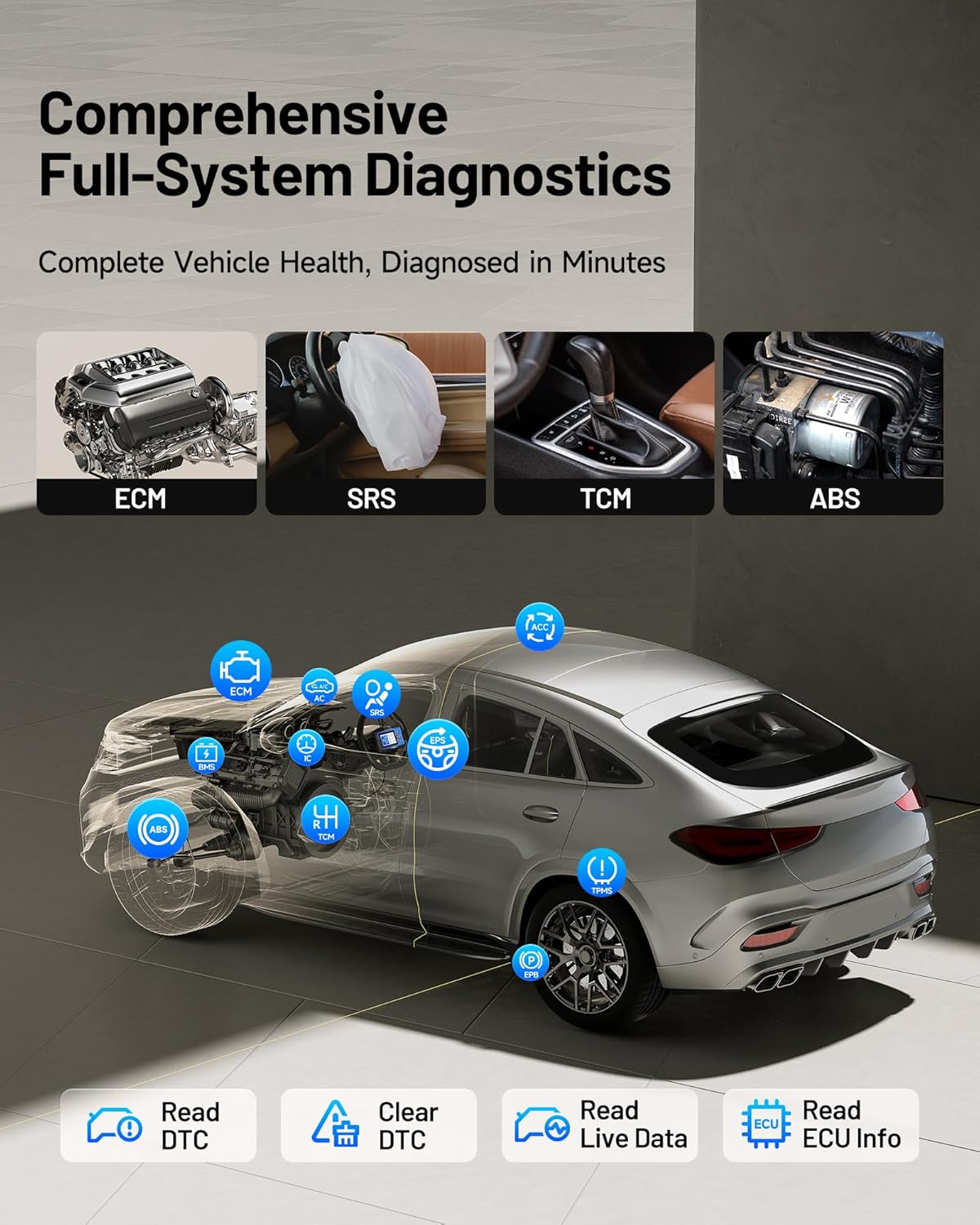
Figure 4.1: An illustration demonstrating the ArtiDiag600 Elite's capability to perform comprehensive diagnostics across all vehicle systems.
4.4 Live Data Monitoring
Monitor real-time data parameters from various sensors and modules. The ArtiDiag600 Elite allows you to compare up to four data streams simultaneously, which is crucial for identifying intermittent issues and analyzing vehicle performance trends.
4.5 Diagnostic Report Generation
After completing a diagnostic session, the tool can generate detailed professional reports. These reports can be easily shared via email or QR code, providing a convenient way to document and communicate findings.

Figure 4.2: Visual representation of Smart AutoVIN, graphic live data, online user feedback, and diagnostic report generation features.
4.6 FCA Gateway and CAN-FD Support
The ArtiDiag600 Elite supports FCA Gateway access, enabling full diagnostics on newer Chrysler, Jeep, Dodge, and Fiat models from 2017 onwards. It also supports the CAN-FD protocol, ensuring compatibility with the latest vehicle models, including select GM and Chrysler vehicles from 2020-2024.

Figure 4.3: Diagram illustrating the FCA Gateway access and CAN-FD protocol support for modern vehicles.
5. Maintenance and Reset Services
The ArtiDiag600 Elite provides 13 essential and advanced reset services to assist with routine vehicle maintenance and specific system recalibrations. These functions help ensure your vehicle operates optimally and can save time and costs associated with dealership visits.
5.1 Essential Reset Services (9 Functions)
- Oil Reset: Resets the oil life system after an oil change.
- Throttle Adaptation: Initializes the throttle actuators to the default state.
- SAS Reset (Steering Angle Sensor): Performs calibration for the Steering Angle Sensor.
- Brake Reset (EPB): Resets the electronic parking brake pads after replacement.
- TPMS Reset (Tire Pressure Monitoring System): Resets tire pressure sensors after replacement or rotation.
- BMS Reset (Battery Management System): Registers the new battery after replacement.
- ABS Bleeding: Bleeds air from the brake system after component replacement.
- DPF Regeneration (Diesel Particulate Filter): Clears particulate matter from the DPF filter.
- Injector Coding: Codes new injector numbers to the ECU.
5.2 Advanced Reset Services (4 Functions)
- AFS Reset (Adaptive Front-lighting System): Initializes the adaptive headlight system.
- AdBlue Reset: Resets the urea level after AdBlue fluid refill.
- Stop/Start Reset: Resets the engine start-stop system.
- Windows Calibration: Performs window initialization/calibration.

Figure 5.1: Overview of the 13 essential and advanced maintenance functions available on the ArtiDiag600 Elite.
6. Troubleshooting
This section provides general guidance for common issues you might encounter while using the ArtiDiag600 Elite. For more detailed troubleshooting or specific technical assistance, please refer to the support section.
6.1 Device Not Powering On
- Ensure the device is fully charged. Connect it to a power source using the provided Type-C USB cable and allow it to charge for at least 30 minutes before attempting to power it on again.
- Verify that the power button is being pressed and held for a sufficient duration (typically 3-5 seconds).
6.2 Failure to Connect to Vehicle
- Check that the OBD 16 Pin Diagnostic Cable is securely connected to both the ArtiDiag600 Elite and the vehicle's OBD2 port.
- Ensure the vehicle's ignition is in the 'ON' position (engine off).
- Verify that the vehicle's battery has sufficient voltage. Low battery voltage can prevent communication.
- Confirm that the vehicle model is supported by the ArtiDiag600 Elite. Refer to the vehicle coverage list in the specifications or on the TOPDON website.
6.3 Diagnostic Functions Not Working
- Ensure the device software is up-to-date. Outdated software may lack support for newer vehicle systems or specific functions.
- Verify that the specific function (e.g., a reset service) is supported for your vehicle's make, model, and year. Not all functions are universally applicable.
- If an error message appears, note the message and consult the user manual or TOPDON support for specific guidance.
7. Specifications
| Feature | Description |
|---|---|
| Brand | TOPDON |
| Model | ArtiDiag600 Elite |
| Product Dimensions | 8.66"L x 3.35"W x 11.42"H |
| Item Weight | 2.29 pounds |
| Operating System | Android 11.0 |
| CPU | 4-Core Processor |
| Memory | 2GB RAM, 32GB ROM |
| Display | 5-inch LCD |
| Battery | 1 Lithium Ion battery (included) |
| Vehicle Coverage | 70+ Brands, 10,000+ Models (from 1996 Onward) |
| Supported Protocols | FCA Gateway, CAN-FD, Full OBD2 Modes |
| Languages | 12 languages (English, German, Russian, Japanese, Portuguese, Polish, Spanish, French, Turkish, Korean, Simplified/Traditional Chinese) |
| UPC | 850051166800 |

Figure 7.1: Illustration of the ArtiDiag600 Elite's extensive vehicle compatibility across American, European, and Asian brands.
8. Warranty and Support
8.1 Warranty Information
The TOPDON ArtiDiag600 Elite comes with a 1-year warranty from the date of purchase. This warranty covers manufacturing defects and ensures reliable operation of your device. Please retain your proof of purchase for warranty claims.
8.2 Free Software Updates
Enjoy 2 years of FREE software and vehicle coverage updates. These updates are crucial for keeping your ArtiDiag600 Elite compatible with the latest vehicle models and diagnostic technologies. Updates can be performed directly on the device via Wi-Fi.
8.3 Customer Support
TOPDON provides professional customer service available 24/7 to assist you with any questions, technical issues, or troubleshooting needs. You can reach out to TOPDON support through their official website or the contact information provided in the quick user guide.