
Introduction
This manual provides detailed instructions for the installation, operation, and maintenance of your MERISHOPP Hy01Rf RF Wireless Room Thermostat. Designed for efficient control of gas boiler heating systems, this thermostat offers programmable scheduling, a large LCD touch screen, and a child safety lock feature. Please read this manual thoroughly before installation and use to ensure proper function and safety.
Product Overview
Key Features:
- Large LCD touch screen with blue backlight for clear visibility.
- Double temperature display mode.
- Time display (minutes, hours, weeks).
- 6-period programmable temperature setting for flexible scheduling (5+2, 6+1, or 7-day options).
- Internal and external temperature sensors.
- Display precision of 0.5°C (0.1°F inner precision).
- Room temperature automatic calibration function.
- Manual control and heating mode.
- Child safety lock feature.
- RF control with a sensor distance of approximately 30 meters.
Package Contents:
- 1 Piece RF Wireless Thermostat (Thermostat unit and Receiver unit)

Figure 1: The MERISHOPP Hy01Rf wireless thermostat unit (left) and its receiver unit (right).
Setup and Installation
1. Wiring the Receiver Unit:
Warning: Please ensure wiring is done strictly according to the wiring diagram. Do not allow water, mud, or other debris to enter the thermostat, as this will cause damage. Installation should be performed by a qualified professional if you are unsure.
- Identify the appropriate wiring terminals on the receiver unit for your gas boiler heating system.
- Connect the power supply and boiler control wires as per the provided wiring diagram (not included in this manual, refer to product packaging or manufacturer's website for specific diagrams).
- Ensure all connections are secure and insulated.
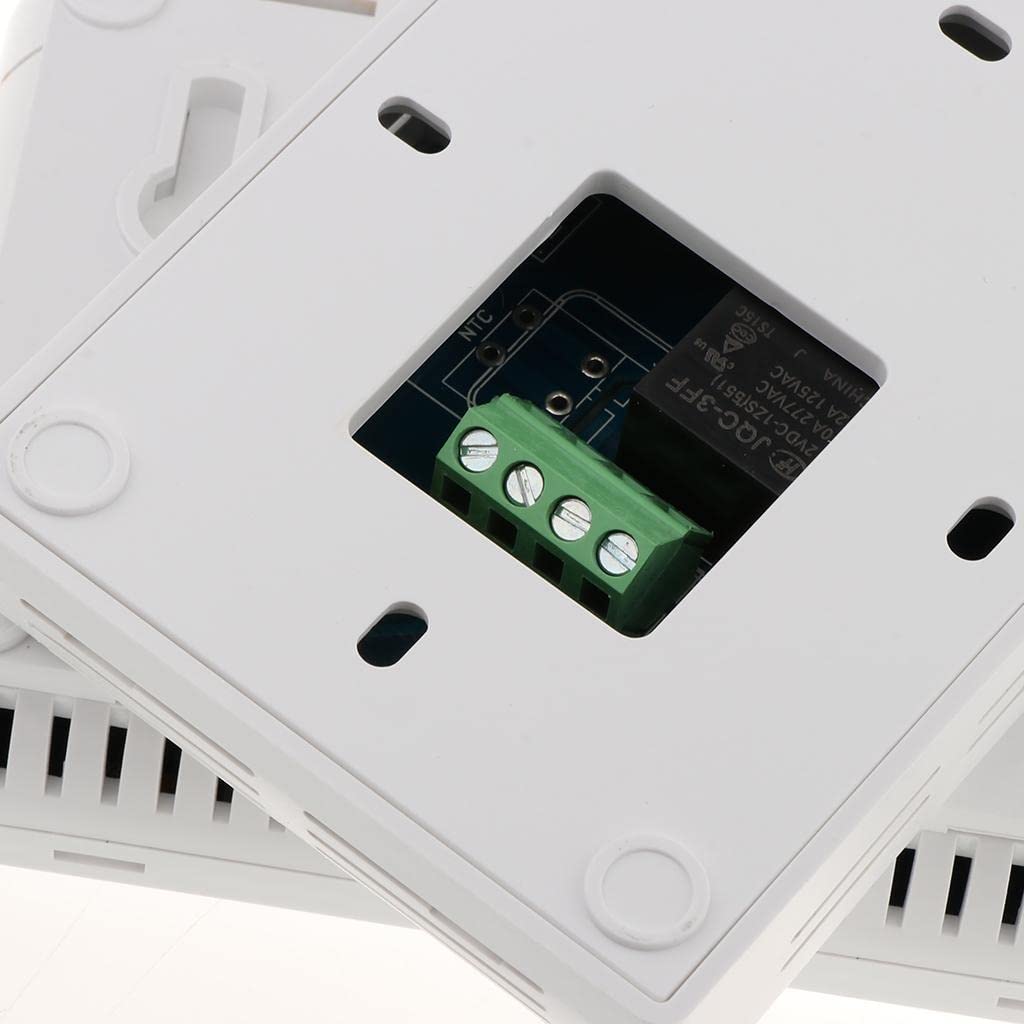
Figure 2: Close-up view of the wiring terminals on the receiver unit, showing connections for power and boiler control.
2. Powering the Thermostat Unit:
- The thermostat unit requires 2 x AA batteries (not included).
- Open the battery compartment on the back of the thermostat unit.
- Insert the batteries, ensuring correct polarity.
- Close the battery compartment securely.
3. Mounting the Units:
- Mount the receiver unit in a suitable location near your boiler, ensuring good RF signal reception with the thermostat unit.
- Mount the thermostat unit on an interior wall, away from direct sunlight, drafts, and heat sources, at a height of approximately 1.5 meters (5 feet) from the floor for accurate temperature readings.

Figure 3: Side view of the receiver unit, illustrating its compact design and potential mounting points.
Operating Instructions
1. Initial Power-On and Pairing:
- Once both units are powered, the thermostat unit should automatically attempt to pair with the receiver.
- Look for a communication icon on the thermostat's LCD display to confirm successful pairing. Refer to the specific product manual for manual pairing instructions if automatic pairing fails.
2. Setting Date and Time:
- Access the settings menu (usually by pressing a 'SET' or 'PROG' button).
- Navigate to the date and time settings.
- Adjust the minutes, hours, and day of the week using the '+' and '-' buttons.
- Confirm settings to save.
3. Programming Heating Schedule (5+2, 6+1, or 7-Day):
- Press the 'PROG' button to enter programming mode.
- Select your desired scheduling mode (5+2 for weekdays/weekend, 6+1 for Monday-Saturday/Sunday, or 7-day for individual day programming).
- For each day or period, set the desired temperature and time intervals (1st-6th interval modes).
- Use the '+' and '-' buttons to adjust values and 'SET' or 'PROG' to confirm and move to the next setting.
- Exit programming mode to save the schedule.
4. Manual Control:
- In manual mode, you can override the programmed schedule to set a desired temperature directly.
- Press the 'SET' button or navigate to manual mode.
- Use the '+' and '-' buttons to adjust the target temperature. The system will maintain this temperature until the next programmed event or until manual mode is exited.
5. Child Safety Lock:
- To activate the child safety lock, typically press and hold a combination of buttons (e.g., '+' and '-' simultaneously) for a few seconds until a lock icon appears on the display.
- To deactivate, repeat the same action. This prevents unauthorized changes to settings.
Maintenance
1. Battery Replacement:
- When the battery indicator appears on the LCD, replace the 2 x AA batteries in the thermostat unit.
- Ensure correct polarity during replacement.
2. Cleaning:
- Wipe the thermostat and receiver units with a soft, dry cloth.
- Do not use abrasive cleaners, solvents, or chemical sprays, as these can damage the plastic and electronic components.
Troubleshooting
| Problem | Possible Cause | Solution |
|---|---|---|
| Thermostat display is blank. | Dead batteries. | Replace the 2 x AA batteries in the thermostat unit. |
| Heating system not responding. | No power to receiver; Receiver not paired; Wiring issue; Boiler fault. | Check power to receiver. Ensure thermostat and receiver are paired. Verify wiring connections. Check boiler for error codes or issues. |
| Incorrect temperature reading. | Thermostat placed in direct sunlight or near a heat source/draft. | Relocate the thermostat to a more suitable position. Use the room temperature automatic calibration function if available. |
| Thermostat not communicating with receiver. | Out of range; RF interference; Pairing lost. | Ensure units are within 30m range. Minimize sources of RF interference. Re-pair the thermostat and receiver units. |
Specifications
| Model | Hy01Rf |
| Item Model Number | MERISHOPP53034335 |
| Material | ABS, PVC |
| Color | White |
| Output Options | 3A (Water Heating); 5A (Gas Boiler Heating); 16A (Electric Heating) |
| Working Environment Temperature | 0~70°C / 32~122°F |
| Range of Temperature Display | 0~40°C / 32~104°F |
| Range of Temperature Adjustment | 5~35°C / 41~95°F |
| Display Accuracy | 0.5°C or 1°F (Inner precision: 0.1) |
| Battery Power | 2 x AA (Not Included) |
| Output | Switch Relay |
| Probe Sensor | NTC(10K)1% |
| Thermostat Dimensions | 130 x 90 x 27 mm |
| Receiver Dimensions | 107 x 78 x 28 mm |
| RF Control Distance | Around 30 meters |
| Country of Origin | Hong Kong |
Warranty and Support
For warranty information and technical support, please contact the manufacturer or seller directly. The manufacturer is LR DECOR ENTERPRISE LLP.
Manufacturer Contact: LR DECOR ENTERPRISE LLP
- Customer Care: +91-7291860014
- Email: lrdecor2nd@gmail.com
Please retain your proof of purchase for any warranty claims.