
1. Introduction and Product Overview
The GOOLOO A2 is a versatile 5-in-1 portable device designed for roadside emergencies and outdoor activities. It integrates a powerful car jump starter, a high-efficiency tire inflator, an SOS light, a bright LED illumination, and a mobile device charger. This manual provides detailed instructions for safe and effective use of your GOOLOO A2.

Image: The GOOLOO A2 unit, showcasing its compact design, integrated display, control buttons, jump starter ports, and air hose connection. Various air nozzles and a USB-C cable are also visible.
Key features include:
- High-Efficient Jump Starter: 2500A peak current, capable of jump-starting vehicles with up to 8.0L gas or 6.0L diesel engines.
- Upgraded 150 PSI Cordless Air Compressor: Features smart preset auto shut-off and a turbocharged 35L/Min inflation rate for quick tire inflation.
- Emergency Lifesaver: Equipped with a bright LED light offering steady, SOS, and strobe modes, and functions as a power bank for mobile devices.
- Safety Features: Incorporates 10 built-in intelligent safety protections, including spark-proof technology and reverse polarity protection.
- Portable Design: Compact and lightweight for easy storage and transport.
2. Package Contents
Please verify that all items are present in your package:
- 1 x GOOLOO A2 Portable Car Jump Starter with Tire Inflator
- 1 x Smart Jumper Cable
- 1 x USB-A to USB-C Cable
- 1 x Pump Tube (Air Hose)
- 5 x Air Nozzles (British Valve Adapter, Short Tapered Nozzle, Presta Valve Adapter, Ball Needle Adapter, Long Tapered Nozzle)
- 1 x User Manual
- 1 x Carrying Bag

Image: A visual representation of the GOOLOO A2 unit, its smart jumper cables, USB-C charging cable, air hose, various air nozzles, user manual, and carrying bag, all neatly arranged.
3. Setup and Charging
Before first use, ensure the GOOLOO A2 is fully charged. It comes with a built-in lithium polymer battery.
3.1 Initial Charging
- Connect the provided USB-A to USB-C cable to the USB-C input port on the GOOLOO A2.
- Connect the other end of the USB-A cable to a 5V/2A USB wall adapter (not included) or a compatible USB port.
- The LED display will indicate the charging status. Charge until the battery indicator shows full.
Note: For optimal performance and battery longevity, it is recommended to fully charge the unit every 3-6 months if not in regular use.

Image: A diagram of the GOOLOO A2 unit, highlighting the LED display, power button, up/down buttons, setting button, LED button, USB-C input (5V/2A), USB-A output (5V/2.1A), aerated port, LED flashlight, and jump cable socket.
4. Operating Instructions
4.1 Jump Starting a Vehicle
Ensure the GOOLOO A2 is sufficiently charged (at least 50% battery recommended) before attempting to jump start a vehicle.
- Connect Jumper Cable: Insert the blue end of the smart jumper cable into the 12V jump cable socket on the GOOLOO A2 unit. Ensure a firm connection.
- Connect to Battery: Attach the red clamp (+) to the positive terminal of the vehicle's battery and the black clamp (-) to the negative terminal. Ensure the clamps make good contact with the battery terminals.
- Check Indicator: Observe the indicator light on the smart jumper cable.
- Solid Green: Ready to jump start.
- Solid Red with Beep: Reverse polarity detected. Disconnect clamps and re-attach correctly.
- Flashing Green: Battery voltage too low. Press the "BOOST" button on the smart cable if available, then proceed.
- Start Vehicle: Once the indicator is solid green, start your vehicle's engine.
- Disconnect: As soon as the vehicle starts, remove the jumper clamps from the car battery, then disconnect the smart jumper cable from the GOOLOO A2 unit.

Image: The GOOLOO A2 unit connected to a car battery via its smart jumper cables, demonstrating the jump-starting process. The image highlights the 2500A peak current and compatibility with 12V, 8.0L gas, and 6.0L diesel engines.

Image: A three-step visual guide showing how to jump start a vehicle: 1. Insert the jumper cable into the unit. 2. Connect the red clamp to the positive battery terminal and the black clamp to the negative. 3. Start the car engine when the light on the smart cable turns green.
4.2 Tire Inflation
The GOOLOO A2 features an intelligent tire inflator with auto shut-off.
- Attach Air Hose: Screw the air hose securely onto the aerated port of the GOOLOO A2.
- Connect to Tire Valve: Attach the other end of the air hose to the tire valve stem. Ensure it is tightly screwed on to prevent air leakage.
- Power On & Select Mode: Press the power button to turn on the unit. Use the "Setting" button (often represented by a gear icon or 'M') to cycle through inflation modes (Car, Motorcycle, Bicycle, Ball). The display will show the current pressure unit (PSI, BAR, KPA).
- Set Target Pressure: Use the "+" and "-" buttons to adjust the desired target pressure. The LCD display provides real-time pressure readings.
- Start Inflation: Press the power button again to begin inflation. The compressor will automatically stop once the preset pressure is reached.
- Disconnect: Quickly unscrew the air hose from the tire valve and then from the GOOLOO A2 unit.
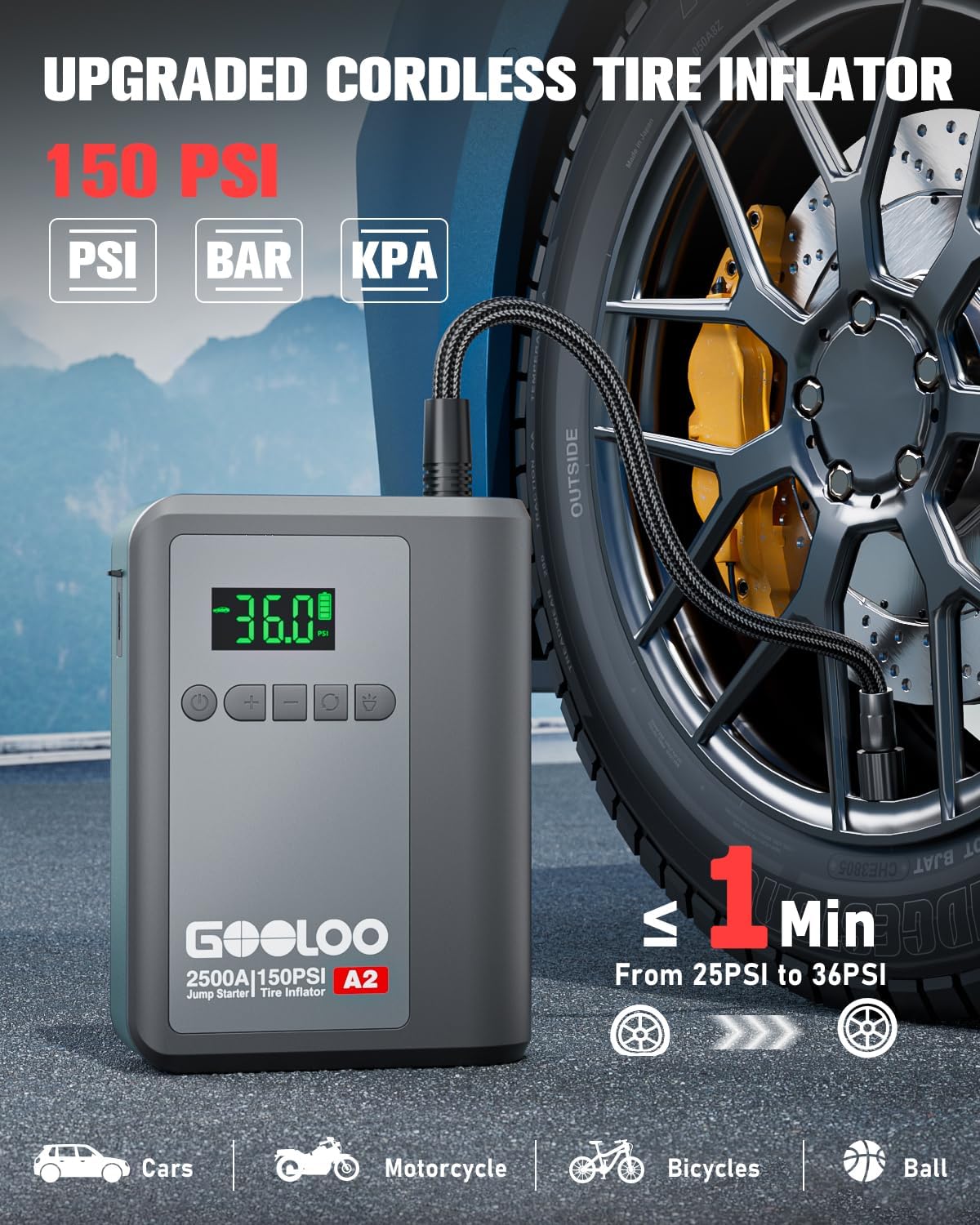
Image: The GOOLOO A2 unit connected to a car tire valve via its air hose, demonstrating the tire inflation process. The display shows "36.0" PSI, indicating the target pressure. The image highlights the 150 PSI capacity and quick inflation time.

Image: A four-step visual guide for tire inflation: 1. Attach the air hose and tighten it. 2. Press the mode button to choose the inflation mode. 3. Press the power button to start inflation. 4. Pull out the air hose when auto-stop occurs.
Note: Use the appropriate air nozzle for different inflatables (e.g., car tires, bicycle tires, sports balls).

Image: A visual guide showing the GOOLOO A2's capability to inflate various items, including car tires, motorcycle tires, bicycle tires, balls, and swimming rings, along with their recommended pressure ranges and adjustable ranges.
4.3 Power Bank Function
The GOOLOO A2 can charge your electronic devices on the go.
- Connect your device's charging cable to the USB-A output port (5V/2.1A) on the GOOLOO A2.
- The unit will automatically begin charging your device.

Image: A person sitting in a car, charging their smartphone using the GOOLOO A2 unit, demonstrating its function as a portable power bank. Icons below indicate compatibility with phones, iPads, headsets, laptops, cameras, and consoles.
4.4 LED Light Functions
The integrated LED light provides illumination and emergency signaling.
- Press the "LED" button (often represented by a light bulb icon) to cycle through the light modes:
- Steady On (Spotlight): For general illumination.
- SOS Mode: Flashes the international SOS signal (three short, three long, three short flashes).
- Strobe Mode: Rapid flashing for warning or signaling.
- Press and hold the "LED" button to turn off the light.
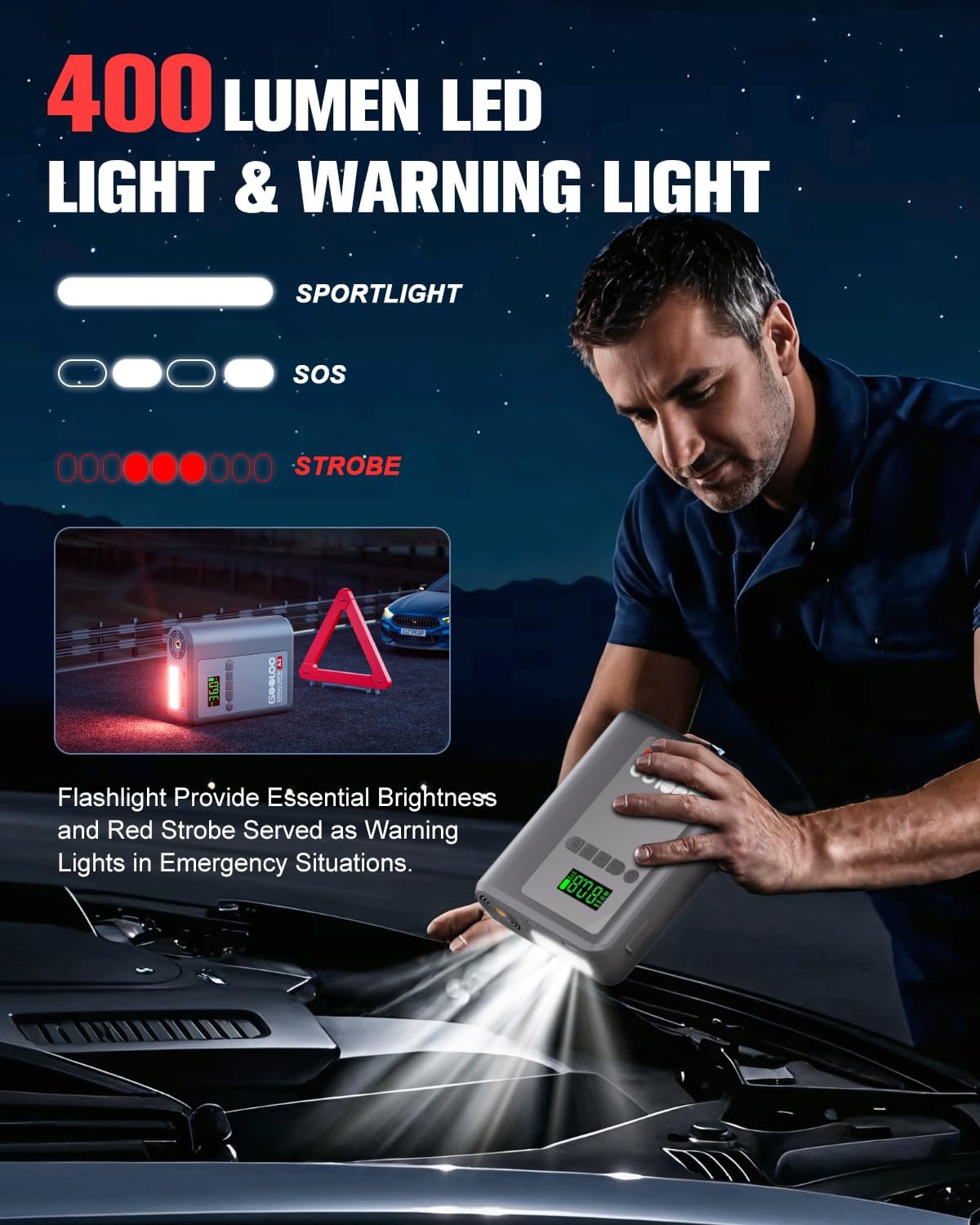
Image: A person using the GOOLOO A2's LED flashlight to illuminate a car engine bay at night, with a warning triangle in the background. The image illustrates the 400 lumen output and the spotlight, SOS, and strobe modes.
5. Maintenance and Care
Proper maintenance ensures the longevity and reliability of your GOOLOO A2.
- Storage: Store the unit in a cool, dry place away from direct sunlight and extreme temperatures. Use the provided carrying bag for protection.
- Charging: Recharge the unit every 3-6 months, even if not in use, to maintain battery health.
- Cleaning: Wipe the unit with a soft, dry cloth. Do not use harsh chemicals or abrasive cleaners.
- Avoid Water: Do not expose the unit to water or excessive moisture.
- Temperature: The unit is designed to operate in temperatures from -20℃ to 60℃. Avoid using or storing outside this range.

Image: An X-ray style view of the GOOLOO A2 unit, illustrating its internal design for efficient battery heat dissipation, with blue air currents flowing through. This design helps ensure longer product life and reliable operation in varying temperatures (-20°C to 60°C).
6. Troubleshooting
If you encounter issues with your GOOLOO A2, refer to the following common problems and solutions:
| Problem | Possible Cause | Solution |
|---|---|---|
| Unit does not turn on. | Battery is depleted. | Charge the unit fully. |
| Vehicle does not jump start. | Incorrect clamp connection; Battery too dead; Vehicle issue. | Ensure clamps are connected correctly (red to +, black to -). Check smart cable indicator. If battery is extremely low, use "BOOST" function if available. Consult a mechanic if vehicle still won't start. |
| Tire inflator not working or slow. | Air hose not securely attached; Incorrect pressure setting; Unit battery low. | Ensure air hose is tightly screwed onto both the unit and tire valve. Verify target pressure. Charge the unit. |
| LED display is dim or unreadable in sunlight. | Direct sunlight glare. | The display is designed for sunlight readability, but extreme glare can still affect visibility. Try to shade the screen if possible. |
| Unit gets warm during use. | Normal operation during high power output (jump starting, inflating). | This is normal. The unit has built-in heat dissipation. If it becomes excessively hot or emits smoke, discontinue use immediately and contact support. |
If the problem persists after trying these solutions, please contact GOOLOO customer support.
7. Specifications
| Feature | Detail |
|---|---|
| Model | A2 portable jump starter with tire inflator |
| Peak Output Current | 2500 Amps |
| Engine Compatibility | Up to 8.0L Gas / 6.0L Diesel |
| Tire Inflator Pressure | Max 150 PSI |
| Product Dimensions | 4.84"D x 1.97"W x 6.54"H |
| Item Weight | 1.5 Pounds |
| Battery Type | Lithium Polymer (1 required, included) |
| USB-C Input | 5V/2A |
| USB-A Output | 5V/2.1A |
| Operating Temperature | -20℃ to 60℃ (-4°F to 140°F) |
| LED Light Output | 400 Lumens |
8. Warranty and Support
GOOLOO stands behind the quality of its products.
- Warranty Period: The GOOLOO A2 comes with an 18-month warranty from the date of purchase.
- Return Guarantee: A 30-day unconditional return guarantee is offered.
- Customer Support: GOOLOO provides 24/7 customer support and lifetime technical support.
For warranty claims, technical assistance, or any inquiries, please contact GOOLOO customer service through their official website or the platform where you purchased the product. Please have your model number (A2) and purchase details ready.
You can visit the official GOOLOO store for more information: GOOLOO Official Store