
1. Introduction
This manual provides essential information for the proper use and maintenance of your K&F CONCEPT 67mm Nano-K Series 3-in-1 Lens Filter. This innovative filter combines three crucial photographic effects: a Variable Neutral Density (ND2-ND32) filter, a Circular Polarizer (CPL), and a Black Diffusion 1/4 filter, designed to enhance your photography and videography.
The filter is constructed from high-quality Japanese AGC optical glass with an 18-layer nano coating, ensuring durability and superior optical performance. It is designed for camera lenses with a 67mm filter thread.

Image 1.1: The K&F CONCEPT 3-in-1 filter combines Variable ND, CPL, and Black Diffusion effects.
2. Setup and Installation
To install the filter, ensure your camera lens has a 67mm filter thread. The filter screws directly onto the front of your lens.
- Identify Lens Thread Size: Locate the filter thread size on your camera lens, usually marked with a ⌀ symbol (e.g., ⌀67mm).
- Align the Filter: Carefully align the filter with the lens thread.
- Screw On: Gently rotate the filter clockwise until it is securely attached. Avoid overtightening.

Image 2.1: Guide to identifying your lens filter size, typically found on the lens barrel or cap.
Important Note: The size of the filter front frame will be 1 size larger than the lens mounting end. For example, if the filter diameter is 82mm (lens mounting end), the front frame will be 86mm. This design may prevent the installation of a lens hood.

Image 2.2: Illustration of the filter's front frame being larger than the lens mounting end, which may affect lens hood compatibility.
3. Operating Instructions
This filter offers three distinct functions that can be adjusted to achieve desired photographic effects.
3.1 Variable Neutral Density (ND2-ND32)
The variable ND function allows you to reduce the amount of light entering the lens by 1 to 5 stops (ND2 to ND32). This is ideal for shooting in bright conditions, enabling wider apertures for shallow depth of field or slower shutter speeds for motion blur effects.
- Unlock Actuator: Loosen the orange pushrod (actuator) on the side of the filter.
- Adjust ND Value: Rotate the outer ring of the filter to increase or decrease the ND effect. The markings on the filter indicate the stop values (2, 4, 8, 16, 32).
- Tighten Actuator: Once the desired ND value is set, tighten the orange pushrod to lock the setting and prevent accidental rotation.
Video 3.1: Demonstrates how to install the filter and adjust the variable ND setting using the orange pushrod.
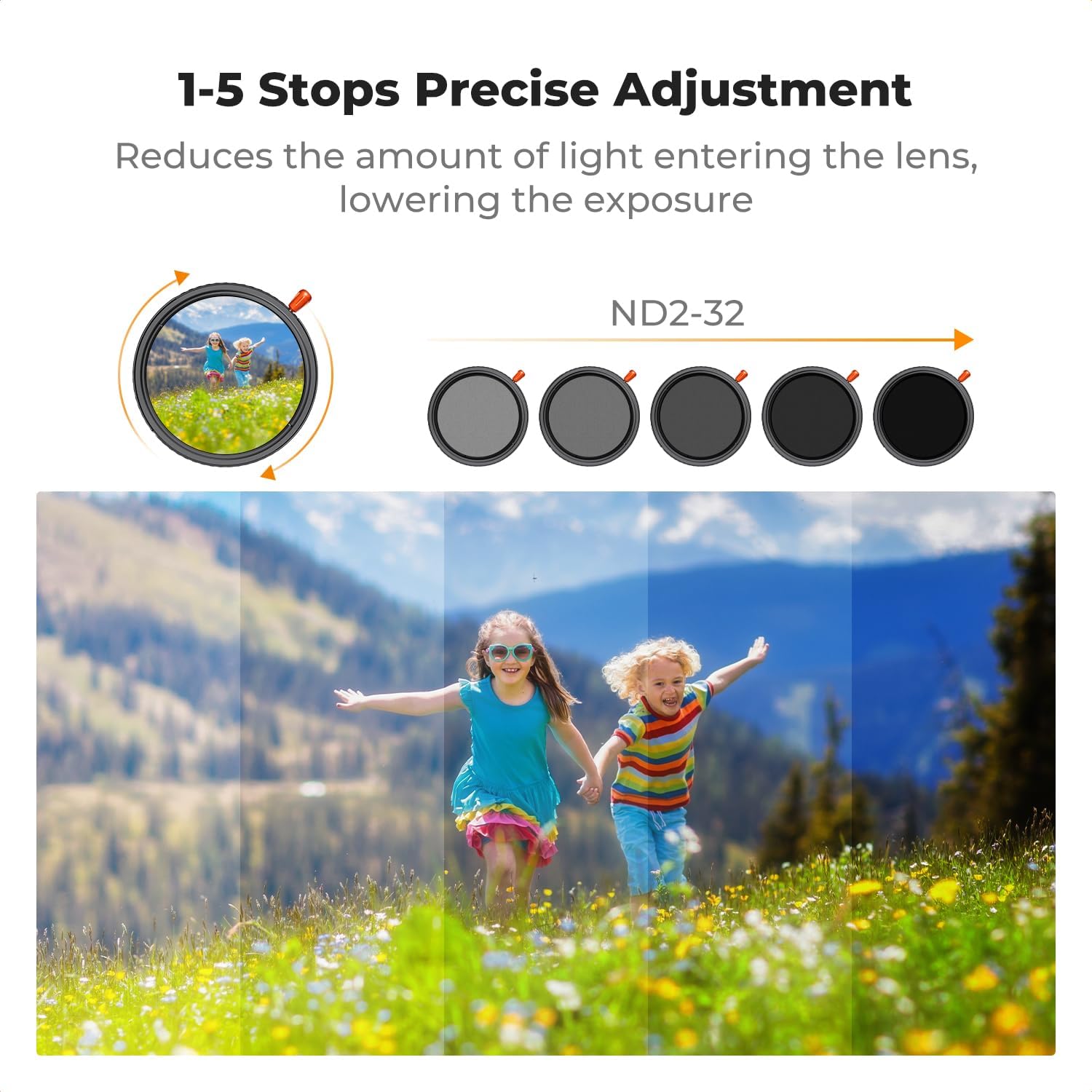
Image 3.1: Visual representation of the 1-5 stops precise adjustment capability of the variable ND filter.
Note on 'Black X Pattern': This filter is designed to avoid the 'black X pattern' often seen with variable ND filters, especially when used with focal lengths larger than 35mm.

Image 3.2: Demonstrates the absence of the 'black X pattern' when using this filter, compared to other filters.
3.2 Circular Polarizer (CPL)
The CPL function helps to remove reflections from non-metallic surfaces (like water or glass) and enhances color saturation and contrast, particularly in skies and foliage.
- Adjust CPL Effect: With the ND actuator tightened, rotate the entire filter frame (the part that screws onto the lens) to adjust the polarization effect. Observe the effect through your camera's viewfinder or LCD screen.
- Optimal Angle: The polarization effect is strongest when shooting at a 90-degree angle to the sun.
Video 3.2: Illustrates the CPL effect, showing how it removes reflections from water and enhances sky blueness.
3.3 Black Diffusion 1/4
The Black Diffusion 1/4 filter softens highlights, reduces contrast, and creates a cinematic, dreamy mist effect, especially in backlighting. It also helps to soften skin texture in portrait photography.
This effect is integrated into the filter and works in conjunction with the ND and CPL functions. No separate adjustment is needed for the diffusion effect itself.
Video 3.3: Showcases the Black Diffusion 1/4 effect, demonstrating its ability to soften highlights and create a cinematic look.
4. Maintenance
Proper care ensures the longevity and optical quality of your filter.
- Cleaning: Use a microfiber cleaning cloth (included in the packaging) to gently wipe away dust and smudges. For stubborn marks, use a specialized lens cleaning solution applied to the cloth, not directly to the filter.
- Storage: Store the filter in its protective case when not in use to prevent scratches and dust accumulation.
- Handling: Avoid touching the glass surface directly with your fingers to prevent oil and fingerprint smudges.

Image 4.1: The filter comes with a protective case and microfiber cleaning cloths for proper maintenance.
5. Troubleshooting
- Vignetting: If you observe darkening at the corners of your image, especially at wider focal lengths or maximum ND settings, this is known as vignetting. While this filter is designed to minimize it, extreme conditions or specific lens combinations might still show some effect.
- Stuck Filter: If the filter becomes difficult to remove, try using a rubber filter wrench for better grip. Avoid excessive force.
6. Specifications
| Brand | K&F CONCEPT |
| Model Number | B0DT5RHWR7 (KF01.2912V1) |
| Filter Type | Variable Neutral Density (ND2-ND32), Circular Polarizer (CPL), Black Diffusion 1/4 (3-in-1) |
| Filter Thread Size | 67mm |
| Material | Japanese AGC Optical Glass |
| Coating | 18-Layer Nano Coating |
| Light Reduction | 1-5 Stops (ND2-ND32) |
| Water Resistance | Not Water Resistant |
7. Warranty and Support
For warranty information and customer support, please refer to the official K&F CONCEPT website or contact your retailer. Keep your purchase receipt as proof of purchase.
For further assistance, visit the K&F CONCEPT Store.