1. Introduction
Welcome to the Ethelred C20 PRO Smart Watch user manual. This guide provides essential information for setting up, operating, and maintaining your new smartwatch. Please read these instructions carefully to ensure optimal performance and longevity of your device.
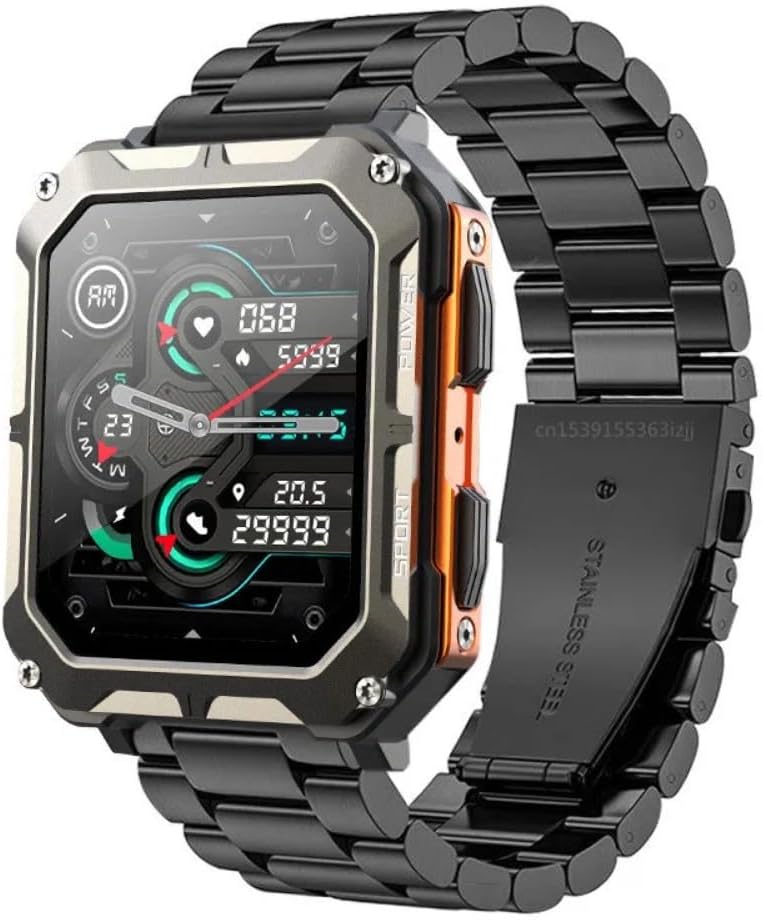
Image 1: The Ethelred C20 PRO Smart Watch featuring a black steel band and a vibrant display showing health metrics.

Image 2: Two Ethelred C20 PRO Smart Watches displayed in an outdoor environment, highlighting their durable design.
2. What's in the Box
Upon unpacking your Ethelred C20 PRO Smart Watch, please verify that all the following items are included:
- Ethelred C20 PRO Smart Watch
- Charging Cable
- User Manual
- Watch Band
3. Initial Setup
3.1 Charging the Device
Before first use, fully charge your smartwatch. Connect the magnetic charging cable to the charging contacts on the back of the watch and plug the USB end into a power adapter (not included) or a computer's USB port.
3.2 Installing the DaFit App
To unlock the full functionality of your Ethelred C20 PRO Smart Watch, download and install the 'DaFit' application on your smartphone. The app is compatible with Android 6.0 / iOS 9.0 and above systems.
- Scan the QR code provided in the manual or on the watch screen, or search for 'DaFit' in your smartphone's app store.
- Download and install the application.
- Follow the on-screen instructions to create an account and set up your profile.
3.3 Pairing with Your Smartphone
Ensure Bluetooth is enabled on your smartphone.
- Open the DaFit app on your smartphone.
- Navigate to the 'Device' or 'Add Device' section within the app.
- The app will search for available devices. Select 'C20 PRO' from the list.
- Confirm the pairing request on both your smartphone and the smartwatch.
4. Operating the Smart Watch
4.1 Basic Navigation
The Ethelred C20 PRO features a 1.83-inch HD rectangle touch screen. Swipe across the screen to navigate through menus and functions. Press the physical buttons on the side for specific actions like power on/off or returning to the home screen.
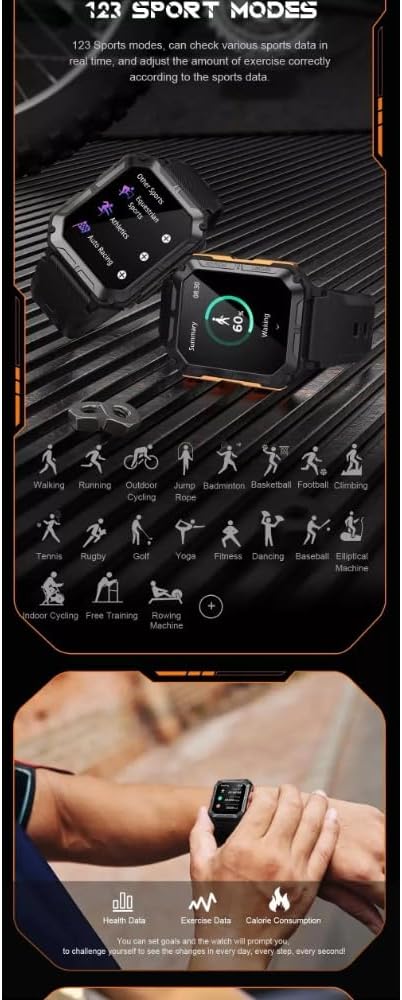
Image 3: The smartwatch interface showing different menu styles and watch faces, demonstrating the customizable UI.
4.2 Bluetooth Call Function
Once paired with your smartphone, you can make and receive calls directly from your watch.
- Making a Call: Access the 'Dial' function on your watch, enter the number, or select from 'Favorite Contacts' or 'Call History'.
- Receiving a Call: When a call comes in, the watch will display the caller ID. You can answer or reject the call directly from the watch screen.

Image 4: The smartwatch displaying an active call interface, illustrating the Bluetooth call feature.
4.3 Voice Assistant
Activate the voice assistant feature on your watch to perform various tasks using voice commands. Ensure your watch is connected to your smartphone for this feature to function.
4.4 Smart Notifications
Receive notifications for text messages, emails, and other app alerts directly on your wrist. Configure notification settings through the DaFit app on your smartphone.
5. Key Features
5.1 Health Monitoring
The C20 PRO Smart Watch includes several health monitoring functions:
- Heart Rate Monitor: Provides 24-hour real-time heart rate monitoring.
- Blood Pressure Monitor: Measures blood pressure.
- Blood Oxygen Monitor: Measures blood oxygen levels.
- Sleep Monitor: Tracks sleep patterns and quality.
- Stress Monitor: Helps track stress levels.

Image 5: An overview of the watch's basic functions including heart rate, call reminder, pedometer, and information reminder, alongside battery life indicators.

Image 6: The watch screen showing health data such as heart rate and blood oxygen, emphasizing the 1.83-inch high-definition display.
5.2 Fitness Tracking
The built-in fitness tracker monitors your daily activities and helps you achieve your fitness goals.
- Steps Tracker: Counts your daily steps.
- Calorie Tracker: Estimates calories burned.
- Activity Tracker: Monitors overall activity levels.
5.3 Sports Modes
The watch supports 123 sports modes, allowing you to track various activities and view real-time data.

Image 7: A visual representation of the 123 sports modes available on the watch, including walking, running, cycling, and more.
5.4 Other Functions
- Weather Display
- Camera Control
- Music Control
- Stopwatch, Alarm, Timer
- Sedentary Reminder
- Breathing Training
- Calculator
- Messages
- Brightness Adjustment
- Mobile Phone Search
6. Maintenance
6.1 Cleaning
Regularly clean your smartwatch and watch band to prevent skin irritation and maintain device functionality. Use a soft, damp cloth to wipe the screen and body. For the band, follow specific cleaning instructions based on its material (e.g., steel, leather).
6.2 Water Resistance
The Ethelred C20 PRO Smart Watch is IP68 waterproof. This means it is resistant to dust and can withstand immersion in water up to 1.5 meters for up to 30 minutes. Avoid hot water, steam, or prolonged submersion.
7. Troubleshooting
7.1 Watch Not Turning On
- Ensure the watch is fully charged. Connect it to the charging cable for at least 30 minutes.
- Press and hold the power button for several seconds.
7.2 Unable to Pair with Smartphone
- Ensure Bluetooth is enabled on your smartphone and the watch.
- Make sure the DaFit app is open and searching for devices.
- Restart both your smartphone and the smartwatch.
- Ensure the watch is not already paired with another device.
7.3 Inaccurate Health Data
- Ensure the watch is worn snugly on your wrist, not too tight or too loose.
- Clean the sensor on the back of the watch.
- Environmental factors and individual physiology can affect readings. Consult a medical professional for accurate health assessments.
8. Specifications

Image 8: Visual representation of the watch's battery specifications, including 380mAh capacity, 35-day standby time, and 5-7 day typical lifetime.
| Feature | Detail |
|---|---|
| Model | C20 PRO |
| Display | 1.83-inch HD Rectangle Screen |
| Resolution | 240*286 |
| Chip | 8763EWE |
| Memory Storage Capacity | 128 MB |
| Battery Capacity | 380mAh Polymer Battery |
| Connectivity | Bluetooth 5.0 |
| Compatible OS | Android 6.0 / iOS 9.0 and above |
| App | DaFit |
| Water Resistance | IP68 |
| Item Weight | 3.17 ounces |
| Manufacturer | Guangzhou Shanshan Watch Co., Ltd |
9. Warranty and Support
For warranty information and customer support, please refer to the documentation provided with your purchase or contact the retailer. Keep your proof of purchase for any warranty claims.


