
ATN X-Celsior, 3-9x
ATN X-Celsior 3-9x Night Vision Scope User Manual
Model: X-Celsior 3-9x | Brand: ATN
Product Overview
The ATN X-Celsior 3-9x Night Vision Scope is a state-of-the-art digital optic designed for precision and clarity in various lighting conditions. Featuring an ultra-sensitive night vision sensor and a high-definition display, it provides clear visuals day or night. This scope is equipped with advanced features such as HD video recording, a long-range infrared illuminator, and a smart ballistic calculator for enhanced performance.

Figure 1: ATN X-Celsior 3-9x Night Vision Scope
Key Features
- Ultra Sensitive Night Vision Sensor: Delivers crystal-clear images even in the darkest environments, ensuring visibility in low light.

Figure 2: Enhanced night vision capabilities.
- 1280 High Definition Display: Provides sharp and vivid visuals, bringing your target into perfect focus.

Figure 3: High-definition display for clear viewing.
- HD Video Recording: Capture every moment in stunning HD with the built-in video recorder.
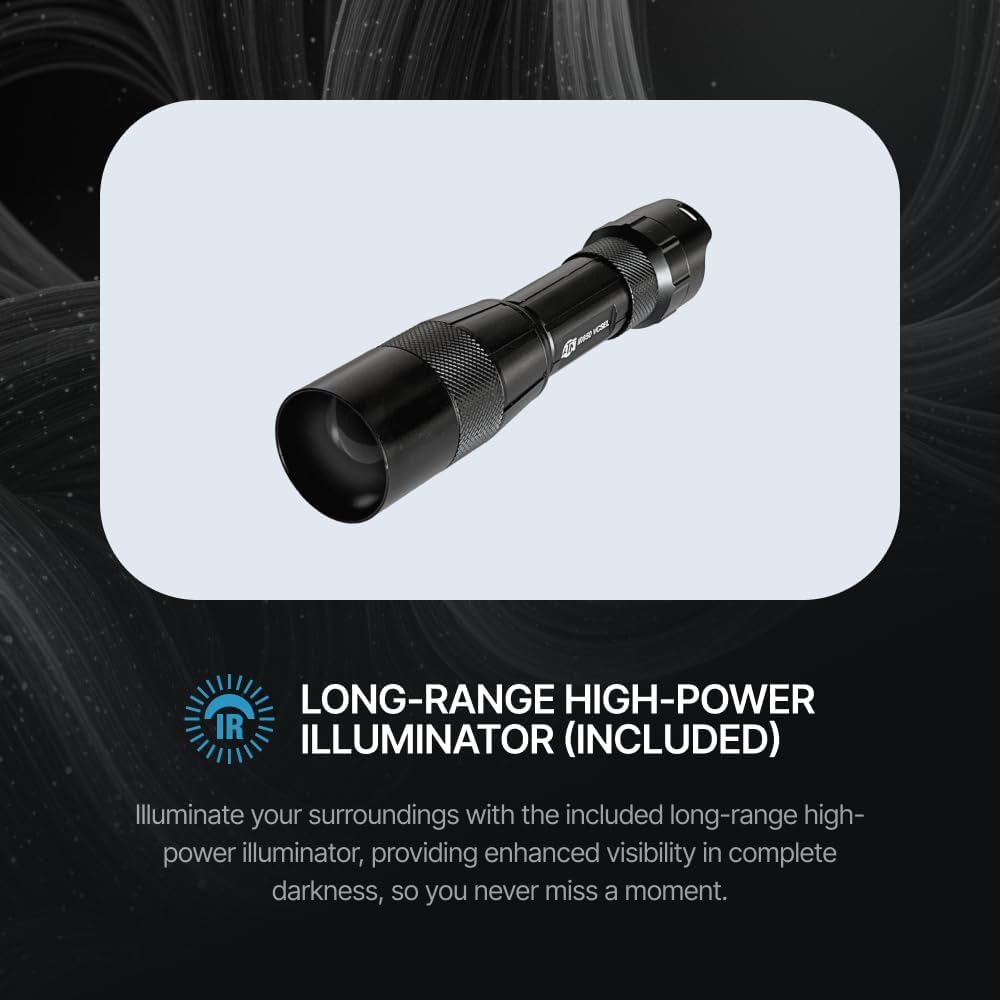
Figure 4: Integrated video recording function.
- Night and Day Mode: Seamlessly transition between day and night modes for 24/7 hunting confidence.

Figure 5: Day and Night operational modes.
- Long Range High Power Infrared Illuminator: Included to enhance night vision visibility up to 700 yards in complete darkness.

Figure 6: Powerful infrared illuminator for extended range.
- ATN Predator Reticle: A specialized reticle for quick and precise shots.
- One Shot Zero: Calibrate your scope instantly by aligning the zero reticle to your first point of impact.
- Stadia Metric Rangefinder: Provides reliable distance measurements for pinpoint accuracy.
- Lightweight Design: Weighing 745 Grams, it ensures ease of movement without compromising durability.

Figure 7: Lightweight and durable construction.
Setup Guide
1. Unboxing and Initial Inspection
Carefully remove all components from the packaging. Verify that all included items are present: ATN X-Celsior scope, USB-C cable, Infrared Illuminator, 3-pc Mount, Lens Cap, Eyecup, IR Battery Charger, Lens Tissue, Scope Cover, and Battery.
2. Battery Installation and Charging
The X-Celsior features a built-in battery with a long life. For initial use, ensure the battery is fully charged using the provided USB-C cable. The IR Illuminator has its own rechargeable battery and charger; ensure it is also fully charged before use.
3. Mounting the Scope
The scope mounts easily with standard 30mm rings (included). Ensure your rifle has a compatible rail system (e.g., Picatinny rail). Position the scope to achieve optimal eye relief (90mm extended eye relief for comfortable shooting). Securely tighten the mounting rings.
4. IR Illuminator Attachment
Attach the Long Range High Power Infrared Illuminator to the scope's rail system. Ensure it is securely fastened and aligned to provide optimal illumination for night vision.
Operating Instructions
1. Powering On/Off
Press and hold the power button (usually located on the top control panel) to turn the scope on or off. The HD display will activate.
2. Day/Night Mode Selection
Toggle between day and night vision modes using the dedicated button on the control panel. In night mode, activate the IR Illuminator for enhanced visibility.
3. Zeroing the Scope (One Shot Zero)
- Mount the scope securely on your rifle.
- Fire a shot at a target.
- Using the One Shot Zero feature, adjust the reticle to align with the point of impact. The scope will automatically adjust its internal ballistics.
- Confirm zero with additional shots if necessary.
4. Using the Stadia Metric Rangefinder
Activate the rangefinder function via the control panel. Follow the on-screen prompts to measure the distance to your target. The scope's ballistic calculator will then adjust the reticle for precise aiming.
5. HD Video Recording
Press the record button to start and stop video recording. Videos are saved to an inserted micro SD card (not included). The scope supports high frame rate recording (up to 240 frames per second) for slow-motion playback.
Video 1: ATN X-Celsior Product Overview. This video demonstrates the key features and operational aspects of the X-Celsior Night Vision Scope.
Maintenance
- Cleaning Lenses: Use the provided lens tissue or a soft, lint-free cloth to gently clean the objective and ocular lenses. Avoid abrasive materials.
- Body Cleaning: Wipe the scope's body with a damp cloth. Do not use harsh chemicals or solvents.
- Storage: Store the scope in a cool, dry place, away from direct sunlight and extreme temperatures. Use the included scope cover for protection.
- Battery Care: While the battery is built-in, ensure it is regularly charged. Avoid complete discharge for prolonged periods to maintain battery health.
Troubleshooting
| Problem | Possible Cause | Solution |
|---|---|---|
| Scope does not power on. | Low or depleted battery. | Charge the internal battery using the USB-C cable. |
| Poor image quality in night mode. | IR Illuminator off or low battery; dirty lens. | Ensure IR Illuminator is on and charged. Clean lenses. |
| Video recording not working. | No SD card inserted; full SD card; incompatible SD card. | Insert a compatible micro SD card. Format or replace full card. |
| Inaccurate rangefinder readings. | Obstruction in path; target too far or too close. | Ensure clear line of sight. Check operating range in specifications. |
Specifications
| Feature | Detail |
|---|---|
| Model Name | X-Celsior, 3-9x |
| Brand | ATN |
| Color | Black |
| Item Weight | 745 Grams |
| Material | Ultra-Durable Aluminum Alloy |
| Compatible Devices | Rifle |
| Mounting Type | Ring Mount |
| Night Vision | Yes |
| Reticle Type | ATN Predator Reticle |
| UPC | 658175126331 |
| Item Package Dimensions | 17 x 7.25 x 3.25 inches |
| Included Components | USB-C cable, Infrared Illuminator, 3-pc Mount, Lens Cap, Eyecup, Unit, IR Battery Charger, Lens Tissue, Scope Cover & Battery |
Warranty and Support
The ATN X-Celsior 3-9x Night Vision Scope comes with a 3-Year Manufacturer Warranty. For technical support, warranty claims, or service inquiries, please visit the official ATN website or contact their customer service department. Keep your proof of purchase for all warranty-related matters.
Visit the ATN Store for more information and resources.
Ask a question about this manual
Ask about setup, troubleshooting, compatibility, parts, safety, or missing instructions. Manuals+ will review the question and use this page’s manual context to help answer it.