
Flashpoint X100
Flashpoint X100 TTL R2 On Camera Li-ion Round Head Flash
User Manual
Introduction
Thank you for purchasing the Flashpoint X100 TTL R2 On Camera Li-ion Round Head Flash. This advanced flash unit is designed to provide powerful and versatile lighting for Canon cameras, featuring TTL auto flash, manual control, high-speed sync, and a robust lithium-ion battery. This manual will guide you through the setup, operation, and maintenance of your new flash to ensure optimal performance and longevity.
Safety Information
Please read and understand all safety precautions before using this product. Improper use can lead to electric shock, fire, or other hazards.
- Do not disassemble or modify the flash unit. Repairs should only be performed by authorized service personnel.
- Keep the unit dry. Do not expose to rain, moisture, or high humidity.
- Do not touch the flash tube immediately after firing, as it can be extremely hot.
- Use only the specified battery and charger. Incorrect battery or charger use can cause fire or explosion.
- Keep out of reach of children.
- Avoid direct eye exposure to the flash, especially at close range, as it can cause temporary vision impairment.
What's in the Box
Verify that all components are present upon unboxing:

Image: Contents of the Flashpoint X100 package, including the flash unit, battery, charger, carrying case, and a selection of light modifiers.
- Flashpoint X100 Flash Unit
- Li-ion Battery (VB30)
- Battery Charger
- Carrying Case
- Light Modifiers:
- Barn Doors with four flags
- Diffusion Dome
- 30.5 Honeycomb Grid
- Wide-Angle Diffuser
- Color Correction Gels (6 pieces)
- Filter/Gel Holders
- Spotlight Snoot
- Bounce Scoop
Product Overview
Familiarize yourself with the main components of your Flashpoint X100.

Image: Front view of the Flashpoint X100, highlighting the round flash head and front panel.

Image: Angled view of the Flashpoint X100, showing the flash head and main body.

Image: Side view of the Flashpoint X100, illustrating the various ports and controls on the side panel.
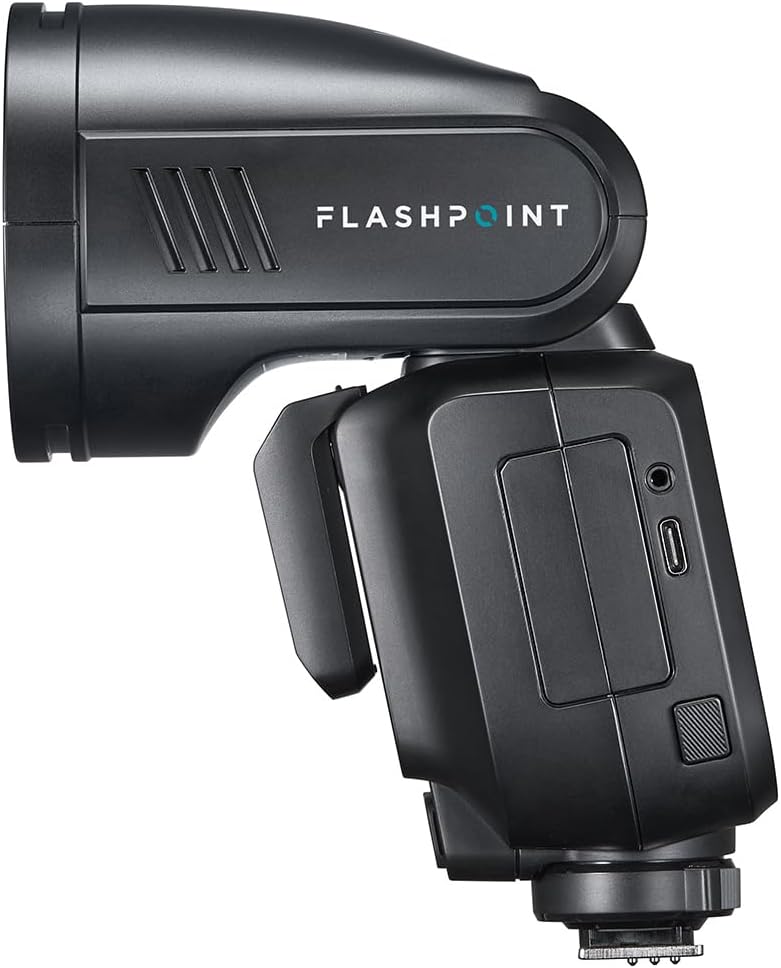
Image: Side profile of the Flashpoint X100, showing its compact design.
Key Components:
- Round Flash Head: Provides even and natural light distribution.
- LCD Display: Shows current settings, modes, and battery status.
- Control Panel: Buttons and dial for navigating menus and adjusting settings.
- Hot Shoe Mount: For attaching the flash to your camera.
- Battery Compartment: Houses the Li-ion battery.
- USB-C Port: For firmware updates.
- Sync Port: For wired synchronization with cameras or triggers.
Setup
1. Charging the Battery
Before first use, fully charge the Li-ion battery (VB30). The battery provides up to 400 full-power flashes on a single charge.
- Insert the VB30 battery into the provided charger.
- Connect the charger to a power outlet.
- The charging indicator light will show the charging status. It typically turns green when fully charged.
2. Installing the Battery
- Locate the battery compartment on the flash unit.
- Open the compartment cover.
- Insert the charged VB30 battery, ensuring correct orientation according to the markings inside the compartment.
- Close the battery compartment cover securely.
3. Mounting on Camera
The Flashpoint X100 is designed for Canon cameras.
- Slide the flash's hot shoe mount into your camera's hot shoe slot.
- Secure the flash by tightening the locking ring or lever on the flash unit.
4. Initial Power-On
Press and hold the power button until the LCD display illuminates. The flash will perform a self-check and display the current settings.
Operating Instructions
Basic Operation Modes

Image: The Flashpoint X100's LCD display showing settings in TTL mode, including exposure compensation and zoom.

Image: The Flashpoint X100's LCD display showing manual power settings, allowing precise control over flash output.
- TTL Auto Flash: The flash automatically adjusts its output for correct exposure. This is the default mode for most situations.
- Manual (M) Mode: Allows you to manually set the flash power from 1/256 to full power. Use the control dial to adjust the power level.
- Multi (Stroboscopic) Mode: Fires a series of rapid flashes during a single exposure, ideal for capturing multiple movements of a subject.
Advanced Features
- High-Speed Sync (HSS): Enables flash synchronization at shutter speeds up to 1/8000 seconds, allowing you to use wide apertures in bright conditions.
- R2 2.4G Wireless Transmission: The built-in R2 wireless system allows the X100 to function as a master or slave unit, controlling or being controlled by other Flashpoint R2 compatible devices within a 100m range.
- Auto Zoom: The flash head automatically adjusts its zoom position (28-105mm) to match the focal length of your lens, ensuring optimal light coverage.
- Bounce and Swivel: The flash head can be tilted vertically from -7 to 120 degrees and rotated horizontally from 0 to 330 degrees for bounce flash photography.

Image: Illustration of the Flashpoint X100's flash head articulation, demonstrating its ability to tilt and swivel for bounce flash.
- Magnetic Modifier Mount: Easily attach various light modifiers (barn doors, diffusion dome, grids, gels, snoot, bounce scoop) to shape and control your light.
- Flash Duration: Offers a lightning-fast flash duration range of 1/300s to 1/20,000s, ideal for freezing fast-moving subjects.
Maintenance
- Cleaning: Use a soft, dry cloth to clean the flash unit. For stubborn dirt, a slightly damp cloth can be used, followed by a dry one. Do not use solvents or abrasive cleaners.
- Battery Care:
- Store the battery in a cool, dry place when not in use.
- If storing for extended periods, charge the battery to about 50% capacity every 3-6 months to maintain its health.
- Do not expose the battery to extreme temperatures.
- Storage: When not in use, store the flash unit in its carrying case in a dry, dust-free environment. Remove the battery if storing for a long duration.
Troubleshooting
| Problem | Possible Cause | Solution |
|---|---|---|
| Flash does not fire. | Battery is low or not installed correctly. Flash is not securely mounted. Flash is in sleep mode. | Charge or re-install battery. Ensure flash is fully seated and locked on hot shoe. Press any button to wake up flash. |
| Flash output is too dark/bright. | Incorrect exposure compensation (TTL mode). Incorrect manual power setting. | Adjust exposure compensation on flash or camera. Adjust manual power setting. |
| Flash does not sync with high shutter speeds. | High-Speed Sync (HSS) is not enabled. | Enable HSS mode on the flash or camera settings. |
| Wireless control not working. | Incorrect channel/group settings. Out of range. Interference. | Verify channel and group settings on both flash and trigger. Move closer to the trigger. Change channels to avoid interference. |
Specifications
| Feature | Detail |
|---|---|
| Model | Flashpoint X100 |
| Power Output | 100Ws |
| Recycle Time | Approx. 1.7 seconds |
| Flash Duration | 1/300s to 1/20,000s (t0.1) |
| High-Speed Sync | Up to 1/8000 seconds |
| Wireless System | R2 2.4G Wireless Transmission |
| Wireless Range | Up to 100m |
| Zoom Range | 28-105mm (Auto) |
| Bounce Angle | Vertical: -7° to 120° |
| Swivel Angle | Horizontal: 0° to 330° |
| Battery Type | 7.2V Lithium-Ion (VB30) |
| Full Power Flashes | Approx. 400 |
| Dimensions | 9.25 x 7.75 x 4 inches |
| Weight | 2.35 pounds |
Warranty and Support
Flashpoint products are backed by a limited warranty. For detailed warranty information, please refer to the warranty card included with your product or visit the official Flashpoint website. For technical support, troubleshooting assistance, or service inquiries, please contact Flashpoint customer service.
Online Support: Visit the Flashpoint Store on Amazon
Related documentsX100


Ask a question about this manual
Ask about setup, troubleshooting, compatibility, parts, safety, or missing instructions. Manuals+ will review the question and use this page’s manual context to help answer it.