
MERACH MR-T12B2
Contents
MERACH Inclinable Foldable Treadmill User Manual
Model: MR-T12B2
1. Important Safety Information
Before operating your MERACH Treadmill, please read all instructions carefully. Keep this manual for future reference. Failure to follow these instructions may result in injury or damage to the product.
- Always place the treadmill on a solid, level surface with at least 2 meters (6.5 feet) of clear space behind it and 0.6 meters (2 feet) on each side.
- Keep children and pets away from the treadmill at all times, especially during operation.
- Ensure the safety key is properly attached to your clothing before starting the treadmill. In case of emergency, the safety key will detach, stopping the machine.
- Do not operate the treadmill if it has a damaged cord or plug, or if it is not working properly.
- Wear appropriate athletic footwear and clothing during use.
- Consult a physician before beginning any exercise program.
2. Product Overview
The MERACH Inclinable Foldable Treadmill (Model MR-T12B2) is designed for home and office use, offering a versatile workout experience with its automatic incline feature and compact design.

Image: The MERACH Treadmill in use, highlighting its automatic incline feature. The treadmill features a large running surface and an integrated LED display.
3. Setup and Assembly
Your MERACH Treadmill comes approximately 90% pre-assembled, requiring minimal setup before first use.
3.1 Unpacking
- Carefully remove the treadmill from its packaging. It is recommended to have two people for this step due to the unit's weight (approximately 44.98 kg).
- Remove all packing materials and protective films.
- Verify all components listed in the packing list are present: main treadmill unit, power cord, safety key, and tool kit.
3.2 Assembly Steps
- Unfold the Treadmill: Gently lift the running deck until it locks into the upright position.
- Attach the Console/Handlebars: Secure the console and handlebars to the main frame using the provided screws and tools. Ensure all connections are tight and secure.
- Connect Power: Plug the power cord into the treadmill's power port and then into a grounded electrical outlet.
- Place Safety Key: Attach the safety key to the designated slot on the console. The treadmill will not operate without the safety key in place.
4. Operating Instructions
Familiarize yourself with the treadmill's controls and features for an optimal workout.
4.1 Power On/Off
- To power on, ensure the safety key is in place and press the 'Start' button on the console.
- To power off, press the 'Stop' button or remove the safety key.
4.2 Console and Display
The integrated LED display shows real-time workout data:
- Speed: Current speed in km/h.
- Distance: Total distance covered during the workout.
- Time: Duration of the workout.
- Calories: Estimated calories burned.
- Heart Rate: (If applicable, via sensors on handlebars).
Adjust settings using the touch screen controls on the console.
4.3 Speed and Incline Adjustment
- Speed: The speed can be adjusted from 0.8 km/h to 12 km/h. Use the '+' and '-' buttons on the console to increase or decrease speed.
- Incline: The treadmill features an automatic incline system with settings at 0%, 6%, and 15%. Use the dedicated incline buttons on the console to adjust the incline level.
4.4 Merach Interactive Application
Enhance your workout experience by connecting to the free Merach application. The app offers:
- Virtual scenic routes.
- Challenges with other users globally.
- Professional fitness courses.
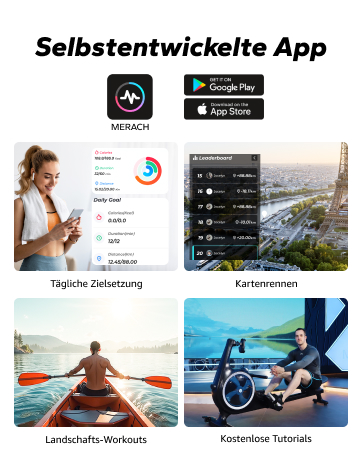
Image: The Merach App interface, illustrating features like daily goal setting, competitive leaderboards, immersive landscape workouts, and access to free tutorials.
4.5 Folding and Storage
The treadmill features an innovative hydraulic folding mechanism for compact storage.
- To fold: Gently lift the running deck until it clicks into the folded position. The hydraulic system reduces resistance by 90%, allowing for easy one-handed folding.
- To unfold: Gently push the running deck down. It will lower smoothly and safely.
- Transport: Equipped with integrated wheels, the folded treadmill can be easily moved to your desired storage location.
5. Maintenance
Regular maintenance ensures the longevity and optimal performance of your treadmill.
- Cleaning: Wipe down the treadmill surfaces, including the console and running belt, with a damp cloth after each use. Avoid using abrasive cleaners.
- Lubrication: Periodically lubricate the running belt according to the instructions in the full user manual (not provided here). Proper lubrication reduces friction and extends belt life.
- Belt Adjustment: Check the running belt tension and alignment regularly. If the belt slips or drifts to one side, refer to the full user manual for adjustment procedures.
- Inspection: Routinely inspect all nuts, bolts, and moving parts for tightness and wear. Tighten any loose components.
6. Troubleshooting
If you encounter issues with your treadmill, refer to the following common troubleshooting tips:
- Treadmill Not Starting: Ensure the power cord is securely plugged in, the safety key is correctly placed, and the main power switch (if present) is on.
- Belt Slipping: The running belt may need tensioning. Refer to the full user manual for instructions on how to adjust belt tension.
- Unusual Noises: Check for loose parts or foreign objects under the running belt. Lubrication may also be required.
- Display Not Working: Check power connections. If the issue persists, contact customer support.
For more complex issues or if troubleshooting steps do not resolve the problem, please contact MERACH customer support.
7. Specifications
Detailed specifications for the MERACH Inclinable Foldable Treadmill (Model MR-T12B2):
| Feature | Specification |
|---|---|
| Model Number | MR-T12B2 |
| Dimensions (L x W x H) | 140 x 70 x 116 cm (unfolded) |
| Product Weight | 44.98 kg |
| Motor Horsepower | 2.5 HP (2.5 Kilowatt) |
| Speed Range | 0.8 - 12 km/h |
| Incline Levels | 0%, 6%, 15% (Automatic) |
| Running Surface | 1080 x 420 mm |
| Maximum User Weight | 136 kg |
| Noise Level | <40 dB |
| Frame Material | Aluminum |
| Power Source | Electric Cable |
| Included Components | Power cord, Safety key, Tool kit, User manual |
8. Warranty and Support
MERACH is committed to providing high-quality products and excellent customer service.
- Warranty: The MERACH Treadmill comes with a 3-year warranty on the frame and a 1-year warranty on parts.
- Customer Service: Our customer service team is available 24 hours a day to assist you with any inquiries or issues. Please refer to your purchase documentation for contact details or visit the official MERACH website.
Documents and downloads
Ask a question about this manual
Ask about setup, troubleshooting, compatibility, parts, safety, or missing instructions. Manuals+ will review the question and use this page’s manual context to help answer it.