
HanRongDa HRD-757
HanRongDa HRD-757 DSP Digital Multi-Band Radio User Manual
Model: HRD-757
1. Introduction
Thank you for purchasing the HanRongDa HRD-757 DSP Digital Multi-Band Radio. This advanced receiver is designed to provide versatile entertainment and essential information across a wide range of frequencies. With its compact design, robust features, and user-friendly interface, the HRD-757 is ideal for everyday listening, travel, and emergency preparedness. Please read this manual thoroughly to understand the full capabilities of your new radio and ensure optimal performance.
2. Package Contents
Please check the package contents carefully. If any items are missing or damaged, contact your retailer.
- HanRongDa HRD-757 Multi-Band Radio
- USB Type-C Charging Cable
- 2500mAh Lithium Battery (pre-installed or separate)
- Wrist Strap
- User Manual (this document)
3. Product Features
- Multi-Band Reception: Capable of receiving FM, AM, Shortwave (SW), Aviation (AIR), VHF, UHF, and Weather Band (WB) signals with high sensitivity.
- Digital Signal Processing (DSP): Enhances signal clarity and reception quality.
- Bluetooth Connectivity: Wireless music streaming from compatible devices.
- TF Card Playback: Supports up to 256GB TF card for MP3, WMA, WAV, APE, and FLA audio formats.
- Clear LCD Display: Large screen with backlight for time, frequency, and other information, visible in low-light conditions.
- Numeric Keypad: For direct frequency input and station memory recall.
- Emergency Functions: Built-in flashlight and SOS alarm.
- Long-lasting Battery: Equipped with a replaceable 2500mAh lithium battery for extended operation.
- Modern Connectivity: TYPE-C interface for charging and data transfer.
- Sleep Timer: Allows the radio to automatically turn off after a set period.
- Portable Design: Compact and lightweight with a convenient wrist strap.
4. Controls and Display

Figure 4.1: Front View of HRD-757 Radio. This image shows the front of the HanRongDa HRD-757 radio, highlighting its large LCD display, speaker grille, and the numeric keypad with various function buttons. The telescopic antenna is extended.
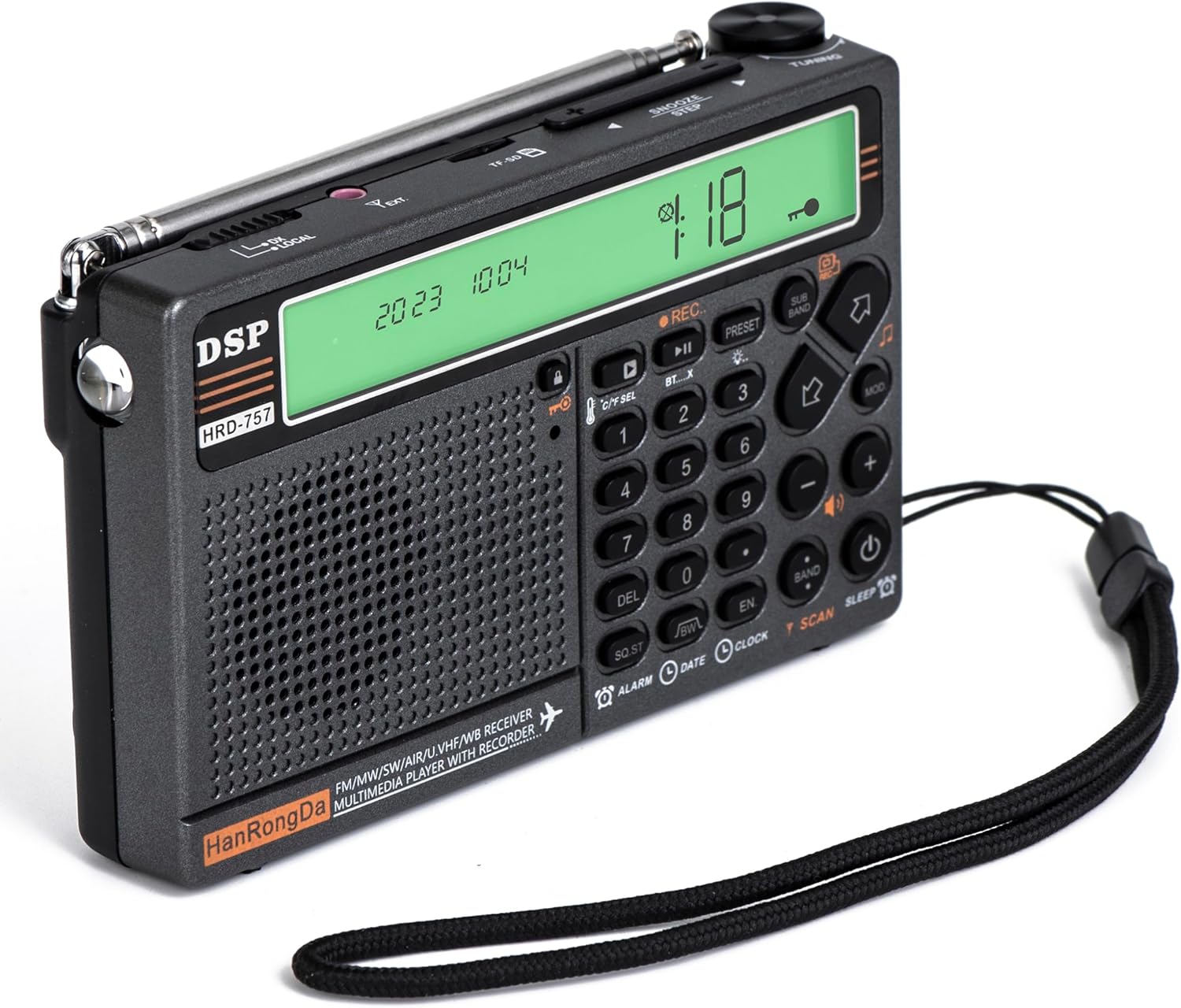
Figure 4.2: Angled View of HRD-757 Radio. This image provides an angled perspective of the HanRongDa HRD-757 radio, showcasing its side ports (likely for charging and TF card) and the tuning knob located on the top right. The wrist strap is also visible.
4.1. Front Panel
- LCD Display: Shows frequency, time, battery status, mode, and other indicators.
- Speaker: Audio output.
- Numeric Keypad (0-9): For direct frequency input, station memory recall, and menu navigation.
- REC Button: (If applicable) For recording audio.
- Play/Pause Button (▶⏸): For media playback control.
- PRESET Button: Accesses preset stations.
- SUB BAND Button: Switches between sub-bands within a main band.
- Volume Buttons (+/-): Adjusts audio volume.
- BAND Button: Cycles through FM, AM, SW, AIR, VHF, UHF, WB bands.
- MOD Button: Changes modulation mode (e.g., AM/SSB if supported).
- DEL Button: Deletes stored stations or entries.
- SQ/ST Button: Squelch control / Stereo mode toggle.
- EN Button: Enter/Confirm button.
- ALARM Button: Sets or activates alarm.
- DATE Button: Displays or sets date.
- CLOCK Button: Displays or sets time.
- SCAN Button: Initiates automatic station scanning.
- SLEEP Button: Activates sleep timer.
- Power Button (⏻): Turns the radio on/off.
4.2. Top/Side Panel
- Telescopic Antenna: For FM, SW, AIR, VHF, UHF, WB reception.
- Tuning Knob: Fine-tunes frequency or navigates menus.
- TYPE-C Port: For charging the battery and connecting to a computer (if data transfer is supported).
- TF Card Slot: Insert TF (MicroSD) card for media playback.
- Headphone Jack: For private listening.
- Flashlight: Built-in LED light.
- Wrist Strap Attachment Point: For securing the wrist strap.
5. Setup
5.1. Battery Installation and Charging
- Locate the battery compartment cover on the back of the radio.
- Open the cover and insert the provided 2500mAh lithium battery, ensuring correct polarity (+/-).
- Close the battery compartment cover securely.
- Connect the supplied USB Type-C cable to the radio's TYPE-C port and the other end to a USB power adapter (not included) or a computer's USB port.
- The battery indicator on the LCD display will show charging status. A full charge typically takes several hours.
- For optimal battery life, fully charge the radio before first use.
5.2. Initial Power On and Time Setting
- Press and hold the Power Button (⏻) to turn on the radio.
- The LCD display will light up.
- To set the time:
- Press the CLOCK Button.
- Use the Numeric Keypad to enter the current time (e.g., HHMM).
- Press the EN Button to confirm.
- To set the date:
- Press the DATE Button.
- Use the Numeric Keypad to enter the current date (e.g., YYYYMMDD).
- Press the EN Button to confirm.
6. Operating Instructions
6.1. Radio Reception (FM/AM/SW/AIR/VHF/UHF/WB)
- Turn On: Press and hold the Power Button (⏻).
- Select Band: Press the BAND Button repeatedly to cycle through FM, AM, SW, AIR, VHF, UHF, and WB bands.
- Extend Antenna: For optimal reception, especially on FM, SW, AIR, VHF, UHF, and WB bands, fully extend the telescopic antenna. For AM, the internal ferrite antenna is used.
- Tuning Methods:
- Manual Tuning: Rotate the Tuning Knob on the top right to adjust the frequency incrementally.
- Direct Frequency Input: Use the Numeric Keypad to enter the desired frequency directly, then press EN.
- Automatic Scan: Press the SCAN Button to automatically search for and store available stations.
- Adjust Volume: Use the Volume Buttons (+/-) to set the desired listening level.
- Store/Recall Presets:
- To Store: Tune to the desired station. Press and hold the PRESET Button. Use the Numeric Keypad to select a memory location, then press EN.
- To Recall: Press the PRESET Button, then use the Numeric Keypad to enter the memory location, and press EN.
- Squelch Control (SQ/ST): For AIR/VHF/UHF bands, press SQ/ST to activate squelch, which mutes static noise when no signal is present. Adjust squelch level if available.
6.2. Bluetooth Mode
- Turn on the radio.
- Press the BAND Button until "BT" or "Bluetooth" appears on the display, indicating Bluetooth mode. The radio will enter pairing mode, and the Bluetooth icon will flash.
- On your Bluetooth-enabled device (smartphone, tablet, etc.), enable Bluetooth and search for available devices.
- Select "HRD-757" from the list of found devices.
- Once paired, the Bluetooth icon on the radio's display will become solid. You can now stream audio from your device to the radio.
- Use the Play/Pause Button (▶⏸) and Volume Buttons (+/-) on the radio to control playback.
6.3. TF Card Playback
- Ensure the radio is powered off.
- Insert a TF (MicroSD) card with supported audio files (MP3, WMA, WAV, APE, FLA) into the TF card slot on the side of the radio. Ensure the card is inserted correctly until it clicks into place.
- Turn on the radio. The radio should automatically detect the TF card and switch to playback mode, or you may need to press the BAND Button to select TF card mode.
- Use the Play/Pause Button (▶⏸) to start or pause playback.
- Use the Volume Buttons (+/-) to adjust volume.
- Use the Previous/Next Track Buttons (if available, often integrated with volume or tuning knob press) to navigate tracks.
6.4. Alarm Function
- Press the ALARM Button.
- Use the Numeric Keypad to enter the desired alarm time (HHMM).
- Press EN to confirm.
- You may be prompted to select an alarm source (e.g., buzzer, last radio station). Use the Tuning Knob or Volume Buttons to select, then EN.
- The alarm icon will appear on the display, indicating it is set.
- To disable the alarm, press the ALARM Button again.
6.5. Sleep Timer
- While the radio is on, press the SLEEP Button.
- Repeatedly press the SLEEP Button to cycle through available sleep timer durations (e.g., 10, 20, 30, 60, 90 minutes, OFF).
- The radio will automatically turn off after the selected duration.
6.6. Flashlight and SOS Alarm
- Flashlight: Locate the flashlight LED on the side or top of the radio. Press the dedicated Flashlight Button (if available, or a long press on a specific button like Power) to turn it on/off.
- SOS Alarm: Press and hold the SOS Button (if dedicated, or a combination of buttons) to activate the loud SOS alarm sound and flashing light. Press again to deactivate.
7. Maintenance
- Cleaning: Wipe the radio with a soft, dry cloth. Do not use abrasive cleaners, solvents, or strong chemicals, as they may damage the surface.
- Storage: When not in use for extended periods, store the radio in a cool, dry place, away from direct sunlight and extreme temperatures.
- Battery Care: If storing for a long time, charge the battery to about 50% and recharge every 3-6 months to maintain battery health.
- Water Resistance: This product is NOT water resistant. Avoid exposure to water, rain, or high humidity.
- Antenna Care: Handle the telescopic antenna gently to prevent bending or breaking.
8. Troubleshooting
| Problem | Possible Cause | Solution |
|---|---|---|
| Radio does not turn on. | Battery is low or depleted. Battery not installed correctly. | Charge the battery. Ensure the battery is inserted with correct polarity. |
| Poor radio reception/static. | Antenna not extended. Weak signal area. Interference from electronic devices. | Fully extend the telescopic antenna. Move to an open area. Move away from other electronic devices. |
| Bluetooth pairing fails. | Radio not in pairing mode. Device too far. Bluetooth disabled on device. | Ensure radio is in Bluetooth pairing mode. Keep devices within 10 meters. Enable Bluetooth on your device. |
| TF card not recognized or no playback. | TF card not inserted correctly. Unsupported audio format. Corrupted card/files. | Reinsert TF card firmly. Ensure files are supported formats (MP3, WMA, WAV, APE, FLA). Try another TF card or reformat the current one. |
| Display is dim or blank. | Backlight off. Low battery. | Check backlight settings (if adjustable). Charge the battery. |
9. Specifications
| Brand | HanRongDa |
| Model | HRD-757 |
| Product Dimensions | 5.4 x 3.4 x 1.2 inches (13.7 x 8.6 x 3.0 cm) |
| Item Weight | 8.8 ounces (249 grams) |
| Power Source | Battery Powered (2500mAh Lithium Battery) |
| Connectivity Technology | Bluetooth, TF Card |
| Tuner Technology | Digital DSP |
| Radio Bands Supported | FM, AM, SW, AIR, VHF, UHF, WB (NOAA ALERT) |
| TF Card Support | Up to 256GB (MP3, WMA, WAV, APE, FLA) |
| Special Features | Sleep Timer, Flashlight, SOS Alarm |
| Water Resistance Level | Not Water Resistant |
10. Warranty and Support
HanRongDa products are manufactured to the highest quality standards. For warranty information, technical support, or customer service inquiries, please refer to the contact information provided with your purchase or visit the official HanRongDa website. Please retain your proof of purchase for warranty claims.
Manufacturer: HanRongDa
Related documentsHRD-757


Ask a question about this manual
Ask about setup, troubleshooting, compatibility, parts, safety, or missing instructions. Manuals+ will review the question and use this page’s manual context to help answer it.