
1. Introduction
Thank you for choosing the Guiheng K68 Wired Portable 60% Mechanical Gaming Keyboard. This compact 68-key keyboard is designed for gaming and office use, featuring RGB LED backlighting and durable red mechanical switches. This manual provides detailed instructions for setup, operation, maintenance, and troubleshooting to ensure optimal performance.
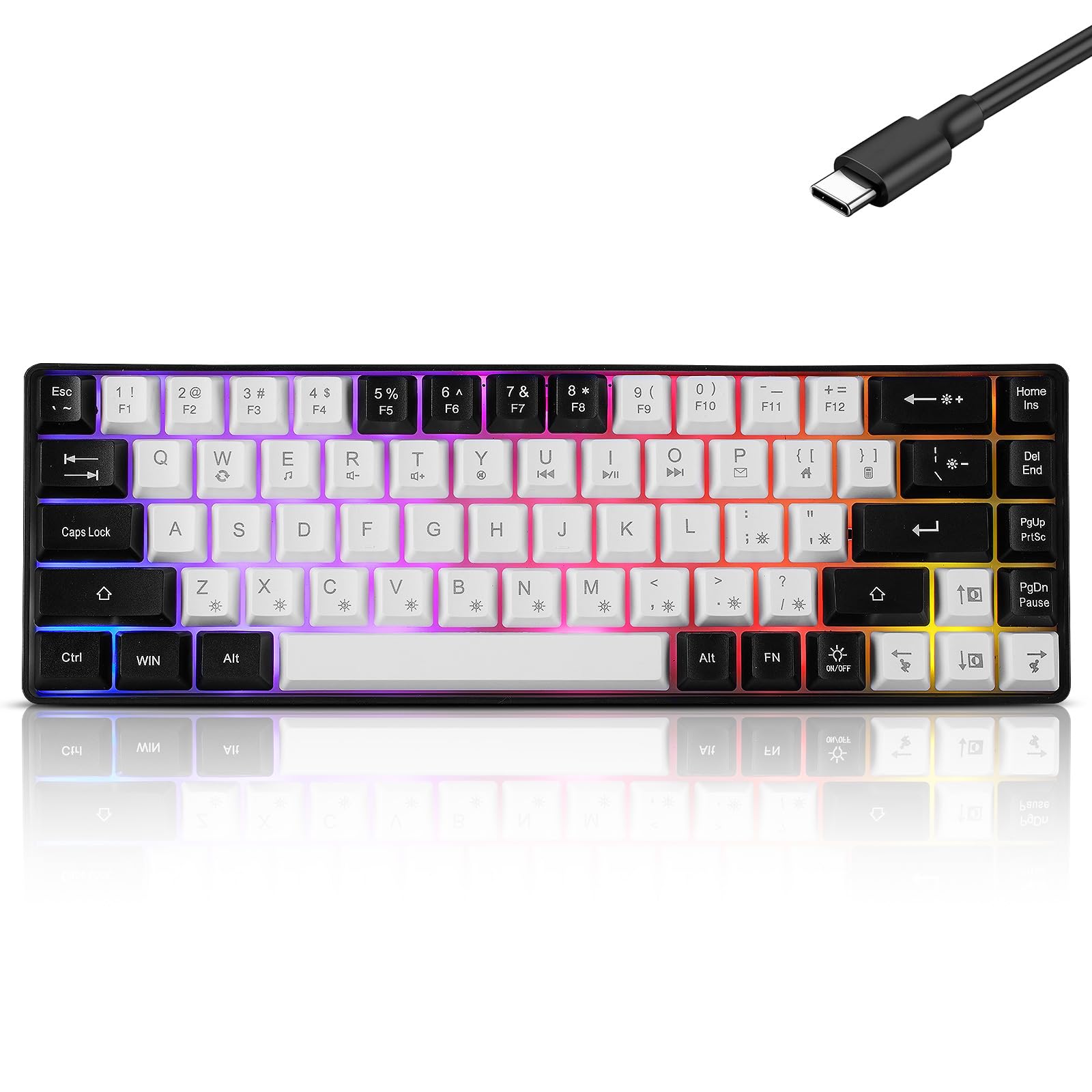
Image 1: Guiheng K68 Wired Portable 60% Mechanical Gaming Keyboard.
2. Product Features
- Compact 68-Key Layout: A 60% form factor keyboard that saves desk space while retaining essential keys.
- Red Mechanical Switches: Provides a linear, quiet, and smooth typing experience with a light actuation force.
- RGB LED Backlighting: Customizable lighting effects with various colors and modes to enhance your setup.
- Wired USB-C Connectivity: Ensures a stable and reliable connection with plug-and-play functionality.
- Anti-Ghosting (68 Keys): All 68 keys are conflict-free, allowing multiple keys to be pressed simultaneously without missed inputs.
- Durable Construction: Features double-shot injection keycaps and a splash-proof design for longevity.
- Wide Compatibility: Supports Windows (XP/7/10/11), Mac, Android, Linux, PS4, and PS5 systems.

Image 2: Wide compatibility of the Guiheng K68 keyboard with various operating systems.
3. Setup Instructions
- Unpack the Keyboard: Carefully remove the keyboard and USB-C cable from its packaging.
- Connect the Cable: Insert the USB-C end of the cable into the port on the keyboard.
- Connect to Device: Plug the USB-A end of the cable into an available USB port on your computer (PC, Mac, Laptop) or gaming console (PS4, PS5).
- Automatic Installation: The keyboard is plug-and-play. Your operating system should automatically detect and install the necessary drivers. No additional software is typically required.
- Ready for Use: Once detected, the keyboard's RGB lighting will illuminate, indicating it is ready for use.

Image 3: Connecting the USB-C cable to the keyboard.
4. Operating Instructions
4.1. RGB Backlight Control
The Guiheng K68 keyboard features various RGB lighting effects. Use the FN key in combination with other keys to adjust the backlighting:
- FN + [ ;' ] (Speed Adjustment): Adjusts the speed of dynamic lighting effects. Three levels available.
- FN + M (Extrusion): Activates the extrusion lighting effect.
- FN + Backspace/Bslash (Brightness Adjustment): Adjusts backlight brightness. Four levels: 0x0, 0x3f, 0x7f, 0xff.
- FN + Left/Right (Adjust Flow Direction): Changes the direction of lighting flow for certain effects.
- FN + B (Monochrome Cyclic Breathing): Cycles through single colors with a breathing effect.
- FN + Up/Down (Adjust Color): Adjusts the color for static or monochrome effects (red, green, blue, purple, yellow, cyan, white).
- FN + Z (Dazzling Breath): Activates a rainbow-style dazzling breathing effect with different colors for each key.
- FN + X (Single-Color Cyclic Pulsating Running Water): A single-color effect that pulsates and flows across the keys.
- FN + V (Ever Bright): Sets the backlight to a constant, non-dynamic brightness.
- FN + C (Single-Color Loop Roll-Up): A single-color effect that rolls up the keyboard.
- FN + < (Two-Color Flashing): Activates a two-color flashing effect.
- FN + = (Always On, Manual Color Adjustment): Manually adjust each light color (red, green, blue, purple, yellow, green, white, black).
- FN + N (Dazzling Breath - Same Color): A dazzling breathing effect where all keys are the same color (red, green, blue, purple, yellow, green, yellow).
- FN + ? (Spot Color): Changes the spot color automatically every time you light up the keyboard.

Image 4: Backlight control functions using the FN key.
4.2. Multimedia Button Functions
Access multimedia controls using the FN key in combination with the designated keys:
- FN + E: Media Player
- FN + R: Volume Down
- FN + T: Volume Up
- FN + Y: Mute
- FN + U: Previous Track
- FN + I: Play/Pause
- FN + O: Next Track
- FN + P: Mail
- FN + [ { : Web Home
- FN + ] } : Calculator
- FN + W: Refresh

Image 5: Multimedia functions using the FN key.
4.3. General Usage
The keyboard operates like a standard QWERTY keyboard. For keys with dual functions (e.g., F-keys, navigation keys), press the FN key simultaneously with the desired key to access the secondary function.
5. Maintenance
5.1. Cleaning
To clean your keyboard, disconnect it from your device. Use a soft, dry cloth to wipe the keycaps and chassis. For deeper cleaning, you can carefully remove the keycaps.
5.2. Keycap Removal
The keycaps are detachable for easy cleaning or replacement. Use a keycap puller (not included) or gently pry them off with your fingers. Be careful not to damage the switches underneath.

Image 6: Detachable keycaps and mechanical switches.
6. Troubleshooting
- Keyboard Not Responding:
- Ensure the USB-C cable is securely connected to both the keyboard and your device.
- Try plugging the keyboard into a different USB port on your device.
- Test the keyboard on another computer to rule out device-specific issues.
- Backlight Not Working or Incorrect:
- Check the backlight control combinations (FN + Backspace/Bslash for brightness, FN + ON/OFF key if present, or other FN combinations as listed in Section 4.1).
- Ensure the keyboard is receiving sufficient power from the USB port.
- Keys Not Registering or Repeating:
- Clean around the affected keycaps to ensure no debris is obstructing the switch.
- If a specific key is consistently malfunctioning, it may indicate a switch issue.
- Multimedia Keys Not Working:
- Ensure you are pressing the FN key simultaneously with the correct multimedia key.
- Some operating systems may require specific settings or software for full multimedia key functionality.
7. Specifications

Image 7: Keyboard dimensions (35.5cm / 13.9in length, 12.8cm / 5in width, 3.6cm / 1.4in height).
| Feature | Description |
|---|---|
| Brand | Guiheng |
| Model | K68 |
| Connectivity Technology | USB-A (Wired) |
| Keyboard Description | Gaming |
| Number of Keys | 68 |
| Switch Type | Mechanical (Red Switch) |
| Keyboard Layout | QWERTY |
| Special Feature | Ergonomic, RGB Backlit, Anti-Ghosting |
| Compatible Devices | Laptop, PC, Mac, PS4, PS5 |
| Material | Plastic |
| Color | White and Black |
8. Official Product Video
Video 1: Official product video demonstrating the Guiheng K68 Wired Portable 60% Mechanical Feeling Gaming Keyboard, showcasing its features and lighting effects.
9. Warranty and Support
This product typically comes with a manufacturer's warranty. Please refer to the warranty information provided with your purchase for specific details regarding coverage and duration. For technical support, product inquiries, or warranty claims, please contact Guiheng customer service through their official channels or the retailer where the product was purchased.