
1. Introduction
Thank you for choosing the aigo CA05 Open Ear Earbuds. These wireless headphones are designed to provide a comfortable and secure listening experience with their unique clip-on design and advanced Bluetooth 5.4 technology. This manual will guide you through the setup, operation, and maintenance of your new earbuds to ensure optimal performance.
2. Product Overview
The aigo CA05 earbuds feature an open-ear clip design for comfort and situational awareness, powered by Bluetooth 5.4 for stable connections. They include a high-sensitivity acoustic unit for clear audio and a charging case for extended battery life.
2.1 Package Contents
- aigo CA05 Open Ear Earbuds (Left and Right)
- Charging Case
- USB Charging Cable (Type-C)
- User Manual
2.2 Earbud and Charging Case Diagram

Figure 1: aigo CA05 White Open Ear Earbuds and Charging Case. This image displays the white version of the aigo CA05 earbuds, showing both the left and right earbuds along with their compact charging case.

Figure 2: aigo CA05 Black Open Ear Earbuds and Charging Case. This image displays the black version of the aigo CA05 earbuds, showing both the left and right earbuds along with their compact charging case.
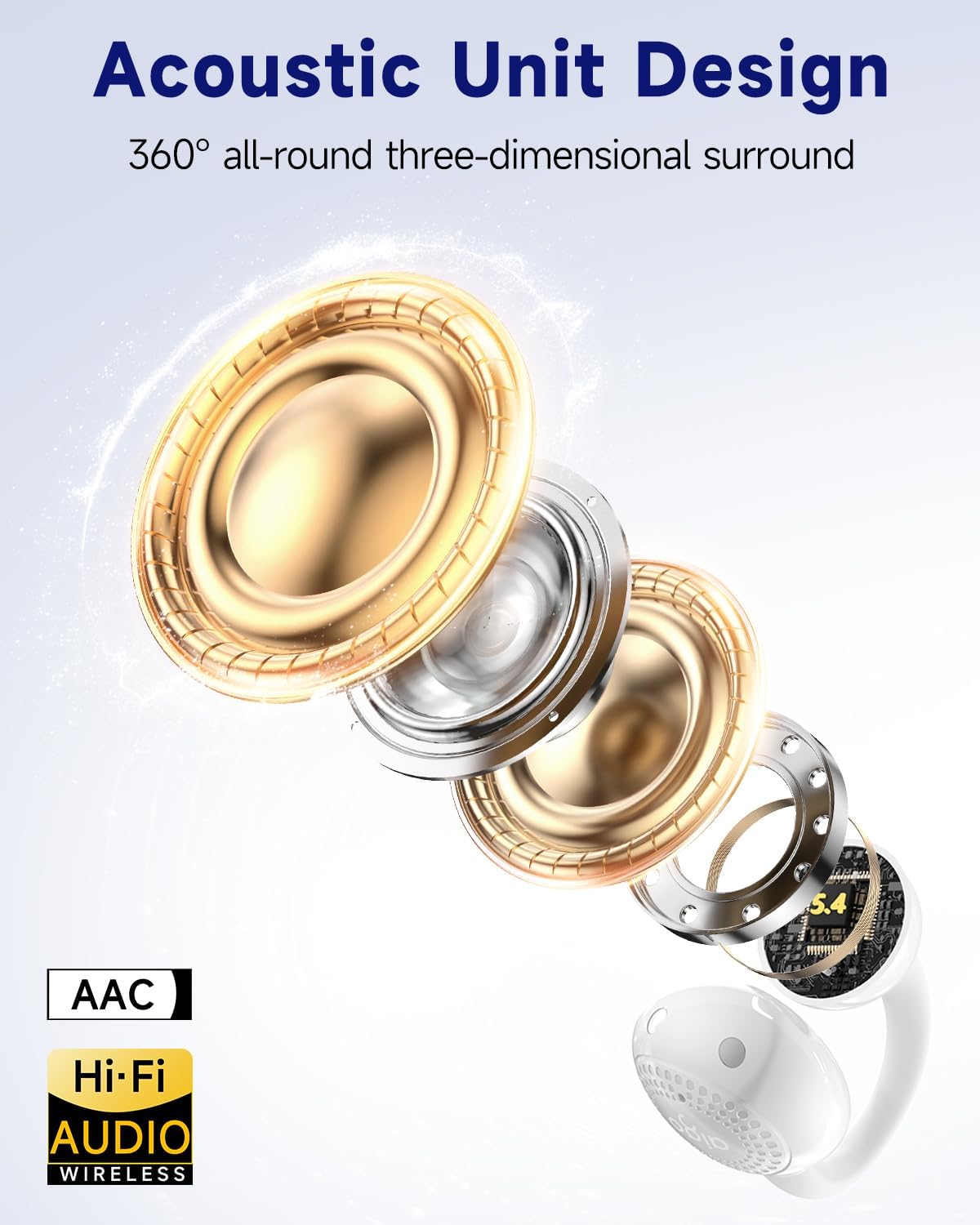
Figure 3: Acoustic Unit Design. This diagram illustrates the internal components of the earbud's acoustic unit, highlighting its multi-layered design for sound reproduction.

Figure 4: Product Size. This image provides the dimensions of both the charging case (2.95 inches x 2.16 inches) and a single earbud (1.3 inches x 1.34 inches), demonstrating their compact form factor.

Figure 5: Earbud Weight. This image shows an earbud resting on a hand, indicating its lightweight design at 0.17 ounces (approximately 4.8 grams) per earbud.
3. Setup
3.1 Charging the Earbuds and Case
- Place the earbuds into the charging case, ensuring they are correctly seated.
- Connect the USB charging cable to the charging port on the case and plug the other end into a USB power source (e.g., wall adapter, computer USB port).
- The indicator light on the charging case will illuminate to show charging status. A full charge typically takes approximately 1.5-2 hours.
- Once fully charged, the indicator light may change color or turn off. Disconnect the charging cable.
Note: For first-time use, fully charge the earbuds and charging case.
3.2 Bluetooth Pairing
- Power On: Open the charging case. The earbuds will automatically power on and enter pairing mode. The indicator lights on the earbuds will flash, indicating they are ready to pair.
- Activate Bluetooth: On your device (smartphone, tablet, laptop), enable Bluetooth.
- Select Device: In your device's Bluetooth settings, search for available devices. Select "aigo CA05" from the list.
- Confirm Connection: Once connected, the earbud indicator lights will stop flashing or turn off, and your device will confirm the connection.
- Automatic Reconnection: After the initial pairing, the earbuds will automatically connect to the last paired device when removed from the case and within range.

Figure 6: Bluetooth 5.4 Pairing Example. This image illustrates the process of connecting the aigo CA05 earbuds to a mobile device via Bluetooth 5.4, showing the earbuds listed in the device's Bluetooth settings.
4. Operating Instructions
4.1 Wearing the Earbuds
The aigo CA05 earbuds feature an open-ear clip design. Gently clip each earbud onto your ear, ensuring the speaker is positioned comfortably near your ear canal without entering it. Adjust for a secure and comfortable fit.
4.2 Basic Controls (Touch Sensitive Area)
The earbuds are equipped with touch-sensitive controls. The exact functions may vary slightly, but common operations include:
- Play/Pause: Single tap on either earbud.
- Next Track: Double tap on the right earbud.
- Previous Track: Double tap on the left earbud.
- Volume Up: Triple tap on the right earbud.
- Volume Down: Triple tap on the left earbud.
- Answer/End Call: Single tap on either earbud during an incoming call.
- Reject Call: Press and hold on either earbud for 2 seconds during an incoming call.
- Activate Voice Assistant: Press and hold on either earbud for 2 seconds (when not on a call).
4.3 Power On/Off
- Power On: Open the charging case, or press and hold the touch area on both earbuds for approximately 3 seconds.
- Power Off: Place the earbuds back into the charging case and close the lid, or press and hold the touch area on both earbuds for approximately 5 seconds.
5. Maintenance
5.1 Cleaning
- Regularly clean the earbuds and charging case with a soft, dry, lint-free cloth.
- Do not use harsh chemicals, cleaning solvents, or strong detergents.
- Avoid getting moisture in any openings.
5.2 Storage
- When not in use, store the earbuds in their charging case to protect them and keep them charged.
- Store in a cool, dry place, away from extreme temperatures and direct sunlight.
5.3 Water Resistance
The aigo CA05 earbuds are rated IPX4 water-resistant. This means they are protected against splashing water from any direction. They are suitable for workouts and light rain but should not be submerged in water or exposed to heavy downpours.

Figure 7: IPX4 Waterproof Rating. This image visually represents the IPX4 water resistance of the earbuds, indicating their ability to withstand sweat and splashes during activities like exercise.
6. Troubleshooting
6.1 Earbuds Not Pairing
- Ensure both earbuds are charged.
- Make sure Bluetooth is enabled on your device.
- Place the earbuds back in the case, close the lid, wait a few seconds, then open it again to re-enter pairing mode.
- Try forgetting "aigo CA05" from your device's Bluetooth list and re-pairing.
- Ensure no other Bluetooth devices are interfering or connected to the earbuds.
6.2 No Sound or Low Volume
- Check the volume levels on both your device and the earbuds.
- Ensure the earbuds are properly connected to your device.
- Try playing different audio sources to rule out a problem with the media file.
- Clean any debris from the earbud speakers.
6.3 Charging Issues
- Verify the charging cable is securely connected to both the case and the power source.
- Try a different USB cable or power adapter.
- Ensure the charging contacts on the earbuds and inside the case are clean and free of obstruction.
6.4 Earbuds Disconnect Frequently
- Ensure the earbuds are within the effective Bluetooth range of your device (typically 10 meters/33 feet).
- Avoid physical obstructions between the earbuds and your device.
- Minimize interference from other wireless devices.
7. Specifications
| Model | aigo CA05 |
| Bluetooth Version | 5.4 |
| Earbud Battery Life | Up to 8 hours (standalone) |
| Total Playtime (with case) | Up to 50 hours |
| Charging Case Battery Capacity | 400mAh |
| Water Resistance Rating | IPX4 |
| Noise Reduction | ENC (Environmental Noise Cancellation) |
| Earbud Weight | Approx. 0.17 oz (4.8g) per earbud |
| Compatibility | iPhone, Android, Laptop (Bluetooth-enabled devices) |
8. Warranty and Support
aigo products are designed and manufactured to the highest quality standards. For specific warranty information, please refer to the warranty card included with your purchase or visit the official aigo website. If you encounter any issues or have questions regarding your aigo CA05 earbuds, please contact aigo customer support through their official channels.
For further assistance, please visit: aigo Official Store on Amazon

