
LEFANT N1
LEFANT N1R Robot Vacuum Cleaner User Manual
Model: N1
1. Introduction
Thank you for choosing the LEFANT N1R Robot Vacuum Cleaner. This manual provides essential information for the safe operation, maintenance, and troubleshooting of your device. Please read it thoroughly before use and retain it for future reference.
1.1 Package Contents
- LEFANT N1R Robot Vacuum Cleaner
- Remote Control
- Charging Base
- Power Adapter
- 560 ml Large Dustbin (pre-installed)
- HEPA Filters (2 pieces)
- Side Brushes (4 pieces)
- Cleaning Brush
- User Manual
2. Product Overview
2.1 Device Components
The LEFANT N1R features a compact, round design with a tempered glass top cover for durability. Key components include:
- Main Unit (Robot Vacuum)
- Dustbin with HEPA Filter
- Side Brushes
- Infrared Sensors (for navigation and obstacle detection)
- Charging Contacts
- Power Button/Indicator Light
- Remote Control

Image: LEFANT N1R Robot Vacuum Cleaner with its remote control.
2.2 Key Features
- Powerful Suction: Equipped with 4500 Pa suction power and 4 adjustable speeds to effectively clean dust, debris, and pet hair.
- Compact Design: With a height of 7.8 cm and a diameter of 28 cm, it can easily clean under furniture and in hard-to-reach areas.
- Long Battery Life: Up to 165 minutes of continuous cleaning in silent mode on hard floors.
- Large Dustbin: 560 ml capacity reduces the frequency of emptying.
- Advanced Sensor System: 13 sets of infrared sensors, 2 sets of wall sensors, and 3 sets of ground sensors for 360-degree detection, preventing falls and collisions.
- Anti-Tangle Technology: Specifically designed to prevent pet hair from tangling, ensuring more thorough cleaning.
- Quiet Operation: Operates at approximately 55 decibels in silent mode.
- Remote Control: Conveniently control cleaning modes, schedules, and suction intensity. Note: This model does not support Wi-Fi functionality.
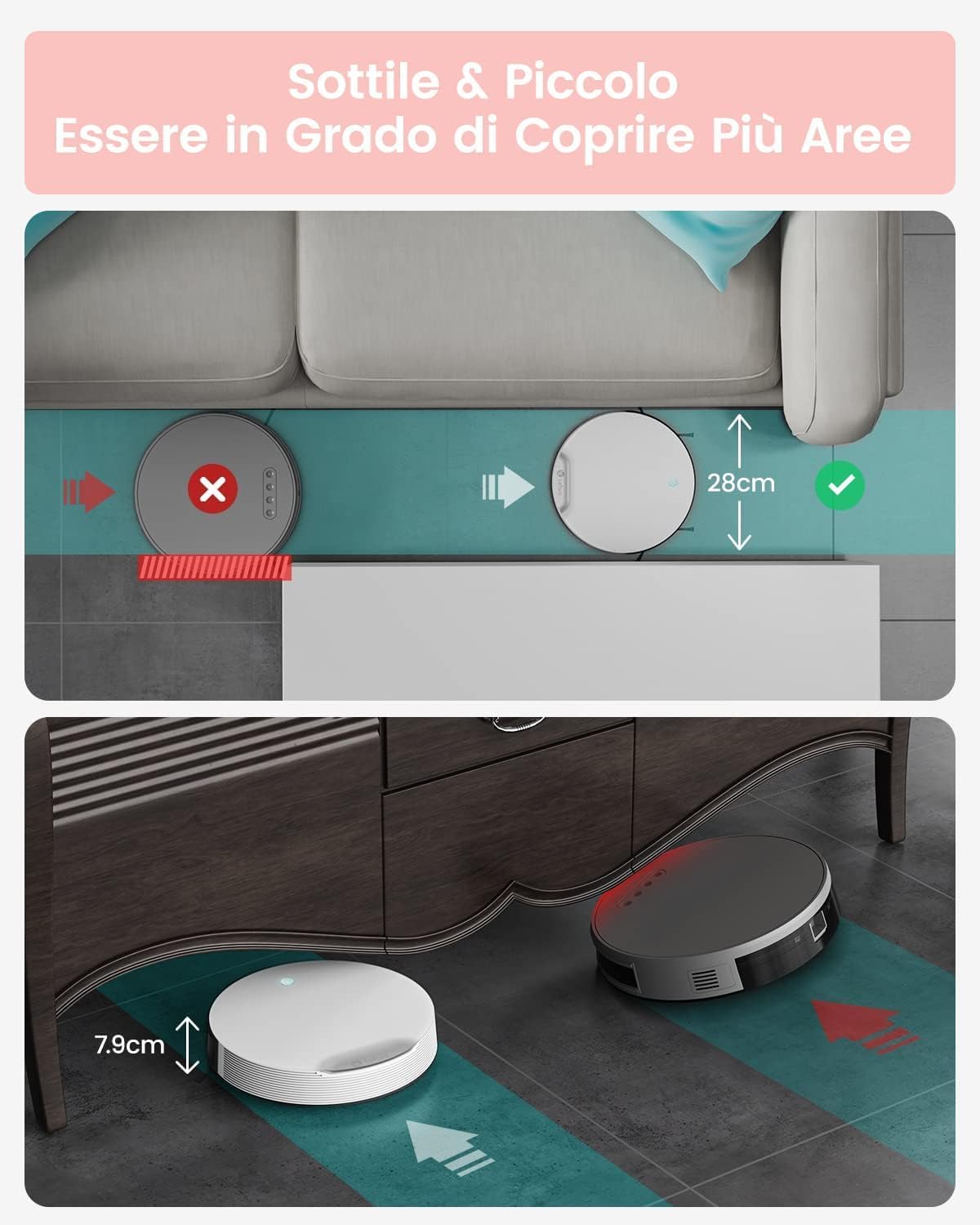
Image: The slim design of the LEFANT N1R allows it to clean under low furniture.

Image: Illustration comparing the brushless suction port of the N1R with a traditional roller brush, highlighting its effectiveness against hair tangles.
3. Setup
3.1 Unpacking and Initial Preparation
- Carefully remove all components from the packaging.
- Remove any protective films or stickers from the robot and charging base.
- Attach the side brushes to the bottom of the robot by pressing them into place until they click.
3.2 Placing the Charging Base
Select a suitable location for the charging base:
- Place the charging base against a wall in an open area.
- Ensure there is at least 0.5 meters (1.6 feet) of clear space on both sides of the base and 1.5 meters (5 feet) in front of it.
- Keep the area free from obstacles, such as power cords, rugs, or furniture, that could obstruct the robot's return to the base.
- Plug the power adapter into the charging base and then into a wall outlet. The indicator light on the charging base will illuminate.
3.3 Initial Charging
Before first use, fully charge the robot vacuum cleaner:
- Manually place the robot onto the charging base, ensuring the charging contacts on the robot align with those on the base.
- The robot's indicator light will show charging status (e.g., breathing light).
- Allow the robot to charge completely, which may take several hours. A full charge is indicated by a solid light or a change in light pattern (refer to the robot's specific indicator guide).
4. Operating Instructions
4.1 Powering On/Off
- To Power On: Press and hold the power button on the robot until the indicator light illuminates.
- To Power Off: Press and hold the power button on the robot until the indicator light turns off.
4.2 Cleaning Modes
The LEFANT N1R offers four cleaning modes, selectable via the remote control:
- Zigzag Mode: The robot cleans in a systematic S-shaped pattern, ideal for large, open areas.
- Random Mode: The robot cleans randomly, suitable for complex environments with many obstacles.
- Edge Mode: The robot cleans along walls and furniture edges.
- Spot Mode: The robot cleans a specific concentrated area in a spiral pattern, useful for heavily soiled spots.

Image: Visual representation of the four cleaning modes: Zigzag, Random, Edge, and Spot.
4.3 Using the Remote Control
The remote control allows you to manage the robot's functions conveniently. Ensure the remote control has AAA batteries installed (1 AAA battery included).

Image: Detailed diagram illustrating the buttons and functions of the remote control.
- Start/Pause Button: Initiates or pauses cleaning.
- Auto Recharge Button: Sends the robot back to its charging base.
- Directional Buttons: Manually control the robot's movement.
- Cleaning Mode Selection: Cycle through different cleaning modes.
- Suction Power Adjustment: Increase or decrease suction intensity.
- Schedule Setting: Program cleaning times.
4.4 Scheduling Cleaning Programs
You can set a daily cleaning schedule using the remote control:

Image: Step-by-step guide on how to set and cancel cleaning schedules using the remote control.
- Press the 'SET' button to enter schedule programming mode.
- Use the directional buttons to select the 'Day', 'Hour', and 'Minute'.
- Press 'OK' to confirm. The robot will emit a beep, indicating the schedule is set.
- To cancel a single scheduled cleaning, set its time to 00:00 and confirm.
- To cancel all scheduled cleanings, press and hold the 'SET' button for 3 seconds. The robot will beep to confirm cancellation.
4.5 Navigation and Safety Features
The N1R is equipped with intelligent sensors to navigate your home safely:
- Anti-Collision: Infrared sensors detect obstacles and allow the robot to slow down and navigate around them.
- Anti-Drop: Ground sensors prevent the robot from falling down stairs or off ledges.
- Obstacle Climbing: The robot can climb over small obstacles, such as door sills, up to 15mm in height.
- Automatic Recharging: When the battery is low, the robot will automatically return to its charging base.

Image: Illustrations of the robot's intelligent features including edge detection, obstacle avoidance, ability to cross small thresholds, and automatic return to charging station.
5. Maintenance
Regular maintenance ensures optimal performance and extends the lifespan of your LEFANT N1R.
5.1 Emptying the Dustbin
Empty the dustbin after each cleaning cycle or when the 'full' indicator (if available) illuminates.
- Press the dustbin release button and pull out the dustbin.
- Open the dustbin lid and empty its contents into a trash can.
5.2 Cleaning the Filters
Clean the HEPA filters regularly (e.g., weekly) and replace them every 3-6 months, depending on usage.
- Remove the filters from the dustbin.
- Tap the filters gently to remove loose dust. Do not wash HEPA filters with water unless specified by the manufacturer.
- Use the provided cleaning brush to remove any remaining debris.
5.3 Cleaning the Side Brushes
Inspect and clean the side brushes regularly to remove tangled hair or debris.
- Gently pull the side brushes upwards to remove them.
- Remove any hair or debris wrapped around the brushes or their posts.
- Reattach the brushes by pressing them firmly into place.
5.4 Cleaning Sensors and Charging Contacts
Wipe the sensors and charging contacts with a clean, dry cloth periodically.
- Locate the infrared sensors around the robot's bumper and on the bottom.
- Clean the two metal charging contacts on the robot's underside and on the charging base.
6. Troubleshooting
If you encounter issues with your LEFANT N1R, please refer to the following common problems and solutions:
| Problem | Possible Cause | Solution |
|---|---|---|
| Robot does not turn on | Low battery; Power button not pressed correctly | Charge the robot fully; Press and hold the power button until the indicator light turns on. |
| Robot does not charge | Charging contacts are dirty; Power adapter not connected | Clean the charging contacts on both the robot and the base; Ensure the power adapter is securely plugged into the base and wall outlet. |
| Reduced suction power | Dustbin full; Filters clogged; Suction inlet blocked | Empty the dustbin; Clean or replace the filters; Check and clear any blockages in the suction inlet. |
| Robot gets stuck frequently | Too many obstacles; Side brushes tangled | Clear the cleaning area of excessive clutter; Clean the side brushes. |
| Robot does not return to charging base | Charging base obstructed; Robot too far from base | Ensure the area around the charging base is clear; Manually place the robot on the base if it's too far. |
If the problem persists after trying these solutions, please contact LEFANT customer support.
7. Specifications
- Model: N1
- Brand: LEFANT
- Suction Power: 4500 Pa
- Battery Life: Up to 165 minutes (in silent mode)
- Dustbin Capacity: 560 ml
- Noise Level: Approximately 55 dB (in silent mode)
- Dimensions (Robot): 28 cm (Diameter) x 7.8 cm (Height)
- Package Dimensions: 40 x 33 x 12 cm
- Package Weight: 3.54 kg
- Color: White
- Special Features: Continuous suction, Pet hair collection, Infrared sensors, Anti-tangle technology
- Batteries Required: 1 AAA battery for remote control (included)
8. Warranty and Support
The LEFANT N1R Robot Vacuum Cleaner comes with a standard manufacturer's warranty. Please refer to the warranty card included in your package for specific terms and conditions.
For technical support, warranty claims, or any questions regarding your product, please contact LEFANT customer service through the retailer where you purchased the product or visit the official LEFANT website for contact information.
Online Support: www.lefant.com
Related documentsN1


Ask a question about this manual
Ask about setup, troubleshooting, compatibility, parts, safety, or missing instructions. Manuals+ will review the question and use this page’s manual context to help answer it.