Introduction
This manual provides comprehensive instructions for the assembly, operation, and maintenance of your RedLemon 60-Inch Electric Standing Desk. Designed for versatility and comfort, this desk features electric height adjustment, integrated LED lighting, and convenient power outlets to enhance your workspace.

Image: The RedLemon 60-Inch Electric Standing Desk, showcasing its spacious white desktop, monitor shelf with blue LED lighting, and various accessories like a laptop, monitor, and headphones. The desk is set up in a room with a large window and a plant, highlighting its suitability for a modern office environment.
Safety Information
Please read and understand all safety warnings before assembling or operating the desk. Failure to follow these instructions may result in injury or damage to the product.
- Always follow the assembly instructions carefully.
- Do not attempt to adjust the desk height while in use or if objects are unstable on the desktop.
- Ensure that the total weight placed on the desk, including the monitor and other equipment, does not exceed 150 lbs (68 kg).
- Keep children and pets away from the desk during operation.
- Do not place liquids directly on the desk surface without proper coasters or protection.
- Disconnect power before cleaning or performing any maintenance.
Setup and Assembly
The RedLemon Electric Standing Desk is designed for hassle-free assembly, typically taking around 60 minutes. All necessary assembly tools are included in the package. Please ensure you have ample space and follow the numbered parts and clear instructions provided in the separate assembly guide.

Image: A diagram illustrating the key dimensions of the desk, including the 60-inch width, 24-inch depth, and height adjustment range from 28.4 to 45.9 inches. It also highlights the monitor shelf dimensions and the desk's load capacity of 175 lbs, stability, and low noise operation.
Pre-Assembly Checklist:
- Verify all parts are present and undamaged according to the packing list.
- Ensure you have a clear, flat, and spacious area for assembly.
- Keep small parts out of reach of children.
Refer to the dedicated assembly manual for step-by-step instructions on attaching the legs, desktop, monitor shelf, keyboard tray, and other accessories.
Operating Instructions
Electric Height Adjustment
The desk features an electric lift system allowing seamless transitions between sitting and standing positions. The height can be adjusted from 28.4 inches to 45.9 inches.

Image: Two RedLemon electric standing desks, one set to its minimum height of 28.4 inches (sitting position) and the other to its maximum height of 45.9 inches (standing position), demonstrating the smooth and wide range of height adjustment.
Control Panel:
The control panel, located on the underside of the desktop, allows for precise height adjustments and memory presets.
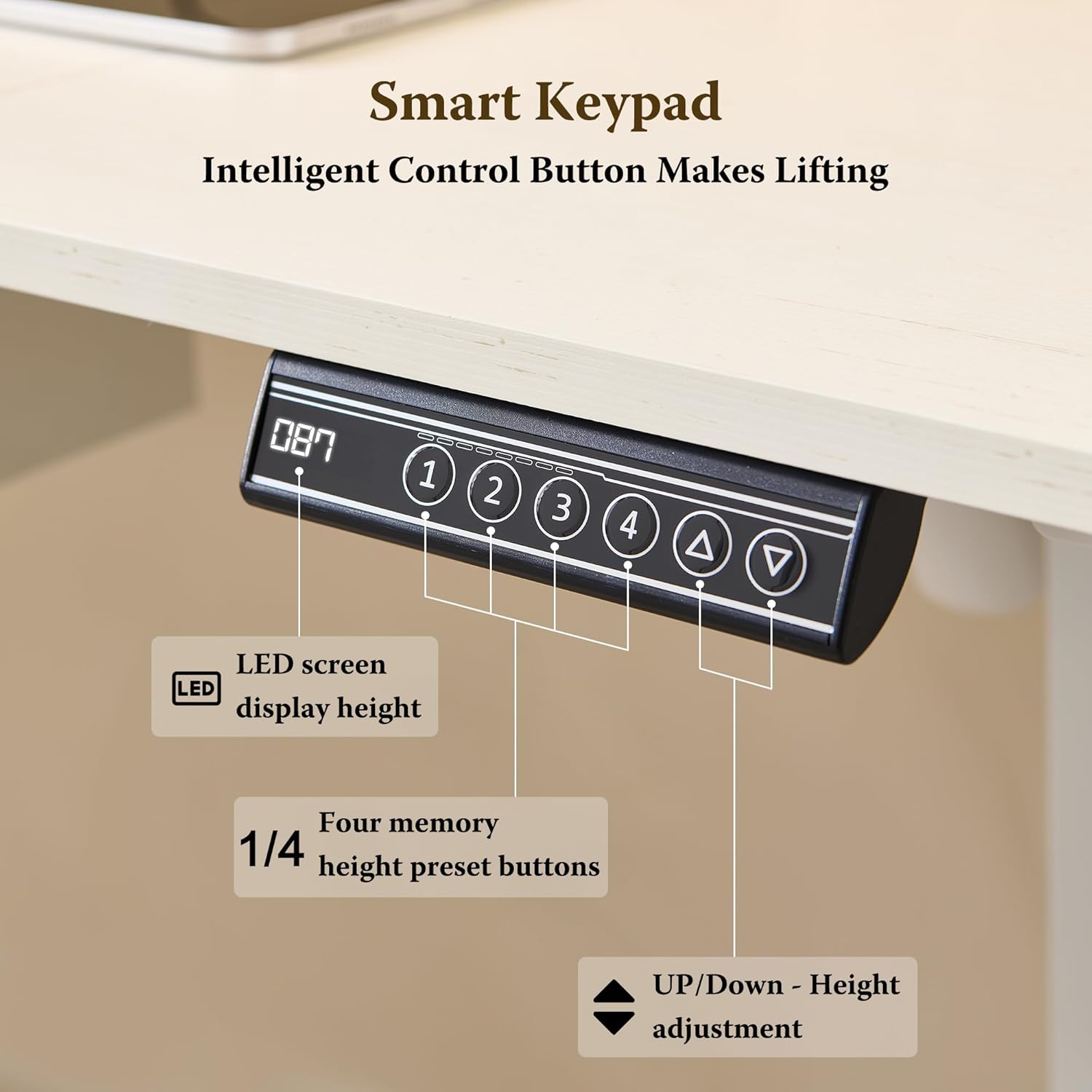
Image: A detailed view of the desk's smart keypad control panel. It features an LED screen to display the current height, four numbered buttons (1-4) for memory height presets, and up/down arrow buttons for manual height adjustment.
- Up/Down Arrows: Press and hold to manually raise or lower the desk to your desired height.
- Memory Presets (1-4): To save a height, adjust the desk to the desired position, then press and hold one of the numbered buttons (1, 2, 3, or 4) for 2 seconds until the display flashes. To recall a saved height, simply press the corresponding numbered button.
- Quick Up/Down Gear Settings: Press and hold any of the memory preset buttons (1-4) for 2 seconds to customize the quick up/down gear settings.
Video: This video demonstrates the various features of the RedLemon Electric Standing Desk, including the smooth height adjustment, the functionality of the control panel with memory presets, the integrated LED lighting with color changes, the convenient rotatable cup holder and headphone hook, the smooth pull-out keyboard tray, and the built-in charging station with USB ports and power outlets.
LED Lighting System
The integrated RGB LED lighting system offers 7 colors and 12 modes to customize your workspace ambiance. Control the lighting with the included wireless remote.

Image: A close-up view of the monitor shelf on the RedLemon desk, highlighting the integrated RGB LED light system. The image also shows the two power outlets, one USB-A port, and one Type-C port, along with the wireless remote control for the LED lights, which offers 7 available colors and 4 dynamic modes.
- Use the wireless remote to cycle through 7 standard colors and 12 dynamic modes (static, gradient, flashing effects).
- Adjust brightness as desired.
Built-in Power Station
The desk includes a convenient power station with 2 standard outlets, 1 USB-A port, and 1 Type-C port to keep your devices charged and organized.

Image: A collage showcasing the convenient features of the RedLemon desk. It includes close-ups of the rotatable cup holder, the rotatable headphone hook, the built-in charging station with power outlets and USB ports, and the stable rubber padding on the desk's base for enhanced stability.
- Plug in your devices directly to the integrated outlets and USB ports.
- Ensure devices are compatible with the provided power specifications.
Additional Features
- Keyboard Tray: A smooth pull-out keyboard tray provides ergonomic placement for your keyboard and mouse.
- Monitor Shelf: The raised monitor shelf helps improve posture and provides additional storage.
- Headphone Hook: A 360° rotating headphone hook keeps your headphones easily accessible and off the desk surface.
- Water Bottle Holder: A rotating water bottle holder ensures your drink is secure and within reach.

Image: An overhead perspective of the RedLemon 60-inch electric standing desk, clearly labeling its various components and features. These include the RGB LED light, monitor stand, built-in power strip, keyboard tray, control panel, handy hook for headphones, and a cup holder, demonstrating how to organize and declutter a workstation.
Maintenance
Regular maintenance will ensure the longevity and optimal performance of your RedLemon Electric Standing Desk.
- Cleaning: Wipe the desk surface with a soft, damp cloth. Avoid abrasive cleaners or harsh chemicals that could damage the finish.
- Motor Care: The motor is designed for quiet and smooth operation. Avoid overloading the desk beyond its specified weight capacity to prevent strain on the motor.
- Cable Management: Periodically check and organize cables to prevent tangles and ensure smooth height adjustment.
- Fasteners: Occasionally check all screws and fasteners to ensure they are tight. Retighten if necessary.
Troubleshooting
If you encounter any issues with your desk, please refer to the following common troubleshooting steps:
| Problem | Possible Cause | Solution |
|---|---|---|
| Desk does not move. | Power cable disconnected; motor overload; control panel issue. | Check power connections. Reduce weight on the desk. Reset the control panel (refer to assembly guide for specific reset procedures). |
| Height adjustment is uneven or jerky. | Uneven weight distribution; obstruction; loose connections. | Distribute weight evenly. Check for obstructions under the desk. Ensure all connections are secure. |
| LED lights not working. | Remote battery low; loose connection; LED strip damage. | Replace remote battery. Check LED strip connections. Contact customer support if damage is suspected. |
If the issue persists after attempting these steps, please contact RedLemon customer support for further assistance.
Specifications
Key technical specifications for your RedLemon Electric Standing Desk:
- Brand: RedLemon
- Model Number: ELD60-AWT-2
- Product Dimensions: 24"D x 60"W x 35"H (Overall, adjustable height)
- Height Adjustment Range: 28.4" to 45.9"
- Color: White
- Desktop Material: Engineered Wood
- Item Weight: 60 Pounds
- Maximum Load Capacity: 175 lbs (approx. 79 kg)
- Motor Noise Level: <50 dB
- Power Station: 2 AC Outlets, 1 USB-A Port, 1 Type-C Port
- LED Lighting: RGB, 7 Colors, 12 Modes (controlled by wireless remote)
- Included Components: Desk, Keyboard Tray, Monitor Shelf, Headphone Hook, Cup Holder
- Assembly Required: Yes (Tools included)
Warranty and Support
Your RedLemon Electric Standing Desk comes with a Limited Warranty. Please retain your proof of purchase for warranty claims.
For technical support, warranty inquiries, or replacement parts, please contact RedLemon Furniture customer service. You can find contact information on the RedLemon official website or through your purchase platform.
RedLemon Furniture: Visit the RedLemon Store on Amazon


