
RedLemon ELD48-AWT-2
RedLemon 48-Inch Electric Standing Desk
Model: ELD48-AWT-2
User Instruction Manual
Important Safety Information
Always follow the assembly instructions carefully. Keep the desk on a stable surface and ensure it is properly anchored to the floor when using the height-adjustable feature. Do not exceed the weight limit of the desk.
Ensure all cables are properly managed to prevent tripping hazards or damage during height adjustments. Keep children and pets away from the desk during operation.
Package Contents
Verify that all components are present before beginning assembly. The package should include:
- Desk components (desktop sections, legs, frame)
- Keyboard Tray
- Monitor Shelf
- Control Panel
- Power Adapter and Cables
- Headphone Hook
- Cup Holder
- Assembly Hardware (screws, tools)
- LED Light Strip and Remote Control

Figure 1: Desk dimensions and key features.
Assembly Instructions
Assembly typically takes approximately 60 minutes. It is recommended to have two people for certain steps to ensure stability and ease of construction. Follow the detailed, step-by-step instructions provided in the separate assembly guide included with your product packaging.
- Unpack all components and verify against the package contents list.
- Assemble the desk frame and legs according to the diagrams.
- Attach the desktop sections, ensuring proper alignment.
- Install the monitor shelf, keyboard tray, control panel, and accessories (headphone hook, cup holder).
- Connect all electrical components, including the motor and control panel, as per the wiring diagram.
- Perform a final check to ensure all screws are tightened and the desk is stable.

Figure 2: Overview of desk features and components.
Setup
After assembly, place the desk in its desired location. Ensure it is on a level surface and there is sufficient clearance for height adjustments.
- Connect the power adapter to the desk's power input and then to a wall outlet.
- The LED display on the control panel should illuminate.
- Perform an initial calibration by pressing and holding the 'Down' arrow button until the desk reaches its lowest point and then slightly rises. This resets the height mechanism.
Operating Instructions
Height Adjustment
The desk features electric height adjustment, allowing seamless transitions between sitting and standing positions. The height range is from 28.4 inches to 45.9 inches.
- Use the Up (▲) and Down (▼) arrow buttons on the control panel to manually adjust the desk height.
- The LED screen displays the current height in inches.
Memory Presets
The control panel allows you to save up to four preferred height settings for quick adjustments.
- Adjust the desk to your desired height using the Up/Down buttons.
- Press and hold one of the numbered preset buttons (1, 2, 3, or 4) for approximately 2 seconds until the display flashes or beeps. This saves the current height to that preset.
- To recall a saved height, simply press the corresponding numbered preset button. The desk will automatically move to the saved position.
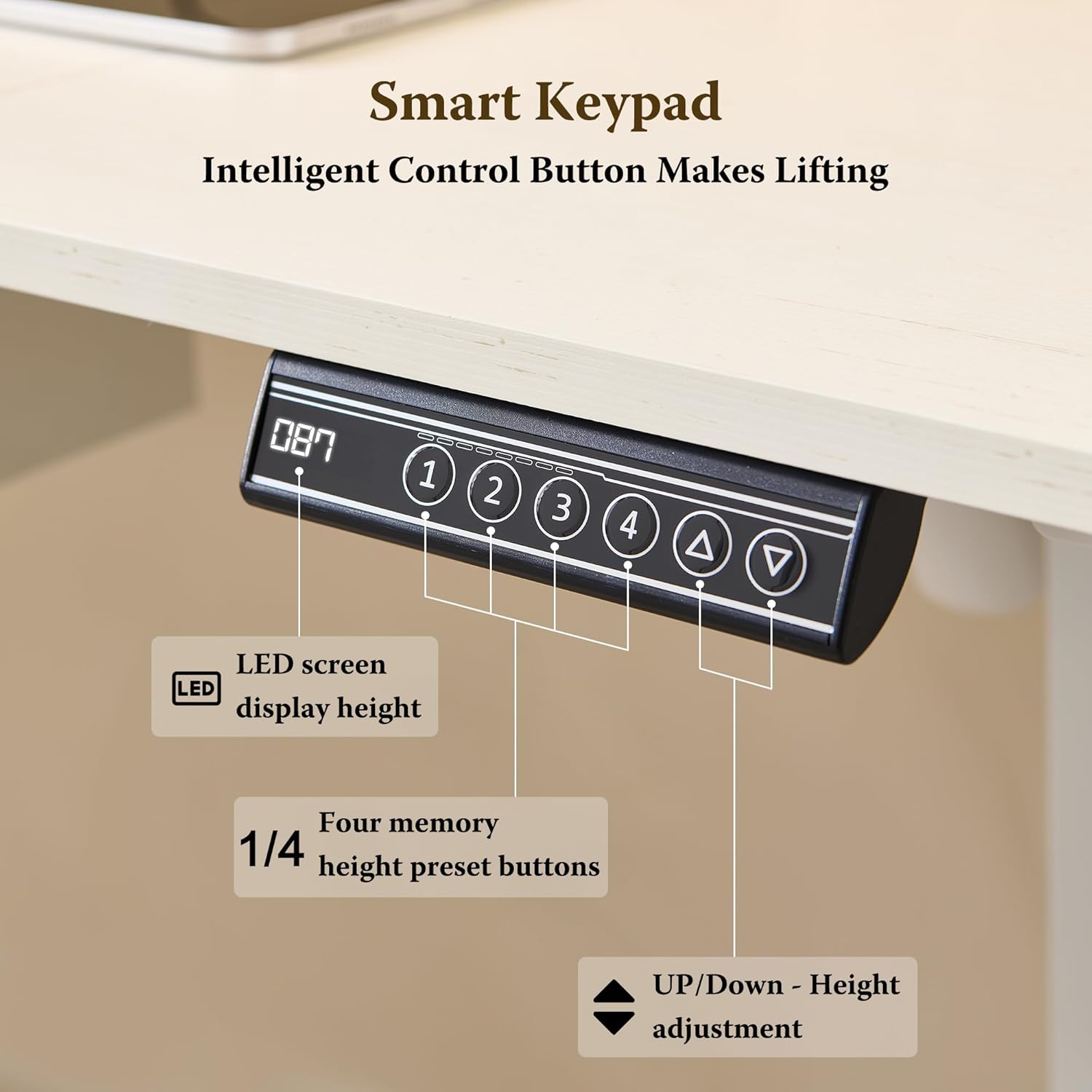
Figure 3: Smart Keypad for height adjustment and memory presets.
LED Lighting System
The integrated RGB LED lighting system offers 7 colors and 12 modes to customize your workspace ambiance.
- Use the provided wireless remote control to operate the LED lights.
- Select from 7 static colors or choose from 12 dynamic modes, including gradient and flashing effects.
- Adjust the brightness of the lights using the remote control.

Figure 4: Power outlets and RGB LED light system.
Built-in Charging Station
The desk includes a convenient power station to keep your devices charged.
- The charging station features 2 standard power outlets, 1 USB-A port, and 1 Type-C port.
- Plug in your devices directly to the desk for easy access to power.
Accessories
The desk is equipped with several accessories designed to enhance productivity and organization.
- Keyboard Tray: A smooth pull-out keyboard tray provides additional space and ergonomic positioning for your keyboard and mouse.
- Headphone Hook: A 360° rotatable hook allows you to conveniently hang your headphones, keeping them within reach and off the desktop.
- Cup Holder: A rotatable cup holder helps prevent spills and keeps your beverage secure.

Figure 5: Convenient accessories: cup holder, headphone hook, and charging station.
Video 1: Demonstration of RedLemon Electric Standing Desk features, including height adjustment, LED lighting, and accessories.
Maintenance
Regular maintenance ensures the longevity and optimal performance of your RedLemon Electric Standing Desk.
- Cleaning: Wipe the desk surfaces with a soft, damp cloth. Avoid harsh chemicals or abrasive cleaners that may damage the finish.
- Cable Management: Periodically check and reorganize cables to prevent tangling or interference with the desk's movement.
- Fastener Check: Every few months, inspect all screws and fasteners to ensure they are tight. Retighten if necessary.
- Motor Care: The electric motor is designed for maintenance-free operation. Avoid obstructing its movement or applying excessive force to the desk during adjustment.
Troubleshooting
If you encounter issues with your desk, refer to the following common solutions:
| Problem | Possible Cause | Solution |
|---|---|---|
| Desk does not move | Power cable disconnected; Motor overload; Control panel error | Check power connections. Unplug and replug the power for 10 seconds. Reduce weight on desk. Perform calibration (see Setup). |
| Uneven height adjustment | Obstruction; Unbalanced load | Clear any obstructions. Redistribute weight evenly on the desktop. Perform calibration. |
| LED lights not working | Remote battery low; Loose connection | Replace remote battery. Check LED strip connections. |
| Charging ports not working | Power not connected; Device incompatibility | Ensure desk is powered on. Try a different device or cable. |
If the issue persists after attempting these solutions, please contact RedLemon customer support for further assistance.
Specifications
| Feature | Detail |
|---|---|
| Brand | RedLemon |
| Model Number | ELD48-AWT-2 |
| Product Dimensions (D x W x H) | 24"D x 48"W x 35"H (overall, non-adjusted) |
| Height Adjustment Range | 28.4 inches to 45.9 inches |
| Number of Height Positions | 4 (Memory Presets) |
| Top Material Type | Engineered Wood |
| Color | White |
| Item Weight | 52 Pounds |
| Power Outlets | 2 AC outlets, 1 USB-A port, 1 Type-C port |
| LED Lighting | RGB, 7 colors, 12 modes, dimmable, remote control |
| Included Components | Desk, Keyboard Tray, Monitor Shelf, Headphone Hook, Cup Holder |
Warranty and Support
This product comes with a limited warranty. For specific warranty details, please refer to the documentation included with your purchase or contact RedLemon customer support.
Optional protection plans are available for purchase, offering extended coverage:
- 2-Year Protection Plan
- 3-Year Protection Plan
For customer support, technical assistance, or to inquire about returns, please contact RedLemon Furniture directly. Contact information can typically be found on the seller's page or your purchase receipt.
Ask a question about this manual
Ask about setup, troubleshooting, compatibility, parts, safety, or missing instructions. Manuals+ will review the question and use this page’s manual context to help answer it.