
Strex SP322
Strex 27000 mAh Power Bank User Manual
Model: SP322
Introduction
Thank you for choosing the Strex 27000 mAh Power Bank. This compact and powerful portable charger is designed to keep your devices powered on the go. With a large capacity, multiple fast-charging ports, and a convenient LED display, it ensures your smartphones, tablets, and other compatible devices remain charged safely and efficiently.
This manual provides essential information on how to use and maintain your power bank. Please read it thoroughly before first use.
Package Contents
- Strex 27000 mAh Power Bank (Model: SP322)
- USB-C Charging Cable
- User Manual

Image: The image displays the Strex Power Bank, a USB-C charging cable, the product packaging, and the user manual, illustrating all items included in the box.
Setup and Initial Charging
1. Charging the Power Bank
Before first use, fully charge your Strex Power Bank. Use the included USB-C cable and connect it to a compatible USB wall adapter (not included). The LED display will show the charging progress.
- Connect the small end of the USB-C cable to the USB-C port on the power bank.
- Connect the other end of the USB-C cable to a USB wall charger.
- The LED display will illuminate, showing the current battery percentage. It will display "100%" when fully charged.
A full charge typically takes approximately 5 hours.

Image: The power bank is shown connected to a wall charger via a USB cable, with text indicating it can be fully charged in 5 hours.
2. Understanding the LED Display
The integrated LED display shows the remaining battery percentage of the power bank. It also indicates when Quick Charge (QC) or Power Delivery (PD) is active during device charging.
Operating Instructions
1. Charging Your Devices
The Strex Power Bank features multiple output ports for charging various devices:
- USB-A Ports (2x 12W, 1x 22.5W Quick Charge 3.0): Use these ports with your device's standard USB-A charging cable. The 22.5W port supports Quick Charge 3.0 for compatible devices.
- USB-C Port (18W Power Delivery): This versatile port functions as both an input for charging the power bank and an output for charging devices. It supports Power Delivery (PD) for fast charging compatible devices.
To charge a device:
- Connect your device's charging cable to the appropriate port on the power bank.
- Connect the other end of the cable to your device.
- The power bank will automatically begin charging your device. The LED display will show the power bank's remaining charge.

Image: A smartphone is shown connected to the power bank, displaying 75% charged. The image highlights the power bank's features: 3 USB ports, 27000 mAh capacity, 1 USB-C input/output, and 22.5W Quick Charge technology.
2. Simultaneous Charging
The Strex Power Bank allows you to charge up to four devices simultaneously using its multiple ports.

Image: The power bank is depicted charging an iPhone 14 (7x), Galaxy S23 (6x), Google Pixel (7x), and iPad mini (4.5x), demonstrating its multi-device charging capability and capacity.
3. Device Compatibility
This power bank is universally compatible with most USB-powered devices, including:
- Smartphones (iOS and Android)
- Tablets
- Earbuds
- Portable Speakers
- Smartwatches
- Other small USB-powered gadgets

Image: The image illustrates the power bank's wide compatibility, showing it can charge Android devices (Samsung, Xiaomi, Google Pixel), iOS devices (iPhone, iPad), earbuds, speakers, and smartwatches.
Maintenance and Care
- Cleaning: Wipe the power bank with a soft, dry cloth. Do not use harsh chemicals or abrasive materials.
- Storage: Store the power bank in a cool, dry place away from direct sunlight and extreme temperatures.
- Battery Life: To prolong battery life, fully charge and discharge the power bank at least once every three months if not in regular use.
- Avoid Drops: Protect the device from drops and impacts.
- Water Exposure: Do not expose the power bank to water or moisture.
Troubleshooting
Common Issues and Solutions:
- Power Bank Not Charging:
- Ensure the charging cable is securely connected to both the power bank and the wall adapter.
- Try a different USB-C cable or wall adapter.
- Verify the wall adapter is functioning correctly.
- Device Not Charging from Power Bank:
- Ensure the power bank has sufficient charge (check LED display).
- Try a different charging cable for your device.
- Try a different output port on the power bank.
- Ensure your device is compatible with USB charging.
- Slow Charging:
- Ensure you are using a fast-charging compatible cable and port (e.g., 22.5W USB-A or 18W USB-C PD) if your device supports it.
- Charging multiple devices simultaneously may reduce individual charging speeds.
Safety Features:
The Strex Power Bank is equipped with a multi-safety system to protect both the power bank and your connected devices against:
- Overcurrent
- Overvoltage
- Over-discharge
- Short circuits
- Overheating

Image: The power bank is shown with icons and text indicating its safety features, including protection against overcurrent, overvoltage, over-discharge, and short circuits, ensuring safe operation.
Specifications
| Product Type | Power Bank |
| Brand | Strex |
| Model Number | SP322 |
| Capacity | 27,000 mAh |
| USB-C Input | 5V/3.0A, 9V/2.2A (Power Delivery) |
| USB-A Output 1 & 2 | 12W (Standard Charge) |
| USB-A Output 3 | 22.5W (Quick Charge 3.0) |
| USB-C Output | 18W (Power Delivery) |
| Max Power Output | 22.5W |
| Number of Ports | 4 (3x USB-A, 1x USB-C) |
| Dimensions (L x W x H) | 16 x 7.5 x 2.5 cm |
| Weight | 370 g |
| Color | White |
| Material | ABS and PC heat-resistant materials |
| Special Features | LED Status Indicator, Multi-safety Protection, Compact Design |
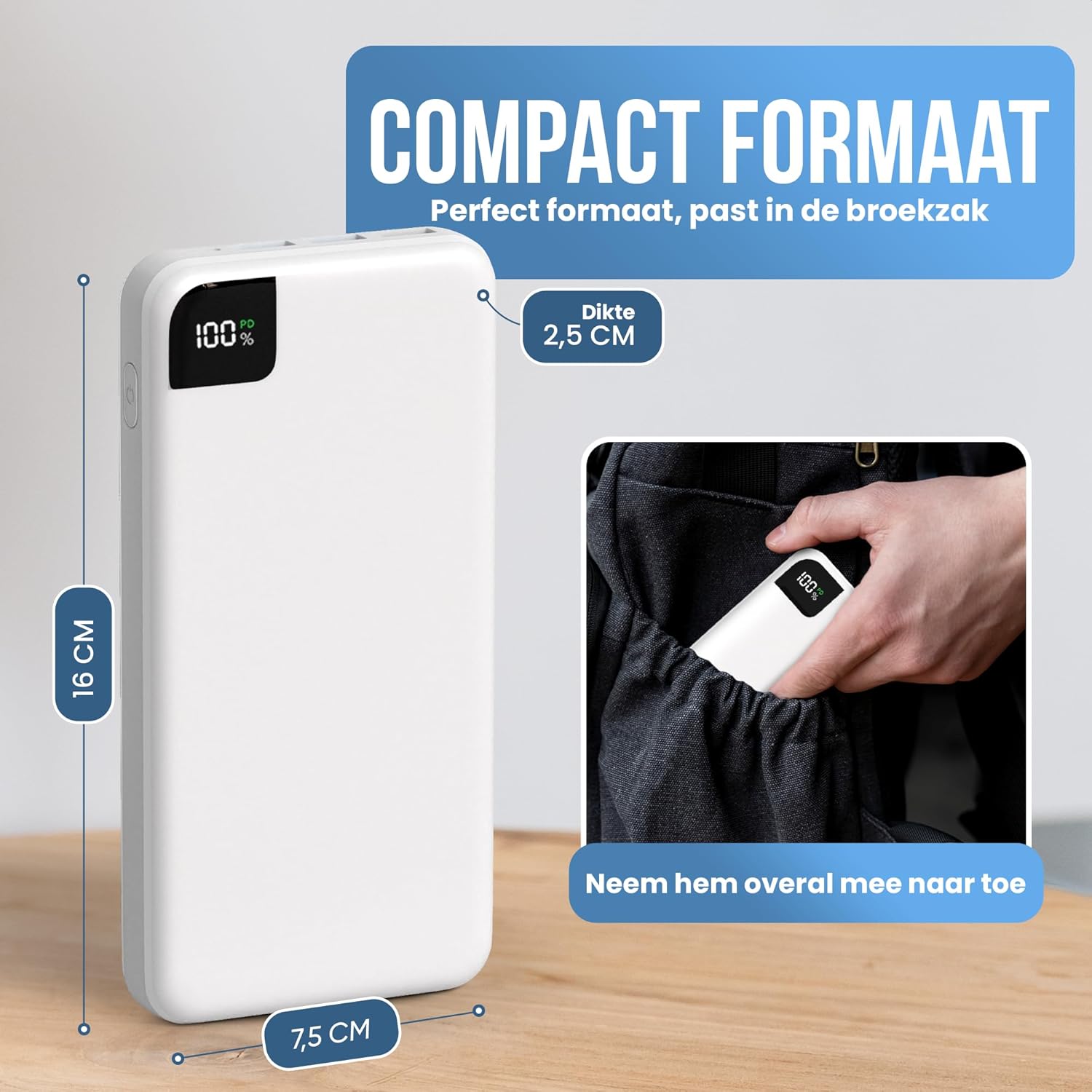
Image: The power bank's compact dimensions are illustrated, showing its length (16 cm), width (7.5 cm), and thickness (2.5 cm), emphasizing its portability and ability to fit into a pocket.
Warranty Information
Strex products are manufactured to high-quality standards. For specific warranty details and terms, please refer to the warranty card included with your purchase or visit the official Strex website. Keep your proof of purchase for any warranty claims.
Customer Support
If you encounter any issues or have questions regarding your Strex 27000 mAh Power Bank, please contact our customer support team. You can find contact information on the official Strex website or through your retailer.
For the latest information and support, please visit: www.strex.nl
Related documentsSP322


Ask a question about this manual
Ask about setup, troubleshooting, compatibility, parts, safety, or missing instructions. Manuals+ will review the question and use this page’s manual context to help answer it.