
1. Introduction
This manual provides detailed instructions for the safe and efficient use of your THREEKEY 4-in-1 Magsafe Wireless Charging Station (Model TK-CW303). This device is designed to simultaneously charge multiple Apple devices, including compatible iPhone, Apple Watch, AirPods, and iPad models, offering a streamlined charging experience.
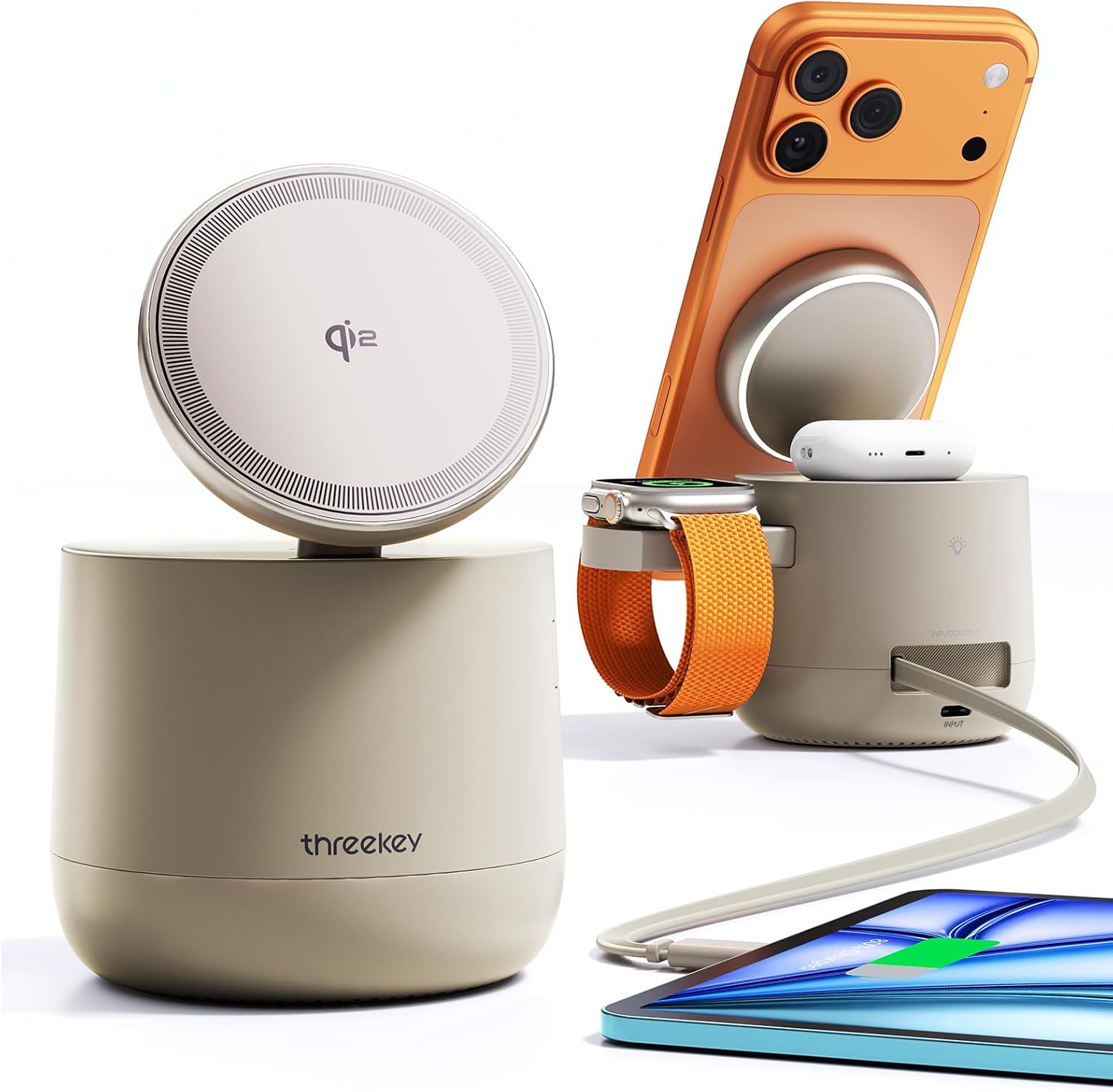
Image 1.1: The THREEKEY 4-in-1 Magsafe Wireless Charging Station with various Apple devices connected.
2. Package Contents
Verify that all items listed below are included in your package:
- 1x THREEKEY 4-in-1 Magsafe Charger Dock with Built-in 3ft Retractable USB-C Cable
- 1x 65W PD Charger with 5ft Braided Charging Cord
- 1x User Manual
- 24 Month Warranty Card
3. Product Overview and Features
The THREEKEY TK-CW303 is a versatile charging solution designed for Apple devices, incorporating advanced technology for efficient and safe charging.
Key Features:
- MFI Certified & Made for Apple Watch: Ensures full compatibility and optimal charging for Apple Watch, iPhone, iPad, and iPods.
- Qi2 Certified & 15W Fast Charging: Provides up to 15W wireless charging for compatible iPhones, significantly reducing charging times.
- Integrated 3ft Retractable USB-C Cable: Offers flexible charging for a fourth device, such as an iPad or Android device, and can also serve as an input for the station.
- Relaxing Ambient Light: Features adjustable warm white light with four brightness levels (0%, 25%, 50%, 100%) for enhanced ambiance.
- Advanced AI Intelligent Chips Control Core: Equipped with 5 exclusive TK-AI Chips for comprehensive protection against overheating, overvoltage, overcurrent, overcharge, and short-circuits.
- 65W PD Adapter Included: A powerful 65W Power Delivery adapter and a 5ft braided charging cord are included for optimal performance.
- StandBy Mode Support: Allows iPhones to utilize StandBy Mode for a bedside clock, photo frame, or widget display.

Image 3.1: The charging station highlighting its MFI and Qi2 certifications.

Image 3.2: The charging station's capability to charge multiple devices simultaneously.
4. Setup Instructions
- Connect Power Adapter: Plug the included 65W PD charger into a wall outlet. Connect the 5ft braided charging cord to the USB-C input port on the back of the THREEKEY charging station.
- Placement: Place the charging station on a stable, flat surface, such as a desk or nightstand. Ensure adequate ventilation around the device.
- Initial Power On: Once connected, the station is ready for use. There is no separate power button for the charging function.
5. Operating Instructions
5.1 Charging iPhone (MagSafe)
- Place your MagSafe-compatible iPhone (iPhone 12 series or newer) onto the magnetic charging pad. The iPhone will snap into place.
- Ensure the iPhone is centered on the pad for optimal 15W Qi2 fast charging.
- For best results, use magnetic cases (0-3mm thickness). Non-magnetic cases exceeding 3.5mm may hinder charging efficiency.
- The charging pad supports flexible positioning up to 70 degrees, allowing for StandBy Mode viewing.

Image 5.1: An iPhone wirelessly charging on the MagSafe pad.
5.2 Charging Apple Watch
- Place your Apple Watch onto the dedicated MFI-certified charging module. The watch will magnetically align.
- Ensure the watch is positioned correctly for charging to begin.

Image 5.2: An Apple Watch charging on its designated spot.
5.3 Charging AirPods
- Place your AirPods charging case onto the designated wireless charging area, typically located at the center of the base.
- Remove thick covers from the AirPods case to maximize charging efficiency.
5.4 Using the Retractable USB-C Cable
- The built-in 3ft retractable USB-C cable can be pulled out to charge a fourth device, such as an iPad or an Android device.
- To extend the cable, gently pull it out to the desired length (up to 3ft). It features multiple adjustable levels.
- To retract the cable, give it a slight tug, and it will automatically retract into the station.
- This cable can also be used as an additional input if you wish to power the charging station from another USB-C source (though the included 65W PD adapter is recommended).

Image 5.3: The retractable USB-C cable in use, showing its length.
5.5 Ambient Light Operation
- The warm white ambient light is located on the top of the charging station.
- To turn the light on/off or adjust its brightness, double-click the light button located on the back of the station.
- The light has four preset brightness levels: 0% (off), 25%, 50%, and 100%.

Image 5.4: The charging station's ambient light feature.
6. Maintenance
- Cleaning: Disconnect the power adapter before cleaning. Use a soft, dry, lint-free cloth to wipe the surface of the charging station. Do not use abrasive cleaners, solvents, or aerosol sprays.
- Storage: When not in use for extended periods, store the charging station in a cool, dry place away from direct sunlight and extreme temperatures.
- Cable Care: Avoid excessive pulling or bending of the retractable USB-C cable to maintain its integrity.
7. Troubleshooting
| Issue | Possible Cause | Solution |
|---|---|---|
| Device not charging wirelessly. | Device not properly aligned; thick phone case; foreign object on charging pad; power adapter not connected. | Ensure device is centered on the charging pad. Remove thick cases or metal objects. Verify power adapter is securely connected. |
| Slow charging speed. | Using a non-compatible power adapter; device not optimally placed; multiple devices charging simultaneously. | Use the included 65W PD adapter. Ensure optimal placement. Charging multiple devices may distribute power. |
| Ambient light not working. | Light is off; power issue. | Double-click the light button on the back to cycle through brightness levels or turn on. Check power connection. |
| Retractable cable not extending/retracting smoothly. | Cable obstruction or damage. | Ensure no obstructions. Avoid forceful pulling. If damaged, discontinue use. |
8. Specifications
| Feature | Detail |
|---|---|
| Product Dimensions | 3.1 x 3.1 x 3.09 inches |
| Item Weight | 1.6 pounds |
| Model Number | TK-CW303 |
| Brand | THREEKEY |
| Connector Type | USB Type C |
| Input Voltage | 240 Volts (via included 65W PD adapter) |
| Amperage | 20 Amps |
| Total USB Ports | 1 (retractable USB-C cable) |
| Wireless Charging Output (iPhone) | Up to 15W (Qi2 Certified) |
| Wireless Charging Output (Apple Watch) | 5W (MFI Certified) |
| Wireless Charging Output (AirPods) | 5W |
| Retractable USB-C Output | Up to 35W |
| Color | Sand |
9. Safety Information
- Do not expose the device to water, moisture, or extreme temperatures.
- Avoid dropping or subjecting the device to severe impacts.
- Do not disassemble, modify, or attempt to repair the device yourself. Refer to qualified service personnel.
- Keep the device away from heat sources, open flames, and flammable materials.
- Ensure proper ventilation during use to prevent overheating.
- Use only the provided power adapter and cable to ensure compatibility and safety.
10. Warranty and Support
Your THREEKEY 4-in-1 Magsafe Wireless Charging Station comes with a 36-month warranty from the date of purchase. This warranty covers manufacturing defects and ensures reliable operation under normal use.
For technical support, warranty claims, or any questions regarding your product, please contact THREEKEY customer service. Refer to the contact information provided on the product packaging or the official THREEKEY website.

