
1. Introduction
This instruction manual provides detailed guidance for the installation and maintenance of replacement parts for the Vyzzle D10 Robotic Vacuum Cleaner. Regular replacement of these consumable parts is essential to maintain the optimal performance and cleaning efficiency of your robotic vacuum.
2. Compatible Models
These replacement parts are specifically designed for use with the Vyzzle D10 Robot Vacuum Cleaner. Ensure your model is compatible before installation.
3. Package Contents
The valuable package includes the following components:
- 1 x Roller Brush
- 2 x Washable Mop Cloths
- 2 x Filters
- 1 x Side Brush
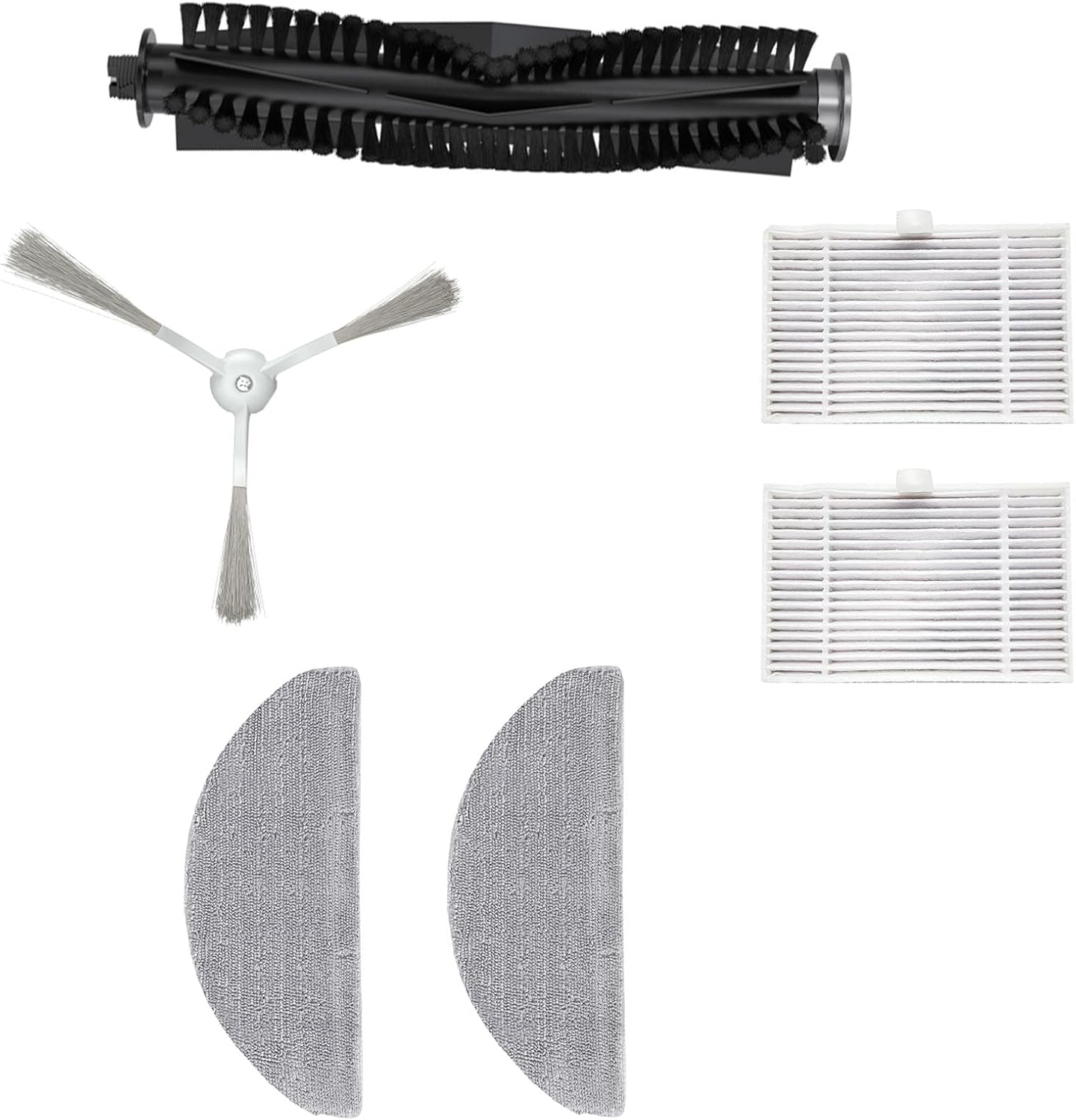
Figure 3.1: Complete set of Vyzzle D10 replacement parts.
4. Installation Guide
Before installing any replacement parts, ensure the robotic vacuum cleaner is powered off and disconnected from its charging base. Always refer to your Vyzzle D10 user manual for specific instructions on accessing component compartments.
4.1. Roller Brush Installation
- Turn the robot vacuum upside down.
- Locate the brush guard or cover, usually secured by latches or screws. Open or remove it.
- Remove the old roller brush. Clean any debris from the brush compartment.
- Insert the new roller brush, ensuring the ends align with the slots in the vacuum.
- Close or reattach the brush guard/cover securely.

Figure 4.1: Roller Brush.
4.2. Side Brush Installation
- Turn the robot vacuum upside down.
- Locate the side brush. It is typically held by a single screw.
- Unscrew and remove the old side brush.
- Align the new side brush with the post and secure it with the screw.

Figure 4.2: Side Brush.
4.3. Filter Installation
- Open the top cover of the robot vacuum to access the dustbin.
- Remove the dustbin from the vacuum.
- Open the dustbin cover and remove the old filter assembly.
- Insert the new filter(s) into the designated slot within the dustbin, ensuring a snug fit.
- Close the dustbin cover and reinsert the dustbin into the vacuum.

Figure 4.3: Filters.
4.4. Mop Cloth Installation
- Locate the mop cloth attachment area on the underside of the vacuum or on the water tank.
- Remove the used mop cloth, if present.
- Attach the new washable mop cloth securely to the designated area, ensuring it is flat and properly aligned.

Figure 4.4: Washable Mop Cloths.
5. Maintenance and Care
Regular cleaning and timely replacement of parts are crucial for the longevity and efficiency of your Vyzzle D10 robotic vacuum cleaner. It is recommended to replace consumable parts every 3-6 months, depending on usage.
5.1. Cleaning the Roller Brush
Remove the roller brush as described in Section 4.1. Use a cleaning tool or scissors to cut and remove any hair or debris tangled around the brush. Wipe the brush and its bearings with a dry cloth.
5.2. Cleaning the Side Brush
Remove the side brush as described in Section 4.2. Remove any hair or debris wrapped around the brush or its base. Wipe the brush with a dry cloth.
5.3. Cleaning the Filters
Remove the dustbin and filters as described in Section 4.3. Tap the filters gently over a trash can to remove dust and debris. The filters are washable; hand-wash them with warm water. Ensure they are completely air-dried before reinstallation to prevent damage to the vacuum.
5.4. Cleaning the Mop Cloths
Remove the mop cloths after each use. Hand-wash them with warm water and mild detergent. Rinse thoroughly and allow them to completely air dry before reattaching them to the vacuum or storing them.
6. Specifications
| Component | Quantity | Material/Type |
|---|---|---|
| Roller Brush | 1 | Plastic, Bristles |
| Washable Mop Cloth | 2 | Microfiber |
| Filter | 2 | HEPA |
| Side Brush | 1 | Plastic, Bristles |
Item Weight: 4.2 ounces
Package Dimensions: 3.9 x 1.96 x 0.78 inches
7. Troubleshooting
If you experience issues after replacing parts, consider the following:
- Reduced Cleaning Performance: Ensure all brushes are free of tangles and debris. Check that filters are clean and properly seated.
- Unusual Noises: Verify that the roller brush and side brush are correctly installed and not obstructed.
- Mop Not Wetting Floor: Ensure the mop cloth is properly attached and the water tank (if applicable) is filled and correctly installed.
- Parts Not Fitting: Double-check that you have purchased the correct replacement parts for the Vyzzle D10 model.
For more complex issues, refer to your original Vyzzle D10 Robotic Vacuum Cleaner user manual or contact customer support.
8. Customer Support
For further assistance, technical support, or inquiries regarding your Vyzzle D10 Robotic Vacuum Cleaner replacement parts, please visit the official Vyzzle website or contact their customer service department.
Online Support: Visit the Vyzzle Store on Amazon
Please have your product model (Vyzzle D10) and purchase details ready when contacting support.


