
1. Introduction
This manual provides essential information for the safe and efficient assembly, operation, and maintenance of your BROTTAR Corner Display Cabinet, Model BD004. This display cabinet is designed to showcase collectibles, books, and decorative items in living rooms, bedrooms, or offices. It features glass doors, integrated 3-color LED lighting, and an intelligent motion sensor for enhanced functionality.

Image 1.1: Overview of the BROTTAR Corner Display Cabinet, showing its dimensions (approximately 33.46 inches wide, 14.17 inches deep, and 65 inches high) and four internal shelves. The image highlights the glass and acrylic components, and indicates a maximum load capacity of 40 lbs per shelf.
2. Safety Information
Please read all safety instructions carefully before assembly and use. Keep this manual for future reference.
- Ensure all components are present and undamaged before beginning assembly. Do not use if any parts are missing or broken.
- Assembly should be performed by at least two adults to prevent injury and ensure proper construction.
- Place the cabinet on a flat, stable, and level surface to prevent tipping.
- Do not overload shelves. The maximum weight capacity per shelf is 40 lbs (18 kg).
- Keep electrical components (LED lights, power adapter) away from water and moisture.
- Only use the provided power adapter for the LED lighting system.
- Do not attempt to modify the electrical system or any part of the cabinet.
- Keep small parts and packaging materials away from children to avoid choking hazards.
- Secure the cabinet to the wall using anti-tip hardware (if included) to prevent serious injury from tipping.
3. Package Contents
Verify that all the following components are included in your package:
- Cabinet panels (engineered wood)
- Glass doors
- Shelves (4 total)
- LED lighting strips and power adapter
- Intelligent motion sensor unit
- Control panel for lighting
- Magnetic latches for doors
- Hinges and associated hardware
- Mounting accessories (screws, dowels, etc.)
- Assembly instructions manual
4. Setup and Assembly
The BROTTAR Corner Display Cabinet requires assembly. Detailed, step-by-step instructions and all necessary tools are included in the package. Please follow the provided assembly manual carefully.
- Unpack Components: Carefully remove all parts from the packaging and lay them out on a clean, soft surface to prevent scratches.
- Identify Parts: Refer to the parts list in the assembly manual to identify each component.
- Assemble Frame: Follow the instructions to assemble the main frame of the cabinet.
- Install Shelves: Insert the four shelves into their designated positions.
- Attach Doors: Install the glass doors using the provided hinges and magnetic latches. Ensure the black plastic ring on the hinges is correctly assembled.
- Install LED Lighting and Sensor: Integrate the LED light strips, motion sensor, and control panel according to the manual. Connect the power adapter.
- Position Cabinet: Carefully move the assembled cabinet to its desired corner location.
- Secure Cabinet: For safety, it is highly recommended to secure the cabinet to the wall using the anti-tip hardware provided.

Image 4.1: Detail showing the "Press to Open" mechanism for the glass doors, indicating a handle-free design for a sleek appearance.
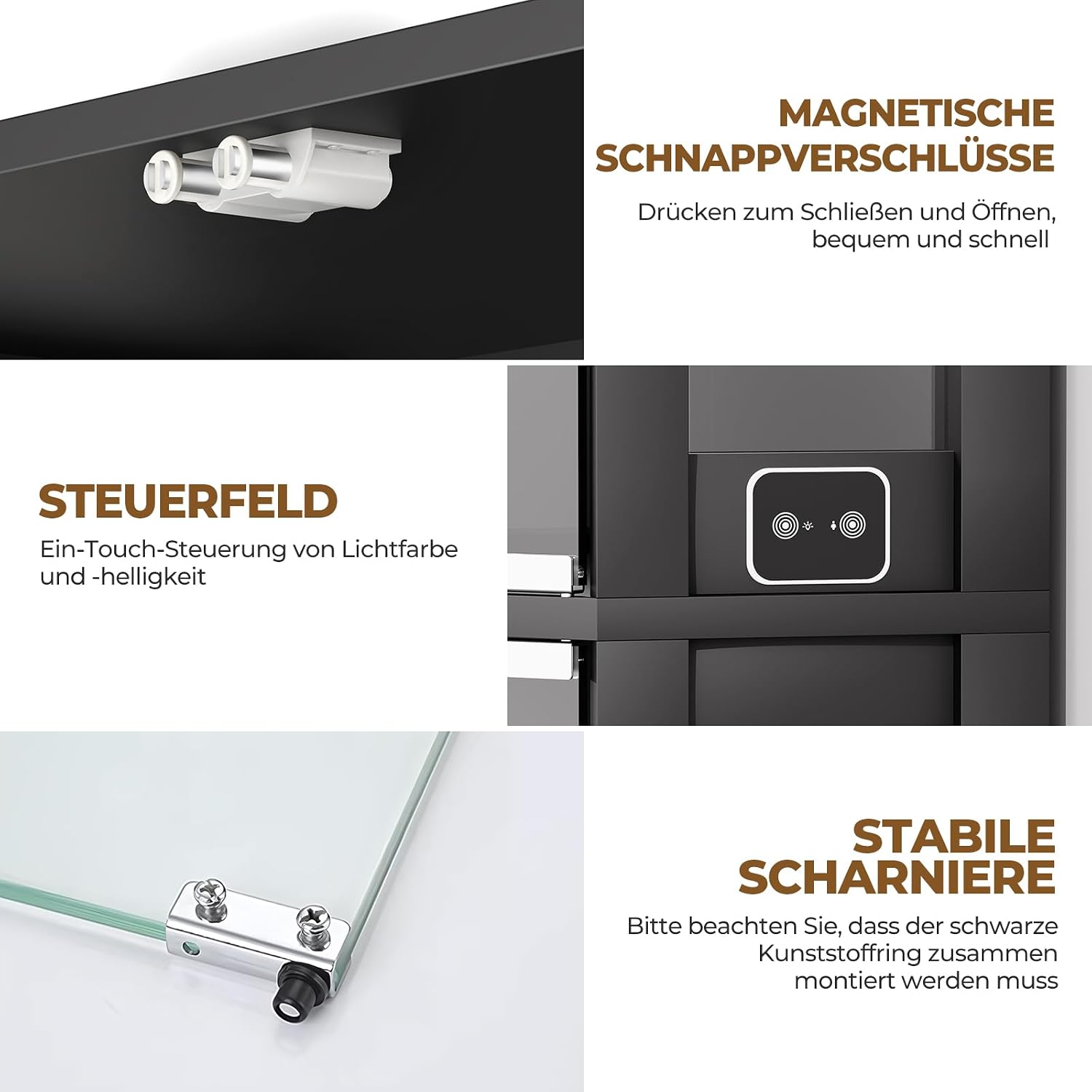
Image 4.2: Close-up view of key hardware components, including magnetic snap latches for secure door closure, the control panel for light adjustments, and stable hinges. Note the instruction to assemble the black plastic ring on the hinges.
5. Operating Instructions
5.1. Pop-up Glass Doors
The cabinet features a handle-free design. To open a glass door, gently press on the door panel. The magnetic latch will release, allowing the door to swing open. To close, push the door firmly until the magnetic latch engages.
5.2. LED Lighting System
The integrated LED lighting system offers three color options and adjustable brightness.
- Color Selection: Use the control panel located on the side of the cabinet to cycle through the three available light colors: White, Warm, and Blue.
- Brightness Adjustment: Press and hold the control button on the panel to adjust the brightness level from 0% to 100%. Release the button when the desired brightness is achieved.
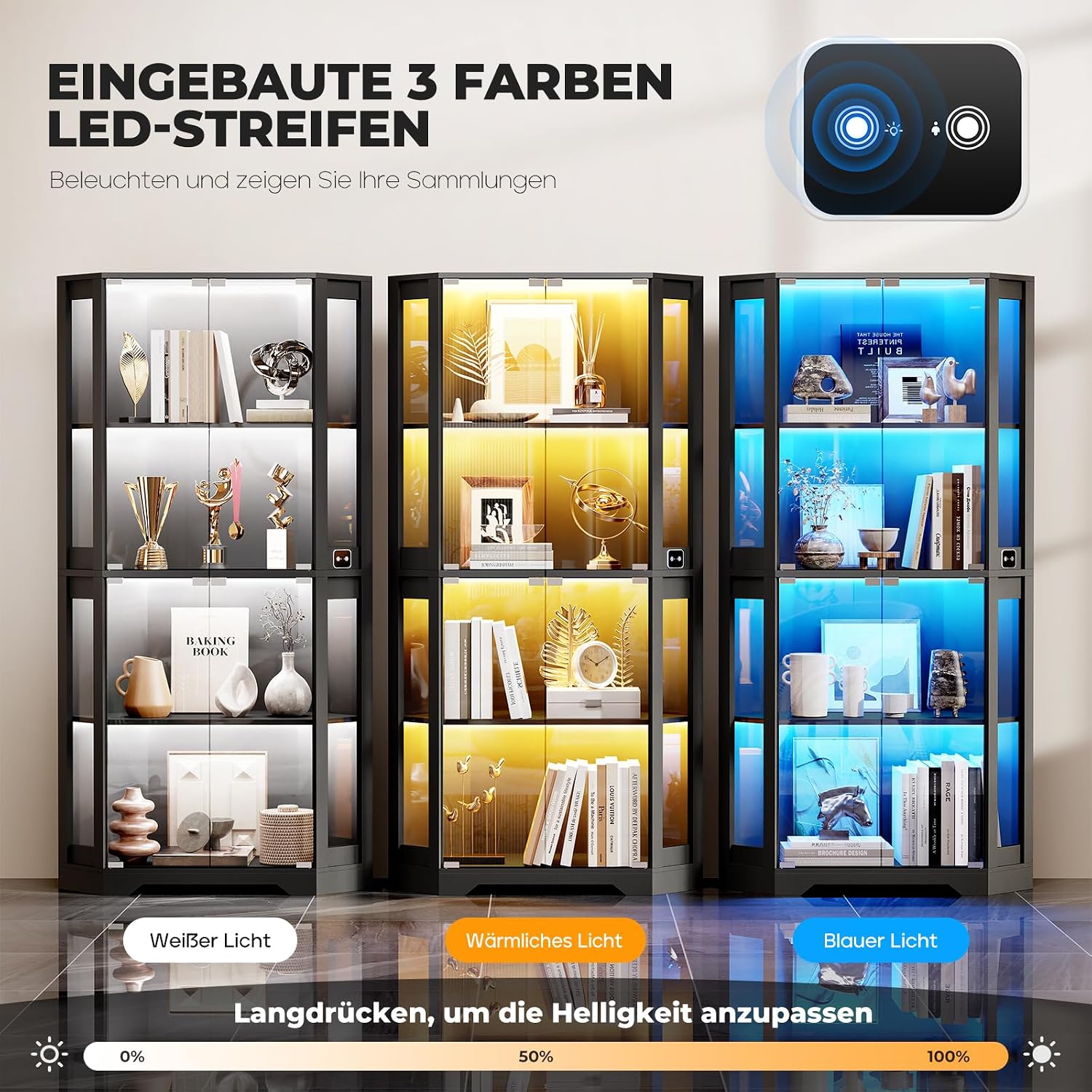
Image 5.1: The display cabinet illuminated with its three distinct LED light colors: white, warm, and blue. The image also illustrates the brightness adjustment range from 0% to 100% via a long press.
5.3. Intelligent Motion Sensor
The cabinet is equipped with an intelligent motion sensor that automatically controls the LED lighting.
- Automatic Activation: When a person approaches within the induction range (approximately 1 meter), the LED lights will automatically turn on.
- Automatic Deactivation: The lights will automatically turn off when no motion is detected within the induction range for a period of time, conserving energy.
- Sensor Location: The motion sensor is typically located on the side or front of the cabinet. Ensure it is not obstructed for optimal performance.

Image 5.2: A person walking past the BROTTAR display cabinet, demonstrating the intelligent motion sensor activating the LED lights. The induction range is approximately 1 meter.
6. Maintenance and Care
Proper care will ensure the longevity and appearance of your display cabinet.
- Cleaning Surfaces: Wipe engineered wood surfaces with a soft, damp cloth. Avoid abrasive cleaners or harsh chemicals that may damage the finish.
- Cleaning Glass: Use a glass cleaner and a lint-free cloth for glass doors and shelves. Spray cleaner onto the cloth, not directly onto the glass, to prevent liquid from seeping into crevices.
- Dusting: Regularly dust all surfaces with a dry, soft cloth.
- Avoid Direct Sunlight: Prolonged exposure to direct sunlight can cause fading or discoloration of the cabinet materials.
- Check Connections: Periodically check all screws and fasteners to ensure they remain tight. Retighten if necessary.
- Electrical Components: Ensure the LED lighting and sensor components are kept dry and free from dust. Do not attempt to clean them with liquids.
7. Troubleshooting
If you encounter issues with your BROTTAR Corner Display Cabinet, refer to the following common problems and solutions:
| Problem | Possible Cause | Solution |
|---|---|---|
| LED lights do not turn on. |
|
|
| Motion sensor not responding. |
|
|
| Doors do not close properly. |
|
|
| Cabinet feels unstable. |
|
|
8. Specifications
| Model Number | BD004 |
| Brand | BROTTAR |
| Dimensions (H x W x D) | 165 cm x 60 cm x 56.5 cm (approx. 64.96" x 23.62" x 22.24") |
| Color | Black |
| Material | Engineered Wood, Glass |
| Number of Shelves | 4 |
| Shelf Weight Capacity | 40 lbs (18 kg) per shelf |
| Lighting | 3-color LED (White, Warm, Blue) with adjustable brightness |
| Special Features | Intelligent Motion Sensor, Pop-up Glass Doors |
| Assembly Required | Yes |
9. Warranty and Support
For warranty information, technical support, or replacement parts, please refer to the contact information provided in your original purchase documentation or contact BROTTAR customer service directly. Keep your proof of purchase for warranty claims.