
1. Introduction
The WISSCOOL WS520 Digital HVAC Manifold Gauge is a professional-grade instrument designed for accurate measurement and diagnosis of HVAC and automotive AC systems. This 3-way digital manifold provides real-time vacuum and pressure readings, supports over 113 refrigerants, and includes features for leak detection, superheat/subcool calculations, and temperature measurement. This manual provides essential information for the safe and effective use of your device.
2. Package Contents
Verify that all items are present in the package:
- 1x WISSCOOL WS520 Digital Manifold Gauge
- 3x Heavy-duty AC Hoses (5 feet, Working pressure 600psi, Burst pressure 3000psi)
- 2x Temperature Clamp Probes
- 4x AA 1.5V Batteries
- 1x Carrying Box
- 1x User Manual
3. Setup
3.1. Battery Installation
- Locate the battery compartment on the back of the digital manifold gauge.
- Open the compartment cover.
- Insert four (4) AA 1.5V batteries, ensuring correct polarity (+/-).
- Close the battery compartment cover securely.
3.2. Connecting Hoses and Temperature Clamps
The gauge set includes three hoses and two temperature clamp probes for comprehensive system analysis.
- Hose Connection: Connect the three AC hoses to the appropriate ports on the manifold gauge (Low, High, and Service/Vacuum ports). Ensure connections are tight to prevent leaks.
- Temperature Clamp Connection: Plug the temperature clamp probes into the designated ports on the gauge. Attach the clamps to the refrigerant lines (suction and liquid lines) to measure line temperatures for superheat and subcool calculations.

Figure 1: Temperature Clamp Probes. These clamps measure line temperatures from -40°F to 302°F (-40°C to 150°C).
4. Operating Instructions
4.1. Power On/Off
Press the power button to turn the unit on. The large color LCD screen will illuminate, displaying current readings. The unit features an auto-shutoff function to conserve battery life. Press the power button again to turn off the unit.
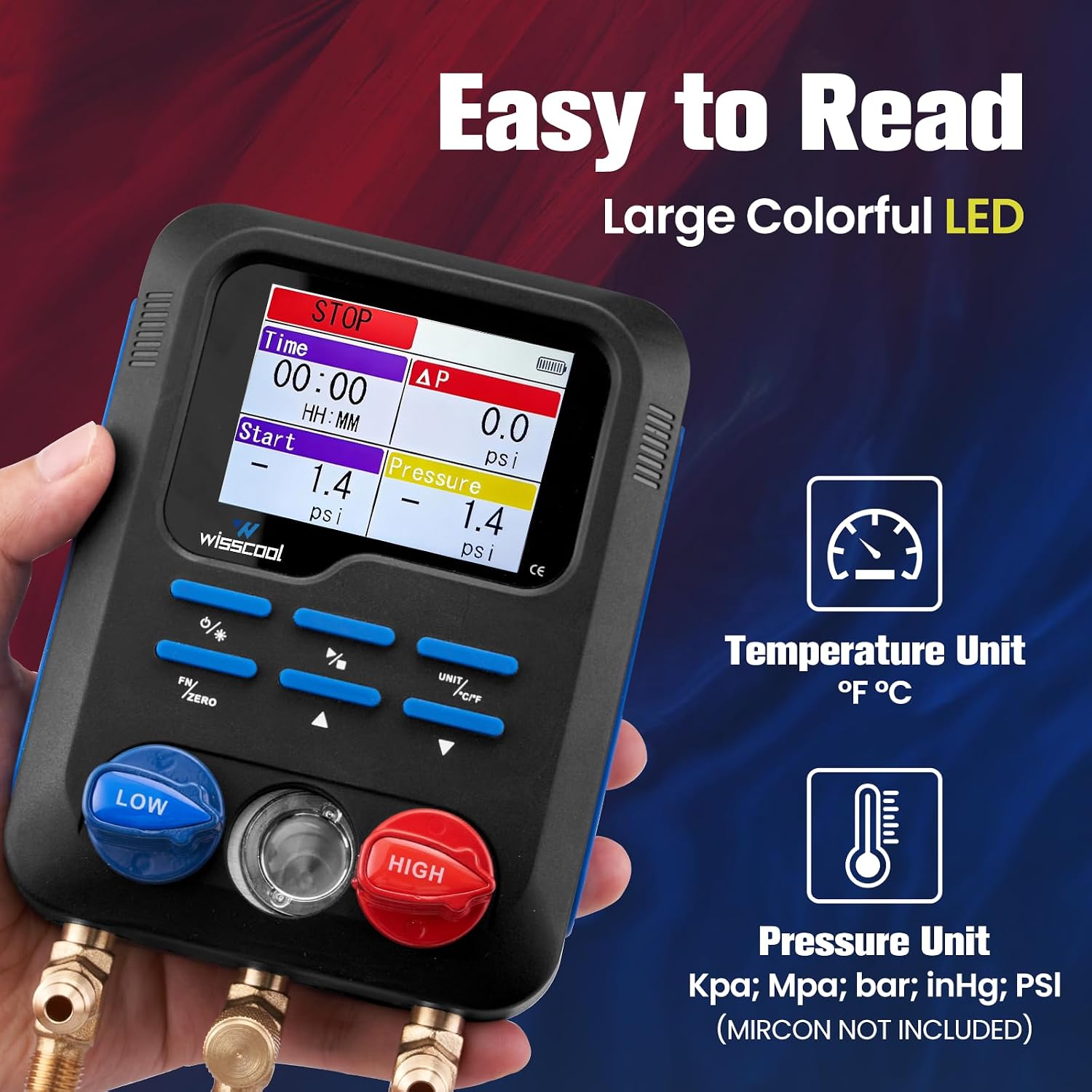
Figure 2: Easy-to-Read Large Colorful LCD. The display shows pressure and temperature data instantly, with selectable units.
4.2. Refrigerant Selection
The WS520 supports 113 types of refrigerants. To select the desired refrigerant:
- With the unit powered on, use the dedicated refrigerant selection button (often labeled "REF" or similar) to cycle through the available refrigerants.
- The selected refrigerant (e.g., R22, R134A, R410A, R1234yf) will be displayed on the screen.

Figure 3: Smart and Accurate with 113 Types of Refrigerants. The gauge provides high precision for temperature and pressure readings across a wide range of refrigerants.
4.3. Pressure and Temperature Readings
The LCD screen displays real-time high-side (HP) and low-side (LP) pressure readings, along with evaporation (EV) and condensation (CO) temperatures derived from the selected refrigerant and measured line temperatures. The unit can display pressure in Kpa, Mpa, bar, inHg, and PSI, and temperature in °F or °C.
- Pressure Units: Use the "UNIT" button to cycle through available pressure units.
- Temperature Units: Use the "°C/°F" button to switch between Celsius and Fahrenheit.
4.4. Superheat and Subcool Calculations
The WS520 automatically calculates superheat and subcool temperatures based on the selected refrigerant, measured pressures, and temperatures from the clamp probes. These values are critical for diagnosing system performance.
4.5. Vacuum Measurement
The gauge features a dedicated vacuum measurement function, allowing monitoring of vacuum pressure down to micron levels. This is essential for proper system evacuation.
4.6. Leak Detection Mode
The built-in refrigerant leak detection mode allows for efficient testing using pressure decay or vacuum hold functions. Monitor the pressure changes over time on the display to identify potential leaks.

Figure 4: Three Working Modes. The gauge supports various operational modes including evacuation, vacuum, and pressure differential for comprehensive diagnostics.
5. Maintenance
5.1. Cleaning
Wipe the unit with a soft, damp cloth. Do not use abrasive cleaners or solvents. Ensure the unit is dry before storage.
5.2. Storage
When not in use, store the digital manifold gauge and its accessories in the provided carrying box in a cool, dry place, away from direct sunlight and extreme temperatures. Remove batteries if storing for extended periods to prevent leakage.
5.3. Battery Replacement
Replace batteries when the low battery indicator appears on the display to ensure accurate readings and proper operation. Refer to section 3.1 for battery installation instructions.
6. Troubleshooting
- Unit does not power on: Check battery installation and ensure batteries are not depleted. Replace if necessary.
- Inaccurate readings: Ensure hoses are properly connected and not leaking. Verify the correct refrigerant is selected. Check that temperature clamps are securely attached to the lines.
- Screen glitches or erratic readings: This may indicate a malfunction. Try turning the unit off and on again. If the issue persists, contact customer support.
- Auto-shutoff too frequent: The unit has a battery saver timer. This is normal operation. Simply power the unit back on.
7. Specifications
| Feature | Specification |
|---|---|
| Model Number | WS520 |
| Refrigerant Compatibility | 113 types, including R12, R1234yf, R134A, R22, R23, R290, R32, R404A, R407C, R410A, R502, R508B, R513A, R600 |
| Pressure Range | 0 kPa - 6000 kPa |
| Pressure Accuracy | ±0.5% FS + 5 dgt |
| Temperature Measurement Range | -40°F to 302°F (-40°C to 150°C) |
| Temperature Precision | ±0.9°F (±0.5°C) |
| Display | Color LCD Screen |
| Power Source | 4x AA 1.5V Batteries (included) |
| Product Dimensions | 7.62 x 7.62 x 7.62 cm (3 x 3 x 3 inches) |
| Item Weight | 2.95 kg (6.5 lbs) |
| Material | Metal |
8. Warranty and Support
For warranty information or technical support, please refer to the documentation provided with your purchase or contact Wisscool customer service directly. Keep your purchase receipt for warranty claims.