
KINGSMITH ETD2
KINGSMITH Height Adjustable Mobile Standing Desk
Model: ETD2
1. Product Overview
The KINGSMITH Height Adjustable Mobile Standing Desk is designed to provide a versatile and ergonomic workspace for various environments, including home offices, bedrooms, and living rooms. Featuring a pneumatic lift system, 360° swivel casters, and a convenient storage drawer, this desk offers both functionality and mobility.
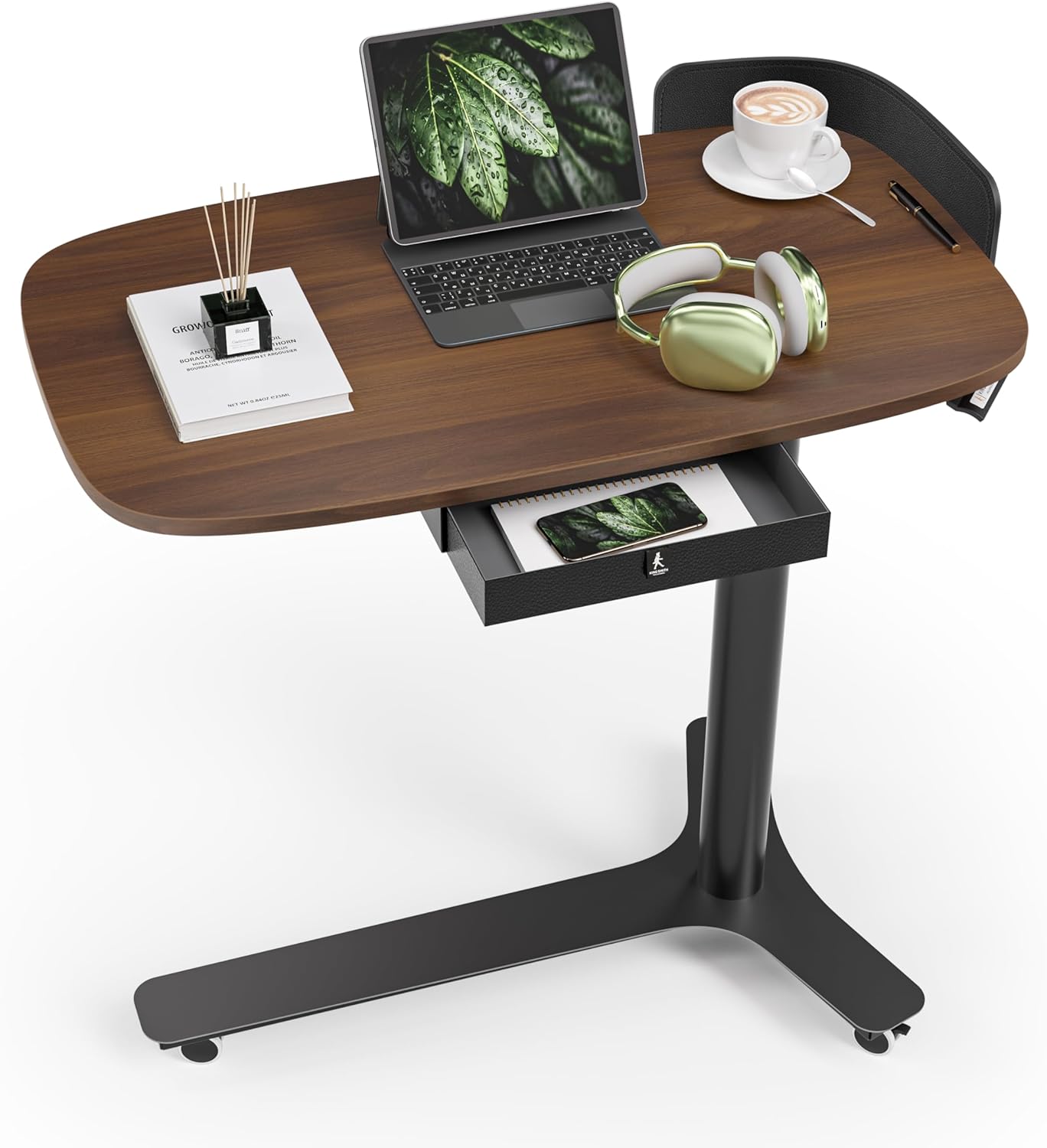
Figure 1.1: KINGSMITH Height Adjustable Mobile Standing Desk (Dark Walnut)
This image displays the overall design of the KINGSMITH mobile standing desk, highlighting its dark walnut tabletop, black base, and integrated storage drawer. A laptop, headphones, and a coffee cup are shown on the desk, illustrating its practical use.
Key Features:
- Elegant Design with Customizable Leather Bumper: Features a sophisticated curved tabletop with a detachable leather bumper that prevents items from falling. The bumper can be easily switched between the left and right sides to suit personal preference.
- Sturdy and Mobile Base with 360° Swivel Casters: Equipped with a robust triangular base made of round steel tubes and 360° swivel casters, making it easy to move and conveniently tuck under sofas or beds. Enhanced stability ensures a secure workspace.
- Convenient Storage Drawer for Organization: A built-in fabric drawer provides ample space to store pens, notebooks, and other small office essentials, keeping your workspace tidy and organized.
- Adjustable Height for Versatile Use: Offers a height adjustment range from 28" to 43", suitable for various activities such as working, reading, or as a bedside table. The pneumatic lift mechanism allows for smooth and effortless height changes.
- Durable and Functional: Built to support daily needs with a weight capacity of 26.5 lbs. Premium materials and thoughtful design make it a perfect addition to any home office, bedroom, or living room.
2. Safety Information
Please read and understand all safety instructions before assembling or operating the desk. Failure to follow these instructions may result in injury or damage to the product.
- Always keep the desk on a stable surface. Do not use the desk on uneven or unstable surfaces.
- When adjusting the height, ensure the desk is stable and secure.
- Keep fingers and other body parts away from moving parts during height adjustment.
- Do not overload the desk; the maximum dynamic weight capacity is 26.5 lbs. The maximum static capacity is 110 lbs.
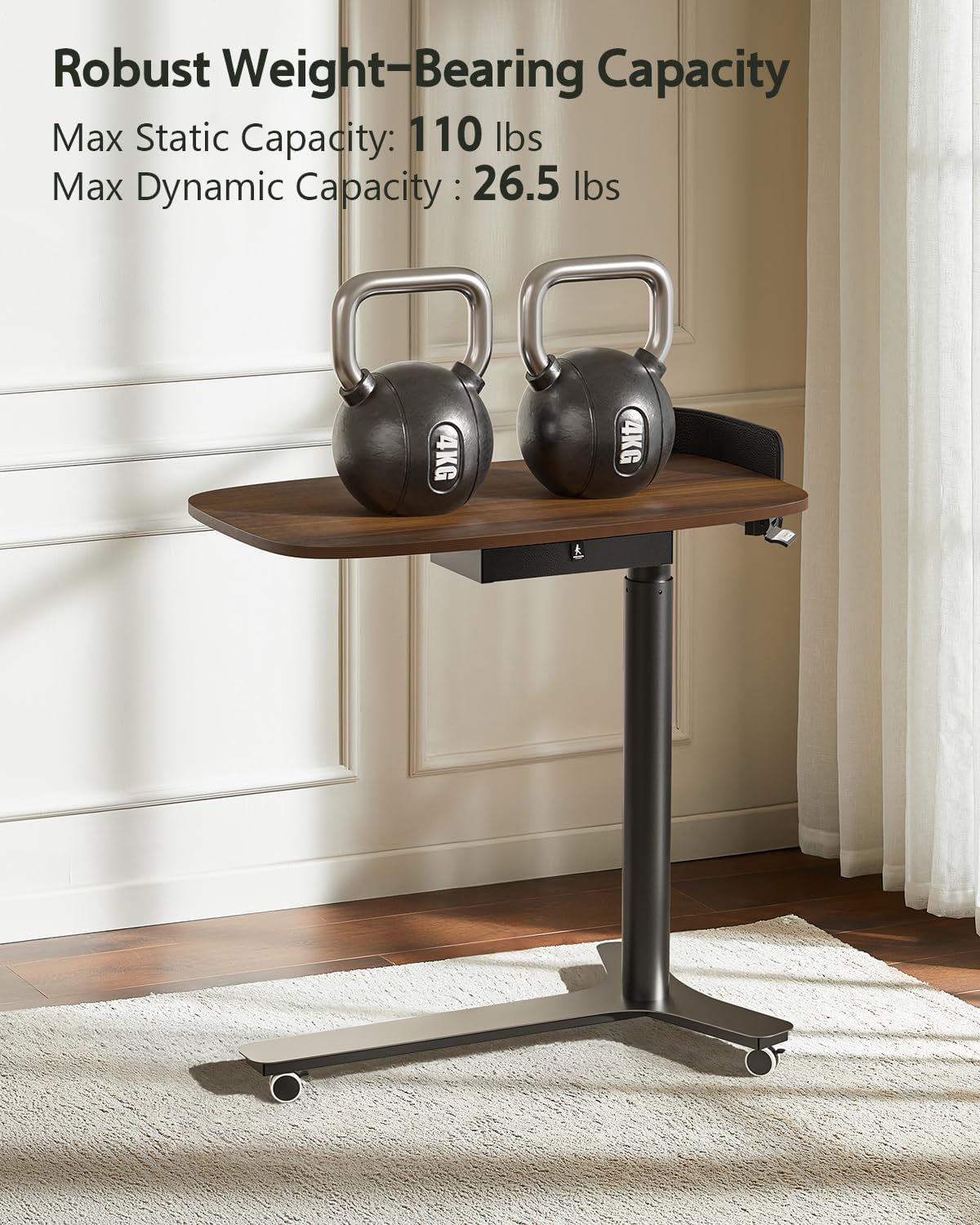
Figure 2.1: Robust Weight-Bearing Capacity
This image illustrates the desk's robust weight capacity, showing two kettlebells placed on the tabletop. The text indicates a maximum static capacity of 110 lbs and a maximum dynamic capacity of 26.5 lbs.
3. Setup and Assembly
The KINGSMITH Mobile Standing Desk requires assembly. Please follow these steps carefully. All necessary tools are included.
Assembly Steps:
- Unpack Components: Carefully remove all parts from the packaging and lay them out on a clean, flat surface. Verify all components are present according to the parts list (not provided in this manual, refer to packaging).
- Attach Tabletop to Column: Secure the main support column to the underside of the tabletop using the provided screws. Ensure the holes align correctly.
- Assemble Base: Attach the triangular base components to the bottom of the support column. Ensure all screws are tightened securely for stability.
- Install Casters: Screw the 360° swivel casters into the designated points on the base. Ensure they are firmly attached and can rotate freely.
- Attach Leather Bumper: Position the detachable leather bumper along the curved edge of the tabletop and secure it using the provided fasteners. The bumper can be installed on either the left or right side.
- Insert Storage Drawer: Slide the fabric storage drawer into its designated slot beneath the tabletop.

Figure 3.1: Key Components for Assembly
This image highlights the desk's robust construction, showing the strong gas spring lifting mechanism, high-quality steel frame, and lockable casters, which are crucial for assembly and stability.
4. Operating Instructions
Adjusting Desk Height:
The desk features a pneumatic lift system for smooth height adjustment. To adjust the height:
- Locate the height adjustment lever, typically found on the side or underside of the tabletop.
- To raise the desk, gently lift the lever while applying slight upward pressure to the tabletop. The pneumatic cylinder will assist in lifting the desk.
- To lower the desk, gently lift the lever while applying downward pressure to the tabletop. The desk will smoothly descend.
- Release the lever once the desired height is reached to lock the desk in position.

Figure 4.1: Height Adjustment Range
This image demonstrates the adjustable height feature of the desk, showing its minimum height of 28 inches and maximum height of 43 inches, accommodating both sitting and standing positions.
Moving the Desk:
The desk is equipped with 360° swivel casters for easy mobility.
- To move the desk, ensure the casters are unlocked (if applicable).
- Gently push the desk to its desired location.
- Once in position, engage the locks on the casters to prevent unintended movement.

Figure 4.2: Desk as a Handy Side Table
This image shows the desk being used as a convenient side table, effortlessly fitting into compact areas next to a sofa, demonstrating its mobility and versatility.
5. Maintenance
Regular maintenance will help prolong the life of your KINGSMITH Mobile Standing Desk.
- Cleaning: Wipe the tabletop and metal parts with a soft, damp cloth. Avoid harsh chemicals or abrasive cleaners that could damage the finish.
- Caster Care: Periodically check the casters for any debris (hair, dust, etc.) that might impede their movement. Clean as necessary.
- Fastener Check: Every few months, check all screws and fasteners to ensure they are tight. Re-tighten if loose to maintain stability.
- Pneumatic System: The pneumatic lift system is designed to be maintenance-free. Do not attempt to disassemble or lubricate it.
6. Troubleshooting
If you encounter any issues with your desk, please refer to the following common troubleshooting tips:
- Desk is wobbly: Ensure all assembly screws are securely tightened. Check that the desk is on a flat, even surface. Adjust the leveling feet (if present) on the base.
- Height adjustment is stiff or not working: Ensure no objects are obstructing the lifting mechanism. Verify that the height adjustment lever is fully engaged or disengaged as required. Do not exceed the maximum weight capacity.
- Casters not rolling smoothly: Check for debris (hair, lint) wrapped around the caster wheels. Clean the wheels thoroughly. Ensure the caster locks are disengaged.
- Drawer not sliding properly: Check for any obstructions in the drawer slot. Ensure the drawer is inserted correctly and not overloaded.
If problems persist, please contact KINGSMITH customer support for assistance.
7. Specifications

Figure 7.1: Desktop Dimensions
This image provides a top-down view of the desk, clearly showing its dimensions: 29.9 inches in width and 17.7 inches in depth, offering ample workspace.
| Attribute | Detail |
|---|---|
| Brand | KINGSMITH |
| Model Number | ETD2 |
| Product Dimensions | 18"D x 30"W x 28"H (Minimum Height) |
| Color | Dark Walnut |
| Style | Minimalist |
| Base Material | Stainless Steel |
| Finish Type | Polished |
| Special Features | Adjustable Height, Ergonomic, Lightweight, Portable, Wheel |
| Mounting Type | Freestanding |
| Item Weight | 28.6 Pounds |
| Furniture Finish | Walnut |
| Included Components | Fabric Drawer |
| Top Material Type | Engineered Wood |
| Storage Options | 1 built-in fabric drawer |
| Shape | Oval |
| Desk Design | Computer Desk, Standing Desk |
| Number of Drawers | 1 |
| Size | 30" W x 18" L x 28" H |
| Maximum Height | 43 Inches |
| Minimum Height | 28 Inches |
| Working Surface Diagonal Length | 39 Inches |
| Required Assembly | Yes |
| Warranty Type | Limited |
8. Warranty and Support
The KINGSMITH Height Adjustable Mobile Standing Desk comes with a Limited Warranty. For specific terms and conditions of the warranty, please refer to the documentation included with your product or visit the official KINGSMITH website.
For customer support, technical assistance, or to inquire about replacement parts, please visit the KINGSMITH Store on Amazon or contact their customer service directly through their official channels.
Related documentsETD2

Ask a question about this manual
Ask about setup, troubleshooting, compatibility, parts, safety, or missing instructions. Manuals+ will review the question and use this page’s manual context to help answer it.