
Introduction
Welcome to the user manual for your Sena Phantom Smart Motorcycle Helmet. This document provides essential information for the proper setup, operation, and maintenance of your helmet. The Sena Phantom is designed to enhance your riding experience with integrated communication systems, advanced LED lighting, and premium audio by Harman Kardon. Please read this manual thoroughly before using your helmet to ensure optimal performance and safety.

Image: Sena Phantom Smart Motorcycle Helmet in gloss black, front-side view.
Safety Information
Your safety is paramount. The Sena Phantom helmet meets and exceeds DOT and FMVSS 218 safety certifications, ensuring a high standard of protection. Always ensure your helmet is properly fitted and secured before riding. Never modify the helmet's structure or integrated components, as this may compromise its protective capabilities and void the warranty.
Proposition 65 Warning: This product may contain chemicals known to the State of California to cause cancer and birth defects or other reproductive harm.
Package Contents
Upon opening your Sena Phantom helmet package, verify that all components are present:
- Sena Phantom Full Face Smart Motorcycle Helmet
- Quick Start Guide
- Two (2) extra microphone sponges
- USB-C charging cable
- Helmet storage bag
Video: This video demonstrates the unboxing of the Sena Phantom helmet and details all included items in the package.
Getting Started & Setup
Helmet Fit Guide
A correct helmet fit is crucial for both comfort and safety. Sena helmets are designed to fit an intermediate oval head shape, which is longer front-to-back and narrower side-to-side, common in the US market.
- Measure Your Head: Use a soft measuring tape. Wrap it around the widest part of your head, approximately one inch above your eyebrows and around the back, just above your ears. Keep the tape snug but not tight. For accuracy, it is recommended to have a friend assist with this measurement.
- Consult the Size Chart: Refer to the size chart below to find the corresponding helmet size for your head measurement.
- Try On the Helmet: Once you receive your helmet, wear it for 30 minutes to an hour before riding. Ensure it fits snugly around the crown of your head without any uncomfortable pressure points. For full-face helmets, the cheek pads should fit tightly, causing a slight 'chipmunk cheek' effect. If it remains comfortable after this period, you have found the perfect fit.
Video: This video provides a detailed guide on how to properly measure your head and ensure a correct fit for your Sena motorcycle helmet.
Size Guide
| Size | Head (cm) | Head (Inches) | Hat Size |
|---|---|---|---|
| S | 55 - 56 | 21 1/2 - 21 7/8 | 6 7/8 - 7 |
| M | 57 - 58 | 22 1/4 - 22 5/8 | 7 1/8 - 7 1/4 |
| L | 58 - 59 | 22 5/8 - 23 | 7 3/8 - 7 1/2 |
| XL | 60 - 61 | 23 1/2 - 23 7/8 | 7 5/8 - 7 3/4 |
| XXL | 62 - 63 | 24 1/4 - 24 5/8 | 7 7/8 - 8 |
Phone Pairing
To connect your Sena Phantom helmet to your smartphone via Bluetooth:
- Initial Pairing: When first turned on out of the box, the helmet will automatically enter phone pairing mode. You will hear an audio prompt, and the status LED will flash red and blue.
- Manual Pairing: If the helmet does not enter pairing mode automatically, or if you need to pair with a new device, hold down the center button on the helmet for 5 seconds until you hear "Phone Pairing" and the status LED flashes red and blue.
- Connect via Device: On your smartphone, navigate to Bluetooth settings and select "Phantom" from the list of available devices. Once successfully paired, the status LED will flash blue.
Video: This video demonstrates the process of pairing your Sena Phantom helmet with a smartphone for Bluetooth connectivity.
Key Features
- Integrated Communications: Seamlessly integrated speakers and microphone for Bluetooth smartphone connectivity (phone calls, navigation, music) and rider-to-rider communication via WAVE or Mesh Intercom.
- LED Lighting: Features an integrated front LED flashlight and rear taillights with brake-sensing technology for enhanced visibility and safety.
- Premium Audio: Equipped with 2nd Generation Sound by Harman Kardon for a superior audio experience.
- Durable Construction: Built with a composite fiberglass shell and EPS padding, meeting rigorous safety standards.
- Retractable Visor: Integrated retractable tinted interior visor for convenience and eye protection.

Image: An X-ray style view of the helmet highlighting the seamlessly integrated speakers and microphone.

Image: Close-up views of the helmet's integrated front LED flashlight and rear brake-sensing taillight.

Image: Top-down view of the Sena Phantom helmet, emphasizing its premium materials and construction.

Image: Overview of Sena Phantom and Phantom ANC helmet features, including Mesh Intercom 3.0, Bluetooth 5.3, integrated LED flashlight, brake-sensing taillight, and active noise cancellation.
Operation
Communication
The Sena Phantom helmet allows you to stay connected while riding:
- Bluetooth Connectivity: Pair your smartphone to the helmet for hands-free phone calls, turn-by-turn navigation, and streaming music.
- Rider-to-Rider Intercom: Utilize WAVE or Mesh Intercom for communication with other riders. Refer to the full user guide for detailed instructions on setting up and using intercom features.
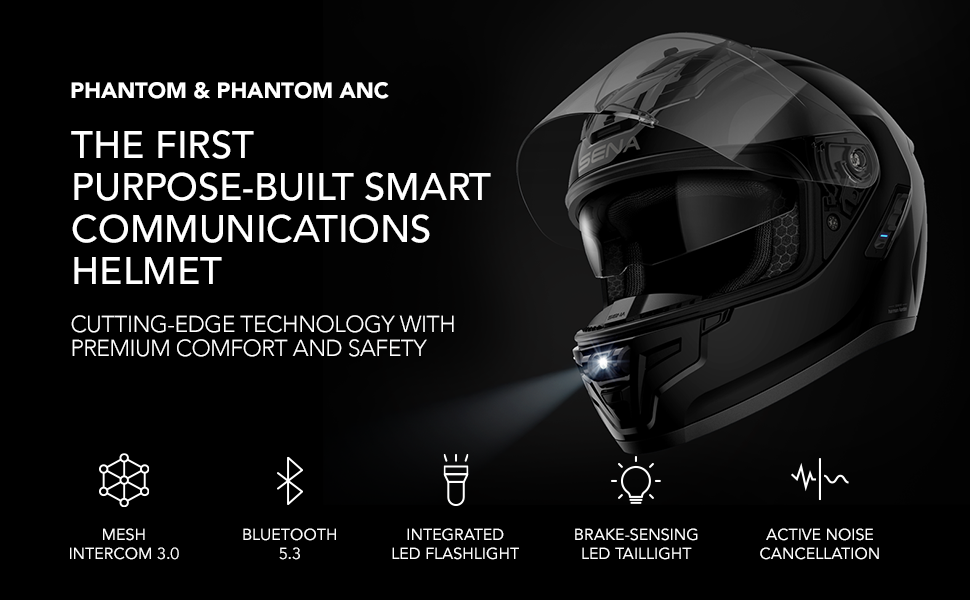
Image: Two motorcyclists riding, demonstrating the 'Ride Connected' feature and enhanced visibility provided by the helmet's lighting.
Sena Motorcycles App
Manage your helmet's settings and features conveniently through the Sena Motorcycles App. The app allows for easy configuration of intercom settings, LED light controls, audio preferences, and more.

Image: A smartphone displaying the Sena Motorcycles App, illustrating how to manage helmet settings from your phone.
Maintenance
Proper maintenance ensures the longevity and performance of your Sena Phantom helmet:
- Cleaning the Exterior: Use a soft, damp cloth and mild soap to clean the helmet's exterior. Avoid abrasive cleaners or solvents.
- Visor Care: Clean the visor with a soft cloth and water. Do not use harsh chemicals that could damage the visor coating.
- Interior Padding: The interior padding is removable and washable. Follow the care instructions on the padding labels.
- Battery Care: Charge the helmet regularly, even when not in use, to maintain battery health. Store in a cool, dry place.
Troubleshooting
If you encounter issues with your Sena Phantom helmet, try the following common troubleshooting steps:
- Pairing Issues: Ensure your helmet is in phone pairing mode (flashing red and blue LED) and your device's Bluetooth is enabled. Try restarting both devices.
- Audio Problems: Check volume levels on both the helmet and your connected device. Ensure speakers are properly positioned.
- Light Malfunction: Verify the helmet is charged. Consult the full user manual for specific light control instructions.
- Reset: If problems persist, perform a factory reset as described in the comprehensive user manual.
For further assistance, please visit the official Sena support website.
Specifications
| Specification | Detail |
|---|---|
| Sport | Motorcycling |
| Certificate Type | DOT, FMVSS 218 |
| Finish Type | Glossy |
| Model Name | Phantom |
| UPC | 885465022145 |
| Item Package Dimensions L x W x H | 16 x 12 x 11.5 inches |
| Package Weight | 2.54 Kilograms |
| Material | Fiberglass |
| Item Weight | 3.7 Pounds |
| Size | Medium |
| Color | Gloss Black |
| Vehicle Service Type | Motorcycle |
Warranty & Support
The Sena Phantom Smart Motorcycle Helmet comes with a manufacturer's warranty. For detailed information regarding warranty coverage, claims, and product support, please visit the official Sena website or contact their customer service.
Visit the Sena Store for more products and support resources.