
1. Introduction
Thank you for choosing the K&F Concept PL-60B 60W Bi-Color COB Video Light. This compact and portable lighting solution is designed for photography and videography, offering adjustable color temperature, brightness, and various lighting effects. This manual provides essential information for the safe and effective use of your device.
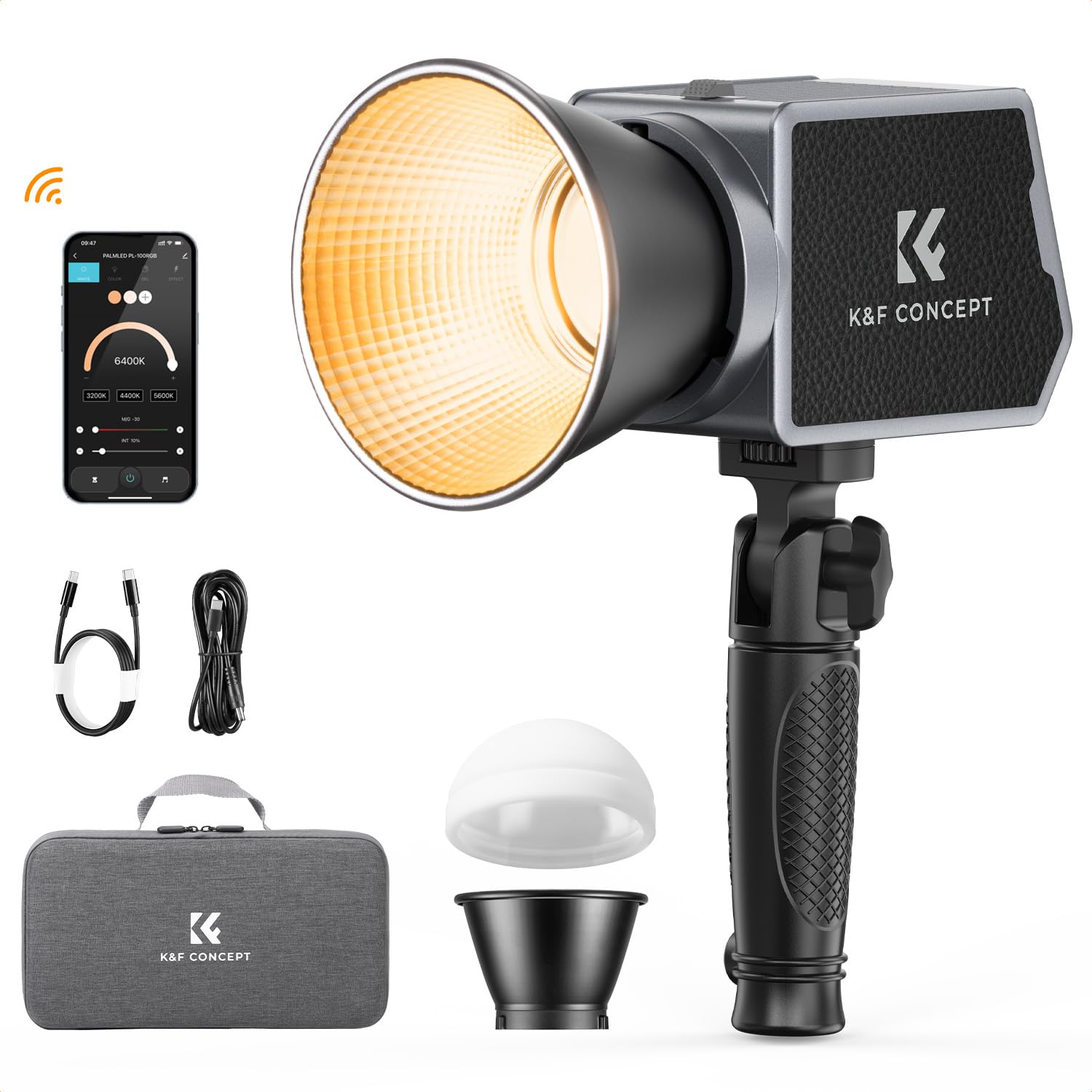
Image 1.1: The K&F Concept PL-60B 60W COB Video Light with its reflector attached.
2. Setup
2.1 Unpacking
Carefully remove all components from the packaging. Please verify that all items listed below are present:
- 60W COB Lamp Body
- Reflector
- Silicone Soft Light Cover
- USB-C Charging Cable (1m)
- DC to USB-C Cable (3m)
- Handle
- Carrying Bag
- Instruction Manual

Image 2.1: All items included in the K&F Concept PL-60B package.
2.2 Physical Assembly
- Attach the Handle: Secure the handle to the bottom of the light body.
- Attach the Reflector/Soft Light Cover: Align the reflector or silicone soft light cover with the front of the COB light and twist to lock it into place.
- Mounting: The light features a mini Bowens bayonet (6.5cm diameter) and is compatible with 1/4" screw light stands. Attach the light to a compatible stand or tripod for stable positioning.
2.3 Initial Charging
The PL-60B has a built-in 4500mAh battery. Before first use, fully charge the device.
- USB-C PD Fast Charging: Connect the provided USB-C charging cable to the Type-C port on the light and to a PD3.0 fast charger (60W or above, not included) or a compatible mobile power supply.
- DC Power Adapter: Alternatively, use a DC power adapter (12V 5A, 60W, not included) with the DC5525 port for direct power and charging.
The light can be used while charging. A full charge provides approximately 75 minutes of use in regular mode and 45 minutes in MAX mode.

Image 2.2: Charging options for the PL-60B, including USB-C and DC input.
2.4 App Installation
For remote control, download the Linklite mobile application from your device's app store. Ensure Bluetooth is enabled on your mobile device to connect to the light.
3. Operating Instructions
3.1 Power On/Off
To power on the device, press and hold the power button for a few seconds. Then, turn the rotary dial approximately 10 times to activate the light. To power off, press and hold the power button again.
3.2 Control Methods
The PL-60B offers two primary control methods:
- Panel Controls: Use the physical buttons and rotary dials on the light's control panel to adjust settings directly.
- App Control: Connect via Bluetooth to the Linklite app on your smartphone for remote adjustments of light switch, color temperature, brightness, and light effects. The app also supports controlling multiple lights simultaneously.

Image 3.1: Control options: mobile app and physical panel.
3.3 Color Temperature Adjustment
The light supports a bi-color temperature range from 2700K (warm light) to 6500K (cool light). Adjust the color temperature using the dedicated dial on the control panel or within the Linklite app to match your shooting environment or desired mood.
3.4 Brightness Adjustment
The brightness can be adjusted from 0% to 100%. Use the brightness dial or app slider to achieve the desired illumination level.
3.5 Special Lighting Effects
The PL-60B includes 12 built-in lighting effects to enhance creative photography and videography:
- Pulse
- Lightning
- TV
- Fault Light
- Paparazzi
- SOS
- Fade to Light
- Fade to Dark
- Campfire
- Explosion
- Candlelight
- Breathing Light
Select and activate these effects via the control panel or the Linklite app.

Image 3.2: The 12 distinct lighting effects for creative applications.
3.6 Cooling Fan Operation
The PL-60B is equipped with an intelligent temperature-controlled cooling fan for efficient heat dissipation and low noise operation. When the brightness is set below 20%, the fan may automatically turn off to ensure silent operation.

Image 3.3: The intelligent cooling system for quiet operation.
3.7 Product Video Overview
Video 3.1: An official product video demonstrating the K&F Concept PL-60B COB photo light features and functionality.
4. Maintenance
4.1 Cleaning
To maintain optimal performance, regularly clean the light body and reflector. Use a soft, dry cloth to wipe away dust and debris. Avoid using harsh chemicals or abrasive materials that could damage the surface or optical components.
4.2 Storage
When not in use, store the PL-60B in its provided carrying bag to protect it from dust, moisture, and physical damage. Store in a cool, dry place away from direct sunlight.
4.3 Battery Care
To prolong battery life, avoid fully discharging the battery frequently. Recharge the battery when the power level is low. If storing the light for an extended period, ensure the battery is charged to approximately 50-70% to prevent deep discharge.
5. Troubleshooting
| Problem | Possible Cause | Solution |
|---|---|---|
| Light does not turn on | Battery is depleted; Incorrect power-on sequence. | Charge the battery using a compatible PD charger or DC adapter. Ensure the power button is held, then the rotary dial is turned 10 times. |
| Battery not charging via USB-C | Non-PD (Power Delivery) USB-C charger used; Charger output too low. | Use a USB-C charger that supports PD3.0 fast charging (60W or above). Alternatively, use a DC power adapter. |
| App control not working | Bluetooth not enabled; App not connected; Out of range. | Ensure Bluetooth is active on your mobile device. Open the Linklite app and connect to the light. Move closer to the light. |
| Fan is noisy | High brightness setting. | The fan operates to dissipate heat. If noise is a concern, reduce the brightness below 20%, and the fan may turn off. |
6. Specifications
| Feature | Detail |
|---|---|
| Model | PL-60B |
| Power Output | 60W |
| Color Temperature | 2700K-6500K (Bi-Color) |
| CRI | 97+ |
| TLCI | 98+ |
| Max Illumination (Bare Light) | 2280lux/1m (5600K) |
| Max Illumination (with Reflector) | 15900lux/1m (5600K) |
| Battery Capacity | Built-in 4500mAh |
| Charging Ports | Type-C (PD3.0 Fast Charging), DC5525 |
| Battery Life (Regular Mode) | Approx. 75 minutes |
| Battery Life (MAX Mode) | Approx. 45 minutes |
| Control Methods | On-board panel, Bluetooth App (Linklite) |
| Lighting Effects | 12 modes (Pulse, Lightning, TV, Fault Light, Paparazzi, SOS, Fade to Light, Fade to Dark, Campfire, Explosion, Candlelight, Breathing Light) |
| Cooling | Intelligent temperature-controlled fan |
| Product Dimensions | 12 x 8.3 x 7.2 cm (4.72 x 3.27 x 2.83 inches) |
| Item Weight | 595g (1.31 lbs) |
7. Warranty & Support
7.1 Warranty Information
Specific warranty details for the K&F Concept PL-60B are typically provided at the point of purchase or on the official K&F Concept website. Please refer to your purchase documentation for precise warranty terms and conditions.
7.2 Customer Support
For technical assistance, troubleshooting beyond this manual, or warranty claims, please contact K&F Concept customer support through their official website or the contact information provided with your product packaging. When contacting support, please have your product model (PL-60B) and purchase details readily available.