
Introduction
This manual provides essential information for the safe and efficient use of your Cerwin Vega VEGAMINI Compact Powerhouse Bluetooth Speaker. Please read these instructions carefully before operating the device and retain them for future reference.
Included Components:
- Bluetooth Speaker
- Charging Cable
- User Manual
Product Overview
Familiarize yourself with the various parts and controls of your VEGAMINI speaker.
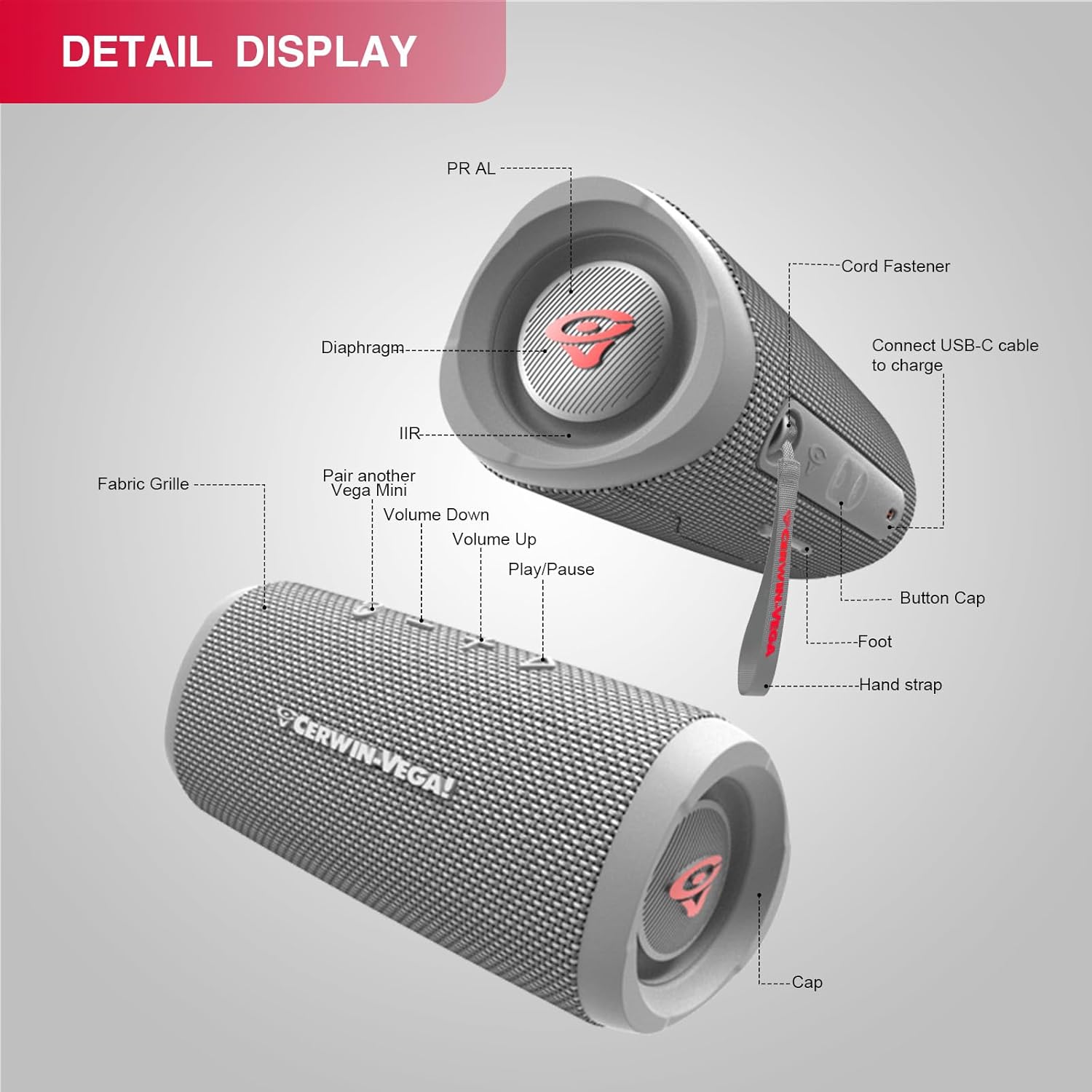
Image: Detailed view of the VEGAMINI speaker components.
Component Identification:
- Fabric Grille: Protects the speaker drivers.
- Volume Down Button: Decreases audio volume.
- Volume Up Button: Increases audio volume.
- Play/Pause Button: Controls audio playback.
- Pair another Vega Mini Button: Initiates True Wireless Stereo (TWS) pairing.
- USB-C Port: For charging the speaker.
- Hand Strap: For portability and secure carrying.
- Passive Radiators (PR AL / IIR): Located at each end, enhance bass response.
- Button Cap: Protects the control buttons.
- Foot: Provides stability when placed on a surface.
- Cap: End cap of the speaker.
Setup
1. Charging the Speaker
Before first use, fully charge the speaker. Connect the provided USB-C charging cable to the speaker's USB-C port and the other end to a compatible USB power adapter (not included). The charging indicator will show the charging status. A full charge takes approximately 2.5 hours (with a 5V/3A adapter).

Image: The VEGAMINI speaker offers up to 12 hours of continuous music playback on a full charge.
2. Powering On/Off
- To Power On: Press and hold the Power button until you hear an audible cue and the indicator light illuminates.
- To Power Off: Press and hold the Power button again until the indicator light turns off.
3. Bluetooth Pairing
To connect your speaker to a Bluetooth-enabled device:
- Ensure the speaker is powered on and in pairing mode (the Bluetooth indicator light will flash).
- On your device (smartphone, tablet, etc.), navigate to the Bluetooth settings.
- Select "VEGAMINI" from the list of available devices.
- Once connected, the Bluetooth indicator light will become solid, and you will hear a confirmation tone.
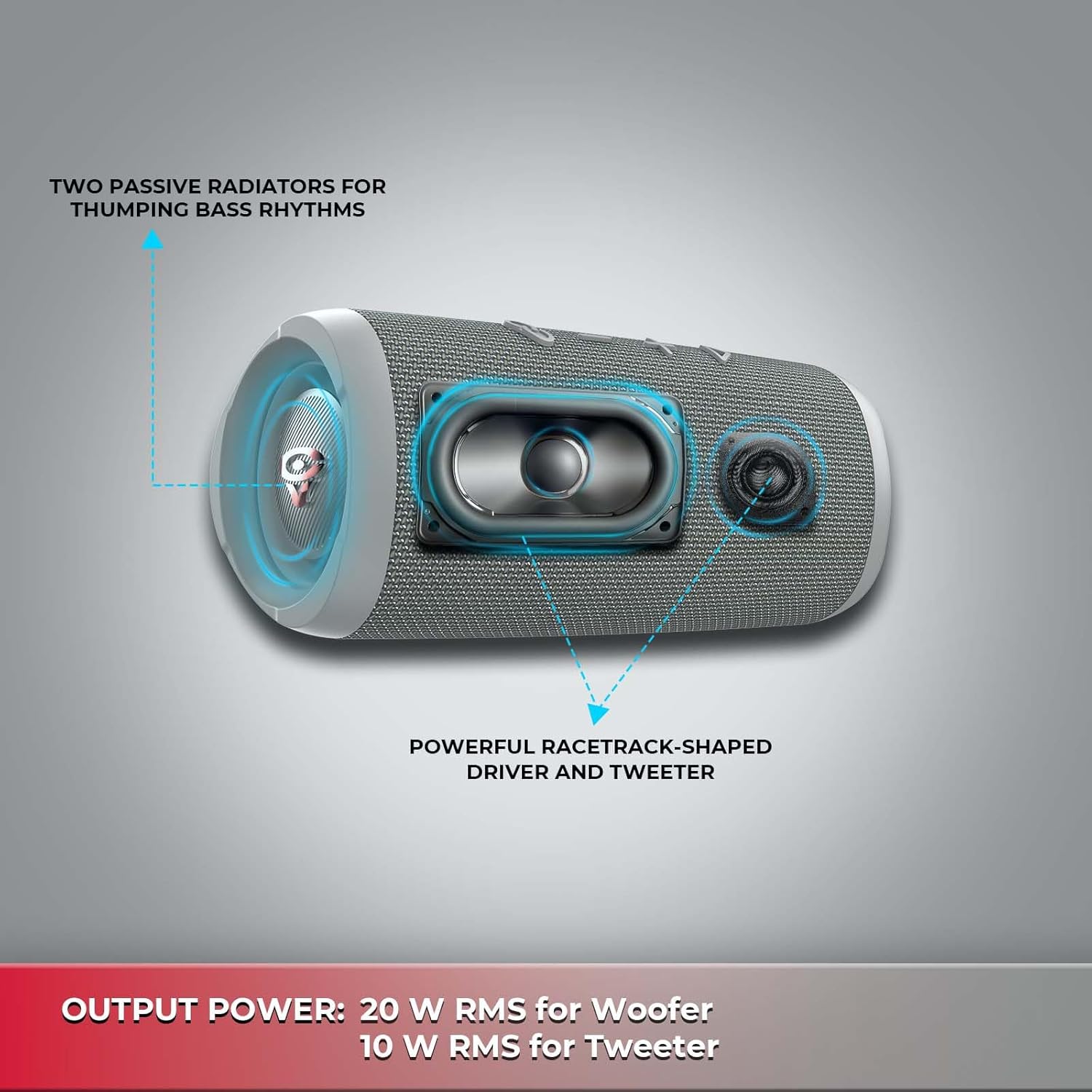
Image: The VEGAMINI speaker can connect to various Bluetooth-enabled devices.
4. True Wireless Stereo (TWS) Pairing
For an immersive stereo experience, you can pair two VEGAMINI speakers together:
- Ensure both VEGAMINI speakers are powered on and not connected to any other Bluetooth device.
- On one speaker, press the TWS pairing button (often indicated by a chain link icon). The speaker will enter TWS pairing mode.
- The two speakers will automatically connect to each other. Once connected, one speaker will act as the primary (left channel) and the other as the secondary (right channel).
- Connect your Bluetooth device to the primary speaker as described in the Bluetooth Pairing section.
Operation
Controls:
- Power Button: Press and hold to power on/off.
- Play/Pause Button: Press once to play or pause audio.
- Volume Up (+): Press to increase volume. Press and hold for continuous volume increase.
- Volume Down (-): Press to decrease volume. Press and hold for continuous volume decrease.
- TWS Button: Press to initiate True Wireless Stereo pairing.
Water Resistance (IPX4)
The VEGAMINI speaker features an IPX4 water-resistant rating, meaning it is protected against splashing water from any direction. This makes it suitable for outdoor use and environments where it might be exposed to light splashes. Do not submerge the speaker in water.

Image: The VEGAMINI speaker is designed with IPX4 water resistance for outdoor use.
Sound Performance
The speaker is equipped with a 20W RMS woofer and a 10W RMS tweeter, complemented by two passive radiators, to deliver clear highs and deep bass.
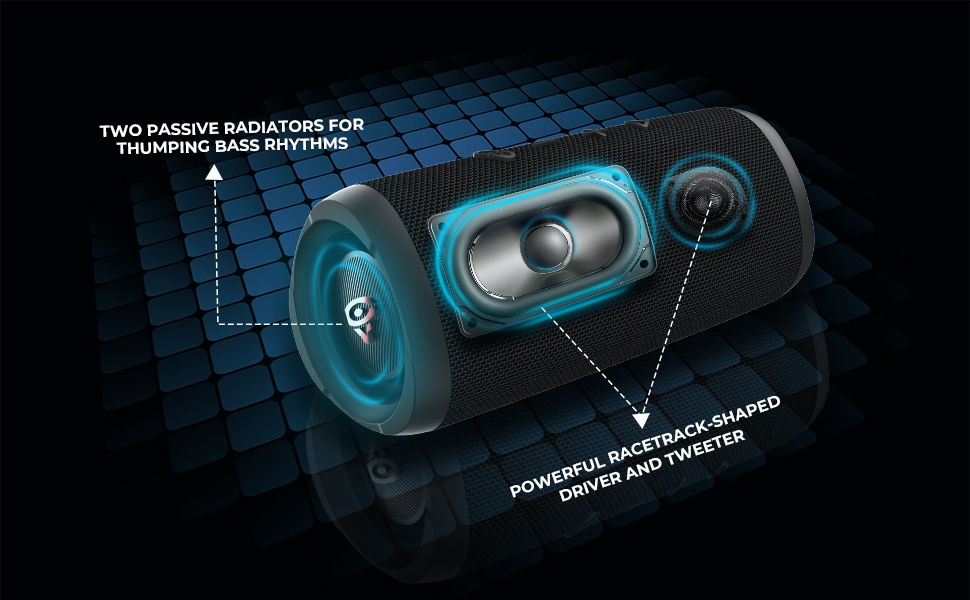
Image: Internal view showing the speaker's woofer, tweeter, and passive radiators.
Maintenance
Proper maintenance ensures the longevity of your speaker.
- Cleaning: Use a soft, dry cloth to wipe the speaker's exterior. Do not use abrasive cleaners or solvents.
- Storage: Store the speaker in a cool, dry place away from direct sunlight and extreme temperatures when not in use for extended periods.
- Battery Care: To maintain battery health, avoid fully discharging the battery frequently. Charge the speaker regularly, even if not in active use.
Troubleshooting
If you encounter issues with your VEGAMINI speaker, refer to the following common solutions:
| Problem | Solution |
|---|---|
| Speaker does not power on. | Ensure the battery is charged. Connect the charging cable and try again. |
| Cannot pair via Bluetooth. | Make sure the speaker is in pairing mode (flashing Bluetooth indicator). Turn off Bluetooth on your device and turn it back on. Ensure no other devices are connected to the speaker. |
| No sound or low volume. | Check the volume levels on both the speaker and your connected device. Ensure the speaker is properly paired. |
| TWS pairing fails. | Ensure both speakers are powered on and not connected to any other Bluetooth device before initiating TWS pairing. Place speakers close to each other. |
| Charging is slow or not working. | Verify the charging cable is securely connected. Use a compatible 5V/3A USB power adapter. |
Specifications
Detailed technical specifications for the Cerwin Vega VEGAMINI speaker.
| Feature | Detail |
|---|---|
| Model Name | VMGRY |
| Material | Plastic |
| Speaker Type | Full-Range Bluetooth Speaker |
| Product Dimensions (D x W x H) | 3.9" x 3.2" x 7.7" |
| Item Weight | 2.2 Pounds (0.58 kg / 1.27 lbs net) |
| Power Source | Battery Powered |
| Battery Type | Li-ion polymer 17.28 WH (Equivalent to 3.6 V / 4800 mAh) |
| Battery Capacity | 14000 Milliamp Hours |
| Charging Time | 2.5 hours (5 V/3 A) |
| Music Play Time | Up to 12 hours (Dependent on volume level and audio content) |
| Bluetooth® Version | 5.3 (A2DP 1.3, AVRCP 1.6) |
| Frequency Response | 63 Hz - 20 kHz |
| Output Power | 20 W RMS for Woofer, 10 W RMS for Tweeter (Total 30 Watts Max) |
| Transducers | Woofer: 80 mm, Tweeter: 44.5mm |
| Signal-to-Noise Ratio | > 80 dB |
| Water Resistance Level | IPX4 (Water Resistant) |
| Compatible Devices | Smartphone, Tablet |
| Control Method | Touch |
Product Video
Watch this official product video for a visual overview of the Cerwin Vega VEGAMINI speaker.
Video: An official overview of the Cerwin Vega VEGAMINI Bluetooth Speaker, highlighting its portable design and sound capabilities.
Warranty Information
The Cerwin Vega VEGAMINI speaker comes with a Limited Warranty. For detailed information regarding warranty coverage, terms, and conditions, please refer to the warranty card included with your product or visit the official Cerwin Vega website.
Support
For further assistance, technical support, or customer service inquiries, please visit the official Cerwin Vega website or contact their customer support team. Contact information can typically be found on the product packaging or the brand's official website.


