
1. Introduction
This manual provides instructions for the General Pump Remote Thermostat, model #100439, specifically designed for hot water pressure washers. This particular model operates within a temperature range of 86°F to 302°F (30°C to 150°C). The thermostat is a critical component for accurately regulating and maintaining the desired water temperature in your pressure washing system.
2. Product Features
- Temperature Range: 86°F - 302°F (30°C - 150°C)
- Thermostat Type: Probe Style with Insulated Stainless Steel Capillary and Copper Immersion Bulb
- Electrical Rating: 16(4)A-380V (UL/CSA approved)
- Control: Panel mounted with a dual scale adjustment knob
- Response: Rapid response, typically within ±5°F
3. Components Included
The General Pump Remote Thermostat #100439 package typically includes the following components:
- Thermostat Control Unit
- Adjustment Knob
- Capillary Tube with Copper Immersion Bulb
- Necessary Fittings for installation

Image 1: General Pump Remote Thermostat #100439 components, including the control unit, adjustment knob, capillary tube, immersion bulb, and brass fitting.
4. Setup and Installation
Proper installation is crucial for the accurate and safe operation of your thermostat. Refer to the technical diagram below for dimensional and connection details.
- Mounting the Control Unit: Securely mount the thermostat control unit to a suitable panel. Ensure adequate space for the adjustment knob and electrical connections.
- Electrical Connections: Connect the electrical wiring to the thermostat terminals according to your system's wiring diagram. The thermostat is rated for 16(4)A-380V. Ensure all connections are secure and comply with local electrical codes.
- Immersion Bulb Installation: Install the copper immersion bulb into the hot water system. The bulb should be placed in a location that accurately reflects the water temperature you wish to control. The diagram indicates a 1/2 NPT component for the bulb.
- Capillary Tube Routing: Carefully route the capillary tube from the control unit to the immersion bulb. Avoid sharp bends, kinks, or damage to the tube, as this can affect thermostat accuracy.
- Secure Fittings: Ensure all fittings, especially those for the immersion bulb, are tightened to prevent leaks.
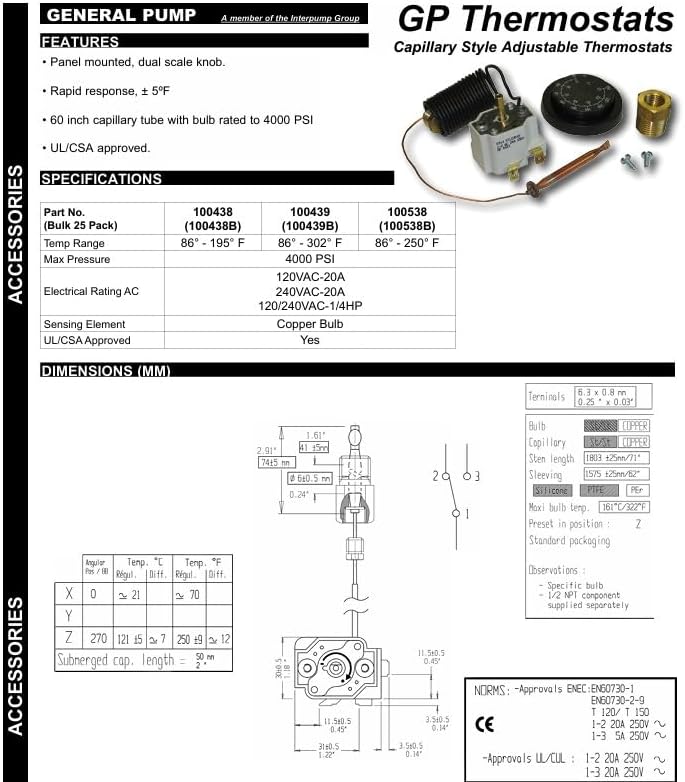
Image 2: Technical diagram and specifications for General Pump GP Thermostats, showing dimensions, electrical ratings, temperature ranges for different models, and a schematic of the capillary style adjustable thermostat.
5. Operating Instructions
The General Pump Remote Thermostat is designed for straightforward operation:
- Power On: Ensure your hot water pressure washer system is powered on and water flow is established.
- Set Temperature: Rotate the adjustment knob on the thermostat control unit to select your desired water temperature. The knob features a dual scale for precise setting within the 86°F to 302°F range.
- Monitoring: The thermostat will automatically engage or disengage the heating element to maintain the set temperature. Allow time for the system to reach the desired temperature.
6. Maintenance
To ensure longevity and reliable performance of your thermostat, consider the following maintenance guidelines:
- Regular Inspection: Periodically inspect the capillary tube and the copper immersion bulb for any signs of physical damage, corrosion, or leaks.
- Electrical Connections: Verify that all electrical connections to the thermostat remain secure and free from corrosion.
- Cleaning: Keep the thermostat control unit and adjustment knob clean and free from dirt or debris. Use a soft, dry cloth for cleaning.
- No User Serviceable Parts: The internal components of the sealed thermostat unit are not user-serviceable. Do not attempt to open or repair the unit yourself.
7. Troubleshooting
If you encounter issues with your General Pump Remote Thermostat, consider these basic troubleshooting steps:
- No Heat or Incorrect Temperature:
- Check the power supply to the pressure washer and heating element.
- Verify the thermostat adjustment knob is set to the desired temperature.
- Ensure the immersion bulb is properly seated in the water system and making good thermal contact.
- Inspect the capillary tube for any damage or kinks.
- Thermostat Not Responding:
- Check all electrical connections for looseness or corrosion.
- If the unit remains unresponsive after checking connections and power, it may require professional inspection.
For persistent issues, it is recommended to consult a qualified technician or contact General Pump customer support.
8. Specifications
| Specification | Detail |
|---|---|
| Model Number | 100439 |
| Temperature Range | 86°F - 302°F (30°C - 150°C) |
| Electrical Rating | 16(4)A-380V |
| Max Pressure (Bulb) | 4000 PSI |
| Sensing Element | Copper Bulb |
| Material | Copper (Sensing Element) |
| Power Source | Corded Electric |
| Item Weight | 11.2 ounces |
| Package Dimensions | 7 x 7 x 4 inches |
| Approvals | UL/CSA approved |
9. Warranty and Support
For specific warranty information, technical assistance, or to inquire about replacement parts, please contact General Pump directly. When contacting support, please reference the model number #100439.
You can visit the official General Pump store for more information: General Pump Store


