1. Introduction
Thank you for purchasing the Panasonic FlashXpress Toaster Oven NBG205S. This appliance is designed for quick and efficient cooking, utilizing double infrared heating and smart sensor technology. Please read this manual thoroughly before use to ensure safe and optimal operation.
2. Important Safety Instructions
When using electrical appliances, basic safety precautions should always be followed, including the following:
- Read all instructions before operating the appliance.
- Do not touch hot surfaces. Use handles or knobs.
- To protect against electrical shock, do not immerse cord, plugs, or appliance in water or other liquid.
- Close supervision is necessary when any appliance is used by or near children.
- Unplug from outlet when not in use and before cleaning. Allow to cool before putting on or taking off parts.
- Do not operate any appliance with a damaged cord or plug, or after the appliance malfunctions or has been damaged in any manner.
- Do not use outdoors.
- Do not let cord hang over edge of table or counter, or touch hot surfaces.
- Do not place on or near a hot gas or electric burner, or in a heated oven.
- Extreme caution must be used when moving an appliance containing hot oil or other hot liquids.
- Do not use appliance for other than intended use.
- Oversize foods or metal utensils must not be inserted in a toaster oven as they may create a fire or risk of electric shock.
- A fire may occur if the toaster oven is covered or touching flammable material, including curtains, draperies, walls, and the like, when in operation.
- Do not place any of the following materials in the oven: paper, cardboard, plastic, or similar materials.
- Do not store any materials, other than manufacturer's recommended accessories, in this oven when not in use.
- Do not cover crumb tray or any part of the oven with metal foil. This will cause overheating of the oven.
3. Product Overview
3.1 Components and Controls
The Panasonic FlashXpress Toaster Oven NBG205S features a compact design with intuitive controls for various cooking needs.

Figure 1: Front view of the Panasonic FlashXpress Toaster Oven NBG205S.

Figure 2: Front view with approximate dimensions (13" W x 10 3/4" H x 12" D).

Figure 3: Detailed view of the control panel.
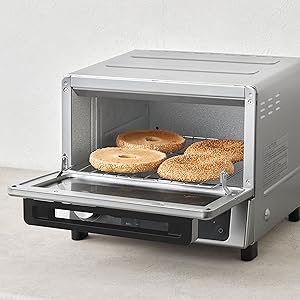
Figure 4: Included baking pan.

Figure 5: Removable crumb tray.
3.2 Included Accessories
- Baking Pan
- Wire Rack
- Removable Crumb Tray
4. Setup
Before first use, ensure the toaster oven is placed on a stable, heat-resistant surface with adequate clearance from walls and other appliances. Remove all packaging materials and accessories. Wash the baking pan, wire rack, and crumb tray with warm, soapy water, rinse thoroughly, and dry completely. Wipe the interior and exterior of the oven with a damp cloth.
4.1 Initial Burn-Off
It is recommended to run the oven empty for about 10-15 minutes at the highest temperature setting (460°F) to burn off any manufacturing residues. A slight odor or smoke may be present during this process; ensure the area is well-ventilated.
5. Operating Instructions
The FlashXpress Toaster Oven is designed for ease of use with its double infrared heating and smart sensor technology, eliminating the need for preheating for most functions.
5.1 Control Panel Functions
- Temperature Dial: Adjusts cooking temperature (250°F to 460°F).
- Preset Buttons: Select from six auto presets for common foods.
- Time/Shade Control: Adjusts cooking time or toast shade level.
- Start/Stop Button: Initiates or cancels cooking.
- Light Button: Activates the interior light to monitor cooking progress.
5.2 Auto Presets
The oven features six convenient auto presets:
- Toast: Ideal for bread and bagels. Features 5 shade control settings.
- Frozen Waffle: Optimized for frozen waffles.
- Reheat Roll: Perfect for warming up rolls and pastries.
- Frozen Pizza: Specifically designed for cooking frozen pizzas.
- Reheat Quick: For quick reheating of various food items.
- Frozen Hash Browns: Ensures crispy frozen hash browns.
To use a preset, simply place your food in the oven, select the desired preset button, and adjust the time/shade if necessary. The smart sensor will automatically adjust heating to prevent burning.

Cooking a pizza using the 'Frozen Pizza' preset.
5.3 Manual Cooking
For foods not covered by presets, use the manual temperature and time settings:
- Place food on the appropriate rack or pan.
- Turn the Temperature Dial to select the desired temperature.
- Turn the Time/Shade Control to set the cooking duration.
- Press the Start/Stop button to begin cooking.
- Monitor food through the viewing window or by using the interior light.
6. Maintenance and Cleaning
Regular cleaning ensures the longevity and optimal performance of your toaster oven. Always unplug the appliance and allow it to cool completely before cleaning.
6.1 Interior Cleaning
- Remove the wire rack, baking pan, and crumb tray. Wash them in warm, soapy water or place them in the dishwasher if they are dishwasher-safe.
- Wipe the interior walls with a damp cloth and mild detergent. Avoid abrasive cleaners or scouring pads, as they may damage the non-stick coating.
- For stubborn stains, a paste of baking soda and water can be applied, left for a few minutes, then wiped clean.
- Ensure the interior is completely dry before closing the door or operating the oven.
6.2 Exterior Cleaning
- Wipe the exterior surfaces with a soft, damp cloth. For stainless steel, use a stainless steel cleaner for best results.
- Do not use abrasive cleaners or polishes on the exterior.
7. Troubleshooting
If you encounter issues with your Panasonic FlashXpress Toaster Oven, refer to the following common problems and solutions:
| Problem | Possible Cause | Solution |
|---|---|---|
| Oven does not turn on. | Not plugged in; power outage; faulty outlet. | Ensure the power cord is securely plugged into a working outlet. Check your circuit breaker. |
| Food is not cooking evenly. | Incorrect rack position; overcrowding; uneven food placement. | Adjust rack position for optimal heat distribution. Avoid overcrowding the oven. Arrange food in a single layer. |
| Excessive smoke during cooking. | Food drippings on heating elements or crumb tray; food too close to heating elements. | Clean the crumb tray and interior thoroughly. Ensure food is not directly touching heating elements. Reduce cooking temperature if necessary. |
| Toast is too light or too dark. | Incorrect shade setting. | Adjust the toast shade control to a higher or lower setting as desired. |
If the problem persists after trying these solutions, please contact Panasonic customer support.
8. Specifications
Detailed specifications for the Panasonic FlashXpress Toaster Oven NBG205S:
| Feature | Specification |
|---|---|
| Brand | Panasonic |
| Model Number | NBG205S |
| Colour | Black/Stainless Steel |
| Product Dimensions | 34 x 37 x 35 cm (13.4 x 14.6 x 13.8 inches) |
| Item Weight | 5.5 kg (12.1 lbs) |
| Material | Stainless Steel |
| Special Features | Double Infrared Heating, Smart Sensor |
| Control Type | Push Button, Dial |
| Included Components | Baking Pan, Crumb Tray, Wire Rack |
| Power Source | Electric |
| Wattage | 1300W |
9. Warranty and Support
This Panasonic product is covered by a manufacturer's warranty. For specific warranty details, please refer to the warranty card included with your product or visit the official Panasonic website. For technical support, service, or to order replacement parts, please contact Panasonic customer service through their official channels.
Please retain your proof of purchase for warranty claims.


