Introduction
This manual provides essential instructions for the safe and efficient operation of your SereneLife Automatic Robot Vacuum Cleaner and Mop Combo, model PUCRCVAC100WT. This device is designed to simplify floor cleaning by combining vacuuming and mopping functions for various surfaces including hardwood, tile, linoleum, and low-pile carpets.
Please read this manual thoroughly before using the product and retain it for future reference.
Product Overview
The SereneLife PUCRCVAC100WT is an automatic robot vacuum and mop designed for comprehensive floor care. Key features include:
- 3 Cleaning Modes: Auto, Spot, and Edge for versatile cleaning.
- Self-Charging: Automatically returns to its charging dock when battery is low.
- Smart Anti-Fall Sensors: Prevents falls from stairs and collisions with obstacles.
- App Control & Scheduling: Manage cleaning sessions via the SereneLife mobile app.
- Simultaneous Vacuuming & Mopping: Efficiently cleans and mops various floor types.
- High Suction Power: 700Pa suction for dust, pet hair, and debris.

Image: The SereneLife robot vacuum and mop combo demonstrating its 2-in-1 cleaning capability on carpet, tile, and hardwood floors.
Setup
- Unboxing: Carefully remove all components from the packaging. Ensure all accessories listed in the packing list are present.
- Charging Dock Placement: Place the charging dock against a wall in an open area, ensuring there are no obstacles within 1 meter (3 feet) to the front and 0.5 meters (1.5 feet) to the sides. Connect the power adapter to the charging dock and plug it into a wall outlet.
- Initial Charge: Place the robot vacuum onto the charging dock. Ensure the charging contacts on the robot align with those on the dock. The indicator light on the robot will show charging status. Allow the robot to fully charge before its first use (approximately 4-5 hours).
- Side Brush Installation: Attach the side brushes to the designated slots on the bottom of the robot until they click into place.
- Water Tank & Mop Pad (for mopping function): Fill the water tank with clean water. Attach the mop pad securely to the water tank. Insert the filled water tank into the robot.
- App Connection: Download the "SereneLife" mobile app from your device's app store. Follow the in-app instructions to connect your robot vacuum via Bluetooth. This allows for scheduling, mode selection, and real-time monitoring.

Image: The robot vacuum automatically navigating back to its charging station, indicated by green and red lines on the floor.
Operating Instructions
Starting a Cleaning Cycle
- Manual Start: Press the power button on the robot's top panel once to start cleaning in Auto mode.
- App Control: Open the SereneLife app, select your device, and choose your desired cleaning mode (Auto, Spot, Edge) or schedule a cleaning session.
- Remote Control: Use the included remote control to start/stop cleaning, select modes, or direct the robot.
Cleaning Modes
- Auto Mode: The robot cleans the entire accessible area, adjusting its path based on obstacles and room layout.
- Spot Mode: The robot focuses on a specific area, cleaning in a spiral pattern to address concentrated dirt or spills.
- Edge Mode: The robot cleans along walls and furniture edges to ensure thorough coverage of room perimeters.
Navigation and Safety Features
- Anti-Fall Sensors: Integrated sensors detect drops and stairs, preventing the robot from falling.
- Obstacle Avoidance: The robot uses sensors to detect and navigate around furniture and other obstacles.
- Low-Profile Design: The robot's slim design allows it to clean under most furniture.

Image: A user interacting with the SereneLife mobile app to control the robot vacuum, demonstrating remote operation capabilities.
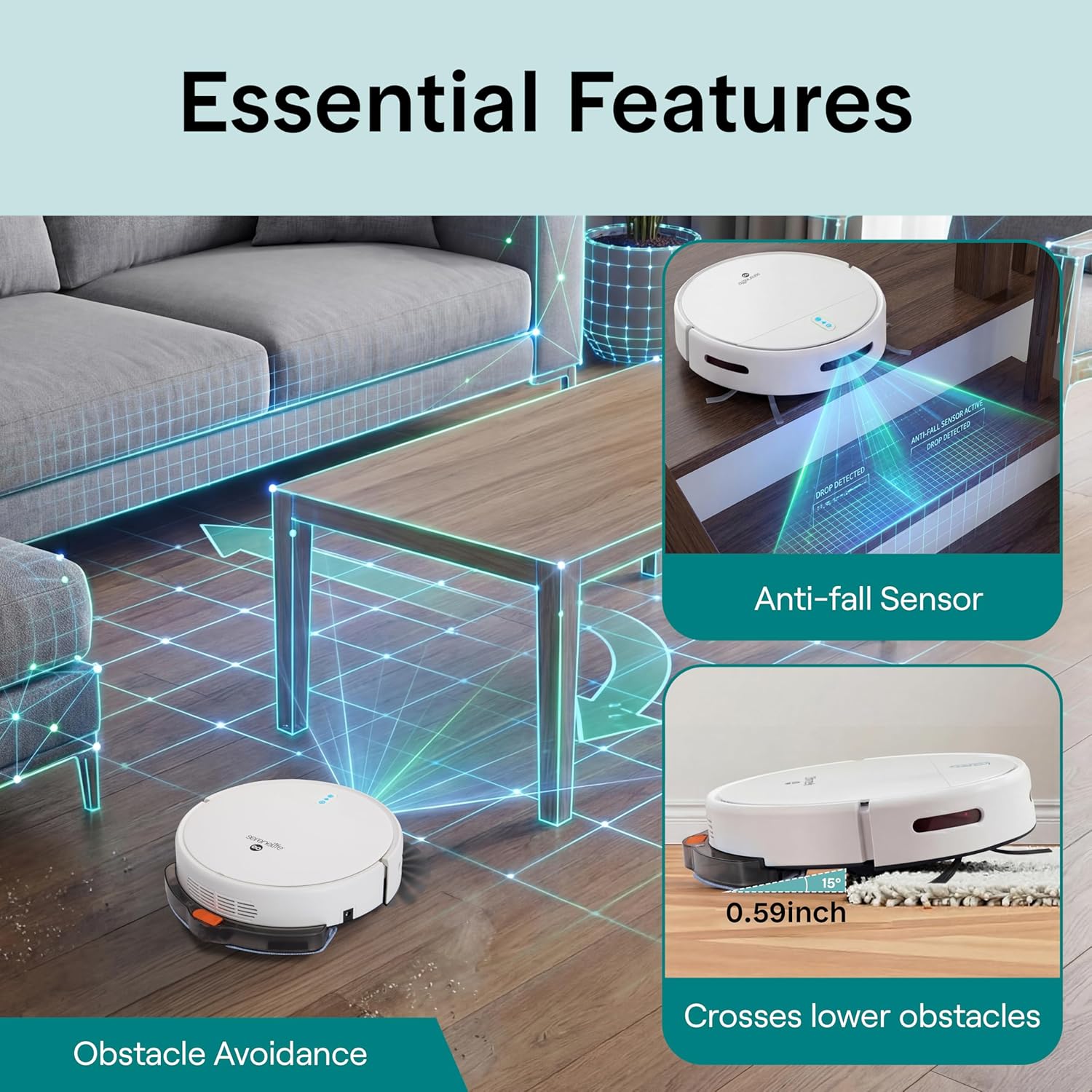
Image: Visual representation of the robot vacuum's anti-fall sensors preventing it from falling down stairs and its ability to cross lower obstacles.
Maintenance
Regular maintenance ensures optimal performance and extends the lifespan of your robot vacuum.
- Emptying the Dustbin: After each cleaning cycle, or when indicated by the app, remove and empty the dustbin. Tap out any loose debris and wipe the interior with a dry cloth.
- Cleaning the Filter: The cartridge filter should be cleaned regularly. Gently tap the filter to remove dust. Replace the filter every 1-3 months, depending on usage.
- Cleaning Side Brushes: Check side brushes for tangled hair or debris. Carefully remove any obstructions. Replace worn or damaged brushes.
- Cleaning the Main Brush: Remove the main brush cover and lift out the main brush. Use the cleaning tool (if provided) to remove hair and debris.
- Cleaning the Mop Pad: After each mopping session, remove the mop pad and wash it with water. Allow it to air dry completely before reattaching.
- Cleaning Sensors and Charging Contacts: Periodically wipe the anti-fall sensors, obstacle sensors, and charging contacts on both the robot and the charging dock with a clean, dry cloth to ensure proper function.

Image: The robot vacuum effectively picking up pet hair, food residue, and cat litter, highlighting its strong suction for pet-friendly homes.
Troubleshooting
| Problem | Possible Cause | Solution |
|---|---|---|
| Robot does not turn on. | Low battery; power switch off. | Charge the robot fully; ensure power switch is on. |
| Robot cannot return to charging dock. | Charging dock obstructed; robot too far. | Clear area around dock; manually place robot on dock. |
| Poor cleaning performance. | Full dustbin; clogged brushes/filter. | Empty dustbin; clean/replace brushes and filter. |
| Robot gets stuck frequently. | Too many obstacles; loose cables/rugs. | Clear obstacles; secure loose items before cleaning. |
| App connection issues. | Bluetooth off; incorrect pairing. | Ensure Bluetooth is on; re-pair device in app. |
Specifications
| Brand: | SereneLife |
| Model Name: | PUCRCVAC100WT |
| Product Dimensions: | 11.41"L x 11.41"W x 3.07"H |
| Item Weight: | 6.18 pounds |
| Battery Life: | 80 minutes |
| Dustbin Capacity: | 520 Milliliters |
| Suction Power: | 700Pa |
| Filter Type: | Cartridge |
| Power Source: | Battery Powered |
| Compatible Devices: | Smartphones, Tablets |
| Included Components: | Charging Adapter, Docking Station, Mop Pad, Remote Control, Side Brush |
| Surface Recommendation: | Carpet, Wood, Tile |
Warranty
This SereneLife product comes with a 1-year limited warranty from the date of purchase. This warranty covers manufacturing defects and workmanship under normal use. It does not cover damage caused by misuse, accident, unauthorized modification, or improper maintenance. Please retain your proof of purchase for warranty claims.
Support
For technical support, troubleshooting assistance, or warranty inquiries, please contact SereneLife customer service. Refer to the contact information provided on the product packaging or the official SereneLife website.
Website: www.serenelifehome.com


