
1. Important Safety Information
Always assemble the desk according to the provided instructions. Do not exceed the weight limit of 150 lbs. Keep the desk away from heat sources and do not place heavy objects on the edges to prevent tipping. Supervise children when they are near the desk to prevent injuries.
2. Product Overview
The Pamray S9 U-shaped corner desk is designed to provide a spacious and functional workspace for home office, gaming, and writing activities. Its unique U-shaped configuration allows for multiple distinct work zones, optimizing corner space utilization.
Key Features:
- U-Shaped Design: Three desktops offer ample surface area for diverse tasks, allowing for dedicated work, gaming, and writing sections.
- Integrated Power Outlets: Equipped with 4 AC power outlets and 2 USB charging ports for convenient device charging.
- Robust Construction: Features a sturdy steel frame and three "X"-shaped back braces for enhanced stability. Supports up to 150 lbs.
- Adjustable Leveling Feet: Leg pads can be adjusted to ensure stability on uneven floor surfaces.
- Water-Resistant Surface: The desktop surface is designed to resist water, making it easy to clean and maintain.
- Pegboard Panels: Includes pegboard panels on the sides for organized storage of accessories like controllers or headphones.
Dimensions:
The desk measures approximately 39.37 inches deep, 70.87 inches wide, and 30.79 inches high. Detailed dimensions are provided in the image below.
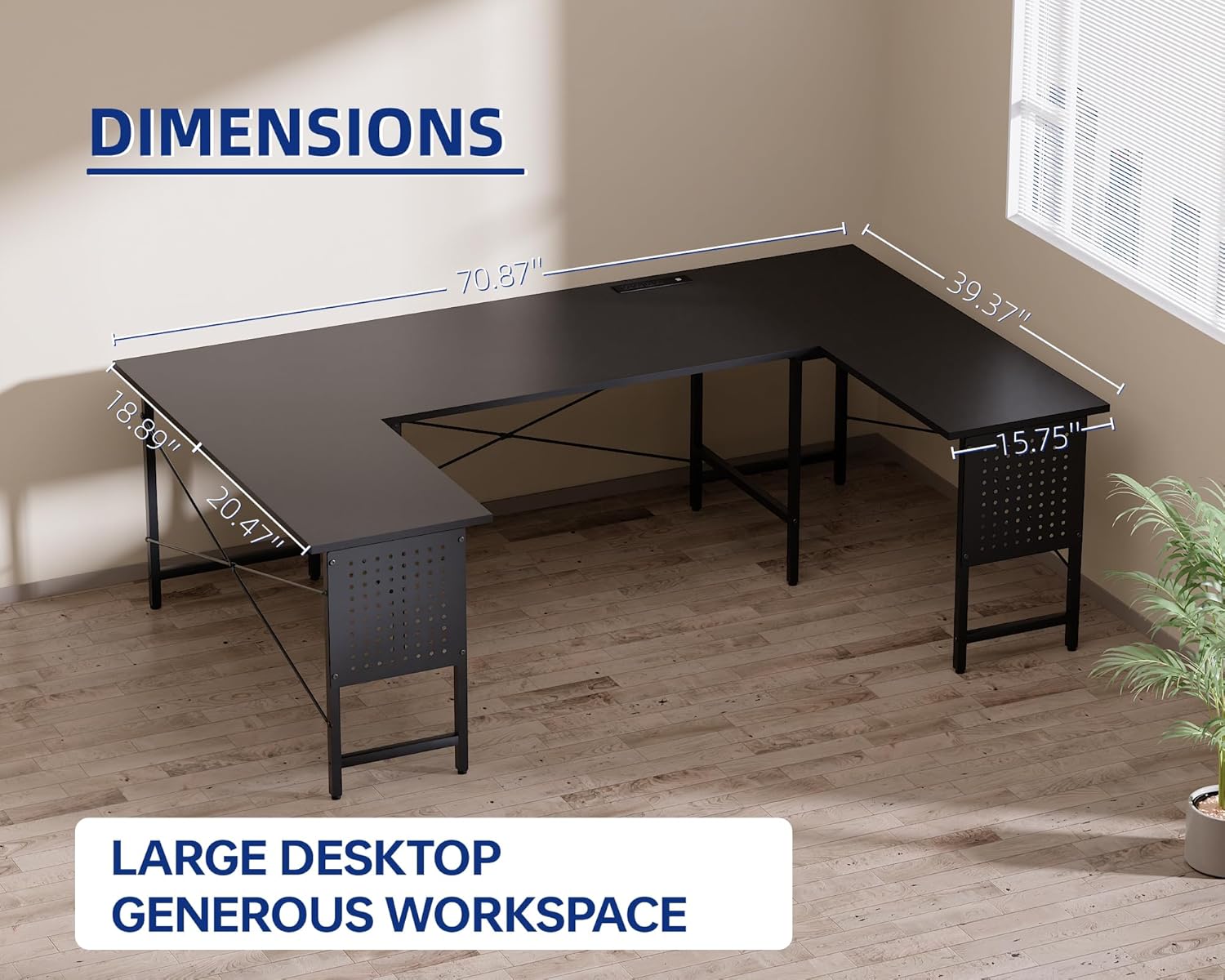
Figure 2.1: Overall dimensions of the Pamray S9 U-shaped corner desk, showing width, depth, and height measurements.
3. Setup and Assembly
The Pamray S9 desk is designed for straightforward assembly. All necessary tools and clear installation instructions are included in the accessory box. For visual guidance, an installation video is available by scanning the QR code on the product packaging.
Ensure all components are present and undamaged before beginning assembly. Follow the step-by-step instructions carefully to ensure proper construction and stability.
Assembly Video:
Video 3.1: An overview of the Pamray U-shaped desk, demonstrating its features and potential setup configurations. This video is provided by the seller, Xstone.
Key Assembly Components:
- Screws: The desk primarily uses M6 40mm hex socket screws and M6 20mm hex socket screws. Ensure correct screw usage for each part.
- Adjustable Leg Pads: Install these on the bottom of the desk legs to customize height and ensure stability.
- Pegboard Installation: Attach the pegboard panels to the designated sides. Ensure all necessary bolts are securely fastened.

Figure 3.1: Close-up view of the adjustable leg pads, which help stabilize the desk on uneven surfaces.
4. Operating Instructions
The Pamray S9 desk offers integrated features to enhance your workspace functionality.
Using the Integrated Power Outlets:
The desk includes a built-in power strip with 4 AC outlets (125V/12A) and 2 USB charging ports (5V/2A), providing a total rated power of 1500W. Connect the desk's power cord (4.92FT) to a wall outlet. You can then plug in and charge your electronic devices directly from the desktop.

Figure 4.1: Detail of the integrated power strip with 4 AC outlets and 2 USB ports, allowing convenient charging of devices.
Utilizing the Pegboard Panels:
The side pegboard panels are designed for customizable storage. Use compatible hooks (not included, or check included accessories) to hang headphones, gaming controllers, or other small items, keeping your desktop clear and organized.

Figure 4.2: The pegboard panel on the side of the desk, shown with a gaming controller and headphones hanging from hooks.
5. Maintenance
To ensure the longevity and appearance of your Pamray S9 desk, follow these simple maintenance guidelines:
- Cleaning: Wipe the desktop surface with a soft, damp cloth. The water-resistant surface makes cleaning spills easy. Avoid abrasive cleaners or harsh chemicals that could damage the finish.
- Spills: Although water-resistant, promptly wipe up any spills to prevent potential damage or staining.
- Weight Distribution: Distribute weight evenly across the desktop. Avoid placing excessively heavy items on the edges to maintain stability and prevent warping.
- Environmental Conditions: Keep the desk away from direct sunlight and extreme temperature changes to prevent material degradation.
- Fasteners: Periodically check all screws and bolts to ensure they remain tight. Retighten if necessary to maintain structural integrity.

Figure 5.1: The water-resistant surface of the desk, showing how liquids bead up for easy cleaning.
6. Troubleshooting
This section addresses common questions and issues you might encounter with your Pamray S9 desk.
Common Issues & Solutions:
- Missing Pegboard Screws: If you find that screws for the pegboard are missing, please contact customer support for replacements. The standard screws used are M6 20mm hex socket screws.
- Desk Instability/Wobbling:
- Ensure all assembly screws are tightened securely.
- Adjust the leveling feet on the bottom of each leg to compensate for uneven flooring.
- Damaged or Broken Parts: If any part of the desk arrived damaged or broke during assembly, do not proceed with assembly. Contact customer support immediately for assistance and replacement parts.
- Sharp Edges: While the desk is designed for safety, if you notice any sharp edges, particularly on the desktop, consider using edge protectors (not included) for added comfort and safety.
- Power Outlets Not Working:
- Verify that the desk's main power cord is securely plugged into a functional wall outlet.
- Check if the total power draw of connected devices exceeds the 1500W rated capacity.
7. Specifications
| Brand | Pamray |
| Model Number | S9 |
| Desk Design | U-Shaped Computer Desk |
| Color | Black |
| Product Dimensions (D x W x H) | 39.37"D x 70.87"W x 30.79"H |
| Item Weight | 40.3 Pounds |
| Maximum Weight Recommendation | 150 Pounds |
| Top Material Type | Engineered Wood (FSC-Certified) |
| Base Material | Metal |
| Included Components | Built-in Outlet, Headphone Hook, Pegboard |
| Required Assembly | Yes (All assembly tools included) |
8. Warranty and Support
The Pamray S9 desk comes with a Limited Warranty. For specific details regarding warranty coverage, duration, and terms, please refer to the documentation included with your product or contact Pamray customer support.
For any questions, missing parts, or assistance with assembly or operation, please contact the manufacturer, PAMRAY, directly. Contact information can typically be found on the product packaging or on the official Pamray website.