1. Introduction
The BASUKEY BD500 Lithium UPS is a high-quality backup power solution designed to provide reliable and efficient power to your devices and appliances. With a capacity of 500VA/400W, this UPS supports small to medium-sized loads and provides uninterrupted power during outages or voltage fluctuations. It features an inbuilt 50Ah lithium battery, offering a longer lifespan and maintenance-free operation compared to traditional lead-acid batteries. The compact, wall-mountable design makes it suitable for home, office, or shop environments.

Image 1.1: The BASUKEY BD500 Lithium UPS integrated into a modern living space, showcasing its compact and sleek design.
2. Safety Instructions
Please read all safety instructions carefully before installing or operating the BASUKEY BD500 Lithium UPS. Failure to follow these instructions may result in electric shock, fire, or serious injury.
- Ensure the UPS is installed in a well-ventilated area, away from direct sunlight, heat sources, and moisture.
- Do not open the UPS casing. There are no user-serviceable parts inside. Refer all servicing to qualified service personnel.
- Do not connect non-electrical loads to the UPS output.
- Avoid placing liquids or heavy objects on top of the UPS.
- Ensure proper grounding for all connected devices.
- Keep children and pets away from the UPS during operation.
- In case of smoke, unusual odors, or abnormal operation, immediately disconnect the UPS from the AC power source and all connected devices.
3. Package Contents
Verify that all items are present in the package:
- BASUKEY BD500 Lithium UPS Unit
- User Manual (this document)
- Mounting accessories (if applicable for wall mount)
- AC Input Power Cord
4. Product Overview
Familiarize yourself with the components and indicators of your BASUKEY BD500 UPS.
4.1 Front Panel
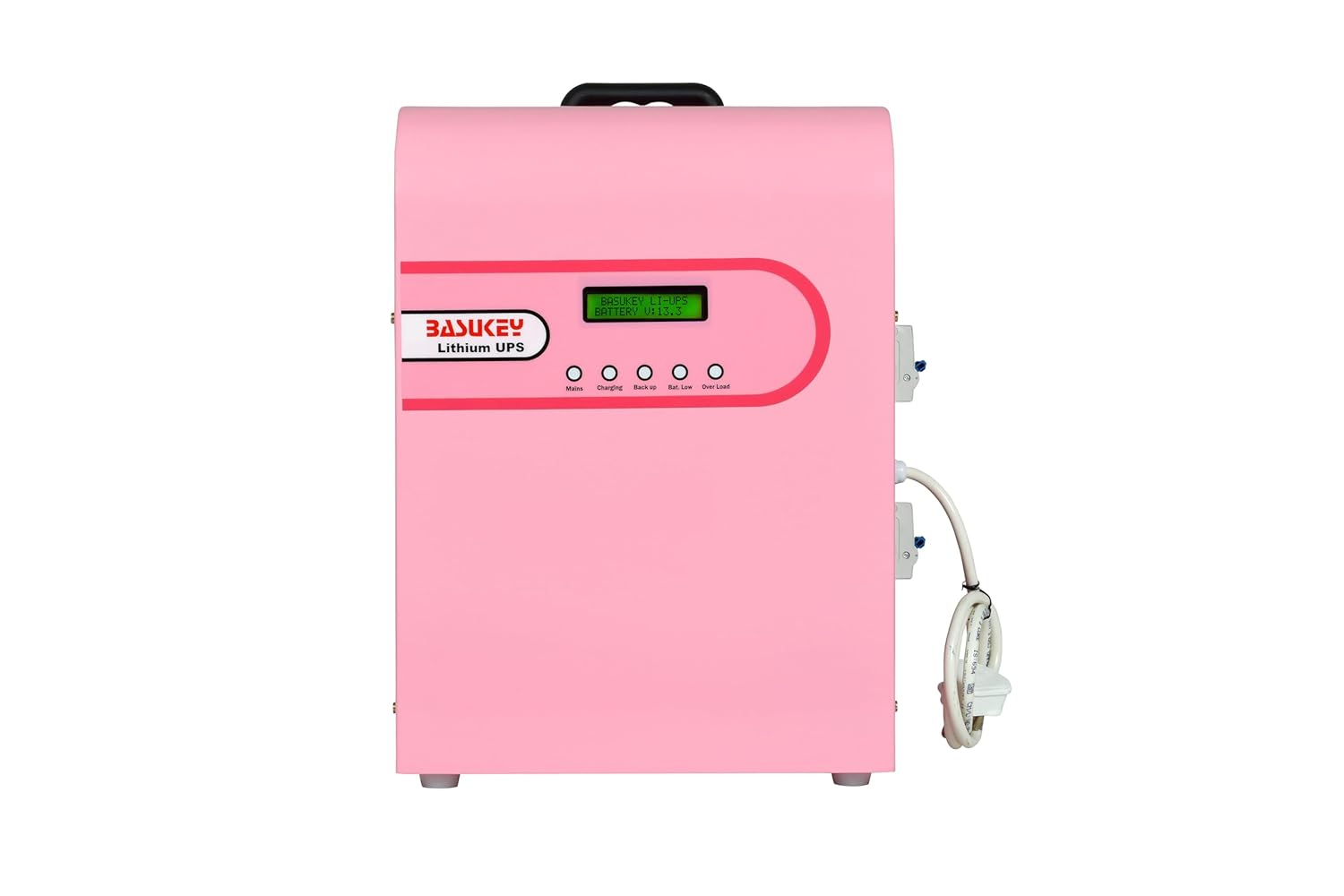
Image 4.1: Front view of the BASUKEY BD500 UPS, highlighting the LCD display and status indicators.
- LCD Display: Shows real-time information such as input/output voltage, battery level, load status, and operational mode.
- Indicator Lights: LEDs for Mains, Charging, Backup, and Overload status.
4.2 Rear Panel

Image 4.2: Rear view of the BASUKEY BD500 UPS, detailing the AC input, output sockets, and protective circuit breakers.
- AC Input: Connects to the main power supply.
- AC Output Sockets: For connecting your devices and appliances.
- Circuit Breakers: Provide overcurrent protection for the input and output.
- Power ON/OFF Switch: Main power control for the UPS.
- Regulated Supply Switch: Controls the regulated output.
5. Installation and Setup
The BASUKEY BD500 is designed for wall-mounting or vertical ground placement.
5.1 Choosing a Location
- Select a cool, dry, and well-ventilated area.
- Avoid areas with excessive dust, humidity, or corrosive substances.
- Ensure sufficient clearance around the UPS for proper airflow, especially around the cooling fan.
5.2 Wall Mounting (Optional)
If wall-mounting, ensure the wall can support the UPS's weight (approximately 13 kg). Use appropriate mounting hardware (not always included) and follow local building codes.
5.3 Connecting the UPS
- Connect to AC Power: Plug the AC input power cord into a grounded wall outlet. The UPS will begin charging its internal battery.
- Connect Devices: Plug your devices (e.g., computer, router, small appliances) into the AC output sockets on the rear panel of the UPS. Do not overload the UPS beyond its rated capacity (400W).
6. Operating Instructions
6.1 Powering On/Off
- To Power On: Press the main Power ON/OFF switch on the rear panel to the 'ON' position. The UPS will perform a self-test, and the LCD display will illuminate.
- To Power Off: Press the main Power ON/OFF switch to the 'OFF' position. Disconnect all connected devices before powering off completely.
6.2 Understanding the LCD Display and Indicators
The LCD display provides critical information about the UPS status:
- Mains Indicator: Lit when AC utility power is present.
- Charging Indicator: Lit when the battery is charging.
- Backup Indicator: Lit when the UPS is operating on battery power (during a power outage).
- Overload Indicator: Lit if the connected load exceeds the UPS's capacity.
- Battery Level: Displays the current charge level of the internal lithium battery.
- Input/Output Voltage: Shows the real-time AC input and output voltage.
6.3 Quick Charging Feature
The BASUKEY BD500 features quick charging, allowing the UPS to fully charge its internal battery within 5-6 hours. This ensures readiness for the next power outage with minimal downtime.

Image 6.1: Highlighting the quick charging capability and other key features like lightweight design, overcharge protection, and LCD display.
7. Maintenance
The BASUKEY BD500 Lithium UPS is designed for zero maintenance, thanks to its inbuilt lithium battery technology. This eliminates the need for distilled water refills, acid handling, or concerns about hazardous fume generation.
- Cleaning: Periodically wipe the exterior of the UPS with a soft, dry cloth to remove dust. Do not use liquid cleaners or solvents.
- Ventilation: Ensure that the ventilation openings are not blocked to prevent overheating.
- Battery Life: The inbuilt lithium battery is designed for a lifespan of more than 10 years under normal operating conditions.
8. Troubleshooting
Refer to the following table for common issues and their solutions:
| Problem | Possible Cause | Solution |
|---|---|---|
| UPS does not turn on | No AC input power; Battery fully discharged; Power switch off. | Check AC power connection; Allow UPS to charge for a few hours; Ensure power switch is ON. |
| UPS beeps continuously / Overload indicator lit | Connected load exceeds UPS capacity. | Disconnect non-essential devices to reduce the load. |
| Short backup time | Battery not fully charged; Battery nearing end of life. | Allow UPS to charge fully; If issue persists, contact support. |
| No output power in UPS mode | Battery discharged; UPS malfunction. | Check battery level; If fully charged and no output, contact support. |
9. Technical Specifications
Detailed specifications for the BASUKEY BD500 Lithium UPS.

Image 9.1: Overview of the BASUKEY BD500's technical specifications.
| Feature | Specification |
|---|---|
| Model Name | BD500 |
| Capacity (VA/Watts) | 500VA / 400W |
| DC Voltage | 12.8V |
| Battery Type | Inbuilt Lithium Battery Pack (Life04 Cylindrical Cells) |
| Battery Capacity | 50 Ah (384 Wh) |
| Mounting Facility | Wall Mounting / Ground Vertical Mounting |
| AC Input Voltage Range | 125V-280V ± 10V |
| Output Voltage (UPS Mode) | 220V ± 10V |
| Output Frequency (UPS Mode) | 50Hz ± 0.1Hz |
| Output Waveform | Sinewave |
| Change Over/Transfer Time | Automatic / <15ms |
| Battery Charging Current | 5A ± 2A |
| Battery Charging HVC/LVC | 14.5VDC / 11.1 VDC |
| Continuous Discharge Current | 35 Amps |
| Product Dimensions (LxWxH) | 28 x 17 x 39 cm |
| Item Weight | 13 kg |
| Material | Metal |
10. Warranty and Support
The BASUKEY BD500 Lithium UPS comes with a 3-year warranty from the date of purchase. This warranty covers manufacturing defects and ensures reliable operation under normal use conditions.
For technical support, warranty claims, or service inquiries, please contact BASUKEY customer service through the retailer where the product was purchased or visit the official BASUKEY website for contact information.
Please retain your purchase receipt as proof of purchase for warranty validation.


