
Product Overview
The MASHI F600 is a 13-inch large LED digital clock designed for clear visibility and versatile use. It displays time, date, day of the week, temperature, and humidity. Key features include adjustable brightness, an alarm function, and support for Daylight Saving Time (DST). It can be wall-mounted or placed on a desk.

Image: The MASHI F600 Digital Clock showing its large display with time, date, temperature, and humidity.
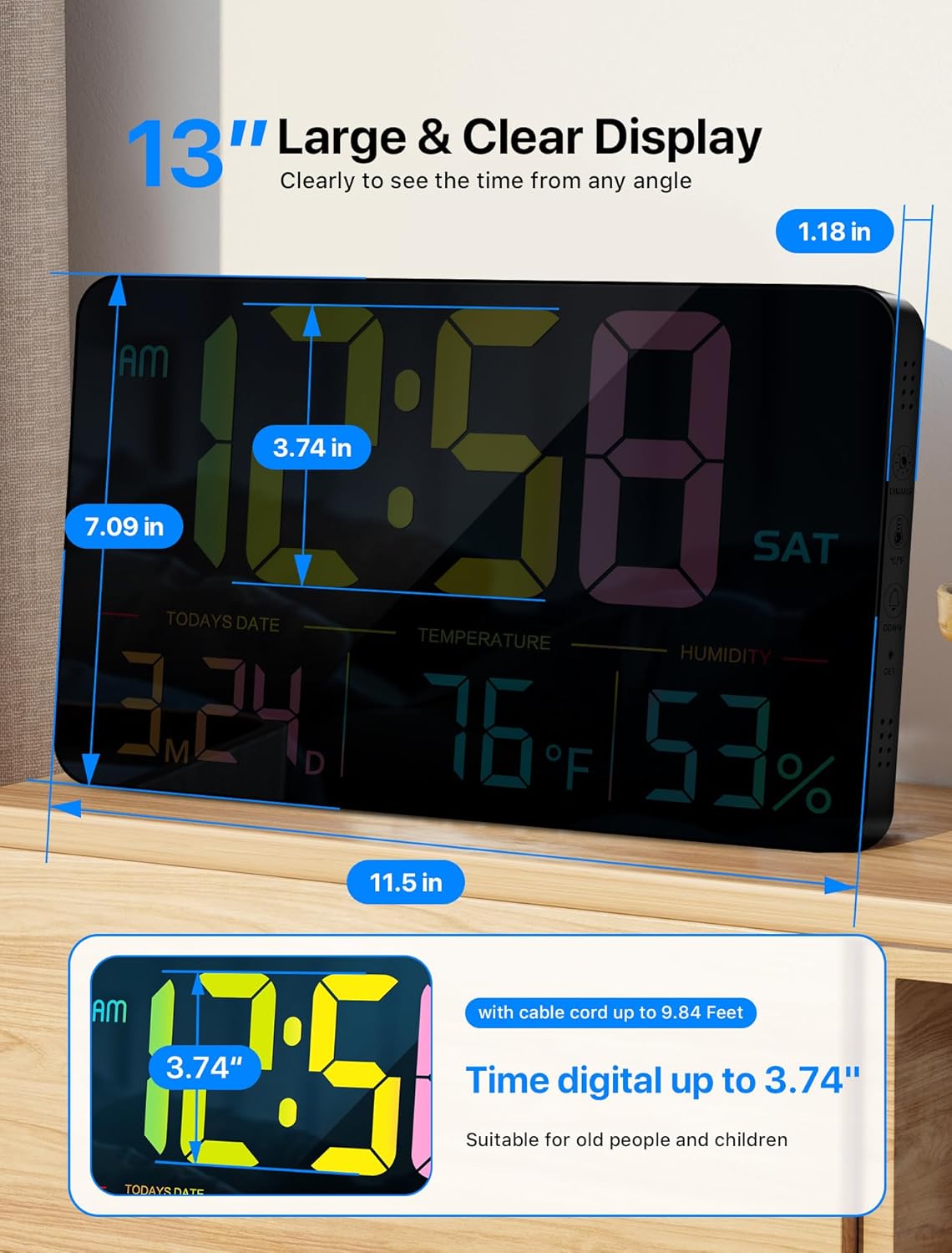
Image: Diagram illustrating the dimensions of the MASHI F600 Digital Clock: 11.5 inches width, 7.09 inches height, and 1.18 inches depth. The time digits are 3.74 inches tall.
Package Contents
Verify that all items are present in the package:
- MASHI F600 Digital Clock
- Remote Control
- USB Charging Cable (11.5 feet)
- Power Adapter (5V/1A)
- CR2032 Battery (for memory backup)
- Mounting Nails (x2)
- Mounting Template/Ruler
- User Manual (this document)

Image: A visual representation of the MASHI F600 Digital Clock package contents, including the clock, remote, power adapter, USB cable, CR2032 battery, mounting nails, and instructions.
Setup
- Insert Memory Battery: Open the battery compartment on the back of the clock and insert the provided CR2032 battery. This battery serves as memory backup to retain settings during power outages, but does not power the display.
- Connect Power: Plug the DC 5V end of the USB charging cable into the clock's power port on the back. Connect the USB-A end to the provided 5V/1A power adapter, then plug the adapter into a wall outlet. The clock requires continuous power to operate.
- Initial Power On: The clock display will illuminate upon connecting to power.
- Remote Control Battery: Ensure the remote control has its battery inserted (typically a CR2032, often pre-installed with a pull tab).

Image: The back of the MASHI F600 Digital Clock showing the power cable connected and the battery compartment. The clock requires a 5V/1A power adapter and the included 11.5-foot cable. A CR2032 memory battery is also shown.
Operating Instructions
The clock can be operated using the buttons on its side or the included remote control.

Image: A hand holding the remote control, pointing towards the MASHI F600 Digital Clock mounted on a wall, illustrating the two setup modes: remote control and button control.
Time and Date Settings
Use the 'SET' button on the remote or side of the clock to enter setting mode. Use the '+' and '-' buttons to adjust values and 'SET' to confirm and move to the next setting (Time, Date, Year, 12/24H format).
Brightness Adjustment
The clock features 6 levels of brightness. Press the 'DIMMER' button on the remote to cycle through the brightness levels. Long-pressing the 'DIMMER' button for 3 seconds activates Night Mode.
- Night Mode Schedule:
- 07:00-18:59: 100% Brightness
- 19:00-22:59: 50% Brightness
- 23:00-06:59: 25% Brightness

Image: A visual comparison of the MASHI F600 Digital Clock display at various brightness levels, from 100% down to 20%, demonstrating the 6-level adjustable brightness feature.
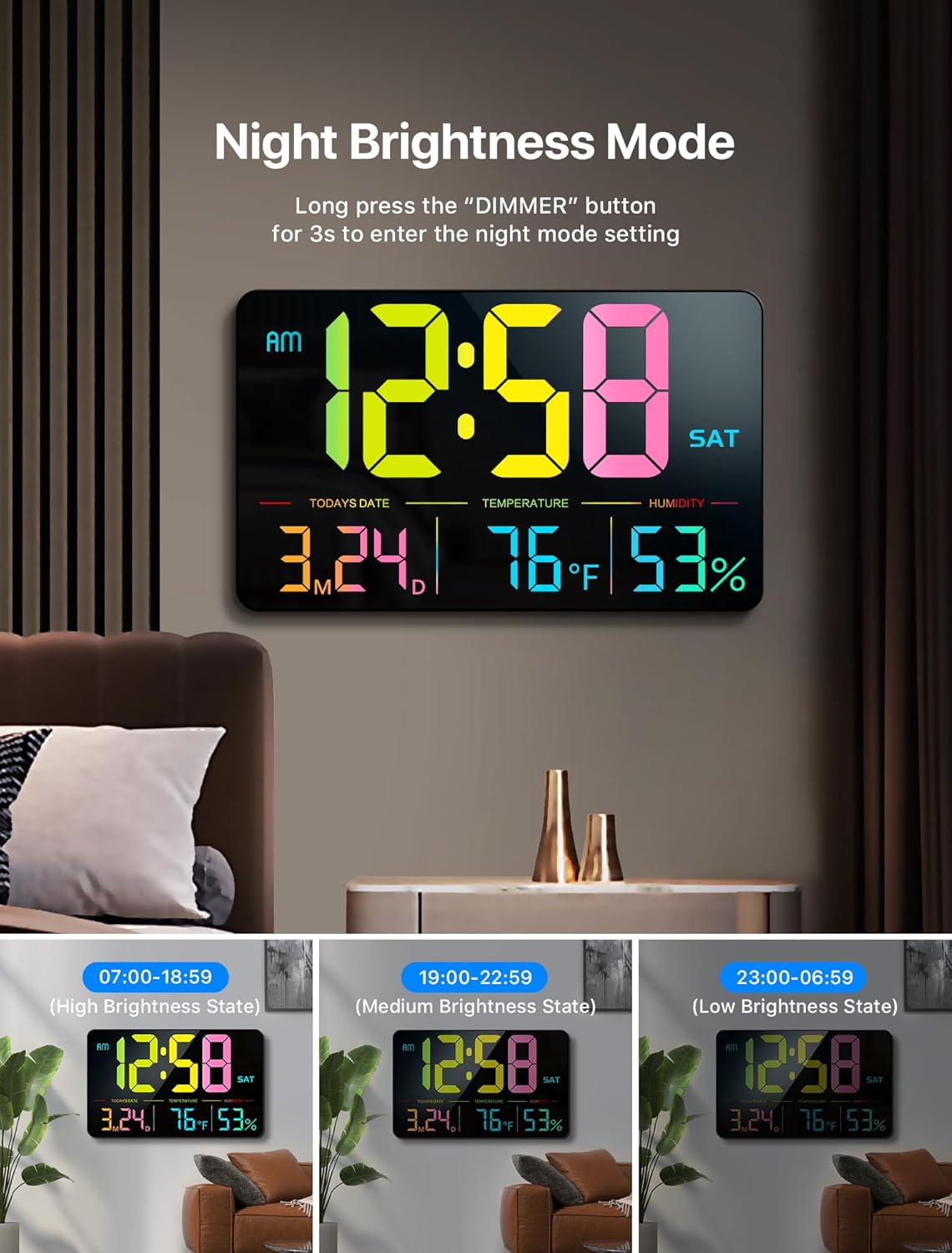
Image: The MASHI F600 Digital Clock displaying time in Night Brightness Mode, with examples of high, medium, and low brightness states corresponding to different time periods.
Alarm Settings
The clock includes an alarm function. Use the 'ALARM' button on the remote or side of the clock to set and activate alarms. You can set alarms for 5 days, 6 days, or everyday.
Daylight Saving Time (DST)
To activate or deactivate Daylight Saving Time, long-press the 'DST' button on the remote. The 'DST' icon on the display will indicate its status.
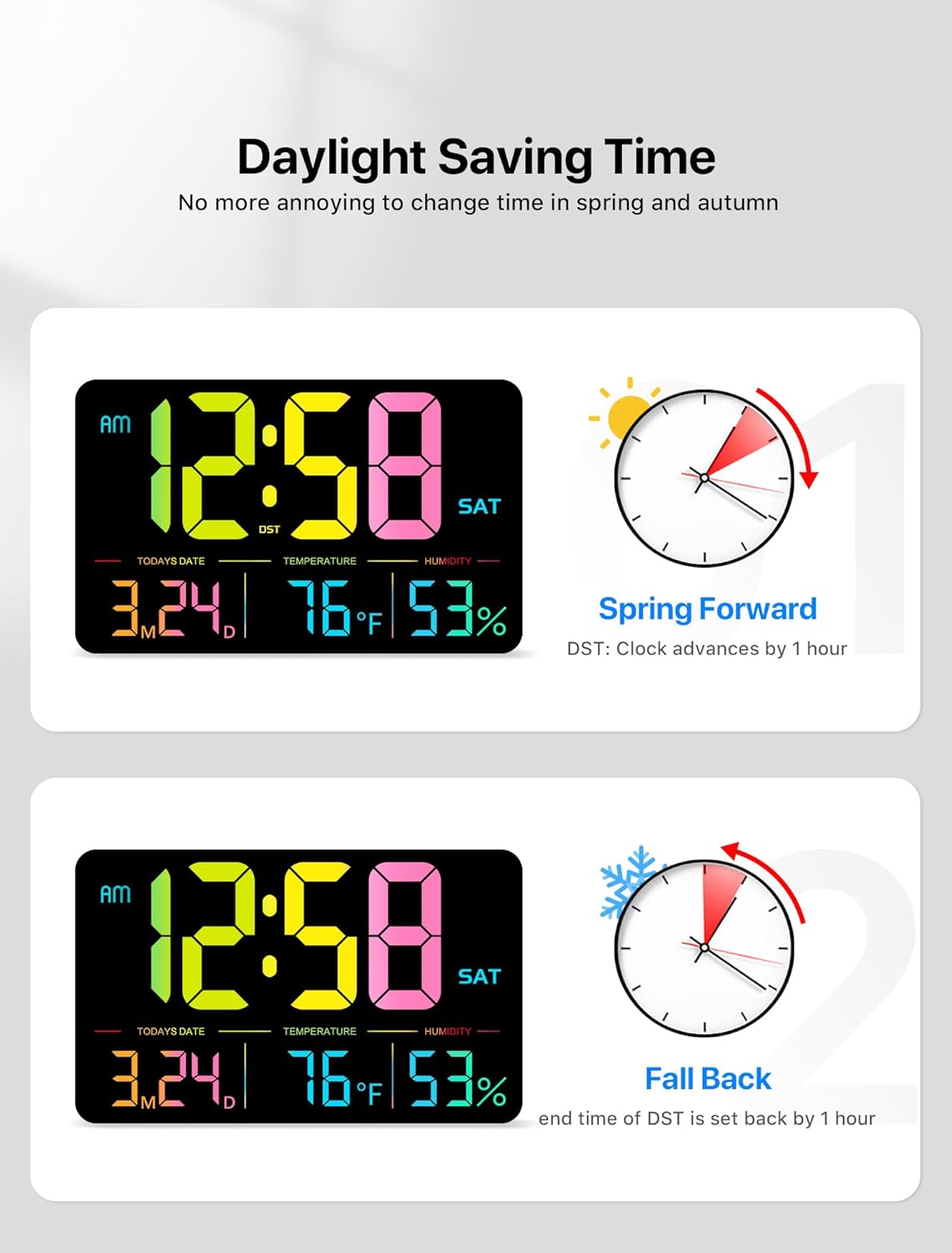
Image: The MASHI F600 Digital Clock illustrating the Daylight Saving Time feature, showing how the clock advances by 1 hour for "Spring Forward" and sets back by 1 hour for "Fall Back".
Temperature and Humidity Display
The clock displays both temperature and humidity. The temperature can be switched between Celsius (°C) and Fahrenheit (°F) using the dedicated button on the remote or side of the clock.
Placement Options
The MASHI F600 Digital Clock offers two convenient placement options:
- Wall-Mounted: Use the two keyhole slots on the back of the clock and the provided mounting nails and template for easy installation on a wall.
- Desktop: Utilize the folding back frame to stand the clock gracefully on any flat surface, such as a desk or table.
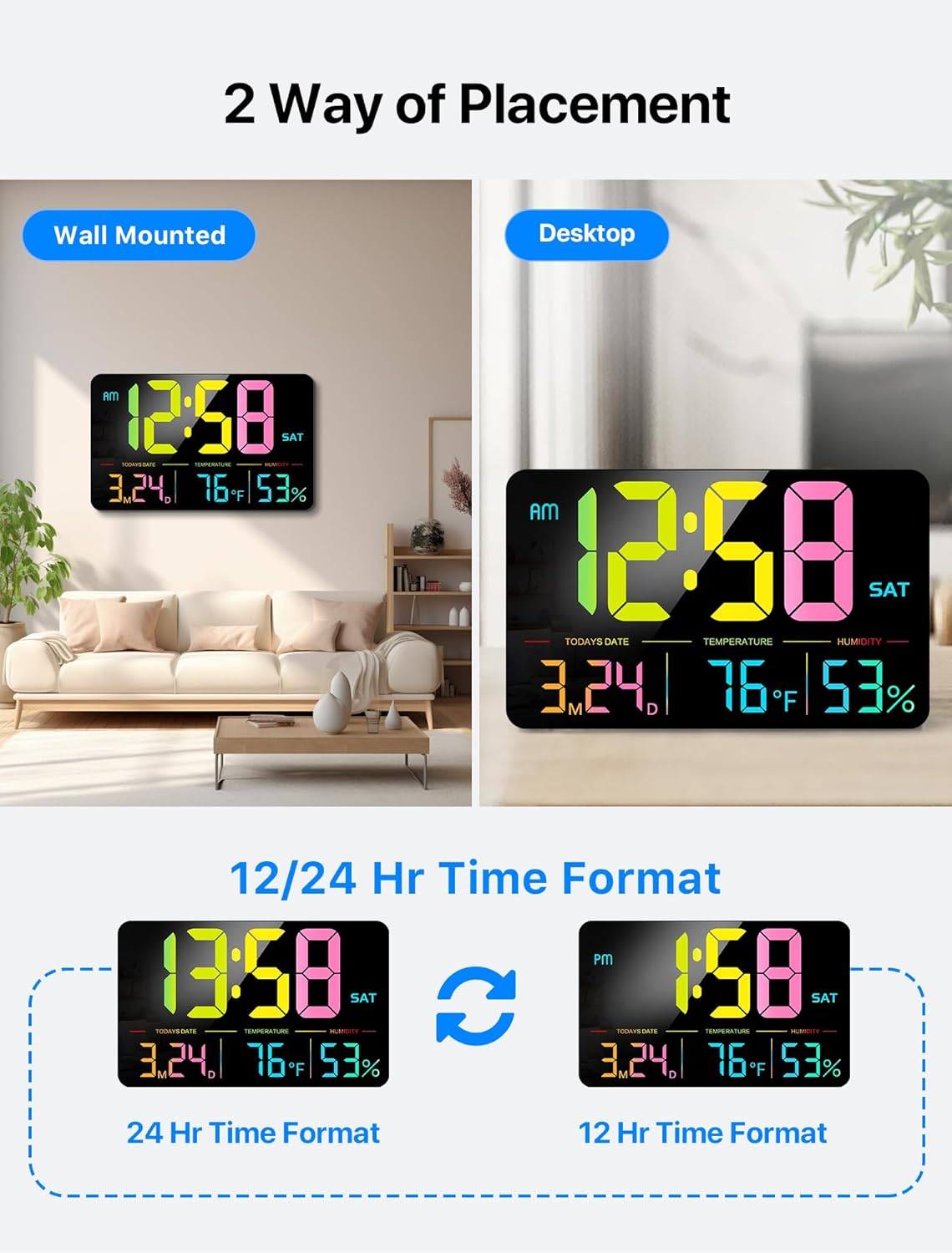
Image: Two images demonstrating the versatility of the MASHI F600 Digital Clock, showing it both wall-mounted in a living room and standing on a desktop.
Power Information
The MASHI F600 Digital Clock is not battery-operated for its main display. It must be continuously plugged into a 5V/1A power source using the provided adapter and 11.5-foot cable. A CR2032 coin battery is included for memory backup, ensuring that time and settings are retained during power interruptions.
Maintenance
- Cleaning: Wipe the display and casing with a soft, dry cloth. Avoid using abrasive cleaners or solvents.
- Battery Replacement: The CR2032 memory battery should be replaced periodically (e.g., every 1-2 years) to ensure settings are saved during power outages.
- Environmental Conditions: Ensure the clock is used indoors and kept away from extreme temperatures and high humidity to prevent damage.
Troubleshooting
| Problem | Solution |
|---|---|
| Clock display is off. | Ensure the power adapter is securely plugged into both the clock and a working electrical outlet. The clock requires continuous power. |
| Settings are lost after power outage. | Replace the CR2032 memory battery on the back of the clock. |
| Remote control is not working. | Check if the remote control battery (CR2032) needs replacement or if the pull tab has been removed. Ensure there are no obstructions between the remote and the clock. |
| Temperature/Humidity readings seem inaccurate. | Ensure the clock is placed in an area with stable environmental conditions, away from direct heat sources or drafts. Allow some time for readings to stabilize after initial setup. |
Specifications
- Brand: MASHI
- Model: F600
- Display Type: Digital LED
- Product Dimensions: 11.5" W x 7.09" H
- Power Source: Corded Electric (5V/1A adapter included)
- Cable Length: 11.5 feet
- Memory Battery: 1 x CR2032 (included)
- Special Features: Large LED Display, Adjustable Brightness (6 levels), Night Mode, Calendar (Date, Day), DST, Alarms, Humidity, Temperature (°C/°F)
- Mounting Type: Wall Mount, Desktop
- Material: Plastic
- Item Weight: 1.7 pounds
Warranty and Support
For warranty information or technical support, please refer to the contact details provided with your purchase or visit the official MASHI website. Keep your purchase receipt for warranty claims.
Return Policy: 30-day refund/replacement policy (as per Amazon's policy at the time of data extraction).
Official Product Video
Video: An official product video from MASHI-MCI showcasing the features and functionality of the 13-inch Digital Wall Clock.