
ARROWMAX GC6
AM ARROWMAX GC6 Smart Engraving Pen User Manual
Model: GC6 | Brand: ARROWMAX
1. Introduction
The AM ARROWMAX GC6 Smart Engraving Pen is a versatile rotary tool designed for artists and DIY enthusiasts. Featuring a carbon fiber body and a powerful HollowCup motor, it offers precise control for delicate engraving, grinding, polishing, sanding, and carving tasks on various materials including metal, wood, glass, and plastic. This manual provides essential information for the safe and effective use of your GC6 engraving pen.

Image: The AM ARROWMAX GC6 Smart Engraving Pen, showcasing its compact design and key features like power, portability, and cordless operation.
2. Package Contents
Verify that all items listed below are included in your package:
- 1 x AM ARROWMAX GC6 Engraving Pen
- 1 x Aluminum Storage Case
- 30 x Engraving Bits (2.35mm diameter)
- 9 x Polishing Bits (2.35mm diameter)
- 1 x USB Magnetic Charging Cable
- 1 x Storage Bag
- 1 x User Manual

Image: All components included in the GC6 starter kit.

Image: Detailed view of the 30 engraving bits.

Image: Detailed view of the 9 polishing bits.
3. Product Overview

Image: Key components of the GC6 Engraving Pen.
- Magnetic Charging Port: For convenient and secure charging.
- Status Display: Shows battery status, selected mode, and rotation direction.
- Power Button: Controls power on/off and mode selection.
- Carbon Fiber Body: Provides a comfortable grip and durable construction.
- Chuck: For easy and tool-free bit changes.
4. Setup
4.1 Charging the Device
Before first use, fully charge the engraving pen. The device features a 500mAh high-performance LiPo battery, providing up to 2 hours of use on a full charge.
- Locate the magnetic charging port on the pen or the storage case.
- Connect the provided USB magnetic charging cable to the port. The magnet will automatically secure the connection.
- Connect the other end of the USB cable to a compatible power source (e.g., computer USB port, USB wall adapter).
- The status display will indicate charging progress. A full charge typically takes approximately 90 minutes.
Video: Demonstrates the magnetic charging feature of the AM ARROWMAX GC6 engraving pen, showing how to connect the charging cable to the pen and its case.
4.2 Inserting/Changing Bits
The GC6 engraving pen uses a chuck system for easy bit changes without additional tools.
- Ensure the device is powered off.
- Gently twist the chuck counter-clockwise to loosen it.
- Insert the desired engraving or polishing bit into the chuck. Ensure the bit is fully seated.
- Twist the chuck clockwise to tighten it securely. Do not overtighten.
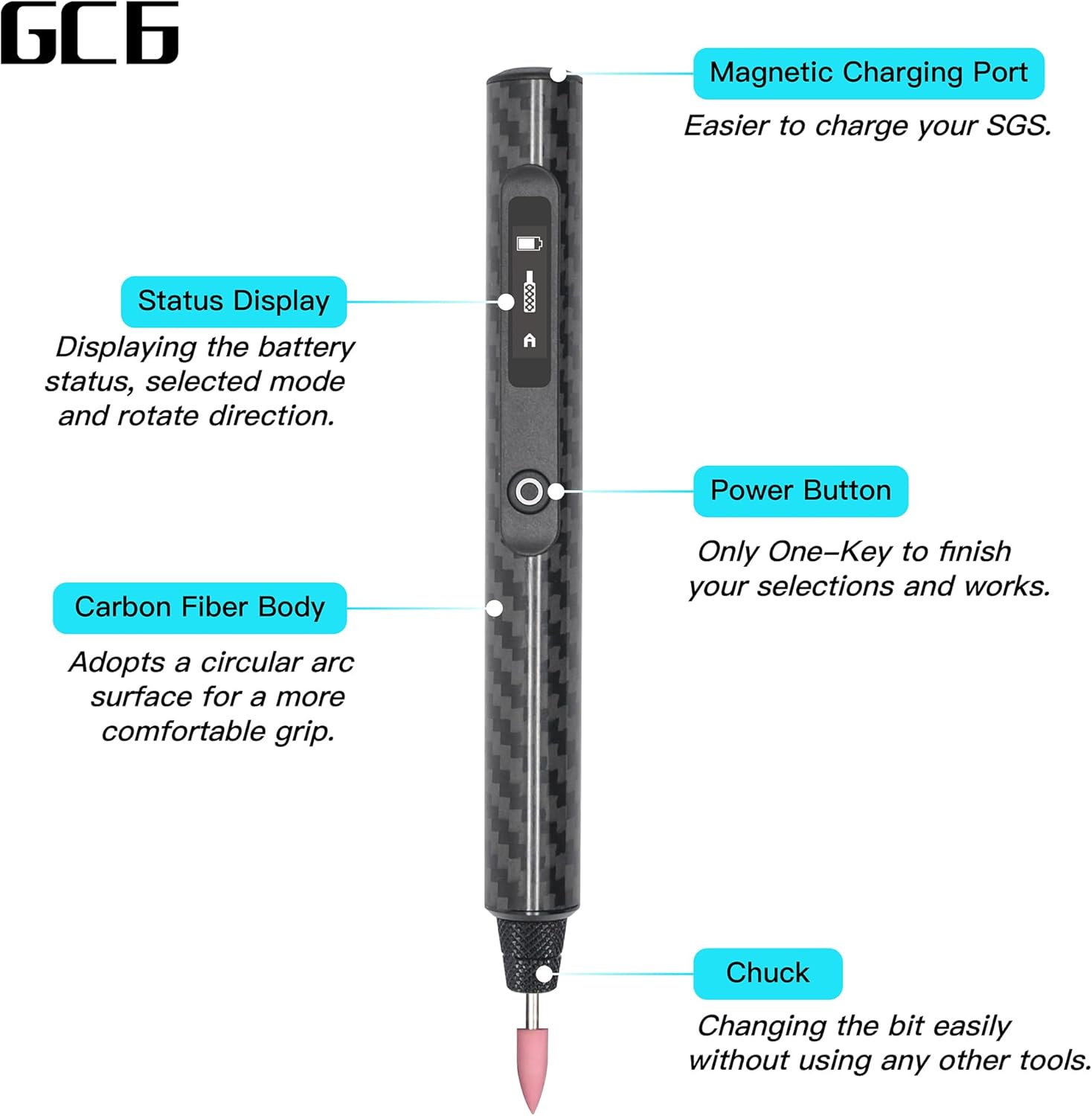
Image: Inserting an engraving bit into the pen's chuck.
5. Operating Instructions
5.1 Power On/Off and Speed Adjustment
The GC6 features a Smart Motion Control System (SMC) and multiple speed settings.
- Power On: Press the Power Button once to turn on the device. The status display will illuminate.
- Speed Mode Selection: After powering on, triple-click the Power Button to enter the speed selection menu.
- Selecting Speed: In the speed selection menu, single-click the Power Button to cycle through the modes: A (Auto Sensing), 1 (15000 RPM), 2 (20000 RPM), 3 (25000 RPM), and 4 (30000 RPM). The selected mode will be displayed. After a few seconds of inactivity, the device will confirm the selection and return to the main display.
- Activating Engraving: Once a speed mode (1-4) is selected, press the Power Button once to start the motor. Press again to stop.
- Auto Sensing Mode (A): In 'A' mode, hold down the Power Button. The speed and rotation direction are controlled by tilting the pen. Tilting clockwise increases speed in one direction, while tilting counter-clockwise increases speed in the opposite direction. Release the button to stop.
- Power Off: Press and hold the Power Button for a few seconds until the display turns off.

Image: Adjustable speed settings and their corresponding RPMs.

Image: Status display indicating operating direction and speed.
5.2 App Control (Optional)
The ARROWMAX app allows for advanced control and customization of speed settings beyond the factory presets.
- Download the ARROWMAX app from the Google Play Store or Apple App Store.
- Ensure Bluetooth is enabled on your mobile device.
- Open the app and follow the on-screen instructions to pair with your GC6 engraving pen.
- Use the app interface to precisely adjust RPMs and control rotation direction.

Image: ARROWMAX App interface for advanced control.
6. Usage Examples
The GC6 Smart Engraving Pen is suitable for light-duty crafting tasks on a variety of materials.
- Engraving: Create intricate designs on wood, metal, glass, plastic, shell, jade, and stone.
- Polishing: Smooth rough edges or surfaces on various materials using the polishing bits.
- Grinding/Sanding: Perform light grinding or sanding for shaping and finishing.
- Carving: Ideal for detailed carving work on softer materials like wood.

Image: Engraving on wood, shell, jade, and stone.

Image: Polishing and engraving applications.
7. Maintenance
Proper maintenance ensures the longevity and optimal performance of your engraving pen.
- Cleaning: After each use, gently wipe the pen body with a soft, dry cloth. Use a small brush to remove any dust or debris from the chuck area.
- Bit Storage: Store engraving and polishing bits in their designated slots within the aluminum case to prevent damage and loss.
- Battery Care: Avoid fully discharging the battery frequently. Charge the device regularly, even if not in use, to maintain battery health. Store in a cool, dry place.
- Case Handling: The aluminum case is designed with a spring-loaded mechanism. To open, push the end of the inner tray to release the lock, then slide it out. To close, slide the tray back in and push until it clicks securely into place.
8. Troubleshooting
| Problem | Possible Cause | Solution |
|---|---|---|
| Device does not turn on. | Low battery. | Charge the device fully using the magnetic USB cable. |
| Bit does not spin or spins weakly. | Incorrect speed mode selected; Bit not properly secured; Excessive pressure applied. | Ensure a speed mode (1-4) is active, not just the speed selection menu. Re-secure the bit in the chuck. Reduce pressure during operation. |
| Difficulty understanding Auto Sensing (A) mode. | Unfamiliarity with motion control. | In 'A' mode, hold the Power Button. Tilt the pen clockwise for forward rotation, counter-clockwise for reverse. The degree of tilt controls speed. Practice on scrap material. |
| Aluminum case mechanism seems stuck or broken. | Incorrect opening/closing procedure. | Push the inner tray end to release the lock before sliding. Push firmly until it clicks to secure when closing. |
9. Specifications
| Feature | Detail |
|---|---|
| Brand | ARROWMAX |
| Model Number | GC6 (230316) |
| Power Source | Battery Powered |
| Battery Type | 1 Lithium Polymer (500mAh) |
| Voltage | 5 Volts |
| Maximum Rotational Speed | 30000 RPM |
| Minimum Speed | 10000 RPM |
| Body Material | Carbon Fiber |
| Special Features | Variable Speed, Multi-Functional, Smart Motion Control System (SMC), OLED Display, App Control |
| Included Components | Engraving pen, 30 engraving bits, 9 polish bits, storage bag, manual, USB charging cable |
| Item Weight | 14.4 ounces |
| Package Dimensions | 8.94 x 2.17 x 2.05 inches |
10. Warranty & Support
For warranty information and customer support, please refer to the official ARROWMAX website or contact your retailer. Keep your purchase receipt for warranty claims.
Related documentsGC6


Ask a question about this manual
Ask about setup, troubleshooting, compatibility, parts, safety, or missing instructions. Manuals+ will review the question and use this page’s manual context to help answer it.