
1. Introduction
Thank you for choosing the LiTime 12V 140Ah H190 LiFePO4 Battery. This battery is designed for reliable and efficient power storage in various applications, including recreational vehicles (RVs), solar energy systems, marine environments, and off-grid setups. It features advanced Bluetooth connectivity for real-time monitoring and a robust Battery Management System (BMS) for enhanced safety and longevity. Please read this manual thoroughly before installation and operation to ensure proper use and maximize the battery's performance and lifespan.

Image: The LiTime 12V 140Ah H190 LiFePO4 battery, a black rectangular unit with orange accents, featuring the LiTime logo and '12.8V 140Ah LiFePO4' branding.
2. Safety Instructions
Always observe the following safety precautions to prevent injury or damage to the battery and connected equipment:
- Read the Manual: Understand all instructions before installation and use.
- Eye Protection: Always wear appropriate eye protection when working with batteries.
- Insulated Tools: Use insulated tools to prevent accidental short circuits.
- Ventilation: Ensure adequate ventilation during installation and operation, although LiFePO4 batteries do not emit gases under normal conditions.
- Avoid Short Circuits: Do not short-circuit the battery terminals. This can cause severe damage and fire.
- Proper Connections: Connect the battery correctly, observing positive (+) and negative (-) polarities. Reverse polarity can damage the battery and connected devices.
- Temperature Range: Operate the battery within its specified temperature ranges for charging and discharging. The battery includes low-temperature protection to prevent damage.
- No Car Starting: This battery is not designed for starting internal combustion engines. Do not use it as a car starter battery.
- Damage Inspection: Inspect the battery for any damage before use. Do not use a damaged battery.
- Children and Pets: Keep the battery out of reach of children and pets.

Image: A glowing blue shield icon, symbolizing product protection and safety features.
3. Product Overview and Features
The LiTime 12V 140Ah H190 LiFePO4 battery is engineered for high performance and reliability. Key features include:
3.1 Smart Bluetooth Connectivity
Equipped with Bluetooth 5.0, this battery allows real-time monitoring via the LiTime APP. You can check the State of Charge (SOC), voltage, and current directly from your smartphone. The app connects automatically via a barcode scan for convenience.

Image: A hand holding a smartphone displaying the LiTime app interface, showing battery status, voltage, and SOC, with a LiTime battery in the background.
3.2 Advanced 150A Battery Management System (BMS)
The integrated 150A BMS provides comprehensive protection with over 20 functions, ensuring the battery's safety and extending its lifespan. These protections include:
- Over-voltage protection
- Under-voltage protection
- Over-current protection
- Short-circuit protection
- Over-temperature protection
- Low-temperature protection
- Intelligent fault recovery
- Pre-charge function
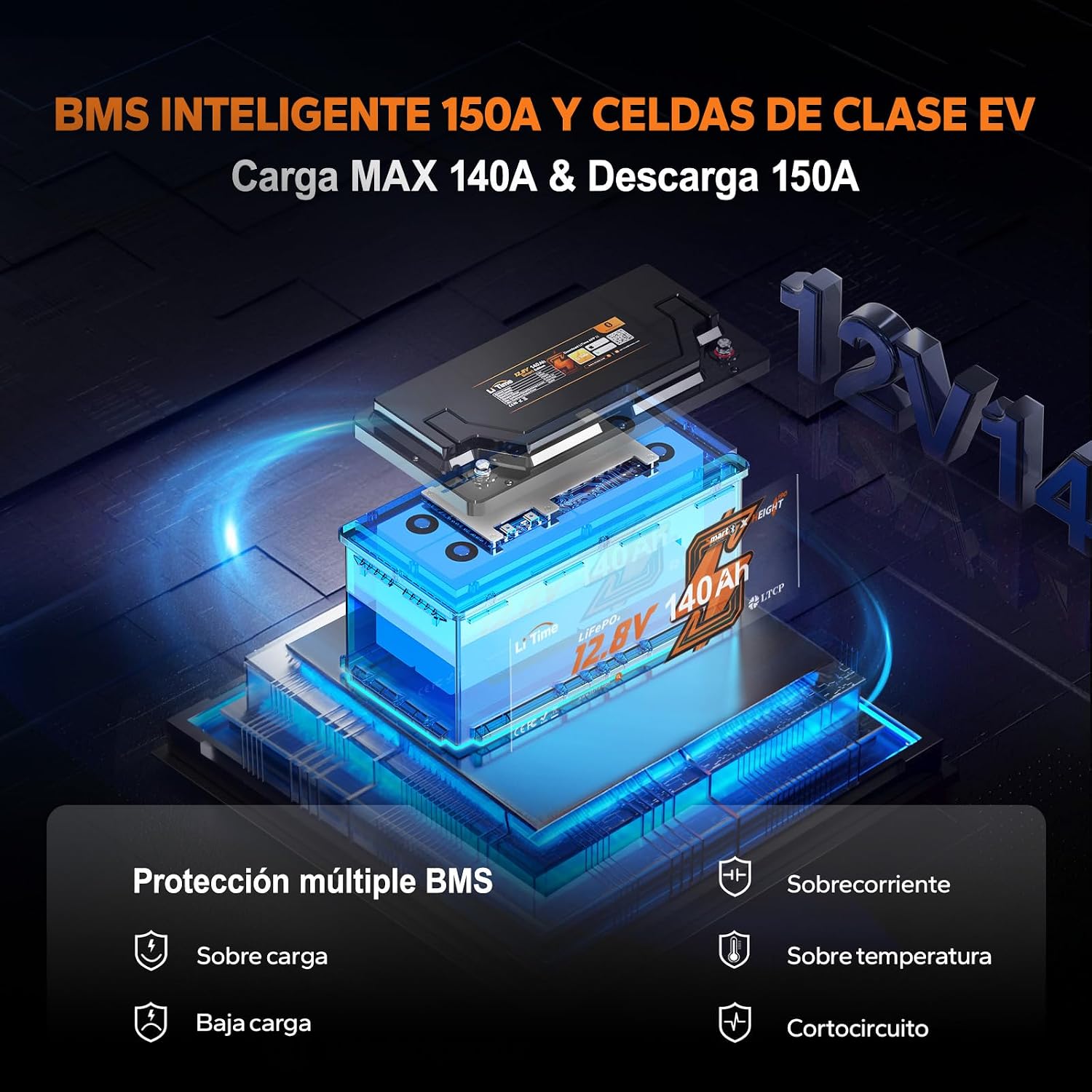
Image: An exploded view diagram of the LiTime battery, highlighting the internal 150A BMS and listing multiple protection features like overcharge, overcurrent, low charge, overtemperature, and short circuit protection.
3.3 High-Quality LiFePO4 Cells
This battery utilizes automotive-grade prismatic LiFePO4 cells, known for their high energy density, stability, and long cycle life. These cells ensure resistance to pressure, efficient heat dissipation, and a lifespan of over 4,000 cycles at 100% Depth of Discharge (DOD), guaranteeing longevity and reliability.

Image: A graphic illustrating the battery's performance metrics: 4000+ deep cycles, 1792Wh energy, 1920W maximum discharge power, 700A peak discharge current, and an upgraded 150A BMS.
3.4 Low-Temperature Protection
The intelligent low-temperature protection feature automatically stops charging when the battery temperature is ≤0℃ and stops discharging when the temperature is ≤-20℃. Charging resumes when the temperature reaches ≥5℃, protecting the battery from damage in cold environments.

Image: A LiTime battery in a snowy environment, illustrating its low-temperature protection: stops discharge below -20°C, stops charge below 0°C, and resumes charge above 5°C.
3.5 Lightweight Design
Weighing only 12.96 kg, this battery is significantly lighter than traditional lead-acid batteries, making it ideal for RVs, caravans, and other applications where weight is a critical factor.
4. Setup and Installation
Proper installation is crucial for the safe and efficient operation of your LiTime LiFePO4 battery.
4.1 Unpacking and Inspection
- Carefully remove the battery from its packaging.
- Inspect the battery for any visible damage, such as cracks, dents, or loose terminals. If damage is found, do not proceed with installation and contact customer support.
- Verify that all included components (e.g., terminal bolts, protective caps) are present.
4.2 Installation Location
- Install the battery in a clean, dry, and well-ventilated area.
- Ensure the location is free from flammable materials, excessive heat, and direct sunlight.
- The battery is designed to fit under the driver's seat in many European RVs.

Image: A graphic showing the dimensions (358mm x 179mm x 189mm) and weight (12.96 kg) of the LiTime battery, with illustrations of an RV and a camper van, indicating its suitability for EU recreational vehicles and under-seat mounting.
4.3 Wiring and Connections
- Use appropriate gauge cables for your application to handle the expected current.
- Connect the positive (+) terminal of the battery to the positive (+) terminal of your system, and the negative (-) terminal to the negative (-) terminal.
- Ensure all connections are tight and secure to prevent resistance and overheating.
- If connecting multiple batteries in series or parallel, consult a qualified electrician or refer to specific wiring diagrams for your system. This battery supports up to 4 parallel and 4 series connections (4P4S).
- Install appropriate fuses or circuit breakers between the battery and your load/charger to protect against overcurrent.

Image: A diagram illustrating the integration of the LiTime 12V 140Ah LiFePO4 battery into an RV's electrical system, showing connections to solar panels, a charge controller, and an inverter.
4.4 LiTime App Installation
- Download the official LiTime app from your smartphone's app store (iOS or Android).
- Enable Bluetooth on your device.
- Open the app and follow the instructions to scan the barcode on your battery or manually connect to the battery's Bluetooth signal.
5. Operating Instructions
Once installed, your LiTime LiFePO4 battery is ready for use. Follow these guidelines for optimal performance.
5.1 Charging
- Use a charger specifically designed for LiFePO4 batteries with a voltage range of 14.2V-14.6V.
- The maximum recommended charge current is 150A.
- The battery's BMS will protect against overcharging.
- In cold conditions (below 0°C), the low-temperature protection will prevent charging until the battery warms up to 5°C or above.

Image: A graphic showing various charging options for the LiTime battery, including a dedicated LiFePO4 battery charger, solar panels, and a generator.
5.2 Discharging
- The maximum continuous discharge current is 150A.
- The peak discharge current is 700A (for 1 second).
- The BMS will disconnect the battery if the discharge current exceeds its limits or if the voltage drops too low.
- Avoid discharging the battery below -20°C, as the low-temperature protection will activate.

Image: A graphic demonstrating the LiTime battery's capacity to power various devices in an RV, such as phones, drones, coffee makers, electric grills, and portable refrigerators, with estimated runtimes.
5.3 Monitoring with LiTime App
- Regularly check the battery status using the LiTime app to monitor voltage, current, temperature, and SOC.
- The app provides valuable insights into battery health and performance.
6. Maintenance
LiFePO4 batteries are largely maintenance-free, but a few simple steps can help ensure optimal performance and longevity.
- Regular Inspection: Periodically check the battery for any physical damage, loose connections, or corrosion on the terminals.
- Clean Terminals: If corrosion is present, clean the terminals with a wire brush and a mixture of baking soda and water. Ensure terminals are dry before reconnecting.
- Keep Charged: For optimal lifespan, avoid leaving the battery in a deeply discharged state for extended periods. If storing for a long time, charge it to 50-70% SOC.
- Storage Temperature: Store the battery in a cool, dry place, ideally between 0°C and 25°C (32°F and 77°F).
- Avoid Extreme Temperatures: While the battery has low-temperature protection, prolonged exposure to extreme heat or cold can degrade performance over time.
7. Troubleshooting
If you encounter issues with your LiTime LiFePO4 battery, refer to the following common problems and solutions:
| Problem | Possible Cause | Solution |
|---|---|---|
| Battery not providing power | Battery discharged; BMS protection activated (low voltage, overcurrent, low temperature); Loose connections. | Check battery charge level via app. Recharge if necessary. Inspect all cable connections for tightness. Allow battery to warm up if low-temperature protection is active. |
| Battery not charging | Charger not connected; Charger fault; BMS protection activated (over-voltage, low temperature); Incorrect charger type. | Ensure charger is properly connected and functioning. Verify charger is compatible with LiFePO4 batteries. Check battery temperature via app; allow to warm up if below 0°C. |
| Bluetooth app not connecting | Bluetooth disabled on phone; Battery out of range; App issue; Battery in deep sleep mode. | Ensure phone Bluetooth is on and close to the battery. Restart the app. If battery is in deep sleep, connect a charger to wake it up. |
| Reduced capacity or runtime | Aging battery; Consistent deep discharge; Operating in extreme temperatures. | Ensure proper charging and discharging practices. Avoid prolonged operation in extreme conditions. If battery is old, consider replacement. |
If the problem persists after attempting these solutions, please contact LiTime customer support for further assistance.
8. Specifications
Detailed technical specifications for the LiTime 12V 140Ah H190 LiFePO4 Battery:
| Specification | Value |
|---|---|
| Nominal Voltage | 12.8V |
| Nominal Capacity | 140Ah |
| Energy | 1792Wh |
| Max Continuous Charge Current | 150A |
| Max Continuous Discharge Current | 150A |
| Peak Discharge Current | 700A (1 second) |
| BMS | 150A |
| Cycle Life | 4000+ cycles (at 100% DOD) |
| Dimensions (L x W x H) | 35.8 x 17.9 x 18.9 cm |
| Weight | 12.96 kg |
| Operating Temperature (Charge) | 0°C to 45°C (32°F to 113°F) |
| Operating Temperature (Discharge) | -20°C to 60°C (-4°F to 140°F) |
| Low Temperature Charge Cut-off | ≤0℃ |
| Low Temperature Discharge Cut-off | ≤-20℃ |
| Cell Composition | Lithium Iron Phosphate (LiFePO4) |
| Connectivity | Bluetooth 5.0 |
9. Warranty and Support
LiTime is committed to providing high-quality products and excellent customer service.
9.1 Warranty
Your LiTime 12V 140Ah H190 LiFePO4 Battery comes with a 5-year warranty from the date of purchase. This warranty covers defects in materials and workmanship under normal use. Please retain your proof of purchase for warranty claims.
Additionally, this LiTime product is covered by AIG product liability insurance, effective from May 22, 2026, providing an extra layer of protection.
9.2 Customer Support
Should you have any questions, require technical assistance, or need to make a warranty claim, please do not hesitate to contact our professional customer support team. We aim to provide quick feedback within 24 hours.
For support, please visit the LiTime store on Amazon or refer to the contact information provided with your purchase.


