Introduction
This manual provides essential information for the safe and efficient use of your Xiaomi Redmi Note 14 Pro+ 5G smartphone. It covers setup, operation, maintenance, and troubleshooting to help you maximize your device's capabilities. The Redmi Note 14 Pro+ 5G features a 200MP pro-grade AI camera, a 1.5K 120Hz eye-care display, and is powered by a MediaTek Helio G100-Ultra processor, offering robust performance and advanced features.
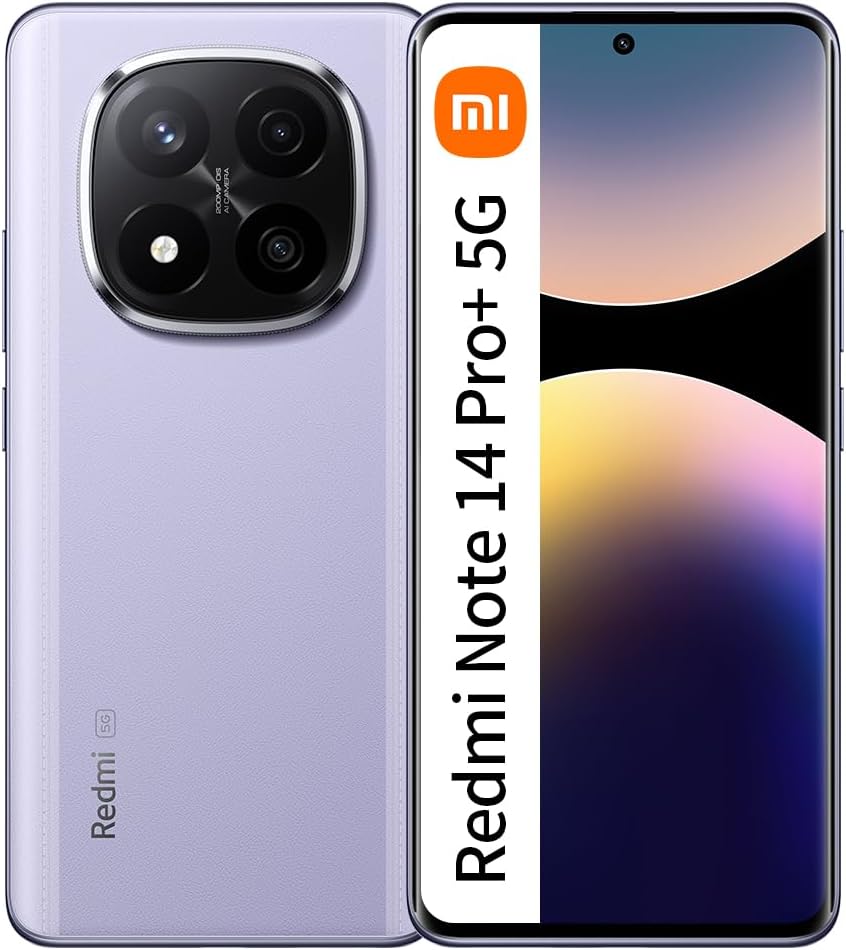
Image: Front and back view of the Xiaomi Redmi Note 14 Pro+ 5G in purple, showcasing its sleek design and camera module.
Setup Guide
1. Unboxing and Initial Inspection
- Carefully remove all components from the packaging.
- Verify that the smartphone, charging cable, and any included documentation are present.
- Inspect the device for any visible damage.
2. Inserting the SIM Card
- Locate the SIM card tray on the side of the device.
- Use the provided SIM ejector tool to open the tray.
- Place your Nano-SIM card(s) into the tray with the gold contacts facing down.
- Gently push the tray back into the slot until it clicks into place.
3. Initial Power On and Setup
- Press and hold the Power button until the Xiaomi logo appears.
- Follow the on-screen prompts to select your language, region, and connect to a Wi-Fi network.
- Sign in with your Google account or create a new one.
- Complete the setup process, including setting up security features like fingerprint or face unlock.
4. Charging the Device
- Connect the USB Type-C cable to the phone's charging port.
- Connect the other end of the cable to a compatible 45W Turbo Charger (if included or purchased separately).
- Allow the device to charge fully before first use for optimal battery calibration.
Operating Instructions
Basic Navigation
- Power Button: Press to wake/sleep the screen. Press and hold to power off or restart.
- Volume Buttons: Adjust media volume, call volume, or ringtone volume.
- Home Screen: Swipe left/right to navigate between screens.
- App Drawer: Swipe up from the bottom of the screen to access all installed applications.
- Notifications Panel: Swipe down from the top of the screen to view notifications and quick settings.
Making Calls and Sending Messages
- Open the "Phone" app to dial numbers or select contacts.
- Open the "Messages" app to compose and send text messages.
Connecting to Wi-Fi and Bluetooth
- Go to Settings > Wi-Fi to connect to available networks.
- Go to Settings > Bluetooth to pair with Bluetooth devices.
Camera System

Image: Detailed breakdown of the Redmi Note 14 Pro+ 5G's imaging system, highlighting the 200MP main camera with OIS, 8MP ultra-wide, and 2MP macro camera.
200MP Pro-Grade AI Camera System with OIS
The Redmi Note 14 Pro+ 5G is equipped with a flagship-level 200MP main camera, designed to capture clear details and stunning night shots. Optical Image Stabilization (OIS) ensures stable photos and videos, even in challenging conditions. The camera system also includes an 8MP ultra-wide camera for expansive shots and a 2MP macro camera for close-up details.
- Main Camera: 200MP, 1/1.4" large sensor size, f/1.65 large aperture, 2.24µm Super Pixel, OIS, 7P lens.
- Ultra-wide Camera: 8MP.
- Macro Camera: 2MP.
Brilliant Display

Image: Visual representation of the phone's 1.5K CrystalRes AMOLED display, detailing its 2712x1220 resolution, 446 PPI, 12-bit color depth, 100% DCI-P3 wide color gamut, and 3000 nits peak brightness.
1.5K 120Hz Eye-Care Display
Experience magnificent colors and an immersive viewing experience on the 6.67-inch flagship-level AMOLED display. With a 120Hz refresh rate, content appears smooth and fluid. The display also incorporates eye-care features to reduce strain during prolonged use.
- Resolution: 2712 x 1220
- Pixel Density: 446 PPI
- Color Depth: 12-bit
- Color Gamut: 100% DCI-P3 wide color gamut
- Peak Brightness: 3000 nits
Performance

Image: Close-up of a mobile processor labeled "Snapdragon 7s Gen 3", illustrating its architecture and performance improvements, including AnTuTu score, GPU performance, and CPU clock speed.
MediaTek Helio G100-Ultra - 6nm Process
The Redmi Note 14 Pro+ 5G is powered by the MediaTek Helio G100-Ultra processor, built on a 6nm process. This high-efficiency chipset enhances performance, imaging, and connectivity, providing a comprehensively enhanced user experience.
- Processor Technology: 6nm process
- Enhanced Performance: Optimized for demanding applications and smooth multitasking.
- AI Functions: Supports advanced AI capabilities for camera and system optimization.
Battery and Charging
45W Turbo Charge with 5500mAh (typ) Battery
The device is equipped with a large 5500mAh (typical) battery, providing extended usage time. The 45W Turbo Charge technology allows for rapid charging, minimizing downtime and ensuring your device is ready when you need it.
Durability and Design

Image: The Redmi Note 14 Pro+ 5G with water droplets on its surface, demonstrating its IP68 dust and water resistance and the functionality of its wet-touch technology.
IP68 Dust and Water-Resistant
The Redmi Note 14 Pro+ 5G is equipped with flagship-level IP68 protection, meaning it has been tested for up to 30 minutes of submersion in up to 1.5 meters of water. This provides enhanced durability against environmental elements.

Image: A layered diagram illustrating the improved scratch and drop resistance provided by Corning Gorilla Glass Victus 2 on the front and Gorilla Glass 7i on the back.
Improved Scratch and Drop Resistance
Protect your phone from the front to the back with advanced glass technology. The front features Corning® Gorilla® Glass Victus® 2, offering a +200% improvement in front drop resistance. The back is protected by Corning® Gorilla® Glass 7i (available on Midnight Black and Frost Blue versions), providing a +100% improvement in back drop resistance.
Wet-Touch Technology
Stay connected without interruption and enjoy smooth scrolling even with wet, oily, or soapy fingers. The wet-touch technology ensures the screen remains responsive, providing the same quick response in various conditions.
Specifications
| Feature | Detail |
|---|---|
| Brand | XIAOMI |
| Model Name | Note 14 Pro+ |
| Operating System | MIUI 12 |
| RAM Memory Installed | 12 GB |
| Memory Storage Capacity | 512 GB |
| Screen Size | 6.67 Inches |
| Resolution | 2712 x 1220 |
| Connectivity Technology | 2G, 5G |
| Cellular Technology | 5G |
| Color | Purple |
| Item Weight | 600 g |
| Audio Jack | No headphone jack |
| Date First Available | 16 March 2025 |
Troubleshooting
Common Issues and Solutions
- Device Not Powering On: Ensure the battery is charged. Press and hold the Power button for at least 10 seconds. If unresponsive, connect to charger and try again.
- Screen Unresponsive: Restart the device by holding the Power button. If the issue persists, perform a force restart (refer to specific key combination for your model, usually Power + Volume Down).
- Poor Battery Life: Reduce screen brightness, disable unnecessary background apps, turn off Wi-Fi/Bluetooth when not in use, and check for app battery usage in settings.
- Network Connectivity Issues: Check if Airplane Mode is off. Restart the device. Reset network settings (Settings > Connection & sharing > Reset Wi-Fi, mobile networks, and Bluetooth).
- Apps Crashing/Freezing: Clear app cache (Settings > Apps > Manage apps > [App Name] > Clear data > Clear cache). Update the app or reinstall it.
- Camera Not Working: Ensure camera permissions are granted. Restart the camera app or the device. Clear camera app cache.
Warranty and Support
Manufacturer Warranty
Your Xiaomi Redmi Note 14 Pro+ 5G comes with an 18-month manufacturer warranty. This warranty covers defects in materials and workmanship under normal use. Please retain your proof of purchase for warranty claims.
Customer Support
For further assistance, technical support, or warranty service, please visit the official Xiaomi support website or contact their customer service hotline. Refer to the official Xiaomi website for the most up-to-date contact information and service center locations.
You can also visit the XIAOMI Store on Amazon for product information and related accessories.


