Product Overview
The SohoTeco Smart Lock ST380 is a state-of-the-art keyless entry deadbolt designed to enhance home security and convenience. Featuring built-in Wi-Fi, it allows for remote management and real-time notifications via a smartphone application. This smart lock offers multiple secure entry methods, including fingerprint recognition, custom passcodes, app control, voice commands (compatible with Alexa and Google Assistant), fob access, and traditional physical keys. Its robust construction and IP56 waterproof rating ensure reliable performance in various weather conditions, making it an ideal solution for modern households.

Image: The SohoTeco Smart Lock ST380, showcasing its sleek matte black design, integrated fingerprint sensor, keypad, and the accompanying mobile application interface for remote control. Physical keys and key fobs are also visible, highlighting the diverse access options.
What's in the Box
The SohoTeco Smart Lock ST380 package includes all necessary components for installation and operation:
- Smart Lock Deadbolt Assembly (Exterior and Interior Units)
- Mounting Plate
- Deadbolt Latch
- Strike Plate
- Physical Keys (2)
- Key Fobs (2)
- Installation Hardware (Screws, Spindle)
- User Manual
- Installation Template

Image: A clear view of all components included in the Smart Lock ST380 package, neatly arranged. This includes the front and back panels of the lock, the deadbolt mechanism, an accessory kit box, two physical keys, and two key fobs.
Installation and Setup
The Smart Lock ST380 is designed for easy installation, typically taking less than 15 minutes. Ensure your door meets the compatibility requirements before beginning.
Door Compatibility Check
Verify your door's dimensions to ensure proper fit:
- Cross Bore Diameter: 1-1/2" to 2-1/8" (38mm-54mm)
- Backset Distance: 2-3/8" to 2-3/4" (60mm-70mm)
- Door Thickness: 1-3/8" to 2-1/6" (35mm-55mm)
The lock works with doors that have a rectangular latch faceplate cutout and is not compatible with round faceplate cutouts.

Image: Diagram illustrating the required door measurements (cross bore diameter, backset distance, and door thickness) for compatibility with the Smart Lock ST380. It also shows the correct rectangular latch faceplate cutout.
Installation Steps
- Remove Existing Hardware: Carefully remove your current deadbolt and any associated hardware from the door.
- Install Latch: Insert the new deadbolt latch into the door edge, ensuring it is correctly oriented for your door's swing. Secure with screws.
- Install Exterior Assembly: Feed the cable and spindle from the exterior unit through the deadbolt latch and the door hole. Align the exterior unit with the door.
- Install Mounting Plate: Secure the mounting plate to the interior side of the door, ensuring the cable passes through it.
- Connect Interior Assembly: Connect the cable from the exterior unit to the interior assembly. Carefully tuck excess cable into the door.
- Secure Interior Assembly: Attach the interior assembly to the mounting plate using the provided screws. Ensure the lock is flush and stable.
- Install Batteries: Open the battery cover on the interior unit and insert 8 AA batteries (not included), ensuring correct polarity.
- Initial Setup: Follow the instructions in the user manual for initial setup, including factory reset and creating your first administrator passcode.

Image: A hand using a screwdriver to install the deadbolt latch mechanism into a door, illustrating the ease of the 15-minute installation process for the Smart Lock ST380.
Operating Instructions
The Smart Lock ST380 offers multiple convenient ways to unlock and lock your door:
Unlock Options:
- Fingerprint: Store up to 100 unique fingerprints for quick and secure access. The lock features 0.2s recognition time with a 99.9% recognition rate.
- Passcode: Program up to 50 passcodes (6-8 digits) for family, friends, or service providers. Includes anti-peep technology for added security.
- App Control: Use the Smart Life/Tuya app to remotely unlock/lock, manage users, set temporary passwords, and view access logs.
- Voice Control: Compatible with Amazon Alexa and Google Assistant for convenient voice commands (e.g., "Alexa, unlock the door").
- Fob Access: Utilize the included key fobs for quick tap-to-unlock functionality.
- Physical Key: Traditional key entry is available as a backup.

Image: Visual representation of the six diverse unlock options for the Smart Lock ST380: Fingerprint, Passcode, App Control, Voice Control (Alexa), Fob, and Physical Key, demonstrating the lock's versatility.
User Management
Manage access to your property with ease through the Smart Life/Tuya app:
- Add/Delete Users: Easily add new fingerprints, passcodes, or fobs for family members or trusted individuals. Remove access instantly when no longer needed.
- Temporary Passwords: Generate time-limited or one-time passcodes for guests, deliveries, or service personnel, providing secure access without sharing permanent codes.
- Access Logs: Monitor who enters and exits your property with detailed access logs available in the app.
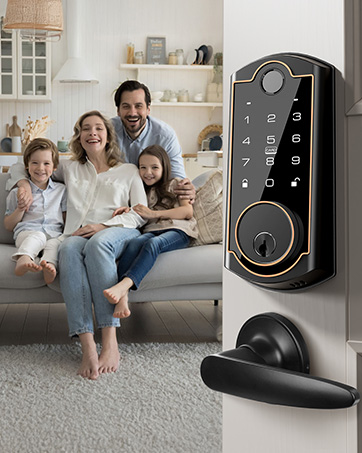
Image: A visual depicting the user management features, showing options to add or manage users via fingerprint, passcode, and fob, as seen within the mobile application.
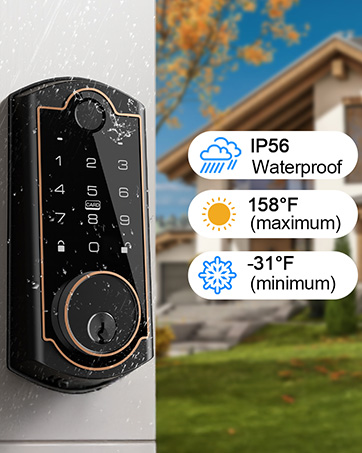
Image: An illustration of the temporary password feature, showing a user receiving a temporary code via message to grant access to another individual.
Connectivity
The Smart Lock ST380 features built-in 2.4GHz Wi-Fi for direct connection to your home network, eliminating the need for a separate gateway or hub.
- Remote Access: Control your lock from anywhere using the Smart Life/Tuya app.
- Real-time Notifications: Receive instant alerts on your smartphone when the lock is accessed or if there are any security events.
- Voice Assistant Integration: Seamlessly integrate with Amazon Alexa and Google Assistant for hands-free control.

Image: A diagram showing the Smart Lock ST380 connecting directly to a 2.4GHz Wi-Fi router, emphasizing that no additional gateway is required for remote accessibility.
Battery Management
The Smart Lock ST380 is powered by 8 AA batteries (not included) and is designed for long-lasting performance.
- Extended Battery Life: Enjoy up to 8 months of battery life under normal usage. Power saving mode can extend this to 12 months (disables remote unlocking and app-based passcode addition).
- Low Battery Warning: Receive notifications via the app when battery levels are low, prompting you to replace them.
- Emergency Charging Port: A Type-C port is available for emergency power supply if batteries completely drain, ensuring you are never locked out. Note: This port is for emergency power only, not for battery charging.

Image: A close-up view of the battery compartment of the Smart Lock ST380, showing the placement of 8 AA batteries and highlighting the 8-month battery life.

Image: A detailed view of the emergency Type-C charging port located at the bottom of the Smart Lock ST380, with a note clarifying its use for emergency power supply only.
Enhanced Security Features
The Smart Lock ST380 incorporates several features to ensure robust home security:
- Auto-Lock: Automatically locks the door after a customizable delay (5-900 seconds) for peace of mind.
- Anti-Peep Passcode: Enter random digits before or after your actual passcode to prevent others from guessing your code by observing finger movements.
- Mute Mode: Silence the lock's sounds for quiet entry or exit, ideal for late nights or early mornings.
- IP56 Waterproof Rating: Designed to withstand dust and water splashes, ensuring durability and functionality in various outdoor conditions.
- Wide Operating Temperature: Functions reliably in temperatures ranging from -22℉ to 158℉ (-35℃ to 70℃).

Image: The Smart Lock ST380 shown with water droplets, illustrating its IP56 waterproof rating and ability to withstand various weather conditions, with temperature ranges also indicated.
Specifications
| Feature | Detail |
|---|---|
| Brand | SohoTeco |
| Model Name | ST380 |
| Lock Type | Biometric, Combination Lock, Deadbolt |
| Special Features | Anti-Peeping Password, Auto-Lock, Back-Lit Keypad, Fingerprint, Fob Unlock, One-Touch Lock, Passcode Unlock, Touchscreen |
| Connectivity Protocol | Bluetooth, Wi-Fi (2.4GHz only) |
| Control Method | App, Touch, Voice (Amazon Alexa, Google Assistant) |
| Material | Aluminum |
| Color | Matte Black |
| Item Dimensions (L x W x H) | 6.69 x 2.91 x 1.38 inches |
| Item Weight | 1 Pounds |
| Power Source | 8 AA Batteries (not included) |
| Battery Life | Up to 8 months (12 months in power saving mode) |
| Waterproof Rating | IP56 |
| Operating Temperature | -22℉ to 158℉ (-35℃ to 70℃) |
| Fingerprint Capacity | Up to 100 |
| Passcode Capacity | Up to 50 (6-8 digits) |
Troubleshooting
If you encounter issues with your Smart Lock ST380, consider the following common solutions:
- Lock Not Responding: Check battery levels and replace if necessary. Ensure the battery ribbon is correctly placed.
- Fingerprint Not Recognized: Ensure your finger is clean and dry. Re-register your fingerprint if the issue persists.
- Passcode Issues: Verify the passcode entered is correct. Ensure anti-peep digits are not interfering with the actual code.
- App Connectivity Problems: Confirm your Wi-Fi network is 2.4GHz. Restart your router and the lock. Ensure the lock is within Wi-Fi range.
- Auto-Lock Malfunction: Check the auto-lock delay settings in the app.
- Factory Reset: If problems persist, perform a factory reset as described in the installation section. This will clear all settings, requiring re-setup.
For more detailed troubleshooting or persistent issues, please refer to the comprehensive user manual or contact customer support.
Warranty and Support
SohoTeco is committed to providing high-quality products and excellent customer service.
- Warranty: The Smart Lock ST380 comes with a 3-year warranty from the date of purchase.
- Customer Support: SohoTeco offers lifetime customer support, including 24/7 email assistance.
- Contact Information: For any questions, technical assistance, or warranty claims, please contact the SohoTeco Support Team via email at support@sohoteco.com.
Please retain your proof of purchase for warranty purposes.