
Introduction
This manual provides instructions for the Cuifati Smart Ring Charging Case, a portable magnetic charging compartment designed for specific smart rings. It is compatible with COLMI R02, R06, R11M, and R8 fitness rings, as well as other smart rings featuring a magnetic charging port. This charging case is not suitable for smart rings with wireless charging functionality.
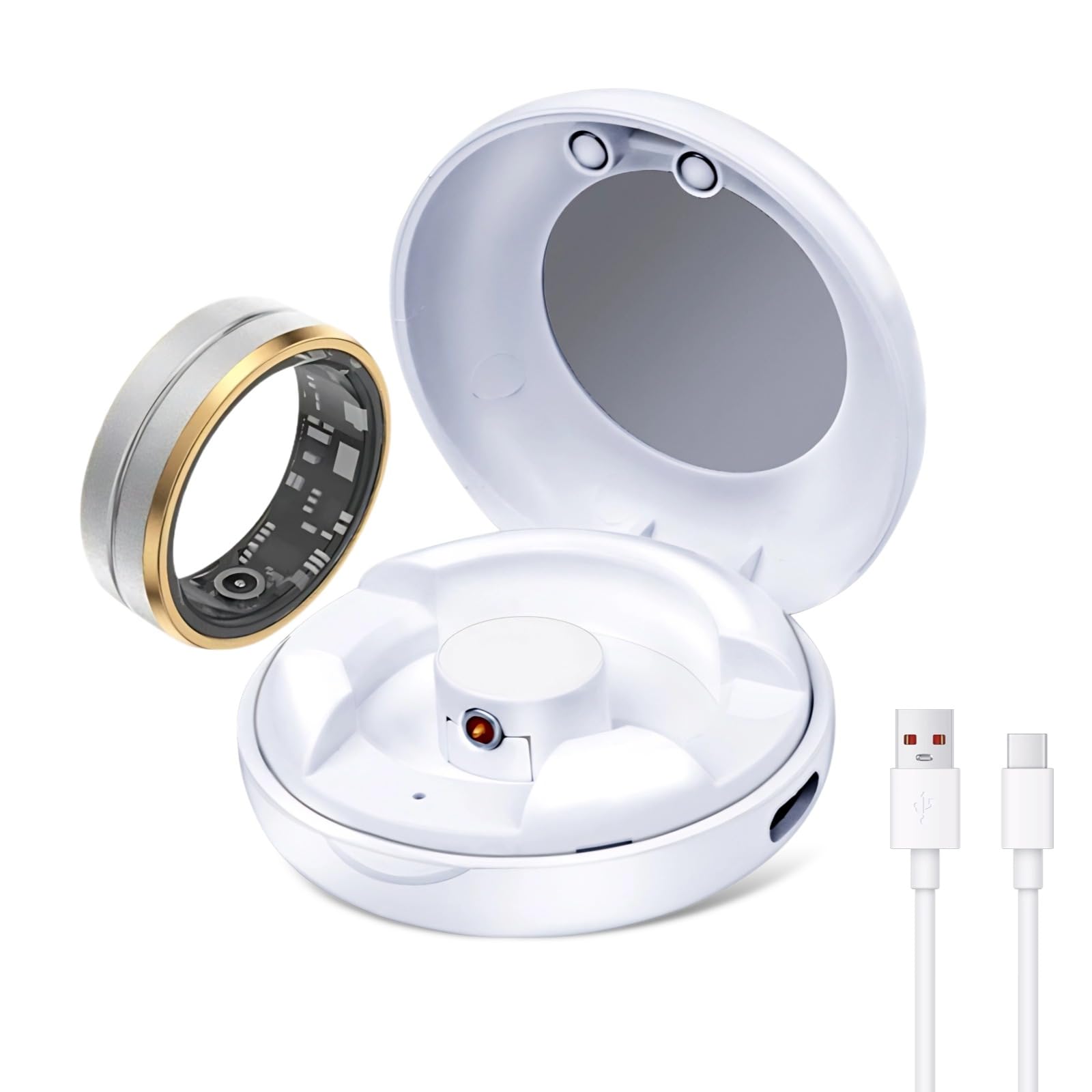
Image: Cuifati Smart Ring Charging Case with a smart ring. This image shows the compact design of the charging case and how a smart ring fits into it for charging.
Setup
- Unpack the Charging Case: Carefully remove the charging case from its packaging.
- Initial Charge of the Case: Before first use, connect the charging case to a power source using a Type C cable (cable not included). The indicator light will show red during charging.
- Check Compatibility: Ensure your smart ring has a magnetic charging port and is compatible with models such as COLMI R02, R06, R11M, or R8. This case is not designed for rings with wireless charging.

Image: The charging case open with a smart ring inside. This illustrates the correct placement of the smart ring for charging.
Operating Instructions
Charging Your Smart Ring
- Place the Ring: Open the charging case and carefully place your smart ring onto the magnetic charging port inside the compartment. Ensure the ring aligns correctly with the magnetic contacts.
- Monitor Charging: The indicator light on the charging case will illuminate to show the charging status:
- Red: The smart ring is currently charging.
- Green: The smart ring is fully charged.
- Flashing Red: The charging case's internal battery is low and needs to be recharged.
- Remove When Charged: Once the indicator light turns green, your smart ring is fully charged and can be removed from the case.

Image: Magnetic Charging Port. This image details the magnetic charging contacts within the case, ensuring proper connection for your smart ring.

Image: Charging Indicator. This image displays the indicator light, which changes color to communicate the charging status of the smart ring and the case itself.
Recharging the Charging Case
When the indicator light flashes red, the charging case's internal 200mAh battery is low. Connect a Type C charging cable to the port on the side of the case and plug it into a suitable USB power adapter (not included). The case supports fast charging and can be fully recharged in approximately one hour. A fully charged case can provide up to 10 charges for your smart ring.

Image: Fast Charging for Smart Ring. This image highlights the fast charging capability of the case, capable of charging a smart ring multiple times.
Portability
The compact design of this charging case (5x5x2cm) allows for easy storage and transport. It fits conveniently into handbags or pockets, making it ideal for use at home, in the car, or while traveling.

Image: Compact and Portable. This image shows the charging case being held, emphasizing its small size and ease of carrying.
Maintenance
- Cleaning: Use a soft, dry cloth to clean the exterior of the charging case. Do not use liquid cleaners or abrasive materials.
- Storage: Store the charging case in a cool, dry place away from direct sunlight and extreme temperatures.
- Avoid Moisture: Keep the device away from water and high humidity to prevent damage to internal components.
Troubleshooting
| Problem | Possible Cause | Solution |
|---|---|---|
| Smart ring not charging |
|
|
| Charging case not recharging |
|
|
| Indicator light not working |
|
|
Specifications
- Brand: Cuifati
- Model Number: Cuifati3ugs9cf14o
- Product Dimensions: 14 x 10 x 4 cm (5.5 x 3.9 x 1.6 inches)
- Item Weight: 26 g (0.9 ounces)
- Case Battery Capacity: 200 mAh
- Charging Port: Type C
- Compatibility: Smart rings with magnetic charging port, including COLMI R02, R06, R11M, R8. (Not for wireless charging rings)
- Country of Origin: China

Image: Product Dimensions. This image provides a visual representation of the compact size of the charging case with its measurements.
Warranty and Support
For warranty information or technical support, please refer to the retailer's return policy or contact Cuifati customer service through their official Amazon store page.