1. Product Overview
The ULANZI Quick Release Mini Tripod Kit (PK-08 & PK-11) is designed to enhance the versatility and functionality of your DJI Osmo Pocket 3. This kit provides a compact and stable solution for various shooting scenarios, allowing for quick transitions between handheld grip and tripod use, along with expanded connectivity options.

Figure 1: Overview of the ULANZI PK-08 Mini Tripod and PK-11 Charging Adapter Base with DJI Osmo Pocket 3.
2. What's in the Box
- PK-08 Mini Tripod
- PK-11 Arri Locating Base (Type-C Full-Function Port)
- Wrench (for PK-08)
- Locating Screws (for PK-08)
3. Assembly and Installation
3.1 Attaching the PK-11 Arri Locating Base
- Align the PK-11 base with the bottom port of your DJI Osmo Pocket 3.
- Gently slide the PK-11 base onto the Osmo Pocket 3 until it clicks securely into place. Ensure the Type-C connector is properly seated.

Figure 2: PK-11 Arri Locating Base securely attached to the DJI Osmo Pocket 3.
3.2 Attaching the PK-08 Mini Tripod
- The PK-08 Mini Tripod can be directly attached to the 1/4" screw hole on the bottom of the PK-11 base or the DJI Osmo Pocket 3's original handle.
- Screw the PK-08 Mini Tripod onto the 1/4" thread until it is firm. Do not overtighten.
- If using the Arri Locating Hole on the PK-11 base, ensure the detachable Arri locating pin on the PK-08 is aligned and secured with the provided wrench and locating screws for enhanced stability.
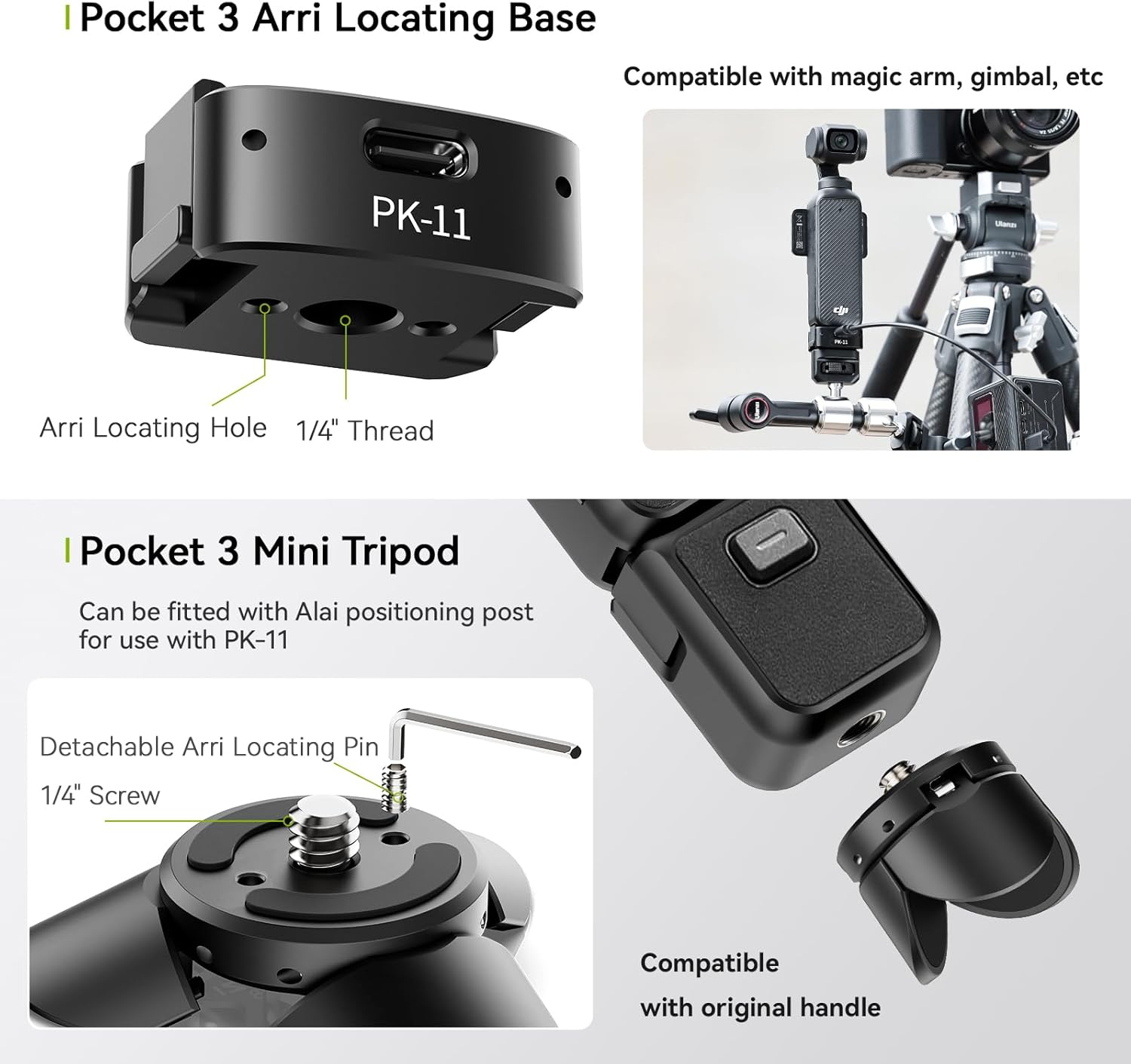
Figure 3: PK-11 base with 1/4" thread and Arri Locating Hole for accessory attachment.
4. Operating Instructions
4.1 Switching Between Tripod and Grip Mode (PK-08)
The PK-08 Mini Tripod features a quick-switch design:
- Tripod Mode: Unfold the legs of the PK-08 to create a stable tripod base for stationary shots.
- Grip Mode: Fold the legs of the PK-08 together to form a comfortable handheld grip, ideal for mobile shooting.

Figure 4: Demonstrating the quick switch between grip and tripod modes with PK-08.
4.2 Using the Type-C Full-Function Port (PK-11)
The PK-11 base integrates a Type-C full-function data port, offering multiple capabilities:
- Charging: Connect a Type-C charging cable to the port to charge your DJI Osmo Pocket 3 while in use.
- Data Transfer: Use the port for seamless data transfer between your Osmo Pocket 3 and a computer or other devices.
- Webcam Functionality: The full-function port supports using your Osmo Pocket 3 as a webcam.

Figure 5: DJI Osmo Pocket 3 charging via the PK-11 Type-C full-function port.
4.3 Attaching Additional Accessories
The PK-11 base and PK-08 tripod offer various mounting points for expanded compatibility:
- 1/4" Thread: Standard 1/4" screw holes allow attachment of magic arms, gimbals, additional tripods, ballheads, and other camera accessories.
- Arri Locating Hole: The Arri locating hole on the PK-11 base provides a secure, anti-twist mounting point for compatible accessories.
5. Care and Maintenance
- Clean the product with a soft, dry cloth. Avoid using harsh chemicals or abrasive materials.
- Store the kit in a dry, cool place away from direct sunlight and extreme temperatures.
- Ensure all screws and connections are tightened before use to prevent accidental detachment.
- When not in use, remove the Arri locating pin from the PK-08 to prevent scratching other equipment.
6. Troubleshooting
- Loose Connection: If the PK-11 base feels loose, ensure it is fully inserted and clicked into place. Check for any debris in the port.
- Unstable Tripod: Ensure the PK-08 tripod legs are fully extended and placed on a flat, stable surface. If using the Arri locating pin, confirm it is properly secured.
- Charging Issues: Verify that the Type-C cable and power source are functioning correctly. Ensure the cable is fully inserted into the PK-11 port.
7. Specifications
| Feature | PK-08 Mini Tripod | PK-11 Arri Locating Base |
|---|---|---|
| Brand | ULANZI | ULANZI |
| Material | Aluminum Alloy + Iron + Silicone | Aluminum Alloy + Iron + PCB + Silicone |
| Dimensions | 1.14"D x 1.03"H (29.1 x 26.2mm) | 1.39"D x 0.73"H (35.2 x 18.5mm) |
| Load Capacity | 1kg / 2.20lb | 1kg / 2.20lb |
| Net Weight | 27g / 0.06lb | 28g / 0.06lb |
| Compatible Devices | DJI Osmo Pocket 3 | |
| Interface | 1/4" Thread, Arri Locating Pin | Type-C Full-Function Port, 1/4" Thread, Arri Locating Hole |
Note: Manually measured weight and size may not be accurate.
8. Official Product Videos
ULANZI Accessories for DJI Osmo Pocket 3
This video provides an overview of ULANZI accessories, including the PK-08 and PK-11, demonstrating their features and how they integrate with the DJI Osmo Pocket 3.
Expansion Adapter Accessories for DJI Osmo Pocket 3
This video specifically highlights the expansion adapter (PK-11) and its functionalities when used with the DJI Osmo Pocket 3.
9. Warranty Information
This product is covered by a return policy allowing for refunds or replacements for up to 2026 days from the date of purchase. For specific warranty details and claims, please refer to the official ULANZI website or contact their customer support.


