1. Introduction
Thank you for choosing the Happybuy 2000W Sump Pump Battery Backup Inverter. This device is designed to provide reliable backup power to your sump pump(s) during power outages, ensuring your basement remains dry and protected. Featuring a 2000W rated power output and a 4000W peak power, this inverter automatically shifts to battery power, offering uninterrupted operation. Please read this manual thoroughly before installation and operation to ensure safe and efficient use.
2. Safety Instructions
Your safety is paramount. Please observe the following safety precautions to prevent injury or damage to the unit and connected equipment:
- Electrical Hazard: Always disconnect the inverter from the battery and AC power before performing any maintenance or installation.
- Proper Ventilation: Ensure the inverter is installed in a well-ventilated area to prevent overheating. Do not block ventilation openings.
- Battery Safety: Connect the inverter only to a 12V battery. Ensure correct polarity (+ to + and - to -) when connecting battery cables. Batteries can produce explosive gases; keep sparks and flames away.
- Water Exposure: Do not expose the inverter to water, rain, or excessive moisture. This device is not waterproof.
- Overload Protection: The inverter is equipped with overload protection. Do not exceed the rated power of 2000W.
- Circuit Breaker: The unit includes a circuit breaker for added protection against electrical faults.
- Qualified Personnel: Installation and servicing should only be performed by qualified personnel.
This unit incorporates multiple protection mechanisms including short circuit protection, overcharging protection, overvoltage protection, and overheat protection to safeguard your equipment and ensure reliable operation.

Image: The inverter highlighting its multiple protection features including overload, short circuit, overcharge, overvoltage, and overheat protection, along with a visible circuit breaker.
3. Product Features
- 2000W Powerful Backup System: Provides a continuous 2000W output (4000W peak) with an 18.2A operating current, capable of supporting up to two sump pumps simultaneously. It automatically switches to battery power during outages.
- Smart Real-Time LCD Display: The high-definition LCD screen and LED indicator lights provide real-time data on input voltage, AC output voltage, loads power, battery level, frequency, working temperature, and various protection statuses (low voltage, overvoltage, over temperature, overload).
- Quick Plug Feature (3-Pin Design): Simplifies installation with a 3-Pin plug design, eliminating complex wiring and reducing the risk of incorrect connections.
- 20A Lightning Fast Charging: Equipped with a 20A charging current, it can fully recharge a 100AH battery in approximately 5 hours, significantly faster than standard 5A chargers.

Image: An illustration showing the Happybuy 2000W Sump Pump Battery Backup Inverter connected to a 12V battery and a sump pump, demonstrating its role in a home basement during a rainy day. The operating current of 18.2A is highlighted.

Image: A detailed view of the inverter's LCD display, showing various parameters like input voltage (12.8V), output voltage (110V), frequency (50/60 Hz), loads power (3000W), battery level, and working temperature (28°C), along with icons for different protection statuses.

Image: A comparison illustrating the Happybuy inverter's 3-Pin plug design for easy, secure connection versus other systems that require complex wiring, emphasizing its 'Plug and Play' and 'High Security Factor' benefits.

Image: A graphic demonstrating the fast charging capability of the inverter, showing a 100AH battery charging in approximately 5 hours with a 20A current, compared to 20 hours with a 5A current.
4. Setup and Installation
Follow these steps for proper installation of your Happybuy Sump Pump Battery Backup Inverter:
- Choose a Location: Select a dry, well-ventilated area near your sump pump and 12V battery. Ensure adequate space around the inverter for air circulation.
- Battery Connection: Using the provided battery connecting cables, connect the positive (+) terminal of the inverter to the positive (+) terminal of your 12V battery. Connect the negative (-) terminal of the inverter to the negative (-) terminal of your 12V battery. Ensure connections are secure and tight.
- Sump Pump Connection: Plug your sump pump(s) into the AC output receptacles on the inverter. The inverter supports up to two sump pumps.
- AC Power Connection: Plug the provided power cord into the inverter's AC input and then into a standard 120V AC wall outlet. This will allow the inverter to charge the battery and provide pass-through power to the sump pump(s) when utility power is available.
- Initial Power On: After all connections are made, switch the inverter's power button to the 'ON' position. The LCD display will illuminate, showing the current status.
Refer to the diagram in the 'Product Features' section for a visual representation of the setup.
5. Operating Instructions
The Happybuy Sump Pump Battery Backup Inverter is designed for automatic operation:
- Normal Operation: When AC utility power is present, the inverter will pass through AC power to your sump pump(s) and simultaneously charge the connected 12V battery. The LCD will display charging status and current parameters.
- Power Outage: In the event of a power failure, the inverter will automatically and seamlessly switch to battery power, converting the 12V DC battery power to 120V AC to keep your sump pump(s) operational. The LCD will indicate battery discharge and output status.
- Power Restoration: Once AC utility power is restored, the inverter will automatically switch back to utility power for the sump pump(s) and resume charging the battery.
- Monitoring: Regularly check the LCD display to monitor battery level, input/output voltage, and any protection warnings. This helps ensure the system is functioning optimally.
- Manual Power Off: To turn off the system, switch the power button to the 'OFF' position.
6. Maintenance
Regular maintenance ensures the longevity and reliability of your inverter system:
- Cleaning: Periodically clean the exterior of the inverter with a dry, soft cloth. Ensure ventilation openings are free from dust and debris. Do not use liquid cleaners.
- Battery Check: Inspect battery terminals for corrosion and ensure connections are tight. If using a lead-acid battery, check electrolyte levels if applicable and top up with distilled water as needed (refer to your battery's manual).
- Fuse Replacement: The inverter uses 40A fuses. If a fuse blows, disconnect all power, locate the fuse holder, and replace it with an identical 40A fuse. Refer to the 'What's in the Box' section for included spare fuses.
- Cable Inspection: Regularly inspect all cables for any signs of wear, damage, or fraying. Replace damaged cables immediately.
- Testing: Periodically test the system by temporarily disconnecting the AC utility power to ensure the inverter switches to battery backup correctly and the sump pump operates.
7. Troubleshooting
If you encounter issues with your inverter, refer to the following common problems and solutions:
- No Power/Inverter Not Turning On:
- Check battery connections for tightness and correct polarity.
- Ensure the battery is charged (check LCD display).
- Verify the power switch is in the 'ON' position.
- Check if the circuit breaker has tripped. Reset if necessary.
- Sump Pump Not Operating on Battery Backup:
- Confirm the inverter is receiving power from the battery.
- Check the battery charge level; a low battery may prevent operation.
- Ensure the sump pump is properly plugged into the inverter.
- Check for overload warnings on the LCD. Reduce load if necessary.
- Battery Not Charging:
- Ensure the AC power cord is securely plugged into a live wall outlet and the inverter.
- Check the AC input fuse (if accessible and replaceable).
- Verify the AC outlet is functional.
- Overload Warning on LCD:
- The connected load exceeds the inverter's 2000W rated power. Disconnect some devices.
- The inverter may temporarily shut down to protect itself. Reduce the load and restart.
- Overheat Warning on LCD:
- Ensure the inverter is in a well-ventilated area and its cooling fans are not obstructed.
- Allow the unit to cool down before resuming operation.
If problems persist after following these steps, please contact Happybuy customer support.
8. Specifications
| Feature | Specification |
|---|---|
| Item Model Number | SGPC2000W-121 |
| Input Voltage | 12V DC |
| Output Voltage | 120V AC / 60Hz |
| Rated Power | 2000W |
| Peak Power | 4000W |
| Operating Current | 18.2A |
| Charging Current | 20A |
| Peak Current | 36A |
| Net Weight | 12.46 lb / 5.65 kg |
| Overall Product Dimensions (L x W x H) | 17.32 x 6.81 x 4.02 in / 440 x 173 x 102 mm |
| Power Source | Corded Electric |
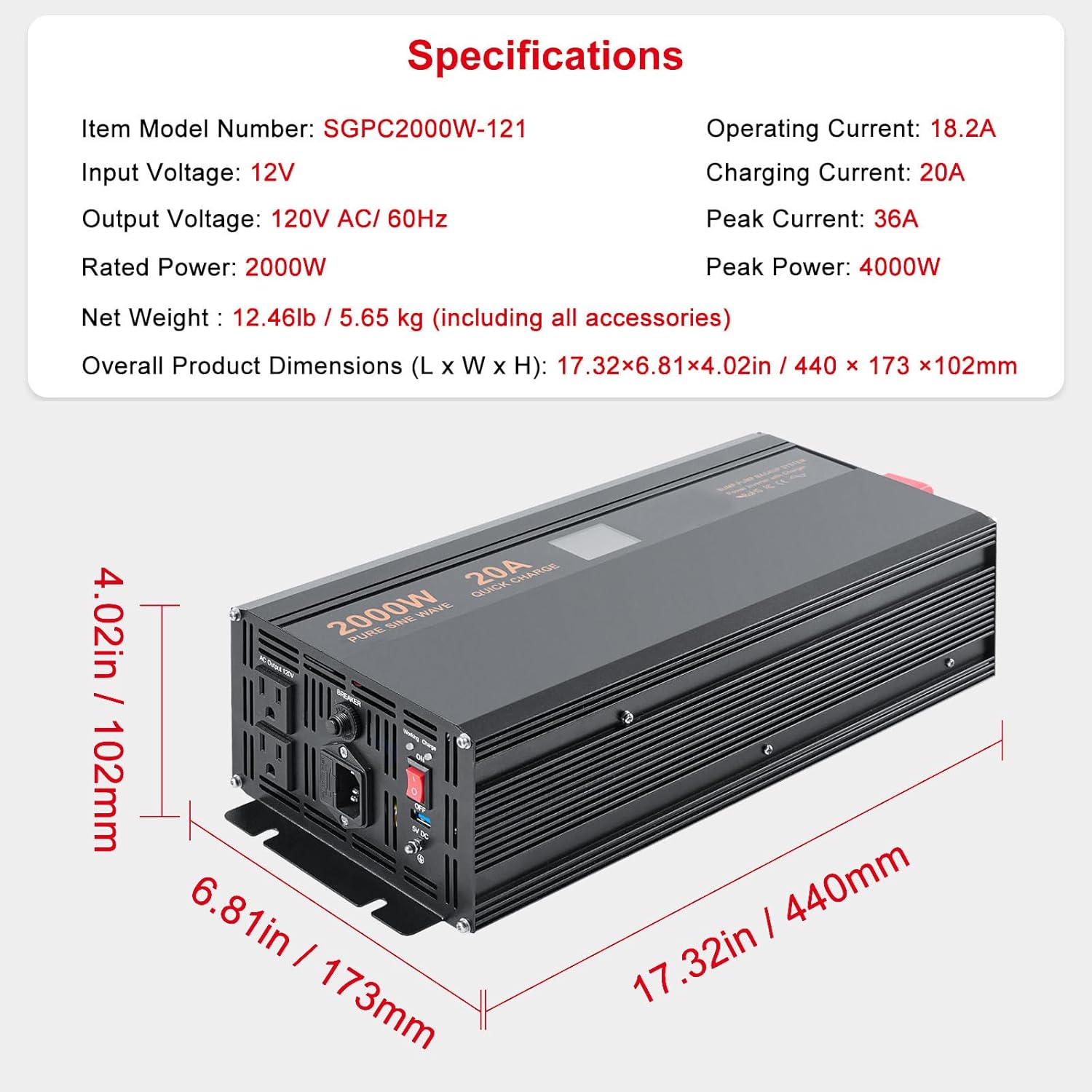
Image: The Happybuy 2000W Sump Pump Battery Backup Inverter with its key dimensions (length, width, height) and a summary of its specifications.
9. What's in the Box
The package includes the following items:
- 1 x Happybuy 2000W Sump Pump Battery Backup Inverter
- 2 x Battery Connecting Cables
- 6 x 40A Fuses (spare fuses)
- 1 x Power Cord

Image: The Happybuy 2000W Sump Pump Battery Backup Inverter displayed alongside its included accessories: battery connecting cables, spare 40A fuses, and the AC power cord.
10. Warranty and Support
For warranty information, technical support, or service inquiries, please contact Happybuy customer service through the retailer's platform or the official Happybuy website. Please have your model number (SGPC2000W-121) and purchase date available when contacting support.


