1. Introduction
The GRABO High-Flow Cordless Vacuum Lifter is an advanced portable electric tool designed for efficiently handling challenging objects and porous materials. It utilizes improved vacuum technology to provide a secure grip on various surfaces, including dry cast pavers, concrete, tiles, and stone slabs. This manual provides essential information for the safe and effective operation, setup, and maintenance of your GRABO High-Flow lifter.

Image 1.1: The GRABO High-Flow Cordless Vacuum Lifter and its canvas carrying case.
2. Safety Information
WARNING: Read all safety warnings and instructions before operating this tool. Failure to follow the warnings and instructions may result in electric shock, fire, and/or serious injury.
2.1 General Safety
- Always wear appropriate personal protective equipment (PPE) such as safety glasses and gloves.
- Ensure the work area is clear of obstructions and well-lit.
- Do not operate the tool in explosive atmospheres, such as in the presence of flammable liquids, gases, or dust.
- Keep children and bystanders away while operating the tool.
- Do not overreach. Maintain proper footing and balance at all times.
- Inspect the tool and accessories for damage before each use. Do not use if damaged.
2.2 Battery Safety
- Use only GRABO-approved batteries and chargers.
- Do not expose batteries to water or extreme temperatures.
- Do not short-circuit battery terminals.
- Charge batteries in a well-ventilated area.
- Dispose of batteries properly according to local regulations.
3. Package Contents
The GRABO High-Flow Kit includes the following components:
- GRABO High-Flow Tool
- Suction Plate 300mm with SMART CUT Foam Seal
- Two (2) GRABO High-Flow 20V Batteries
- Battery Charger
- T-Bar Handle Attachment with Wired Remote Control ON/OFF Cable
- Spare SMART CUT Foam Seal 300mm
- Extra Filter
- Operator's Manual (this document)
- HIGH FLOW Canvas Carrying Case
Note: A 400mm Suction Plate is available as an add-on and is not included in the standard kit.

Image 3.1: Overview of the GRABO High-Flow kit components, including the tool, T-bar handle, suction plate, batteries, and charger.
4. Setup
4.1 Charging and Installing the Battery
- Connect the battery charger to a power outlet.
- Insert a GRABO High-Flow 20V battery into the charger. The indicator light on the charger will show the charging status.
- Once fully charged, remove the battery from the charger.
- Align the charged battery with the battery slot on the GRABO High-Flow tool and slide it in until it clicks securely into place.
4.2 Attaching the Suction Plate
- Ensure the tool is powered off.
- Align the Suction Plate (300mm or optional 400mm) with the base of the GRABO High-Flow tool.
- Secure the suction plate using the designated clips or fasteners on the tool. Ensure it is firmly attached to prevent air leaks.
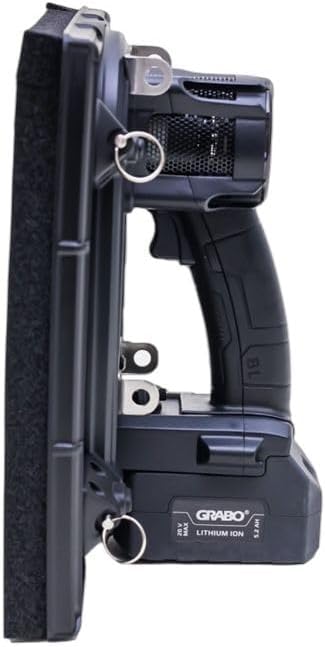
Image 4.1: Side view illustrating the attachment of the suction plate to the main tool body.
4.3 Attaching the T-Bar Handle
For enhanced ergonomics and control, especially with larger materials, attach the T-Bar handle:
- Locate the attachment points on the GRABO High-Flow tool.
- Connect the T-Bar handle to these points, ensuring it is securely fastened.
- Connect the wired remote control ON/OFF cable from the T-Bar handle to the corresponding port on the main tool.

Image 4.2: The T-Bar handle, designed for improved grip and control.
5. Operating Instructions
5.1 Powering On and Off
- To power on the tool, press the ON/OFF button located on the pistol grip or the remote control on the T-Bar handle.
- To power off, press the ON/OFF button again.
5.2 Understanding the LED Pressure Display
The GRABO High-Flow features a large LED digital display that shows real-time PSI or BAR pressure. This display allows users to monitor the vacuum pressure being created, ensuring a secure grip on the material.

Image 5.1: Close-up of the LED display indicating vacuum pressure and battery status.
5.3 Lifting Materials
- Ensure the SMART CUT foam seal is clean and free of debris.
- Place the GRABO High-Flow tool firmly onto the surface of the material to be lifted.
- Press the ON/OFF button to activate the vacuum. The tool will begin to create suction.
- Monitor the LED display to confirm sufficient pressure has been achieved for a secure lift.
- Carefully lift and move the material using the pistol grip or T-Bar handle.
- To release the material, press the ON/OFF button to deactivate the vacuum.

Image 5.2: Demonstrating the GRABO High-Flow in use, lifting a dry cast paver.
5.4 Lifting Capacity
The lifting capacity of the GRABO High-Flow depends on the suction plate used:
- With the 400mm Suction Plate (optional add-on): Up to 242 lbs (110 kg)
- With the 300mm Suction Plate (included): Up to 150 lbs (68 kg)
Always ensure the chosen suction plate is appropriate for the weight and porosity of the material being lifted.
6. Maintenance
6.1 Cleaning the SMART CUT Foam Seal
Regularly inspect the foam seal for wear, tears, or debris. A damaged or dirty seal can compromise suction performance.
- Power off the tool and remove the battery.
- Carefully detach the suction plate.
- Clean the foam seal with a damp cloth. Avoid harsh chemicals.
- Allow the seal to dry completely before reattaching or storing.
- Replace the foam seal if it shows signs of significant wear or damage (a spare seal is included).
6.2 Replacing the Filter
The GRABO High-Flow includes an extra filter. Replace the filter periodically or if you notice a decrease in vacuum performance.
- Power off the tool and remove the battery.
- Locate the filter compartment (refer to diagrams in the physical manual if available).
- Remove the old filter and insert the new one, ensuring it is seated correctly.
- Close the filter compartment securely.
6.3 Battery Care and Storage
- Store batteries in a cool, dry place away from direct sunlight.
- Do not store fully discharged batteries for extended periods. Charge them periodically.
- If the tool will not be used for a long time, remove the battery.
7. Troubleshooting
This section addresses common issues you might encounter with your GRABO High-Flow tool.
| Problem | Possible Cause | Solution |
|---|---|---|
| Tool does not power on. | Battery is not charged or not properly installed. | Ensure battery is fully charged and securely inserted. |
| Loss of suction or weak grip. |
|
|
| Tool picks up one paver then stops working. |
|
|
| Reduced lifting capacity. |
|
|
8. Specifications
| Brand | GRABO |
| Model Number | GHF-V1-005530 |
| UPC | 840082400943 |
| Power Source | Battery Powered (20V) |
| Vacuum Flow Rate | 1.5 m³/min |
| Lifting Capacity (with 400mm Suction Plate) | Up to 242 lbs (110 kg) |
| Lifting Capacity (with 300mm Suction Plate) | Up to 150 lbs (68 kg) |
| Recommended Uses | Lifting, Moving, Installing Heavy and Porous Materials (e.g., Dry Cast Pavers, concrete, tiles, stone slabs) |
| Special Features | Cordless, Portable, Pistol Grip Design, LED Pressure Display, SMART CUT Foam Seal, T-Handle, High Flow Rate, Real-Time PSI/BAR Reading |
| Item Dimensions (L x W x H) | 14.5 x 14 x 10.5 inches |
| Item Weight | 17.99 pounds |
| Manufacturer | Grabo |
| Part Number | GP-1Li-FB-1S-HC |
9. Warranty and Support
9.1 Warranty Information
Warranty terms and conditions for the GRABO High-Flow Cordless Vacuum Lifter are typically provided with your purchase documentation. Please refer to the warranty card or contact GRABO customer service for detailed information regarding warranty coverage, duration, and claims procedures.
9.2 Customer Support
For technical assistance, spare parts, or any questions not covered in this manual, please contact GRABO customer support. Contact information can usually be found on the GRABO website or on your product packaging.
When contacting support, please have your product model number (GHF-V1-005530) and purchase date ready.


