
1. Introduction
Thank you for choosing the TBTeeK Butane Torch, Model GF-901. This versatile tool is designed for a variety of applications, including culinary tasks like caramelizing desserts, browning meats, and melting cheese, as well as DIY projects such as soldering and crafts. This manual provides essential information for safe operation, maintenance, and troubleshooting to ensure optimal performance and longevity of your torch.
2. Important Safety Information
- Read All Instructions: Before using the torch, read and understand all instructions and warnings in this manual.
- Butane Gas Only: Use only high-quality butane gas for refilling. Do not use any other type of fuel.
- Keep Away from Children: This product is not a toy. Keep out of reach of children and pets.
- Ventilation: Use in a well-ventilated area to prevent accumulation of flammable vapors.
- Flammable Materials: Keep the torch away from flammable materials, liquids, and gases.
- High Temperature: The flame reaches extremely high temperatures (up to 1371°C / 2500°F). Do not touch the nozzle during or immediately after use.
- Storage: Store the torch in a cool, dry place, away from direct sunlight and heat sources. Ensure the safety lock is engaged and the flame adjustment is set to minimum before storage.
- Do Not Puncture or Incinerate: Do not puncture or incinerate the torch or butane canisters.
- Eye Protection: Always wear appropriate eye protection when operating the torch.
3. Product Components
Familiarize yourself with the different parts of your TBTeeK Butane Torch:
- Flame Outlet: Where the flame exits the torch.
- Safety Lock: Prevents accidental ignition.
- Ignition Button: Activates the piezo ignition to light the flame.
- Flame Adjustment Button: Controls the intensity and size of the flame.
- Butane Filling Port: Located at the base, used for refilling the torch with butane gas.
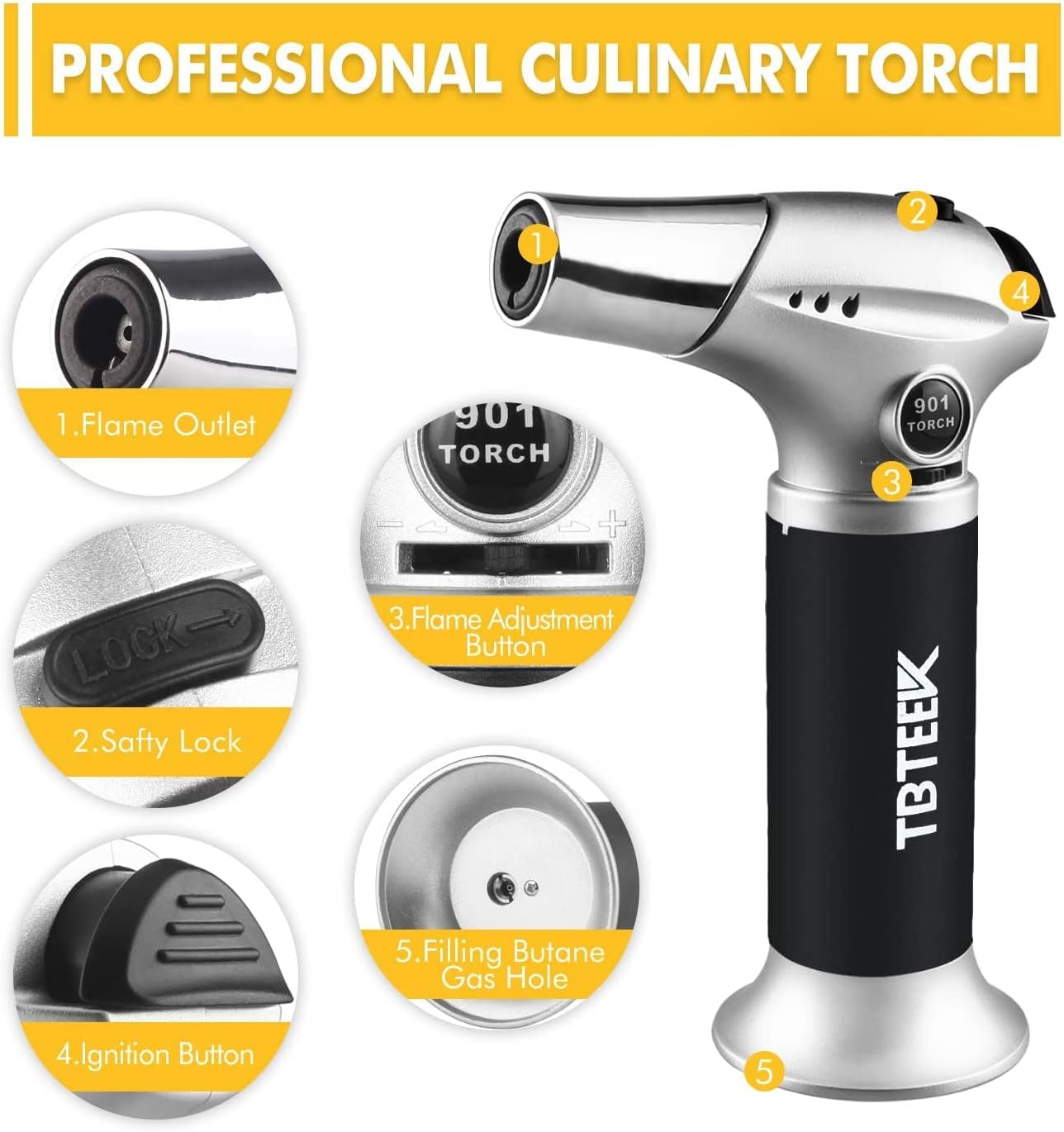
Figure 1: Overview of the TBTeeK Butane Torch components, including flame outlet, safety lock, ignition button, flame adjustment, and butane filling port.
4. Setup: Butane Refilling
The TBTeeK Butane Torch is shipped without butane gas. Please follow these steps carefully to refill your torch:
- Ensure Safety: Make sure the torch is turned off and the safety lock is engaged.
- Invert Torch: Hold the torch upside down.
- Select Butane: Use a butane canister with a long nozzle. If your butane canister has a short nozzle, use one of the included adapters.
- Insert Nozzle: Firmly insert the butane canister nozzle into the filling port at the base of the torch.
- Refill: Press down firmly for 5-10 seconds. You may hear a hissing sound and see liquid butane escaping, which indicates the torch is full.
- Wait: After refilling, wait a few minutes for the gas to stabilize before attempting to ignite the torch.

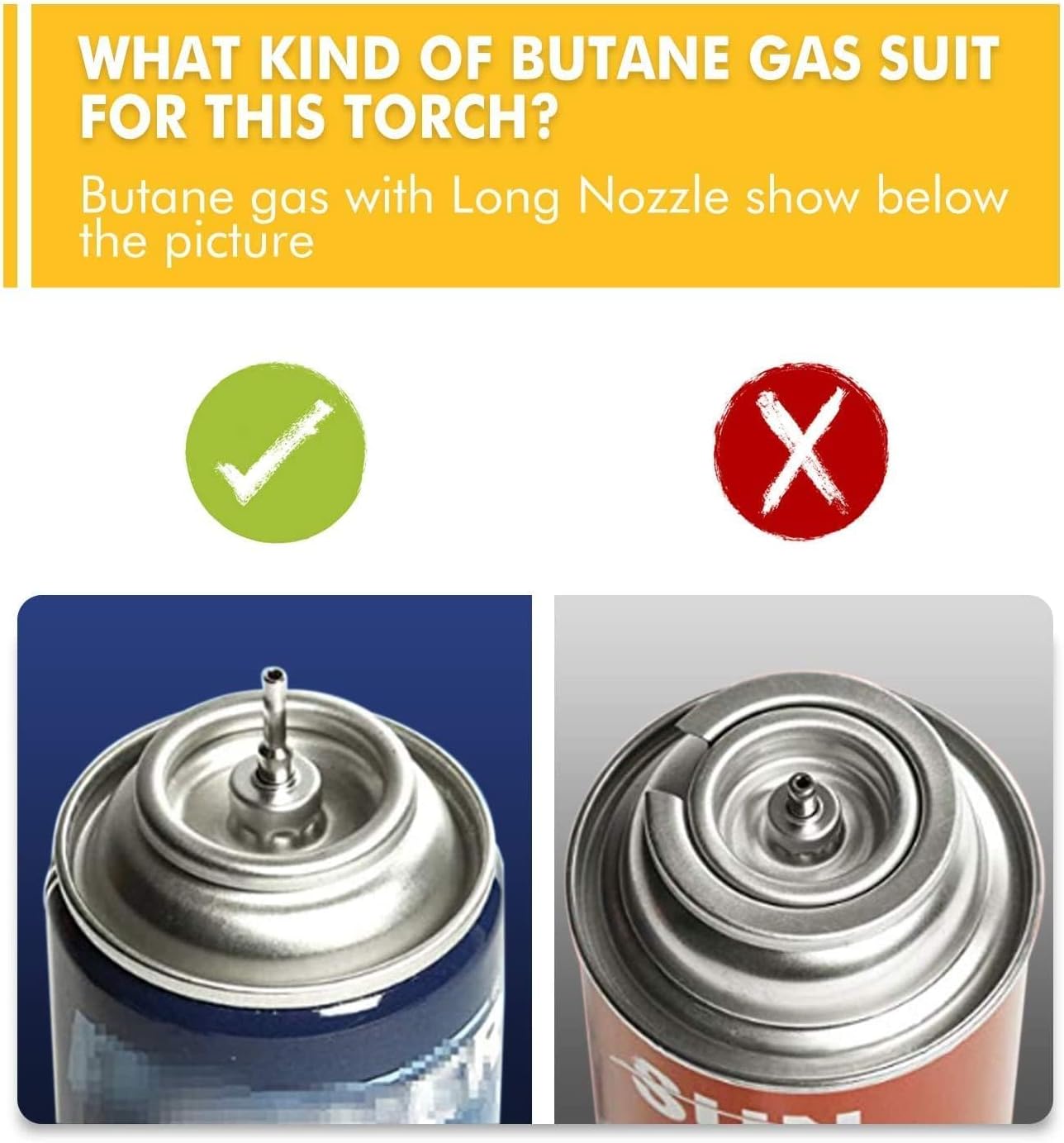
Figure 2: Proper butane refilling technique and compatible nozzle types. Ensure to use butane gas only.
5. Operating Instructions
5.1. Ignition
- Unlock: Slide the safety lock to the "unlock" position (usually to the right).
- Ignite: Press the ignition button firmly. The flame should ignite instantly.
- Continuous Flame (Optional): To maintain a continuous flame without holding the button, rotate the flame adjustment knob clockwise after ignition.
- Turn Off: To turn off the torch, release the ignition button. If continuous flame mode is engaged, rotate the flame adjustment knob counter-clockwise to disengage, then release the ignition button. Slide the safety lock to the "lock" position (to the left) after use.
5.2. Flame Adjustment
The flame intensity can be adjusted to suit your specific task:
- Increase Flame: Rotate the flame adjustment button towards the "+" sign for a stronger, larger flame.
- Decrease Flame: Rotate the flame adjustment button towards the "-" sign for a softer, smaller flame.


Figure 3: Step-by-step guide for igniting and adjusting the flame on your butane torch.
6. Applications
The TBTeeK Butane Torch is a versatile tool suitable for various tasks:
- Culinary: Caramelizing sugar on crème brûlée, browning meringues, searing steaks, roasting vegetables, melting cheese, and skinning tomatoes.
- DIY & Crafts: Soldering small components, heat shrinking, jewelry making, and lighting candles or fireplaces.
- Outdoor: Lighting BBQs and campfires.


Figure 4: Examples of culinary and other uses for your TBTeeK Butane Torch.
7. Maintenance
- Cleaning: After use, allow the torch to cool completely. Wipe the exterior with a soft, damp cloth. Do not use abrasive cleaners or immerse the torch in water.
- Nozzle Care: Keep the flame outlet clear of debris. Do not attempt to clean the internal components of the nozzle.
- Storage: Store the torch in its original packaging or a protective case in a cool, dry, well-ventilated area, away from direct sunlight and heat. Ensure the safety lock is engaged and the flame adjustment is set to minimum.
8. Troubleshooting
| Problem | Possible Cause | Solution |
|---|---|---|
| Torch does not ignite. | No butane gas; safety lock engaged; low gas pressure. | Refill with butane; disengage safety lock; ensure flame adjustment is not at minimum. |
| Flame is weak or inconsistent. | Low butane level; air in the tank; flame adjustment too low. | Refill butane; purge air from the tank (refer to butane canister instructions); adjust flame to a higher setting. |
| Gas leaks during refilling. | Canister nozzle not properly aligned; torch is full. | Ensure nozzle is firmly and straightly inserted; stop refilling if gas escapes, as the torch is likely full. |
9. Specifications
- Model: GF-901
- Brand: TBTeek
- Material: Aluminum, Plastic
- Maximum Temperature: 1371°C / 2500°F
- Power Source: Butane Gas (not included)
- Ignition: Piezo Ignition
- Features: Safety Lock, Adjustable Flame, Continuous Flame Mode
- Item Weight: Approximately 520 Grams (1.15 pounds)
- Package Dimensions: 9.29 x 6.77 x 2.64 inches
10. Warranty and Support
For any questions, concerns, or support regarding your TBTeeK Butane Torch, please refer to the contact information provided with your purchase or visit the official TBTeek website. Please retain your proof of purchase for warranty claims.
TBTeek is committed to providing high-quality products and excellent customer service. Your satisfaction is our priority.

