1. Product Overview
The Xiaomi Poco X7 5G is a high-performance smartphone designed for speed and efficiency. It features a powerful Dimensity 7300-Ultra processor, a vibrant 1.5K 120Hz AMOLED curved display, and a versatile 50MP main camera with OIS. The device is built with IP68 dust and water resistance and is powered by a large 5110mAh battery with 45W turbo charging capabilities.
Its advanced cooling system ensures stable performance, while the display offers exceptional brightness and eye comfort with TÜV Rheinland certifications. The Wet Touch technology enhances screen responsiveness even with moisture.
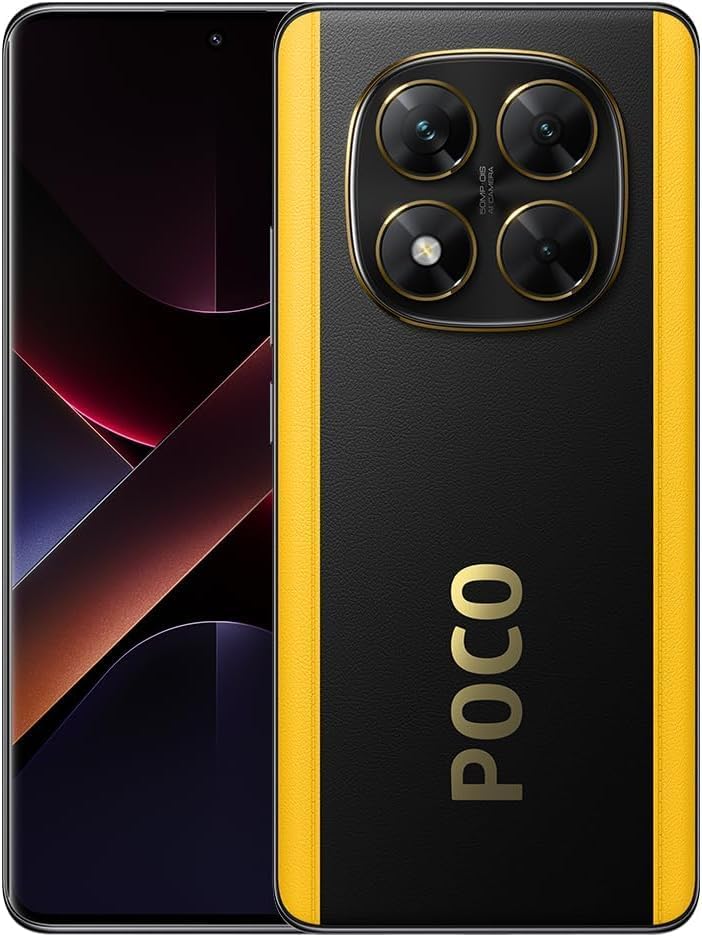
Figure 1: Front and rear view of the Xiaomi Poco X7 5G smartphone, highlighting its design and camera setup.
2. What's in the Box
Upon unboxing your Xiaomi Poco X7 5G, please verify that all the following items are included:
- Xiaomi Poco X7 5G Smartphone
- Fast Car Charger
- Power Adapter
- USB Cable
- Phone Case
3. Initial Setup
3.1. Inserting SIM Card
- Locate the SIM card tray on the side of the device.
- Insert the SIM ejector tool into the small hole next to the tray and push gently until the tray pops out.
- Place your activated Nano-SIM card(s) into the designated slots on the tray. This device supports dual SIM cards but does not support a Micro SD card.
- Carefully reinsert the SIM tray into the phone.
Note: This device is designed to work with T-Mobile, Mint, Tello, or any carrier under the T-Mobile network in the USA. Outside the USA, it works with any GSM carrier SIM. Ensure your SIM card is already activated before insertion.
3.2. Charging the Device
- Connect the USB cable to the power adapter.
- Plug the power adapter into a wall outlet.
- Connect the other end of the USB cable to the USB-C port at the bottom of your phone.
- Allow the device to charge fully before first use for optimal battery performance. The device supports 45W turbo charging.
3.3. Initial Power On and Setup Wizard
- Press and hold the Power button until the Xiaomi logo appears.
- Follow the on-screen instructions to select your language, region, connect to Wi-Fi, and set up your Google account.
- Configure security settings such as fingerprint unlock or AI Face Unlock.
4. Operating Instructions
4.1. Display Features
The Poco X7 5G features a 6.67-inch CrystalRes AMOLED display with a resolution of 2712 x 1220 (1.5K). Key display features include:
- Refresh Rate: Up to 120Hz for smooth scrolling and gaming.
- Touch Sampling Rate: Up to 480Hz, with 2560Hz instant touch sampling rate for highly responsive interaction.
- Brightness: 500 nits (typ), 1200 nits (HBM), and 3000 nits (peak brightness) for clear visibility in various lighting conditions.
- Color Depth: 12-bit with DCI-P3 wide color gamut for vibrant and accurate colors.
- Protection: Corning Gorilla Glass Victus 2 for enhanced durability.
- Eye Comfort: Supports Dolby Vision, Reading mode, 1920Hz PWM dimming, and 20,000-level brightness adjustment. It holds TÜV Rheinland Low Blue Light, Circadian Friendly, and Flicker Free Certifications.
- Wet Touch: Enhanced touch accuracy even with wet or oily fingers.
4.2. Camera Usage
The device is equipped with a versatile triple camera system and a high-resolution front camera:
- Rear Camera System:
- 50MP Main Camera: Features OIS (Optical Image Stabilization) and f/1.5 aperture, with 4-in-1 binning into one large 1.6µm pixel for excellent low-light performance.
- 8MP Ultra-wide Camera: f/2.2 aperture.
- 2MP Macro Camera: f/2.4 aperture.
- Front Camera: 20MP with f/2.2 aperture and a soft-light ring.
- Photography Modes: Dynamic shots, Motion tracking focus, Lightning Burst, FilmFrame, Portraits, Document mode, Night mode, Dual video.
- Video Recording:
- Rear: 4K at 24/30fps, 1080p at 30/60fps, 720p at 30fps.
- Slow motion: 1080p at 120fps, 720p at 120/240fps.
- Front: 1080p at 30/60fps, 720p at 30fps.
4.3. Connectivity
The Poco X7 5G offers comprehensive connectivity options:
- Cellular Networks: Supports 5G (Sub6G: n1/3/5/7/8/20/28/38/40/41/77/78), 4G LTE FDD (B1/2/3/4/5/7/8/20/28/66), 4G LTE TDD (B38/40/41), 3G WCDMA (1/2/4/5/8/19), and 2G GSM (Quad Band).
- Wi-Fi: Wi-Fi 6/Wi-Fi 5/Wi-Fi 4/802.11a/b/g, supports 2.4GHz and 5GHz Wi-Fi, Wi-Fi Direct.
- Bluetooth: Bluetooth 5.4.
- Navigation: Beidou (B1I), GPS (L1), Galileo (E1), GLONASS (G1), QZSS (L1), A-GPS supplementary positioning.
- NFC: Yes (implied by product title).
4.4. Security Features
- In-screen Fingerprint Sensor: For quick and secure unlocking.
- AI Face Unlock: Convenient facial recognition for unlocking.
5. Maintenance and Care
- Cleaning: Use a soft, lint-free cloth to clean the screen and body. Avoid abrasive materials or harsh chemicals.
- Water and Dust Resistance: The device has an IP68 rating for dust and water resistance. While it can withstand immersion in up to 1.5 meters of fresh water for up to 30 minutes, it is not waterproof. Avoid exposing it to saltwater, chlorinated water, or other liquids.
- Temperature: Operate the device within recommended temperature ranges to prevent damage to the battery and internal components.
- Software Updates: Regularly update your device's operating system (HyperOS based on Android 14) to ensure optimal performance, security, and access to new features.
- Battery Care: To prolong battery lifespan, avoid extreme temperatures and do not leave the device fully charged or fully discharged for extended periods.
6. Troubleshooting
| Issue | Possible Solution |
|---|---|
| Device not powering on | Ensure the battery is charged. Connect to the charger and wait a few minutes before attempting to power on again. If unresponsive, try a forced restart by holding the Power button for 10-15 seconds. |
| Poor Wi-Fi signal | Ensure you are within range of the Wi-Fi router. Restart the router and the phone. Check for obstructions. Note that some users have reported weaker Wi-Fi signal beyond 35 feet. |
| SIM card not detected / No network | Ensure the SIM card is correctly inserted and activated. Restart the phone. Verify that your carrier is compatible with the device (T-Mobile network in USA, any GSM carrier outside USA). |
| Apps crashing or freezing | Close the app and reopen it. Clear the app's cache and data in Settings. Ensure the app and your phone's operating system are up to date. |
| Battery drains quickly | Reduce screen brightness, disable unnecessary background apps, turn off Wi-Fi/Bluetooth/GPS when not in use. Check battery usage in Settings to identify power-hungry apps. |
7. Specifications
| Feature | Detail |
|---|---|
| Model Name | Poco X7 5G |
| Item Model Number | 24095PCADG |
| Brand | Xiaomi |
| Operating System | HyperOS Base on Android 14 |
| Display Size | 6.67 Inches |
| Display Resolution | 2712 x 1220 (1.5K) |
| Processor | Dimensity 7300-Ultra (4nm manufacturing process, Octa-core CPU up to 2.5GHz, Mali-G615 MC2 GPU) |
| RAM Memory | 12 GB |
| Storage Capacity | 512 GB |
| Main Camera | 50MP with OIS |
| Ultra-wide Camera | 8MP |
| Macro Camera | 2MP |
| Front Camera | 20MP |
| Battery Capacity | 5110 mAh (typ) |
| Charging | 45W Turbo Charging |
| Connectivity | 5G, 4G LTE, Wi-Fi 6, Bluetooth 5.4, GPS, NFC |
| Sensors | Proximity sensor, Ambient light sensor, Accelerometer, Electronic compass, IR blaster, Gyroscope, X-axis linear motor, In-screen fingerprint sensor |
| Dimensions (Package) | 7 x 4 x 2 inches |
| Item Weight | 14 ounces |
| Color | Black |
| Audio Jack | No headphone jack |

Figure 2: Certification details for the Poco X7 5G, including model number and regulatory compliance information.
8. Warranty and Support
8.1. Warranty Information
Specific warranty terms and conditions for the Xiaomi Poco X7 5G may vary by region and retailer. Please refer to the warranty card included in your product packaging or visit the official Xiaomi website for detailed warranty information applicable to your purchase.
Generally, Xiaomi provides a limited warranty covering manufacturing defects for a specified period from the date of purchase. Damage caused by misuse, accidents, unauthorized repairs, or normal wear and tear is typically not covered.
8.2. Customer Support
For technical assistance, troubleshooting, or service requests, please contact Xiaomi customer support through one of the following methods:
- Online Support: Visit the official Xiaomi support website for FAQs, forums, and online chat support.
- Service Centers: Locate an authorized Xiaomi service center near you for in-person assistance.
- Contact Number: Refer to the contact information provided in your product documentation for regional support numbers.
When contacting support, please have your device's model number (24095PCADG) and serial number ready.


