
1. Introduction
Thank you for purchasing the JAPOUCA K8001A Karaoke Machine. This portable Bluetooth speaker system is designed to provide high-quality audio and an engaging karaoke experience with its dual 8-inch woofers, wireless microphones, and dynamic lighting. This manual provides essential information for the safe and effective operation of your device. Please read it thoroughly before use and retain it for future reference.
2. Safety Instructions
- Power Source: Use only the specified power adapter. Ensure the voltage is compatible with your local power supply.
- Water and Moisture: Do not expose the device to rain, moisture, or any liquids. Keep it away from water sources.
- Ventilation: Ensure adequate ventilation around the unit. Do not block any ventilation openings.
- Heat: Keep the device away from heat sources such as radiators, heat registers, stoves, or other apparatus (including amplifiers) that produce heat.
- Cleaning: Unplug the device before cleaning. Use a dry, soft cloth. Do not use liquid cleaners or aerosol cleaners.
- Servicing: Do not attempt to service this product yourself. Refer all servicing to qualified service personnel.
- Volume Level: Avoid prolonged listening at high volume levels to prevent hearing damage.
- Battery Safety: The device contains a rechargeable battery. Do not expose to excessive heat or direct sunlight. Dispose of batteries according to local regulations.
3. Package Contents
Please check that all items are present and in good condition upon unpacking:
- JAPOUCA K8001A Karaoke Machine (Main Unit)
- 2 x Wireless Microphones
- Power Adapter/Cable
- Auxiliary Audio Cable
- User Manual (this document)
4. Product Overview
The JAPOUCA K8001A is a versatile karaoke and party speaker system. Familiarize yourself with its components and controls.
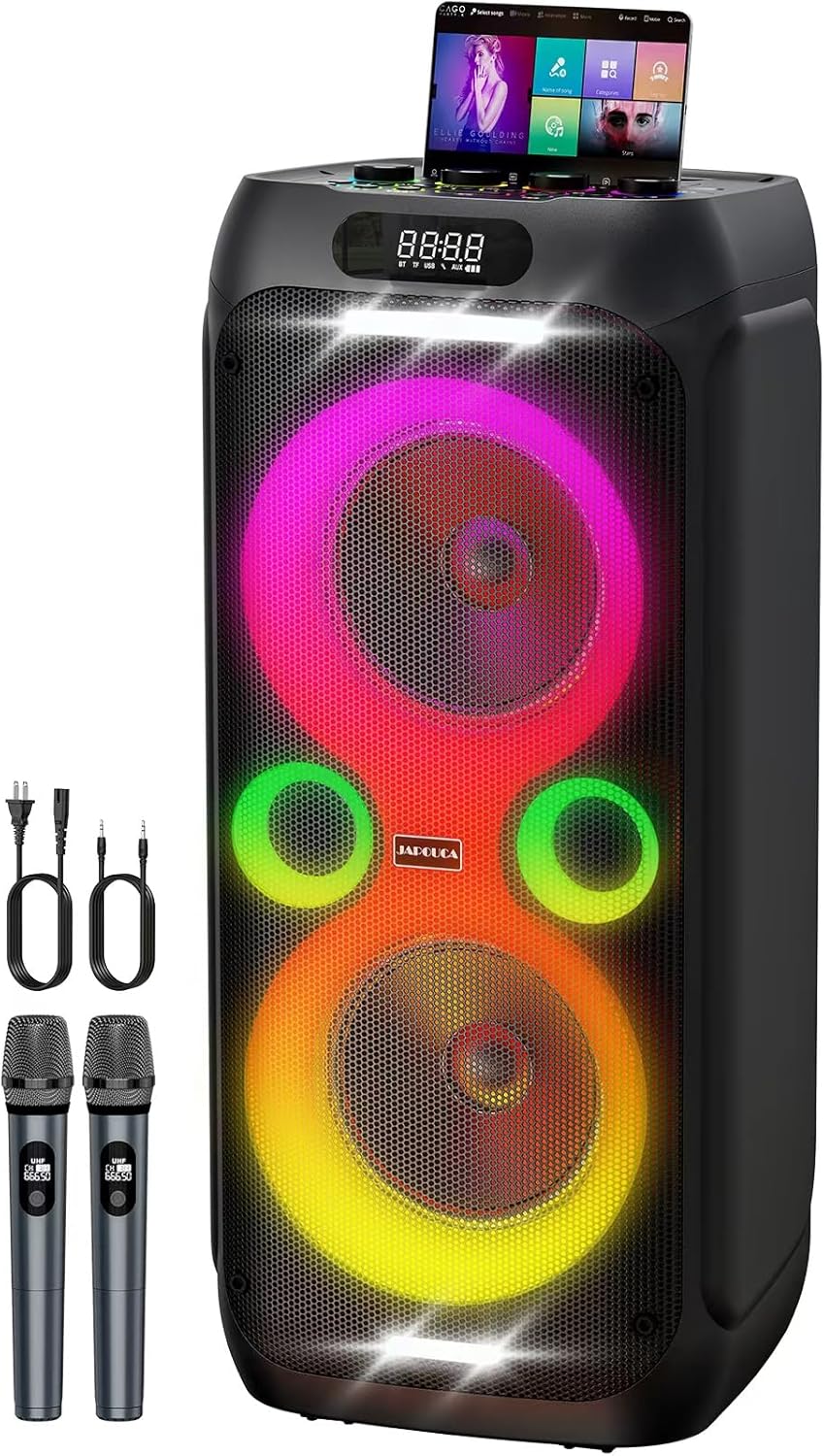
Figure 4.1: Front view of the JAPOUCA K8001A Karaoke Machine, showcasing its dual speakers with integrated LED lights, top control panel, and included wireless microphones and cables.
4.1 Main Unit Features
- Dual 8-inch Woofers: Deliver powerful bass and clear sound.
- Integrated LED Lights: Dynamic light show synchronized with music.
- Control Panel: Located on top for easy access to audio adjustments and mode selection.
- Device Holder: Slot on top to securely hold a smartphone or tablet.
- Portable Design: Equipped with a handle for easy transport.

Figure 4.2: Internal speaker configuration of the K8001A, highlighting the dual 8-inch woofers and a 2.5-inch tweeter, along with DSP (Digital Signal Processor) for enhanced sound quality.
4.2 Control Panel and Interfaces
The top panel provides all necessary controls and connection ports.

Figure 4.3: Close-up of the K8001A's control panel, showing four rotary adjustment knobs for Echo, Guitar, Mic Volume, and Master Volume, along with six input/output interfaces including Guitar, Mic, AUX, USB, TF card, and a 5V Output for charging devices.
Adjustment Knobs:
- ECHO+: Adjusts the echo effect for microphones.
- GUITAR+: Adjusts the volume for the guitar input.
- MIC VOL+: Adjusts the volume of the wireless microphones.
- VOLUME+: Master volume control for the entire system.
Interfaces:
- GUITAR: 6.35mm jack input for connecting a guitar.
- MIC: 6.35mm jack input for connecting a wired microphone.
- AUX: 3.5mm auxiliary input for external audio devices.
- USB: USB port for playing music from a USB drive.
- TF: TF (MicroSD) card slot for playing music from a memory card.
- OUTPUT (5V): USB output for charging external devices like smartphones or tablets.
Operation Shortcut Keys:
The control panel also features various buttons for mode selection, playback control, and sound effects. Refer to the detailed diagram on the unit for specific functions of each button (e.g., Power, Mode, Play/Pause, Skip Tracks, Record, EQ, Bass Boost, TWS, Lighting).
5. Setup
5.1 Initial Charging
Before first use, fully charge the karaoke machine. Connect the provided power adapter to the AC input port on the unit and plug it into a standard wall outlet. The charging indicator will show the charging status. A full charge ensures maximum battery life for portable use.

Figure 5.1: The AC power input (AC100-240V, 50/60Hz) for continuous power supply and the 5V USB output for charging tablets and phones, ensuring uninterrupted usage and device charging.
5.2 Microphone Setup
The two wireless microphones are pre-paired with the unit. Simply insert the required AAA batteries (not included) into each microphone and power them on. They should automatically connect to the karaoke machine.
5.3 Placement
Place the karaoke machine on a stable, flat surface. For optimal sound dispersion, position it in a central location within the listening area. Ensure there are no obstructions blocking the speakers or ventilation ports.
6. Operating Instructions
6.1 Power On/Off
Press and hold the Power button on the control panel to turn the unit on or off. The LED display will illuminate upon power-on.
6.2 Bluetooth Connection
- Turn on the karaoke machine. It will automatically enter Bluetooth pairing mode, indicated by a flashing 'BT' on the LED display.
- Enable Bluetooth on your smartphone, tablet, or other audio device.
- Search for 'JAPOUCA K8001A' (or similar name) in your device's Bluetooth list and select it to pair.
- Once connected, the 'BT' indicator will stop flashing, and you can stream audio wirelessly.
6.3 Using Wireless Microphones
Ensure the microphones have batteries and are powered on. Adjust the MIC VOL+ knob on the control panel to set the microphone volume. Use the ECHO+ knob to add an echo effect to your vocals.
6.4 DJ Mode and Bass Boost
Activate DJ Mode via the dedicated button on the control panel to access various sound effects and mixing capabilities. Press the BASS+ button to enhance low-frequency sounds for a richer audio experience.
6.5 TWS (True Wireless Stereo) Function
The TWS function allows you to connect two JAPOUCA K8001A units wirelessly for a stereo sound experience.
- Ensure both K8001A units are powered on and not connected to any Bluetooth device.
- On one unit (this will be the primary unit), press the TWS button. It will search for another unit.
- On the second unit, also press the TWS button.
- Once connected, you will hear a confirmation sound. The primary unit's Bluetooth indicator will flash, and the secondary unit's indicator will be solid.
- Now, connect your audio device to the primary K8001A via Bluetooth as described in section 6.2. Audio will play through both speakers in stereo.

Figure 6.1: Illustration of the TWS function, demonstrating how two K8001A speakers can be wirelessly linked to create an immersive stereo sound environment, ideal for larger gatherings or outdoor entertainment.
6.6 AC Power and Charging External Devices
The K8001A can operate continuously when connected to AC power. Additionally, the 5V USB OUTPUT port allows you to charge your smartphone or tablet directly from the karaoke machine, ensuring your devices stay powered during long sessions.
6.7 Dynamic Light Show
The integrated LED lights synchronize with the music, creating a dynamic visual experience. Use the LIGHT button on the control panel to cycle through different light modes or turn the lights off.

Figure 6.2: Examples of the K8001A's beat synchronization and dynamic light show, illustrating various color combinations and patterns that respond to the music.
6.8 Other Audio Inputs (USB, TF Card, AUX, Guitar)
Insert a USB drive or TF card into the respective ports to play audio files directly. Connect external audio devices using the AUX input. Plug in a guitar to the GUITAR input and adjust its volume with the GUITAR+ knob.
7. Maintenance
- Cleaning: Wipe the exterior surfaces with a soft, dry cloth. Do not use abrasive cleaners or solvents.
- Storage: When not in use for extended periods, store the unit in a cool, dry place, away from direct sunlight and extreme temperatures.
- Battery Care: For optimal battery longevity, fully charge the unit at least once every three months if not in regular use.
8. Troubleshooting
| Problem | Possible Cause | Solution |
|---|---|---|
| No power | Battery depleted; Power cable not connected. | Charge the unit; Ensure power cable is securely connected. |
| No sound | Volume too low; Incorrect input mode; Device not paired. | Increase master volume; Select correct input mode (Bluetooth, AUX, USB, TF); Re-pair Bluetooth device. |
| Microphone not working | Microphone off; Batteries depleted; Mic volume too low. | Ensure microphone is powered on; Replace batteries; Increase MIC VOL+ knob. |
| Bluetooth connection unstable | Device too far; Interference; Low battery. | Move device closer to the speaker; Avoid obstacles; Charge the unit. |
| Unit powers off after 15 minutes | Automatic power-saving feature. | This is a design feature to conserve battery. To continue use, simply power the unit back on. Ensure a stable connection to AC power for uninterrupted use. |
9. Specifications
- Model Number: K8001A
- Brand: JAPOUCA
- Speaker Type: Dual 8-inch Woofers
- Peak Power: 600W
- Connectivity: Bluetooth 5.3, AUX, USB, TF Card, 6.35mm Guitar Input, 6.35mm Mic Input
- Wireless Microphones: 2 included
- Battery: 18000mAh (internal, rechargeable)
- Power Source: AC100-240V, 50/60Hz (Plug-in)
- Charging Output: 5V USB
- Product Dimensions (L x W x H): 12.99 x 12.87 x 28.93 inches
- Item Weight: Approximately 28.5 pounds (12.97 Kilograms)
- Recommended Uses: Indoor/Outdoor
10. Warranty and Support
JAPOUCA stands behind its products. For warranty information, technical support, or any questions regarding your K8001A Karaoke Machine, please refer to the warranty card included with your purchase or contact JAPOUCA customer service through the retailer where the product was purchased. Our professional support team is committed to ensuring your complete satisfaction.