
Monster Monster Traveler Mini
Monster Traveler Mini Bluetooth Speaker User Manual
Model: Monster Traveler Mini
Introduction
Thank you for choosing the Monster Traveler Mini Bluetooth Speaker. This portable speaker is designed to deliver powerful, high-fidelity audio with an included wireless microphone for karaoke, making it ideal for various entertainment needs. This manual provides essential information for setting up, operating, and maintaining your device to ensure optimal performance and longevity.
What's in the Box
Please verify that all items listed below are included in your package:
- Monster Traveler Mini Bluetooth Speaker
- Wireless Microphone
- Remote Control
- Charging Cable (USB-C)
- AUX Audio Cable
- Carrying Strap
- User Manual (this document)

Image showing the Monster Traveler Mini speaker, wireless microphone, remote control, AUX audio cable, charging cable, carrying strap, and the user manual, all neatly arranged as they would appear in the product box.
Product Overview
Top Panel Controls

Detailed view of the speaker's top control panel, indicating buttons for Microphone Volume +/-, Reverb Adjustment, Power On/Off, Bluetooth Connection, Play/Pause, Speaker Volume +/-, Mic Mute, Sound Mode, Previous/Next track, Vocals On/Off, and Mic First function.
- Microphone Volume +/-: Adjusts the volume of the connected microphone.
- Reverb Adjustment: Controls the echo effect for the microphone.
- Power On/Off: Turns the speaker on or off.
- Bluetooth Connection: Initiates or disconnects Bluetooth pairing.
- Play/Pause: Plays or pauses audio playback.
- Speaker Volume +/-: Adjusts the main speaker volume.
- Mic Mute: Mutes or unmutes the microphone.
- Sound Mode: Cycles through available EQ sound modes (e.g., Bass Boost, Vocal, Balanced).
- Previous/Next: Skips to the previous or next track.
- Vocals On/Off: Enables or disables vocal removal for karaoke.
- Mic First: Prioritizes microphone audio over music.
Rear Panel Ports
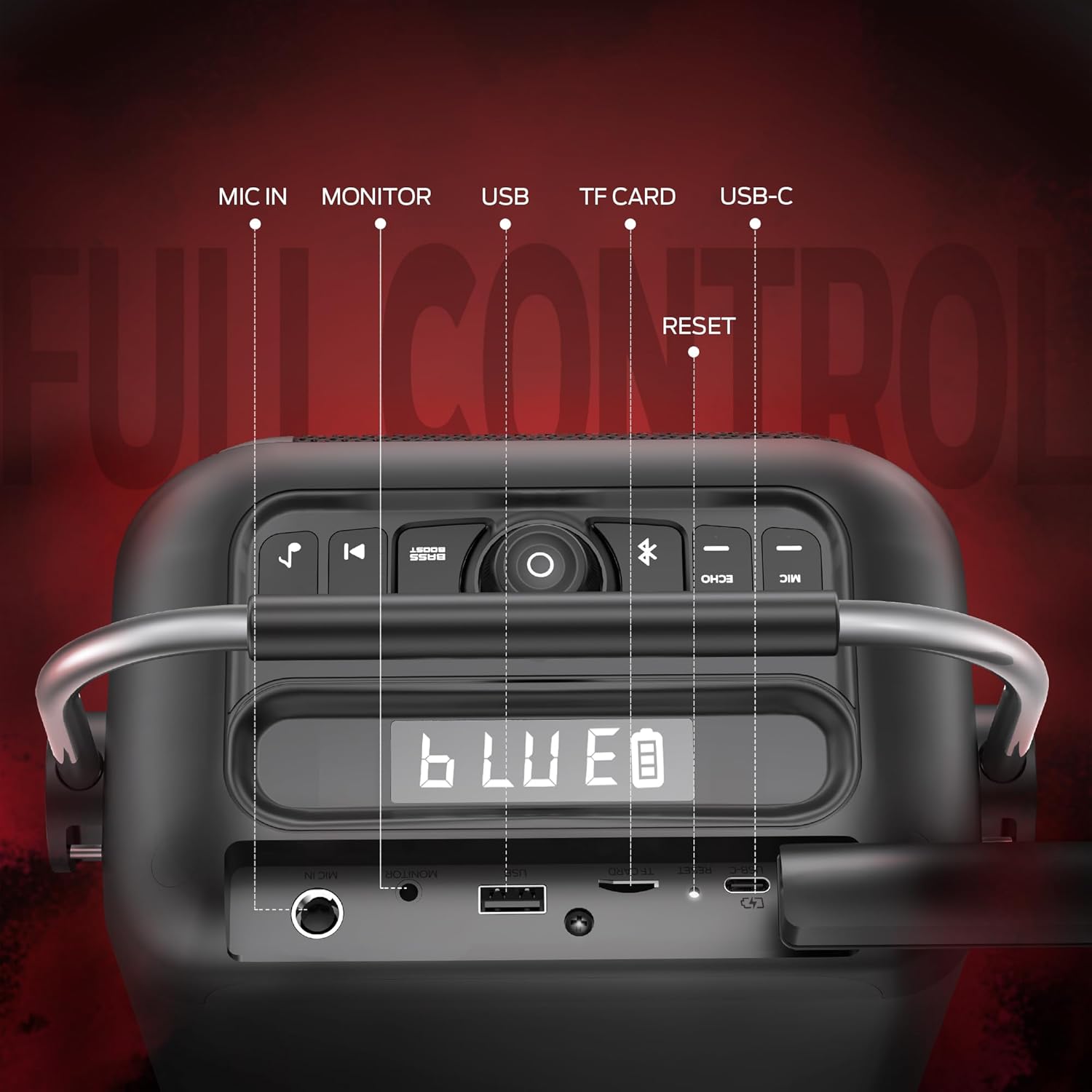
Detailed view of the speaker's rear panel, indicating ports for MIC IN, MONITOR, USB, TF CARD, USB-C, and a RESET button.
- MIC IN: 6.35mm input for wired microphones.
- MONITOR: Audio output for monitoring.
- USB: USB-A port for media playback from USB drives.
- TF CARD: MicroSD card slot for media playback.
- USB-C: Charging port for the speaker.
- RESET: Button to reset the device to factory settings.
Setup
Charging the Speaker
Before first use, fully charge the Monster Traveler Mini. Connect the provided USB-C charging cable to the speaker's USB-C port and the other end to a compatible USB power adapter (not included). The charging indicator will show the charging status. A full charge provides up to 12 hours of playback time.

The Monster Traveler Mini offers up to 12 hours of continuous music playback on a single charge, suitable for extended use day or night.
Attaching the Carrying Strap
For convenient portability, attach the included carrying strap to the designated loops on the sides of the speaker. This allows for easy transport, whether you're heading to a picnic, beach, or party.

The Monster Traveler Mini is designed for portability, featuring an easy-grip handle and a detachable shoulder strap for convenient carrying.
Operating Instructions
Powering On/Off
Press and hold the Power On/Off button on the top panel to turn the speaker on or off.
Bluetooth Pairing
- Turn on the Monster Traveler Mini speaker. It will automatically enter Bluetooth pairing mode, indicated by a flashing Bluetooth icon on the display.
- On your smartphone, tablet, or laptop, enable Bluetooth and search for available devices.
- Select "Monster Traveler Mini" from the list of devices.
- Once connected, the speaker will emit an audible confirmation, and the Bluetooth icon will stop flashing.
- The speaker supports Bluetooth 5.4, offering a stable connection up to 20 meters (66 feet).
Karaoke Machine Mode
The Monster Traveler Mini comes with a wireless microphone, transforming it into a karaoke machine.
- Ensure the wireless microphone is powered on and paired with the speaker.
- Play your desired music through the speaker via Bluetooth or other input methods.
- Use the Microphone Volume +/- buttons on the speaker's top panel to adjust the microphone's volume.
- Adjust the echo effect using the Reverb Adjustment button.
- For vocal removal from songs, press the Vocals On/Off button.
- To prioritize microphone audio, press the Mic First button.

The Monster Traveler Mini allows users to sing along with the sound system, providing an ultimate karaoke experience with its included wireless microphone.
EQ Sound Modes
The speaker features three adjustable EQ sound modes to optimize your listening experience:
- Bass Boost: Enhances low frequencies for a deeper, more impactful bass.
- Vocal: Optimizes clarity for vocals, ideal for podcasts or speeches.
- Balanced: Provides a neutral sound profile suitable for most music genres.
Press the Sound Mode button on the top panel to cycle through these modes.

The Monster Traveler Mini delivers 80W peak power with a 5.25-inch subwoofer and a 2-inch tweeter for powerful, shocking sound.
Media Playback (USB/TF Card)
Insert a USB drive into the USB port or a TF (MicroSD) card into the TF CARD slot on the rear panel. The speaker will automatically detect and begin playing compatible audio files. Use the Play/Pause and Previous/Next buttons to control playback.
AUX Input
Connect an external audio device (e.g., MP3 player, computer) to the speaker's AUX IN port using the provided 3.5mm AUX audio cable. The speaker will automatically switch to AUX input mode.
Maintenance
- Cleaning: Use a soft, dry cloth to clean the speaker's surface. Do not use abrasive cleaners or solvents.
- Storage: Store the speaker in a cool, dry place away from direct sunlight and extreme temperatures.
- Battery Care: To prolong battery life, avoid fully discharging the battery frequently. Charge the speaker regularly, even if not in use for extended periods.
- Water Resistance: This speaker is not waterproof. Avoid exposure to water or excessive moisture.
Troubleshooting
| Problem | Possible Cause | Solution |
|---|---|---|
| Speaker does not turn on. | Low battery; Power button not pressed correctly. | Charge the speaker fully. Press and hold the Power button for a few seconds. |
| Cannot pair via Bluetooth. | Speaker not in pairing mode; Device Bluetooth off; Too far from speaker. | Ensure speaker is in pairing mode (flashing Bluetooth icon). Turn on Bluetooth on your device. Move device closer to speaker (within 20m). |
| No sound from speaker. | Volume too low; Incorrect input mode; Muted. | Increase speaker and device volume. Ensure correct input mode (Bluetooth, AUX, USB/TF). Check if speaker is muted. |
| Microphone not working. | Microphone off; Low microphone volume; Microphone muted. | Ensure wireless microphone is powered on and paired. Increase Microphone Volume. Check Mic Mute button. |
| Poor sound quality. | Interference; EQ mode not suitable. | Move speaker away from other electronic devices. Try different EQ sound modes. |
Specifications
| Feature | Detail |
|---|---|
| Model Name | Monster Traveler Mini |
| Output Wattage | 80 Watts (Peak) |
| Speaker Amplification Type | Active |
| Subwoofer | 1 x 5.25 inches |
| Tweeter | 1 x 2 inches |
| Connectivity Technology | Bluetooth 5.4 |
| Wireless Range | Up to 20 meters (66 feet) |
| Playback Time | Up to 12 hours |
| Battery Type | Lithium Ion (Speaker), AAA (Remote) |
| Charging Port | USB-C |
| Dimensions (Parcel) | 33.1 x 25.8 x 16.7 cm |
| Weight (Parcel) | 2.89 kg |
Warranty and Support
For warranty information and customer support, please refer to the warranty card included in your product packaging or visit the official Monster website. Keep your purchase receipt as proof of purchase for any warranty claims.
Manufacturer: Monster
Model: Monster Traveler Mini
ASIN: B0DSPX441Z
Ask a question about this manual
Ask about setup, troubleshooting, compatibility, parts, safety, or missing instructions. Manuals+ will review the question and use this page’s manual context to help answer it.