
1. Product Overview
The VONROC 20V Lithium-Ion Battery (Model CD828AA) is designed for use with the VONROC 20V battery platform. This battery features enhanced technology and a robust design, including a durable rubber coating for increased resistance to shocks and wear. A key feature is its bidirectional USB-C port, allowing the battery to be charged via a standard USB-C cable and adapter (not included) or used as a power bank to charge other devices.
The battery incorporates advanced electronic cell protection to monitor energy consumption and temperature, automatically shutting off the tool in extreme situations like overload or short circuit to ensure safety and prolong battery life. It also supports Power Delivery (PD) protocols for efficient charging.
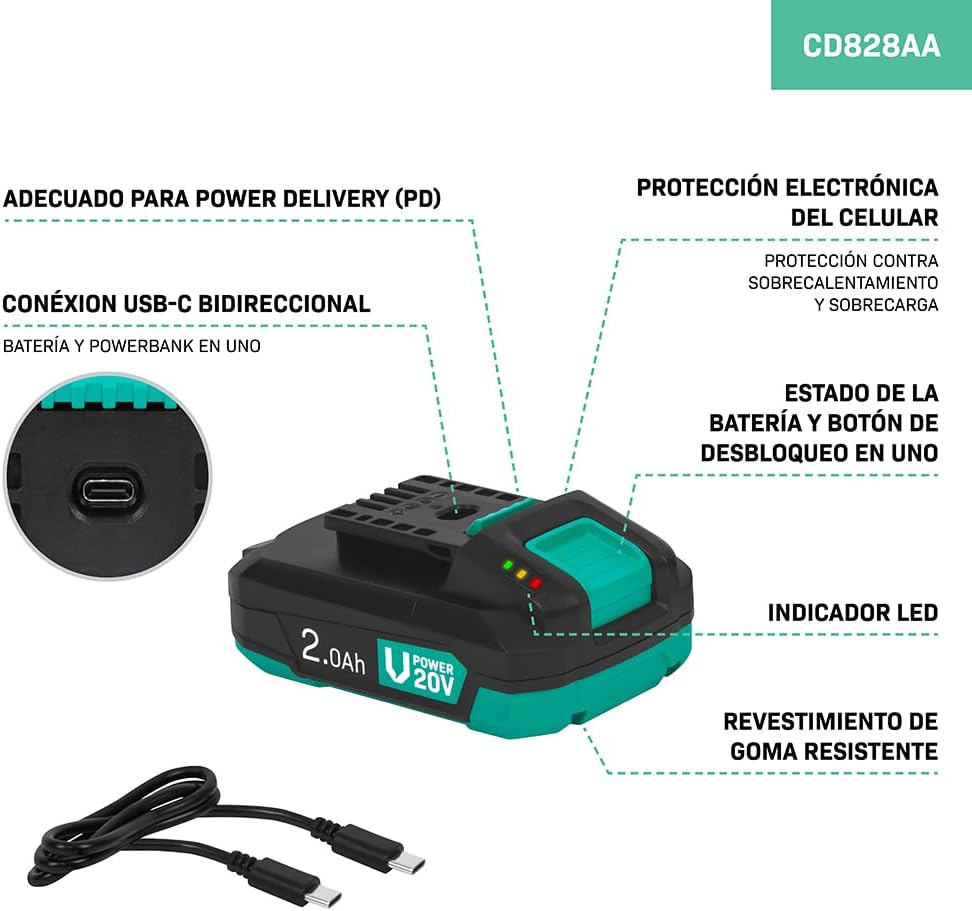
Image: The VONROC 20V Lithium-Ion Battery, showcasing its compact design and integrated features.

Image: Detailed diagram illustrating the key features of the battery, including the bidirectional USB-C connection, electronic cell protection, LED indicator, and durable rubber coating.
2. Setup
2.1 Initial Charging
The battery is delivered partially charged to comply with safety regulations. Before its first use, fully charge the battery. Connect the supplied USB-C cable to the battery's USB-C port and to a compatible USB-C power adapter (not included) or a VONROC fast charger.

Image: The VONROC 20V battery connected to a charger, indicating the charging process.
2.2 Compatibility
This battery is fully compatible with all tools within the VONROC 20V battery platform. Ensure your tool is part of the VONROC 20V series for proper function.
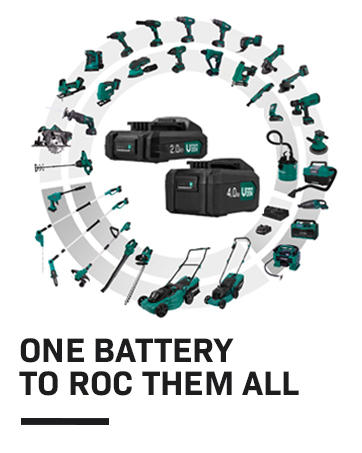
Image: An illustration showing the VONROC 20V battery's compatibility with a wide range of VONROC power tools.
3. Operating Instructions
3.1 Using as a Tool Battery
- Align the battery with the battery slot on your VONROC 20V tool.
- Slide the battery firmly into place until it clicks, indicating it is securely locked.
- To remove, press the release button (integrated with the LED status button) and slide the battery out.
3.2 Using as a Power Bank
The bidirectional USB-C port allows the battery to function as a power bank for charging external devices such as smartphones, tablets, or other USB-C compatible electronics.
- Connect your device to the battery's USB-C port using a compatible USB-C cable.
- Press the LED status button (integrated with the unlock button) to activate the power bank mode. The LED indicators will illuminate to show the battery's charge level and confirm activation.
- Charging will begin automatically.

Image: The VONROC 20V battery functioning as a power bank, charging various electronic devices.
4. Maintenance
4.1 Charging Guidelines
- This is a Lithium-Ion battery; it does not suffer from memory effect. You do not need to fully discharge it before recharging.
- The battery can be recharged at any time without negative impact on its lifespan.
- Always use a compatible VONROC charger or a certified USB-C Power Delivery adapter and cable for charging.
- Monitor the LED indicators for charge status.
4.2 Storage
- Store the battery in a cool, dry place, away from direct sunlight and extreme temperatures.
- For long-term storage, it is recommended to store the battery with a partial charge (around 50%).
- Avoid storing the battery in a completely discharged state.
5. Troubleshooting
5.1 Electronic Cell Protection Activation
The battery is equipped with electronic cell protection. In situations of extreme overload, jamming, or short circuit, the battery will automatically shut off the connected tool to prevent damage.
- If the tool stops functioning unexpectedly, remove the battery from the tool.
- Wait a few moments, then reinsert the battery. This action typically resets the protection system.
- If the issue persists, ensure the tool is not overloaded and check for any obstructions or short circuits.
6. Specifications
| Feature | Specification |
|---|---|
| Model Number | CD828AA |
| Voltage | 20 V |
| Battery Type | Lithium-Ion |
| Capacity | 4.0 Ah / 80 Wh |
| USB-C Input/Output | 5/9/12/15 V max. 3 A, 20 V 2.25 A max. 45 W |
| Weight | 0.65 kg |
| Dimensions (L x W x H) | 26 x 15 x 10 cm |
| Supported Protocols | USB-PD (PD2.0/PD3.0/PD3.1), QC2.0/QC3.0/QC3+, FCP, AFC, SCP, Apple (5V/3A, 9V/3A, 12V/3A, 15V/3A, 20V/2.25A) |

Image: Physical dimensions of the VONROC 20V battery.
7. Warranty and Support
7.1 Warranty Information
Specific warranty details are not provided within this manual. Please refer to the product packaging or the official VONROC website for comprehensive warranty information.
7.2 Customer Support
For technical assistance, troubleshooting beyond the scope of this manual, or general inquiries, please visit the official VONROC website or contact their customer service department. Contact information is typically available on the product packaging or the brand's official online presence.

