
Introduction
Thank you for choosing the Bennett Read Duo Force 2-in-1 Upright Cordless Vacuum Cleaner. This manual provides essential information for the safe and efficient operation, maintenance, and troubleshooting of your new appliance. Please read it thoroughly before first use and keep it for future reference.
The Bennett Read Duo Force is designed for effortless cleaning of floors and carpets without the constraints of power cords. Its versatile design allows it to convert from an upright vacuum to a convenient handvac, making it suitable for various cleaning tasks in homes, cars, and caravans. Key features include automatic dust detection for optimized suction, an advanced brushless motor for durability, and a high-quality digital display.
Important Safety Instructions
When using electrical appliances, basic precautions should always be followed, including the following:
- Read all instructions before using the appliance.
- Do not use outdoors or on wet surfaces.
- Do not allow to be used as a toy. Close attention is necessary when used by or near children.
- Use only as described in this manual. Use only manufacturer's recommended attachments.
- Do not use with damaged cord or plug. If appliance is not working as it should, has been dropped, damaged, left outdoors, or dropped into water, return it to a service center.
- Do not pull or carry by cord, use cord as a handle, close a door on cord, or pull cord around sharp edges or corners. Do not run appliance over cord. Keep cord away from heated surfaces.
- Do not unplug by pulling on cord. To unplug, grasp the plug, not the cord.
- Do not handle plug or appliance with wet hands.
- Do not put any object into openings. Do not use with any opening blocked; keep free of dust, lint, hair, and anything that may reduce air flow.
- Keep hair, loose clothing, fingers, and all parts of body away from openings and moving parts.
- Do not pick up anything that is burning or smoking, such as cigarettes, matches, or hot ashes.
- Do not use to pick up flammable or combustible liquids, such as gasoline, or use in areas where they may be present.
- Do not use without dust bag and/or filters in place.
- Turn off all controls before unplugging.
- Use extra care when cleaning on stairs.
- Do not use to pick up toxic material (chlorine bleach, ammonia, drain cleaner, etc.).
- Do not pick up hard or sharp objects such as glass, nails, screws, coins, etc.
- Prevent unintentional starting. Ensure the switch is in the off-position before picking up or carrying the appliance.
- Recharge only with the charger specified by the manufacturer. A charger that is suitable for one type of battery pack may create a risk of fire when used with another battery pack.
- Under abusive conditions, liquid may be ejected from the battery; avoid contact. If contact accidentally occurs, flush with water. If liquid contacts eyes, additionally seek medical help. Liquid ejected from the battery may cause irritation or burns.
- Do not use an appliance that is damaged or modified. Damaged or modified batteries may exhibit unpredictable behavior resulting in fire, explosion or risk of injury.
- Do not expose an appliance to fire or excessive temperature. Exposure to fire or temperature above 130°C (265°F) may cause explosion.
- Follow all charging instructions and do not charge the appliance outside of the temperature range specified in the instructions. Charging improperly or at temperatures outside of the specified range may damage the battery and increase the risk of fire.
- Have servicing performed by a qualified repair person using only identical replacement parts. This will ensure that the safety of the product is maintained.
- Do not modify or attempt to repair the appliance or the battery pack except as indicated in the instructions for use and care.
Product Components
The Bennett Read Duo Force 2-in-1 Upright Cordless Vacuum Cleaner comes with the following components:

Image: All included components of the Bennett Read Duo Force 2-in-1 Upright Cordless Vacuum Cleaner. This includes the main vacuum unit, extension wand, motorized floor brush, crevice tool, brush tool, wall-mount bracket, and charging adapter.
- Main Vacuum Unit (with dustbin and motor)
- Extension Wand
- Motorized Floor Brush with LED light
- Crevice Tool
- Brush Tool
- Wall-Mount Bracket
- Charging Adapter
Setup and Initial Use
Assembly
- Attach the Extension Wand: Align the extension wand with the main vacuum unit and push until it clicks securely into place.
- Attach the Motorized Floor Brush: Connect the motorized floor brush to the other end of the extension wand, ensuring it clicks into place. For handvac use, attach the crevice tool or brush tool directly to the main vacuum unit.

Image: The Bennett Read Duo Force vacuum cleaner fully assembled in its upright configuration.
Initial Charging
Before first use, fully charge the vacuum cleaner. Connect the charging adapter to the charging port on the main vacuum unit or the wall-mount bracket, then plug it into a power outlet. The digital display will indicate charging status. A full charge can provide up to 60 minutes of runtime depending on the suction level used.
It is recommended to fully discharge and recharge the battery periodically to maintain battery health.
Operating Instructions
Power On/Off
Press the power button located on the handle to turn the vacuum cleaner on or off.
Adjusting Suction Power
The vacuum cleaner features 3 levels of adjustable suction power. Use the suction control button on the handle to cycle through the power settings. The digital display will show the current suction level.
The automatic dust detection feature will adjust the suction power as needed to optimize cleaning performance based on the amount of dust detected.
Using as a Handvac
To convert to a handvac, detach the extension wand and motorized floor brush from the main unit. Attach the desired accessory (crevice tool or brush tool) directly to the main vacuum unit for cleaning upholstery, car interiors, or hard-to-reach areas.
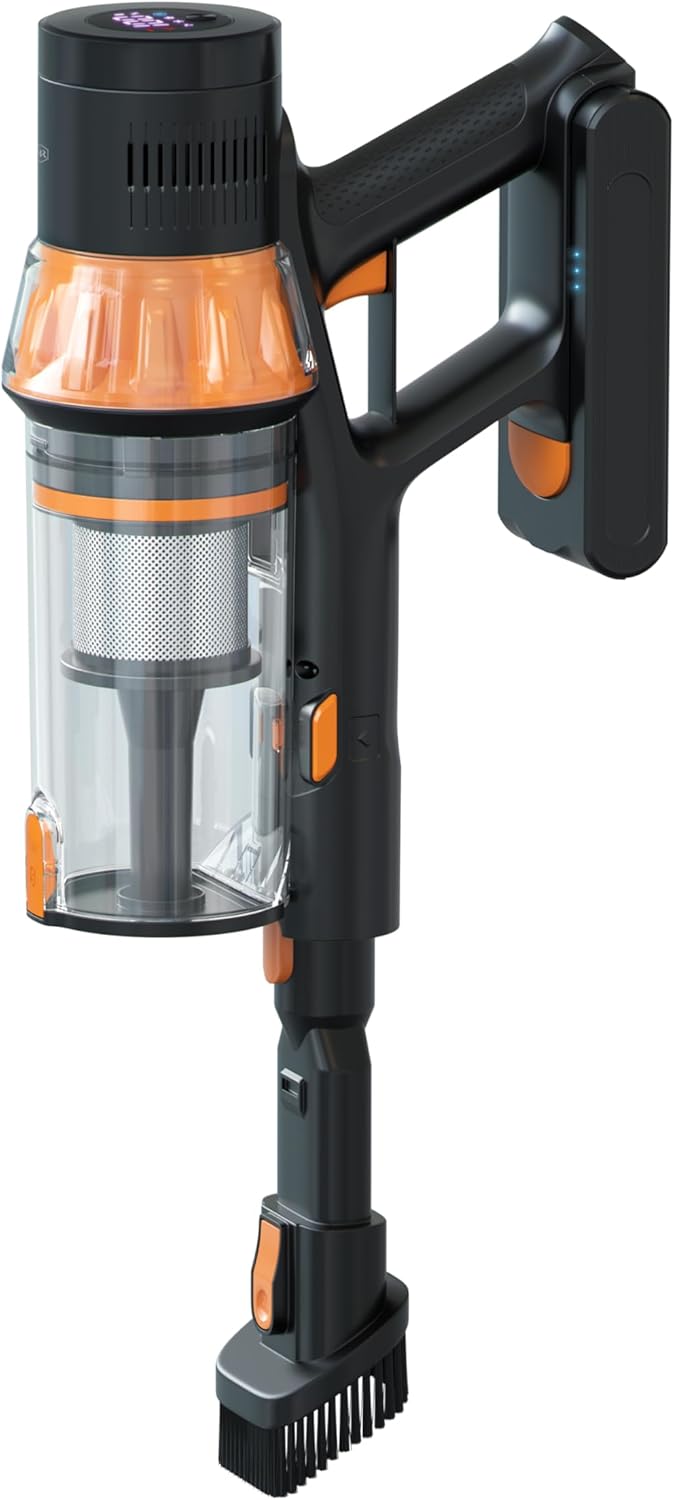
Image: A detailed view of the main vacuum unit, highlighting the dustbin and handle, which can be used as a handheld vacuum.
Motorized Floor Brush with LED Light
The motorized floor brush is equipped with a built-in LED floor light, which illuminates the cleaning path, making dust and debris more visible, especially in dimly lit areas.
Maintenance and Care
Emptying the Dustbin
To maintain optimal suction, empty the dustbin regularly, ideally after each use or when the MAX fill line is reached. Press the dustbin release button to detach it from the main unit, then open the bottom flap to empty contents into a waste bin.
Cleaning Filters
The vacuum cleaner uses cyclonic filtration. The filters should be cleaned periodically to ensure efficient operation. Refer to the specific instructions in your product packaging for filter removal and cleaning. Most filters can be rinsed with cold water; ensure they are completely dry before reinserting.
Cleaning the Motorized Floor Brush
Periodically check the motorized floor brush for tangled hair or debris. Remove any obstructions to ensure the brush rotates freely and effectively.
General Cleaning
Wipe the exterior of the vacuum cleaner with a soft, damp cloth. Do not use harsh chemicals or abrasive cleaners. Ensure the appliance is turned off and unplugged before cleaning.
Troubleshooting
| Problem | Possible Cause | Solution |
|---|---|---|
| Vacuum does not turn on. | Battery is not charged. | Charge the battery fully. |
| Vacuum has low suction. | Dustbin is full. Filters are clogged. Obstruction in nozzle or hose. | Empty the dustbin. Clean or replace filters. Remove any obstructions. |
| Motorized brush not spinning. | Brush roll is jammed. Attachment not properly connected. | Remove hair/debris from brush roll. Ensure the motorized floor brush is securely attached. |
| Short battery runtime. | Battery not fully charged. Using high suction mode continuously. Battery degradation over time. | Ensure battery is fully charged before use. Use lower suction modes for lighter cleaning tasks. Contact customer support if battery life significantly decreases. |
Product Specifications
| Brand | Bennett Read |
| Model Name | Duo Force |
| Model Number | HVC134 |
| Colour | Multicolor |
| Item Weight | 3.7 kg |
| Product Dimensions | 58L x 28W x 16H centimetres |
| Special Features | Lightweight, 3 Levels of adjustable suction power, Automatic dust detection, Advanced brushless motor, Motorised floor brush with built-in LED floor light, High-quality digital display screen |
| Included Components | 1 x Bennett Read Duo Force 2-in-1 Upright Cordless Vacuum Cleaner (main unit, extension wand, motorized floor brush, crevice tool, brush tool, wall-mount bracket, charging adapter) |
Warranty and Support
For warranty information, please refer to the warranty card included with your product packaging or visit the official Bennett Read website. Keep your proof of purchase for any warranty claims.
If you encounter any issues not covered in the troubleshooting section or require further assistance, please contact Bennett Read customer support. Contact details can typically be found on the manufacturer's website or on the product packaging.
Note: Spare part information is not explicitly provided in the product details. Please contact customer support for spare part availability.