
1. Introduction
Thank you for choosing the UNITOPSCI 10.1 Inch Single Din Adjustable Car Stereo. This advanced car multimedia player is designed to enhance your driving experience with its versatile features, including Wireless CarPlay, Android Auto, Bluetooth 5.2, and a large IPS floating touchscreen. This manual provides detailed instructions for installation, operation, maintenance, and troubleshooting to ensure optimal performance and user satisfaction.

Figure 1.1: UNITOPSCI 10.1 Inch Single Din Adjustable Car Stereo with its main components.
2. Product Features
The UNITOPSCI Car Stereo is equipped with a range of features designed for convenience and entertainment:
- 10.1 Inch Touchscreen MP5 Car Radio, Detachable Screen & Touch Button Design: Features a floating and adjustable design, allowing for 30° front/rear tilt, 30° left/right tilt, and 5cm vertical movement for optimal viewing. The touch button design simplifies volume, mute, and power control.
- Wireless CarPlay & Android Auto, Mirror Link: Seamlessly connect your smartphone via wireless/wired BT/WIFI or USB for access to navigation, contacts, and media. The Mirror Link function allows screen mirroring from your phone to the car radio display.
- Bluetooth 5.2, EQ Sound: Advanced Bluetooth 5.2 ensures faster and more stable connections for hands-free calls and music streaming. Multi-band EQ mode allows for personalized audio customization.
- You-tube Online Video, Lossless Sound Quality: Supports online video streaming via phone hotspot. Enjoy pure, uncompressed sound with FLAC mode support.
- FM/AM Radio, USB & TF & AUX-IN: Digital stereo FM/AM radio with 30 preset stations (18 FM, 12 AM) and memory function. Dual USB ports for playback and 5V_2A phone charging, plus TF card and AUX-IN support.
- Rear View Camera, SWC: Automatic display of reversing video when in reverse gear. Includes a 12-LED backup camera with 170° wide angle for safer parking. Steering Wheel Control (SWC) compatibility for convenient function access.

Figure 2.1: Wireless CarPlay, Android Auto, and Mirrorlink capabilities.
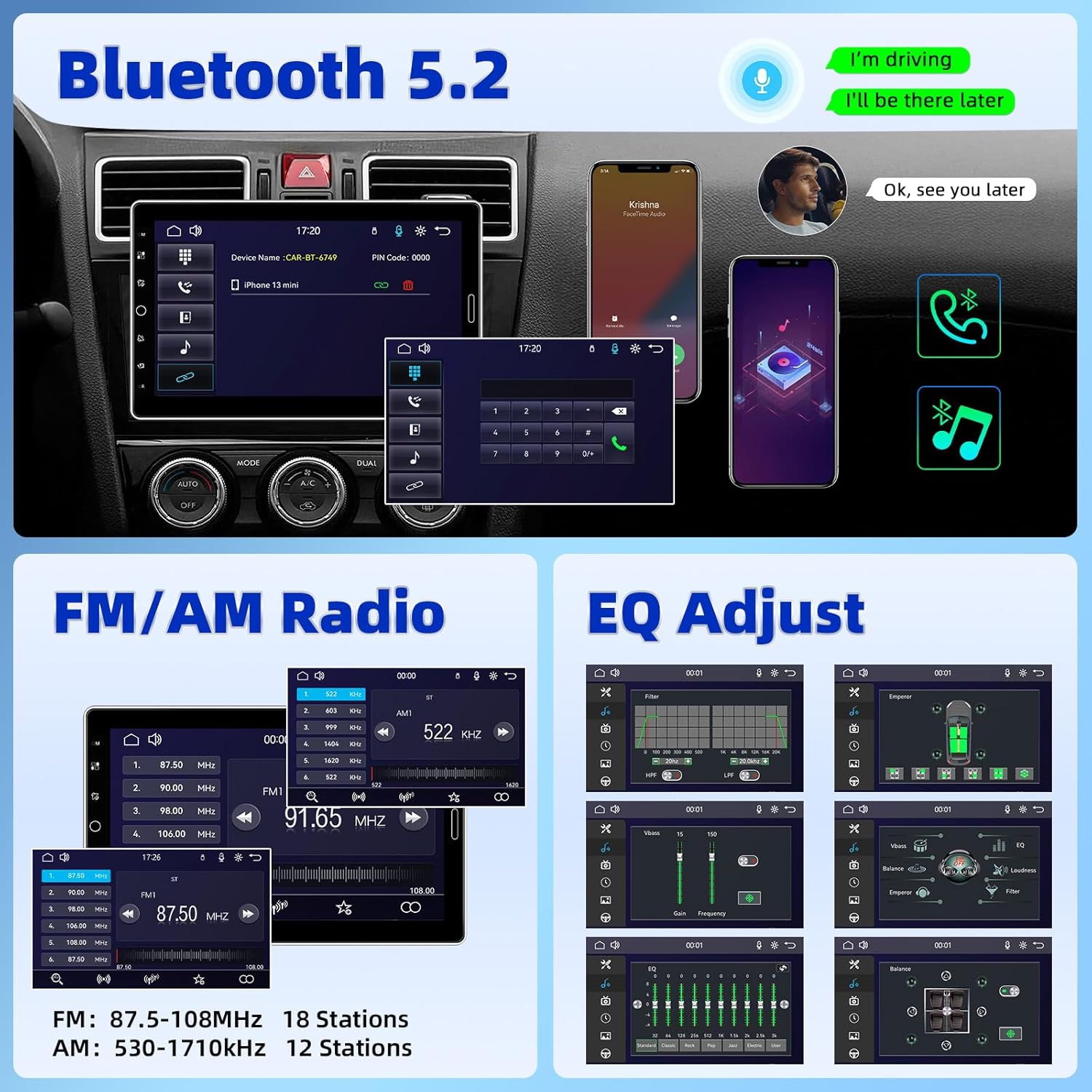
Figure 2.2: Bluetooth 5.2, FM/AM Radio, and EQ Adjustment options.

Figure 2.3: Support for YouTube Online Video playback.

Figure 2.4: Detachable and adjustable 10.1 Inch IPS Touchscreen.
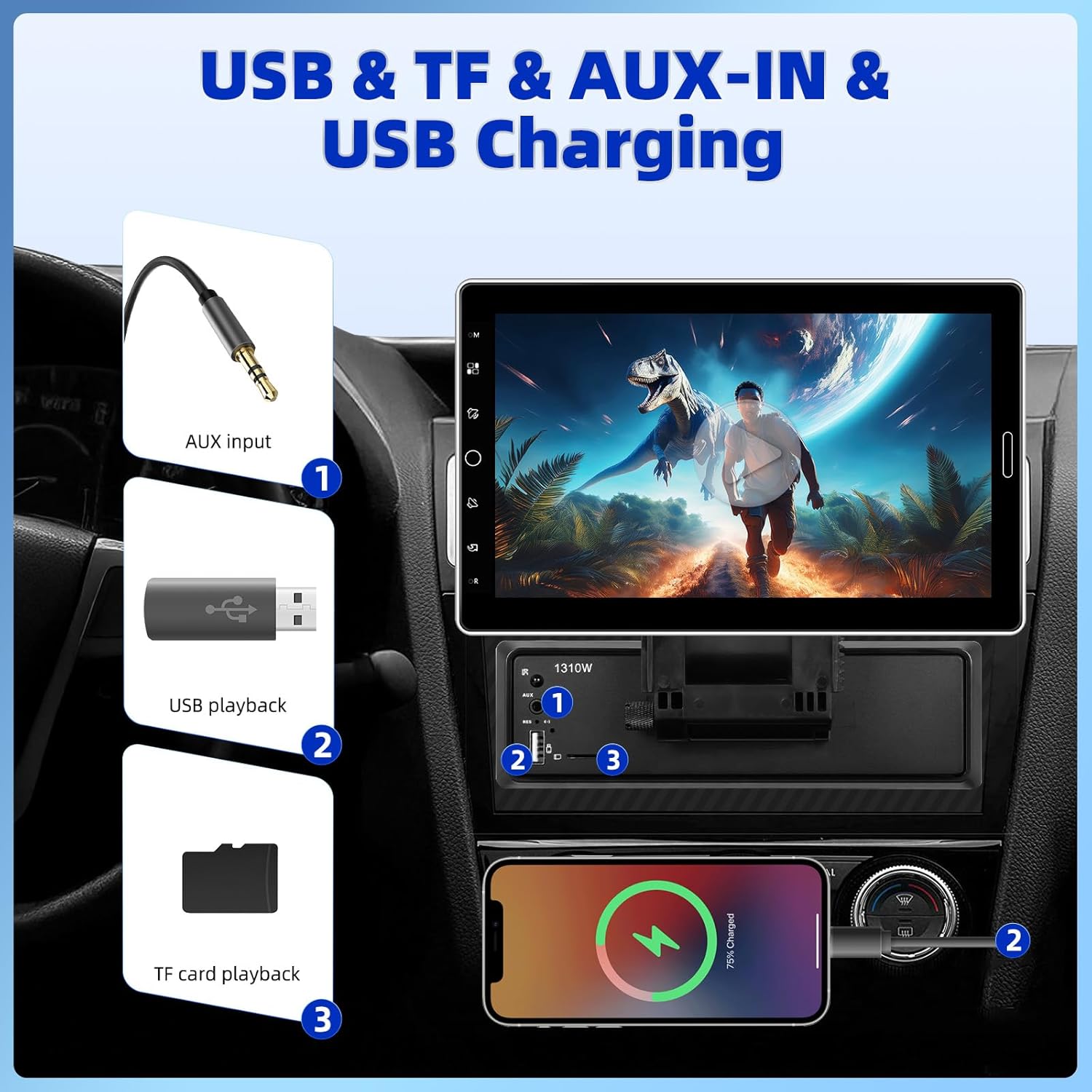
Figure 2.5: USB, TF, AUX-IN, and USB Charging ports.
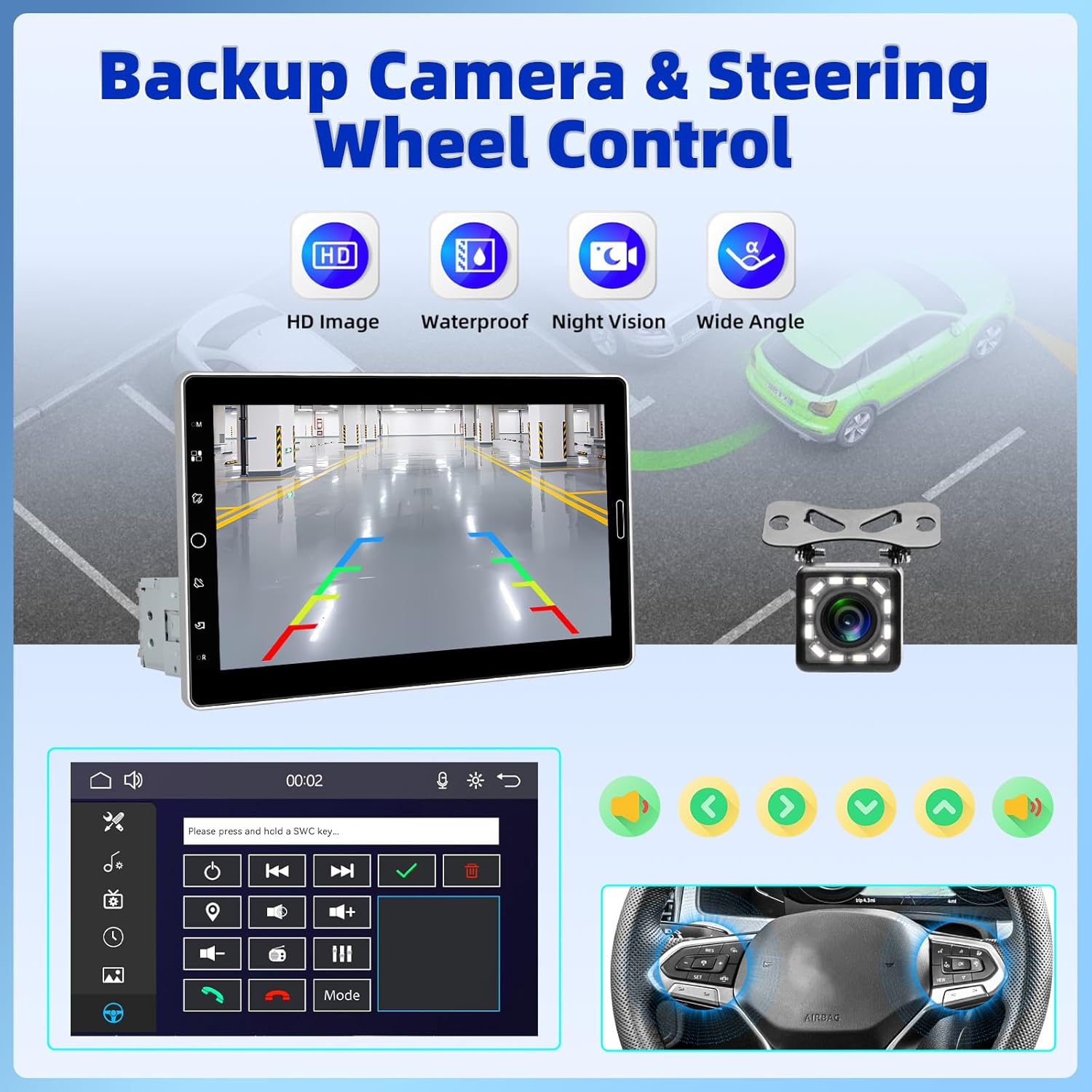
Figure 2.6: Backup Camera and Steering Wheel Control (SWC) functionality.
3. What's in the Box
Upon opening your product package, please verify that all the following items are included:
- 1 x Car MP5 Player (Main Unit)
- 1 x Power Cable
- 1 x Horn Cable
- 1 x MIC (Microphone)
- 1 x Mounting Bracket
- 1 x User Manual
- 1 x 12 LEDs Backup Camera

Figure 3.1: Product Size and Packing List overview.
4. Setup and Installation
Installing the UNITOPSCI Car Stereo requires careful wiring and mounting. Due to the complexity of car audio systems and varying vehicle models, professional installation is highly recommended to ensure proper functionality and avoid damage to your vehicle or the stereo unit. If you choose to install it yourself, please refer to the detailed wiring diagrams and instructions provided in the included user manual.
Note: Some users have reported that wiring instructions may require prior experience with car radios. Pay close attention to wire colors and functions.
4.1 Mounting the Unit
- Ensure the single DIN slot in your vehicle is compatible with the stereo's dimensions.
- Use the provided mounting bracket to secure the main unit firmly into the dashboard.
- Attach the 10.1-inch display to the main unit, ensuring it clicks securely into place. Adjust the screen angle for optimal viewing.
4.2 Wiring Connections
Connect the power cable, horn cable, microphone, and backup camera according to the wiring diagram in the dedicated user manual section. Ensure all connections are secure and properly insulated to prevent short circuits.
5. Operating Instructions
This section outlines the basic operation of your UNITOPSCI Car Stereo.
5.1 Power On/Off and Basic Controls
- Press the power button on the unit to turn it on or off.
- Adjust volume using the touch buttons or steering wheel controls (if connected).
- The screen dimming option or screen-off feature can be accessed through the settings menu.
5.2 Wireless CarPlay & Android Auto
- For Wireless Connection: Enable Bluetooth and Wi-Fi on your smartphone. On the car stereo, navigate to the CarPlay or Android Auto icon. Follow the on-screen prompts to pair your device.
- For Wired Connection: Connect your smartphone to the stereo's USB port using a compatible USB cable. The system should automatically detect and launch CarPlay or Android Auto.
- Once connected, you can access navigation, make calls, send messages, and play music directly from the stereo's interface.
5.3 Bluetooth Connectivity
- Go to the Bluetooth settings on the stereo.
- Enable Bluetooth on your phone and search for available devices. Select "UNITOPSCI" (or similar name) from the list.
- Confirm the pairing code on both devices. Once paired, you can make hands-free calls and stream audio.
5.4 FM/AM Radio
- Select the FM/AM radio application from the main menu.
- Use the scan function to automatically search and save available stations.
- Manually tune to frequencies or select from your preset stations.
5.5 Media Playback (USB, TF, AUX-IN, Online Video)
- USB/TF: Insert your USB drive or TF card into the respective slot. The system will automatically detect and allow you to browse and play media files (audio, video, images).
- AUX-IN: Connect an external audio device to the AUX-IN port using a 3.5mm audio cable. Select the AUX input source on the stereo.
- Online Video (YouTube): Connect the stereo to your phone's hotspot. Open the YouTube application on the stereo to browse and stream videos.
5.6 EQ Settings
- Access the EQ settings from the audio menu.
- Adjust various frequency bands to customize your sound profile. Preset EQ modes are also available.

Figure 5.1: User Interface Display and Media Playback examples.
6. Maintenance
Proper maintenance ensures the longevity and optimal performance of your car stereo.
- Cleaning the Screen: Use a soft, lint-free cloth to gently wipe the touchscreen. For stubborn smudges, slightly dampen the cloth with water or a screen-safe cleaner. Avoid abrasive materials or harsh chemicals.
- General Cleaning: Keep the unit free from dust and debris. Use a soft brush or compressed air to clean vents and ports.
- Temperature: Avoid exposing the unit to extreme temperatures. Prolonged exposure to direct sunlight or very cold conditions can affect performance and lifespan.
- Connections: Periodically check all wiring connections to ensure they are secure and free from corrosion.
7. Troubleshooting
If you encounter issues with your UNITOPSCI Car Stereo, refer to the following common problems and solutions:
| Problem | Possible Cause | Solution |
|---|---|---|
| Unit does not power on. | No power supply; Blown fuse; Incorrect wiring. | Check power cable connections. Inspect vehicle's fuse box and the unit's fuse. Verify wiring against the manual. |
| No sound or distorted audio. | Speaker wires disconnected; Volume too low; Incorrect audio source. | Check speaker connections. Increase volume. Ensure correct audio input (Radio, USB, Bluetooth, AUX). Adjust EQ settings. |
| CarPlay/Android Auto not connecting. | Bluetooth/Wi-Fi off; Incorrect USB cable; Phone software issue. | Ensure phone's Bluetooth/Wi-Fi is on. Use original or certified USB cable. Restart phone and stereo. |
| Backup camera not displaying. | Camera not connected; Reverse trigger wire not connected. | Verify camera cable connection to the stereo. Ensure the reverse trigger wire is correctly connected to the vehicle's reverse light circuit. |
| Steering Wheel Controls not working. | SWC wires not connected; SWC not configured. | Ensure SWC wires are correctly connected. Access the stereo's settings to configure steering wheel controls. |
If the problem persists after attempting these solutions, please contact UNITOPSCI customer support for further assistance.
8. Specifications
Detailed technical specifications for the UNITOPSCI 10.1 Inch Single Din Adjustable Car Stereo:
- Product Dimensions: 5.44 x 7.01 x 6.34 inches (13.82 x 17.81 x 16.10 cm)
- Item Weight: 2.2 pounds (1 Kilogram)
- Model Number: A4061A3
- Connectivity Technology: Auxiliary, Bluetooth, USB
- Controller Type: Hand Control
- Compatible Devices: Smartphone, Speaker
- Connector Type: USB Type A
- Audio Output Mode: Mono
- Output Power: 180 Watts
- Screen Size: 10.1 Inch IPS Touchscreen
- Bluetooth Version: 5.2
- Radio Frequencies: FM: 87.5-108MHz (18 Stations), AM: 530-1710KHz (12 Stations)
9. Warranty and Support
UNITOPSCI is committed to providing high-quality products and excellent customer service. Your car stereo comes with comprehensive support and warranty coverage:
- Replacement Availability: Replacements are available within 24 months of purchase.
- Quick Response: Expect a response to your inquiries within 16 hours.
- Lifetime After-Sales Support: Benefit from lifetime consultation and technical support.
- Return Policy: Enjoy a 60-day no-worry return period.
For any technical issues, questions, or support needs, please contact us directly:
Email: UNITOPSCI@126.com

Figure 9.1: UNITOPSCI Customer Support Information.