
Introduction
This manual provides comprehensive instructions for the assembly, operation, and care of your HUGERSTAR 90mm Aperture 800mm Refractor Telescope. Please read this manual thoroughly before using the telescope to ensure proper function and longevity of the instrument.
Package Contents
Verify that all components listed below are present in your package:
- Telescope Tube (90mm Aperture, 800mm Focal Length)
- Stainless Steel Tripod (Adjustable height: 28.7 to 46.4 inches / 73 to 118 cm)
- Accessory Tray
- 10mm Eyepiece
- 25mm Eyepiece
- 3X Barlow Lens
- 5x24 Finder Scope
- Zenith Mirror (45-degree diagonal)
- Moon Filter
- Phone Adapter
- Instruction Manual
- Carry Bag
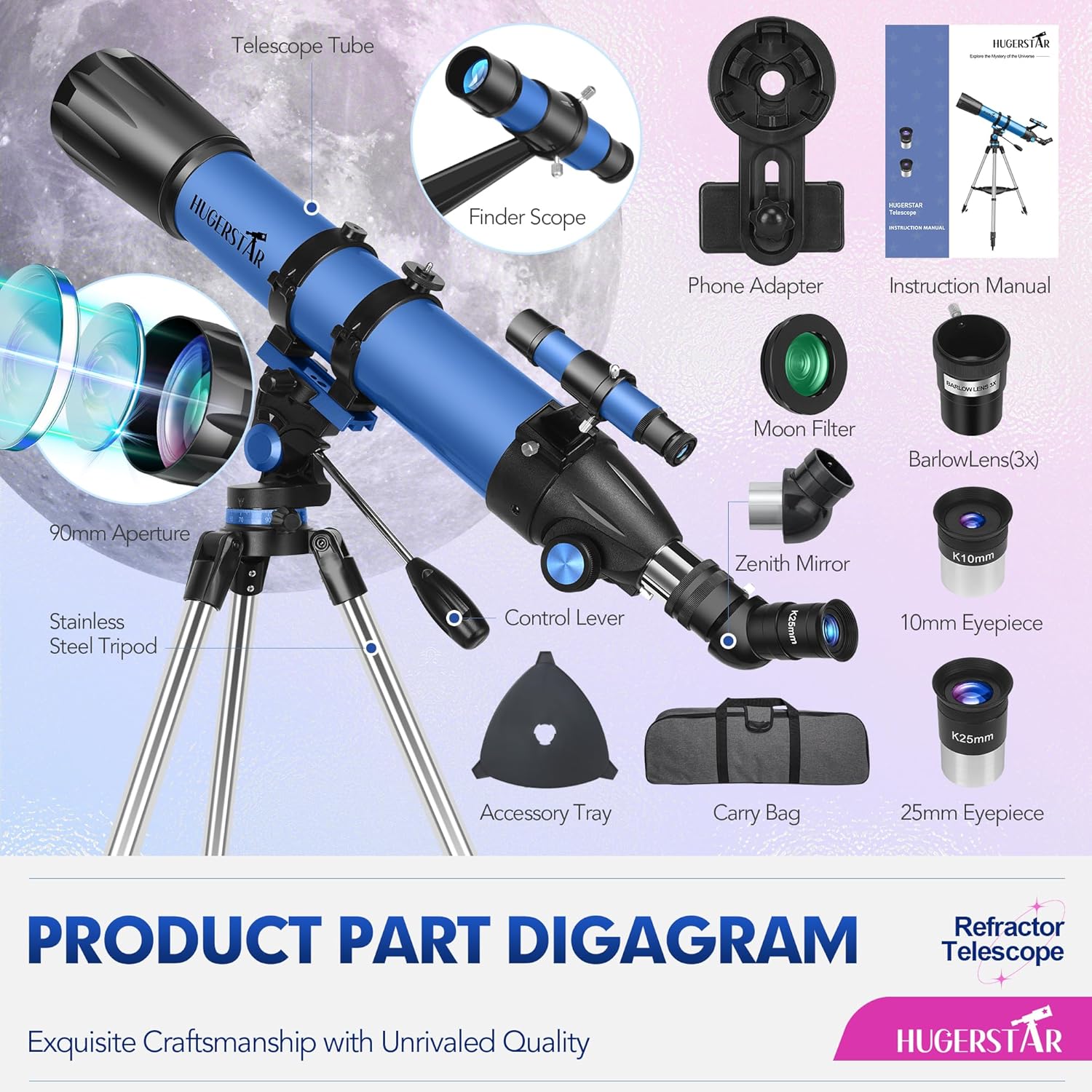
Image: Detailed diagram showing all included components of the HUGERSTAR telescope package.
Setup Instructions
Follow these steps for quick and tool-free assembly:
- Set up the Tripod: Extend the stainless steel tripod legs to a stable position. Adjust the height as needed. Attach the accessory tray to the tripod.
- Mount the Telescope Tube: Securely attach the telescope tube to the tripod mount. Ensure all locking mechanisms are tightened.
- Install the Finder Scope: Attach the 5x24 finder scope to its base on the main telescope tube. The finder scope assists in locating objects before viewing through the main eyepiece.
- Install the Zenith Mirror: Insert the 45-degree zenith mirror into the focuser tube. This mirror provides an erect image, which is useful for terrestrial viewing and comfortable astronomical observation.
- Insert an Eyepiece: Choose an eyepiece (e.g., 25mm for lower magnification) and insert it into the zenith mirror. Secure it with the retaining screw.
- Remove Lens Cover: Remove the dust cover from the main objective lens of the telescope.

Image: Visual guide demonstrating the installation of the finder scope, zenith mirror, and eyepiece, followed by focusing.
Video: HUGERSTAR 90mm Aperture 800mm Professional Telescope assembly and feature overview. This video demonstrates the physical components and initial setup steps.
Operating Instructions
Locating Objects with the Finder Scope
The 5x24 finder scope provides a wider field of view at lower magnification, making it easier to locate celestial or terrestrial objects. Look through the finder scope and center the desired object in its crosshairs. Once centered, the object should be visible through the main telescope eyepiece.
Focusing
After locating an object, turn the focusing knob slowly until the image appears sharp and clear. Fine adjustments may be needed as objects move or as atmospheric conditions change.

Image: Illustration of the finder scope's function and the zenith mirror's role in image orientation.
Magnification Guide
Your telescope comes with two eyepieces and a 3X Barlow lens, offering various magnification levels:
- 25mm Eyepiece: Provides 32X magnification. Ideal for wide-field views and locating objects.
- 10mm Eyepiece: Provides 80X magnification. Suitable for more detailed observation of brighter objects.
- 3X Barlow Lens: Triples the magnification of any eyepiece.
- With 25mm Eyepiece: 32X * 3 = 96X magnification.
- With 10mm Eyepiece: 80X * 3 = 240X magnification.
Higher magnifications are best used on clear nights with stable atmospheric conditions and for brighter objects like the Moon and planets. Lower magnifications provide brighter, wider views, suitable for star clusters and nebulae.

Image: Visual representation of magnification options using different eyepieces and the Barlow lens.
Moon Filter Usage
The included moon filter reduces the brightness of the Moon, enhancing contrast and allowing for more comfortable and detailed observation of lunar features. To use, screw the moon filter onto the bottom of your chosen eyepiece before inserting the eyepiece into the zenith mirror.

Image: Demonstration of attaching the moon filter to an eyepiece and its effect on lunar viewing.
Phone Adapter Usage
The phone adapter allows you to attach your smartphone to the eyepiece for capturing images or videos through the telescope. Secure your phone in the adapter, then align your phone's camera lens with the eyepiece. Adjust the phone's position and focus for optimal results.
Video: HUGERSTAR Telescope overview, including a demonstration of the phone adapter for capturing images.
Maintenance
- Cleaning Lenses: Use a soft, lint-free cloth specifically designed for optical lenses. Gently wipe the lens surfaces. For stubborn smudges, use a small amount of optical cleaning fluid on the cloth, not directly on the lens.
- Storage: Always replace dust covers on the objective lens and eyepieces when not in use. Store the telescope in its carry bag in a dry, dust-free environment.
- Avoid Direct Sunlight: Never point the telescope at the sun without a professional solar filter, as this can cause severe eye damage and damage to the telescope.
Troubleshooting
| Problem | Possible Cause | Solution |
|---|---|---|
| Image is blurry or out of focus. | Incorrect focus; atmospheric conditions; lens cover still on. | Adjust the focusing knob slowly. Wait for more stable atmospheric conditions. Ensure the objective lens cover is removed. |
| Cannot find objects easily. | Finder scope not aligned; using too high magnification initially. | Align the finder scope with the main telescope. Start with the lowest magnification eyepiece (25mm) to locate objects. |
| Image appears inverted or reversed. | Normal for astronomical telescopes without a diagonal or with a standard diagonal. | The 45-degree zenith mirror provides an erect image. If using a different diagonal, image orientation may vary. This is normal for astronomical viewing. |
| Vibrations affect viewing. | Unstable tripod setup; windy conditions. | Ensure tripod legs are fully extended and stable on a flat surface. Avoid touching the telescope during observation. Observe on calm nights. |
Specifications
- Brand: HUGERSTAR
- Model Name: 90800
- Optical Design: Refractor
- Aperture: 90mm
- Focal Length: 800mm
- Focal Ratio: f/8.89
- Eyepieces: 10mm, 25mm (Kellner type)
- Barlow Lens: 3X
- Finder Scope: 5x24 Straight-Through
- Zenith Mirror: 45-degree Erect Image Diagonal
- Mount Type: Altazimuth Mount
- Tripod: Stainless Steel, Adjustable Height (73-118 cm / 28.7-46.4 inches)
- Optical Coating: Fully Multi-Coated
- Magnification Range: 32X - 240X
- Field of View: 31.25 degrees
- Compatible Devices: Smartphone (with included adapter)
- Product Dimensions: 33.07"D x 18.5"W x 11.41"H
Warranty and Support
For warranty information and customer support, please refer to the contact details provided with your purchase documentation or visit the official HUGERSTAR website. Keep your purchase receipt as proof of purchase for any warranty claims.


