
Introduction
Thank you for choosing the VIAGDO Floating Bed Frame. This twin-size bed frame features a modern floating design, an upholstered headboard with integrated storage, dynamic RGB LED lighting, and a built-in charging station. This manual provides detailed instructions for assembly, operation, maintenance, and troubleshooting to ensure a safe and enjoyable experience with your new bed frame.
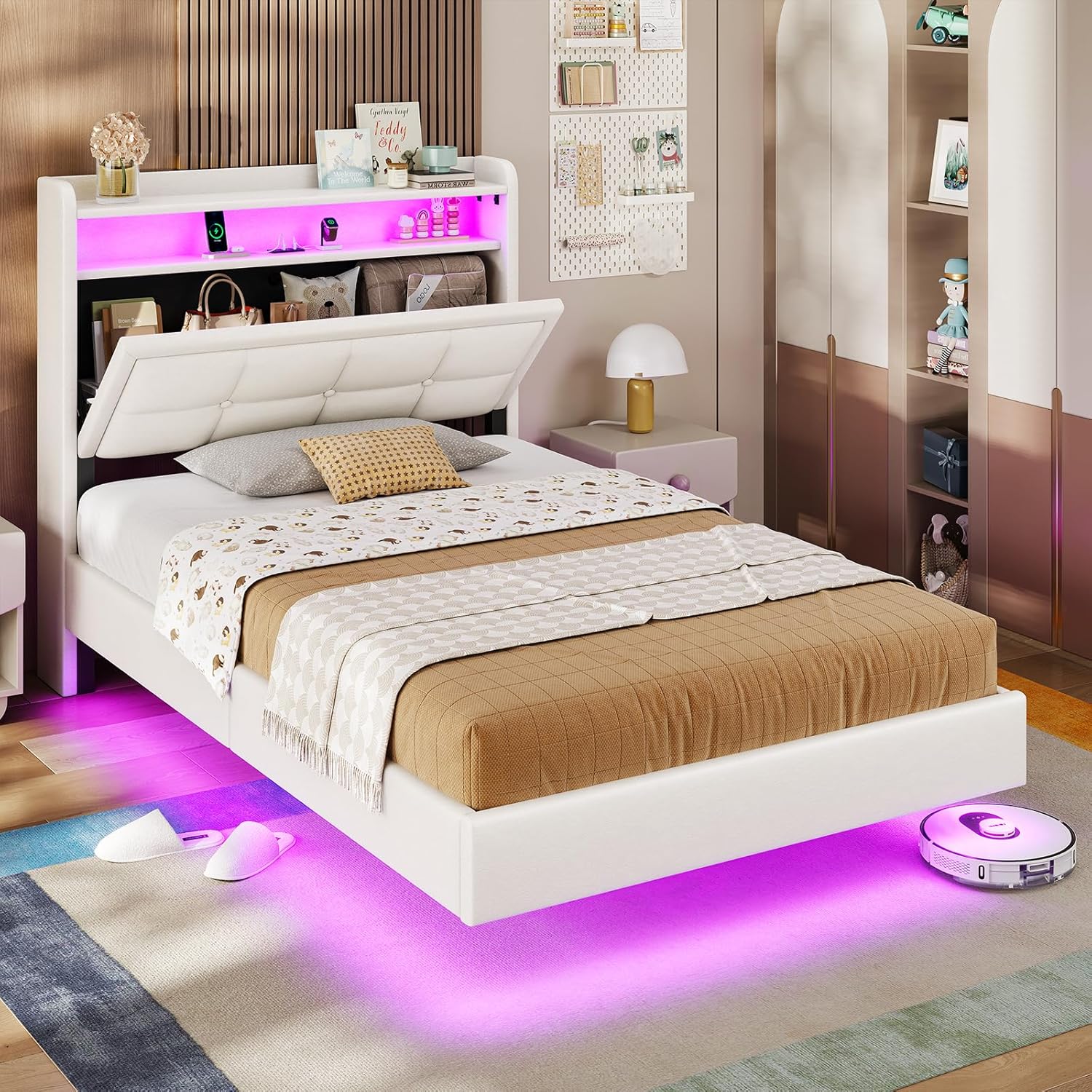
Image: The VIAGDO Floating Bed Frame in a bedroom setting, showcasing its LED lighting and storage headboard.
Important Safety Information
Please read and understand all safety warnings before assembly and use.
- Do not load more than 1000 pounds onto the bed frame.
- Exercise caution around sharp edges during assembly to prevent injury.
- Always follow the assembly instructions precisely to ensure stability and prevent structural failure.
- Keep all electrical components dry and away from flammable materials.
- Unplug charging ports when not in use to conserve energy and prevent potential hazards.
Package Contents
Your VIAGDO Floating Bed Frame package includes all necessary components for assembly. Please verify that all parts are present before beginning assembly.
- Headboard with integrated storage and LED lights
- Bed frame side rails and footboard
- Wooden slat support system
- Installation Manual
- Assembly tools (hex key, screws, etc.)
- LED Light Strip (pre-installed or separate, refer to manual)
- Charging station module (pre-installed or separate, refer to manual)
All components are typically shipped in one box. If any parts are missing or damaged, please contact customer support.
Setup and Assembly Instructions
Assembly of the VIAGDO Floating Bed Frame is designed to be straightforward. Follow the numbered steps in the included installation manual. It is recommended to assemble the bed frame in the room where it will be used.
- Unpack Components: Carefully remove all parts from the packaging. Lay them out on a clean, soft surface to prevent scratches. Verify all parts against the parts list in your included manual.
- Assemble Headboard: Attach any separate headboard components as instructed. Ensure the LED light strip and charging station are correctly positioned and secured.
- Connect Side Rails: Attach the side rails to the headboard and footboard using the provided hardware. Do not overtighten screws until all connections are made.
- Install Slat System: Position the wooden slats across the bed frame. The Velcro design simplifies installation and helps prevent squeaking. Ensure all slats are evenly spaced and securely fastened. This bed frame does not require a box spring.
- Final Tightening: Once all components are in place, systematically tighten all screws and bolts.
- Connect Power: Plug in the power cord for the LED lights and charging station to a suitable power outlet.

Image: Detailed view of the bed frame's heavy-duty metal and wooden slat structure, highlighting the Velcro design for easy and secure slat installation.

Image: Diagram illustrating the hidden legs design, which reduces the risk of accidental bumping compared to traditional bed frames.
Operating Instructions
LED Lighting System
The integrated LED lights on the headboard and under the bed offer customizable ambiance. Control the lights using the provided remote control or a compatible smartphone application.
- Color Selection: Choose from over 60,000 RGB colors to match your mood or decor.
- Dynamic Modes: Select from 29 dynamic lighting modes for various effects.
- Brightness and Speed: Adjust the brightness level and the speed of dynamic modes.
- Music Sync: Utilize the microphone function to synchronize the lights with music beats.
- Timing Function: Set schedules for the lights to turn on or off automatically.
- Control Methods: Use either the included remote control or download the specified smartphone application for full control.

Image: A bedroom scene featuring the VIAGDO bed frame with its dynamic RGB LED lights illuminated, alongside icons representing remote control, color options, dynamic modes, music sync, microphone function, schedule, and app control.
Integrated Charging Station
The headboard includes a convenient charging station for your electronic devices.
- USB Ports: Features 3 standard USB ports (5V/2A).
- Type C Port: Includes 1 Type C port (5V/3A) for faster charging compatible devices.
- Power Cord: The charging station is powered via a 6.5-foot power cord.
Ensure the bed frame's main power cord is plugged into a wall outlet for the charging station to function.

Image: A detailed view of the bed frame's headboard, showcasing the embedded charging station with its USB and Type C ports, along with a diagram indicating the power cord length.
Storage Headboard
The headboard provides practical storage solutions.
- 2-Tier Shelf: An open 2-tier shelf is available for displaying items or keeping frequently used objects.
- Hidden Storage: A larger hidden compartment behind the upholstered backrest offers discreet storage for personal items.

Image: A detailed view of the bed frame's headboard, illustrating the open 2-tier shelf with various items and the hidden storage compartment accessible by lifting the upholstered section.
Maintenance
Proper maintenance will extend the life and appearance of your bed frame.
- Cleaning:
- For the upholstered headboard, gently wipe with a damp cloth and mild soap if necessary. Avoid harsh chemicals.
- For the frame, wipe with a soft, dry cloth.
- Electrical Components: Ensure the LED lights and charging station remain dry. Do not expose them to liquids.
- Hardware Check: Periodically check all screws and bolts to ensure they are tight. Retighten if necessary to maintain stability.
- Weight Limit: Adhere to the maximum weight capacity of 1000 pounds to prevent damage.
Troubleshooting
If you encounter issues with your bed frame, refer to the following common problems and solutions:
| Problem | Possible Cause | Solution |
|---|---|---|
| LED lights not working | Power cord unplugged; remote control battery dead; app not connected; faulty connection. | Ensure the bed frame's power cord is securely plugged in. Check remote control batteries. Re-pair the app if necessary. Inspect LED strip connections. |
| Charging station not functioning | Bed frame power cord unplugged; device cable faulty; charging station module issue. | Verify the bed frame's main power cord is plugged in. Try a different charging cable for your device. Ensure devices are compatible with USB/Type C outputs. |
| Bed frame squeaks | Loose hardware; uneven slat placement. | Retighten all screws and bolts. Ensure slats are properly seated and evenly distributed. The Velcro design and sound absorption straps are designed to minimize squeaks. |
| Parts missing or damaged upon arrival | Shipping damage; packaging error. | Do not proceed with assembly. Contact customer support immediately with your purchase details. |
Specifications
| Feature | Detail |
|---|---|
| Brand | VIAGDO |
| Model Number | floating bed frame |
| Size | Twin |
| Product Dimensions (L x W x H) | 81.5" x 39.4" x 43.3" |
| Color | White |
| Material | Engineered Wood, Leather, Metal |
| Headboard Material | Leather |
| Weight Capacity | 1000 pounds (maximum) |
| Box Spring Required | No |
| LED Lights | RGB, 60,000+ colors, 29 dynamic modes, brightness/speed adjustable, mic/timing function, remote/app control. |
| Charging Station | 3 USB ports (5V/2A), 1 Type C port (5V/3A), 6.5-foot power cord. |
| Assembly Required | Yes |
| Certifications | FSC-Certified wood components |

Image: A diagram illustrating the dimensions (length, width, height) and maximum weight capacity (800 lbs shown in image, refer to text for 1000 lbs) of the twin-size bed frame.
Warranty and Support
VIAGDO is committed to providing quality products and excellent customer service.
- Warranty Information: Specific warranty details are typically included with your purchase documentation. Please refer to the warranty card or contact VIAGDO customer service for information regarding coverage and duration.
- Customer Support: For any questions, concerns, or assistance with assembly, operation, or troubleshooting, please contact VIAGDO customer support. Have your purchase details and model number ready for faster service.
- Contact Information: Refer to the contact information provided in your product packaging or on the official VIAGDO website.