1. Introduction
This manual provides essential information for the safe and correct installation, operation, and maintenance of the CFguang Multi-Door Switch Assembly. This component is designed as a replacement part compatible with Midea Dishwasher models RX10Pro, RX20S, and RX30. It functions as a single pole, normally closed door switch, ensuring proper door sensing for dishwasher operation.
Please read this manual thoroughly before attempting any installation or repair to ensure safety and optimal performance of the part.
2. Safety Information
- Disconnect Power: Always disconnect the dishwasher from its power source before attempting any installation, repair, or maintenance. Failure to do so can result in electric shock or serious injury.
- Qualified Personnel: Installation and repair should ideally be performed by a qualified technician. If you are unsure about any step, consult a professional.
- Wear Protective Gear: Use appropriate personal protective equipment, such as gloves and eye protection, during installation.
- Handle with Care: The switch assembly contains delicate components. Handle it carefully to avoid damage.
- Verify Compatibility: Ensure this part is compatible with your specific dishwasher model before installation.
3. Package Contents
Verify that all items are present and undamaged upon opening the package.
- 1 x CFguang Multi-Door Switch Assembly (Single Pole, Normally Closed)
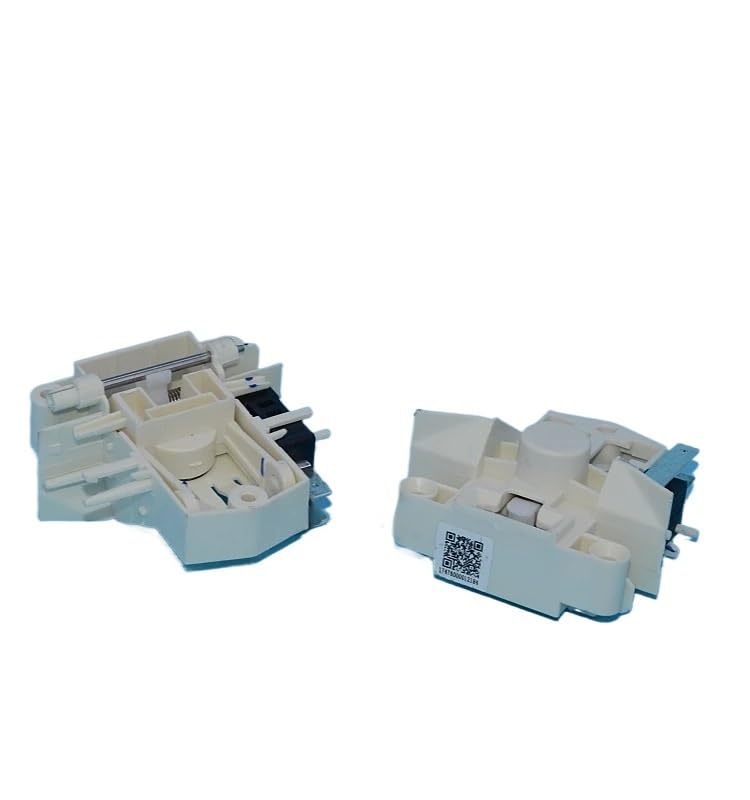
Image 1: The CFguang Multi-Door Switch Assembly. This image displays the compact design of the single pole, normally closed switch, showing its electrical terminals and mounting points.
4. Installation
This section outlines the general procedure for replacing the dishwasher door switch. Specific steps may vary slightly depending on your dishwasher model. Refer to your dishwasher's service manual for detailed instructions if available.
- Prepare the Dishwasher:
- Unplug the dishwasher from the electrical outlet or turn off the circuit breaker supplying power to the dishwasher.
- Close the water supply valve to the dishwasher.
- Open the dishwasher door and remove the lower dish rack to provide better access.
- Access the Old Switch:
- The door switch is typically located near the top of the dishwasher door frame or inside the control panel. You may need to remove the inner door panel or the control panel cover to access it.
- Carefully remove any screws or clips securing the control panel or door panel.
- Remove the Old Switch:
- Once the old switch is accessible, disconnect the electrical wires connected to it. Note the position of each wire before disconnecting, or take a photograph for reference.
- Unclip or unscrew the old switch from its mounting bracket.
- Install the New Switch:
- Position the new CFguang Multi-Door Switch Assembly into the mounting bracket, ensuring it is securely fastened.
- Reconnect the electrical wires to the new switch, matching them to their original positions. Ensure connections are firm.
- Reassemble and Test:
- Carefully reattach the control panel or inner door panel, securing it with screws or clips.
- Restore power to the dishwasher by plugging it in or turning on the circuit breaker.
- Open and close the dishwasher door several times to ensure the switch engages correctly.
- Run a short cycle to confirm the dishwasher operates as expected and the door switch functions properly.
5. Operation
The Multi-Door Switch Assembly is a safety and operational component. When the dishwasher door is closed, the switch is activated, signaling to the dishwasher's control board that it is safe to begin or continue a wash cycle. If the door is open, the switch remains disengaged, preventing the dishwasher from operating to avoid water leaks or injury.
No direct user interaction is required with the switch itself once installed. Its operation is automatic upon opening and closing the dishwasher door.
6. Maintenance
The CFguang Multi-Door Switch Assembly is designed for durability and typically requires minimal maintenance. However, periodic inspection can help ensure its longevity and proper function.
- Visual Inspection: Periodically inspect the area around the door switch for any signs of wear, corrosion, or physical damage. Ensure the wires are securely connected.
- Cleaning: If accessible, gently clean any dust or debris from around the switch using a soft, dry cloth. Do not use liquid cleaners directly on the switch.
- Function Check: If you suspect an issue, perform a simple function check by opening and closing the dishwasher door and observing if the dishwasher responds correctly (e.g., cycle pauses when opened, resumes when closed).
7. Troubleshooting
If your dishwasher is experiencing issues related to door sensing, the door switch assembly may be a factor. Always ensure power is disconnected before inspecting components.
| Problem | Possible Cause | Solution |
|---|---|---|
| Dishwasher does not start when door is closed. | Faulty door switch, loose wiring, or door not fully latched. | Ensure door is fully latched. Check wiring connections to the switch. Test the switch for continuity (if equipped with a multimeter). Replace switch if faulty. |
| Dishwasher stops mid-cycle. | Intermittent door switch failure or door opening slightly. | Check if the door is securely closed. Inspect the switch for physical damage or loose connections. |
| Dishwasher runs with door ajar (safety concern). | Door switch stuck in closed position or wiring shorted. | Immediately disconnect power. Inspect the switch for physical damage. Replace the switch if it fails to open the circuit when the door is open. |
If troubleshooting steps do not resolve the issue, it is recommended to consult a qualified appliance repair technician.
8. Specifications
- Product Type: Multi-Door Switch Assembly
- Switch Type: Single Pole, Normally Closed
- Compatibility: Midea Dishwasher models RX10Pro, RX20S, RX30
- Brand: CFguang
- Item Weight: 50 Grams
- Unit Count: 1.0 Count
9. Warranty and Support
For information regarding warranty coverage or technical support for your CFguang Multi-Door Switch Assembly, please refer to the retailer or the original purchase documentation. Keep your proof of purchase for warranty claims.
If you require further assistance with installation or troubleshooting, please contact a certified appliance technician.