
1. Introduction
This manual provides essential information for the safe and effective use of your Kepwam Self Heating Coffee Mug T2. Please read these instructions thoroughly before operating the device and retain them for future reference.

Figure 1: Kepwam Self Heating Coffee Mug T2
2. Product Overview
The Kepwam Self Heating Coffee Mug T2 is designed to maintain your beverage at a preferred temperature. It features a durable stainless steel body with a ceramic matte surface, double-wall vacuum insulation, and a built-in rechargeable battery. The mug includes a sliding lid to help retain heat and prevent spills.
- Temperature Control: Three adjustable temperature settings (113°F, 131°F, 149°F).
- Smart Technology: Long-lasting battery for portable use and a charging coaster for indefinite warming.
- Easy Operation: Single-button control for power and temperature adjustment with a smart display for battery and temperature status.
- Capacity: 16 oz (14 oz with lid).

Figure 2: Key features of the Kepwam Self Heating Coffee Mug T2
3. What's Included
- Kepwam Self Heating Coffee Mug T2
- Charging Coaster with Power Adapter
- Sliding Lid
Video 1: Unboxing the Kepwam Self Heating Coffee Mug T2, showing the mug, lid, and charging coaster.
4. Setup
- Initial Charge: Before first use, connect the charging coaster to a power supply and place the mug on it to fully charge the internal battery.
- Prepare Beverage: Pour your desired hot beverage into the mug. Ensure the liquid level does not exceed the maximum capacity mark.
- Attach Lid: For optimal heat retention and spill prevention, place the sliding lid securely on the mug.
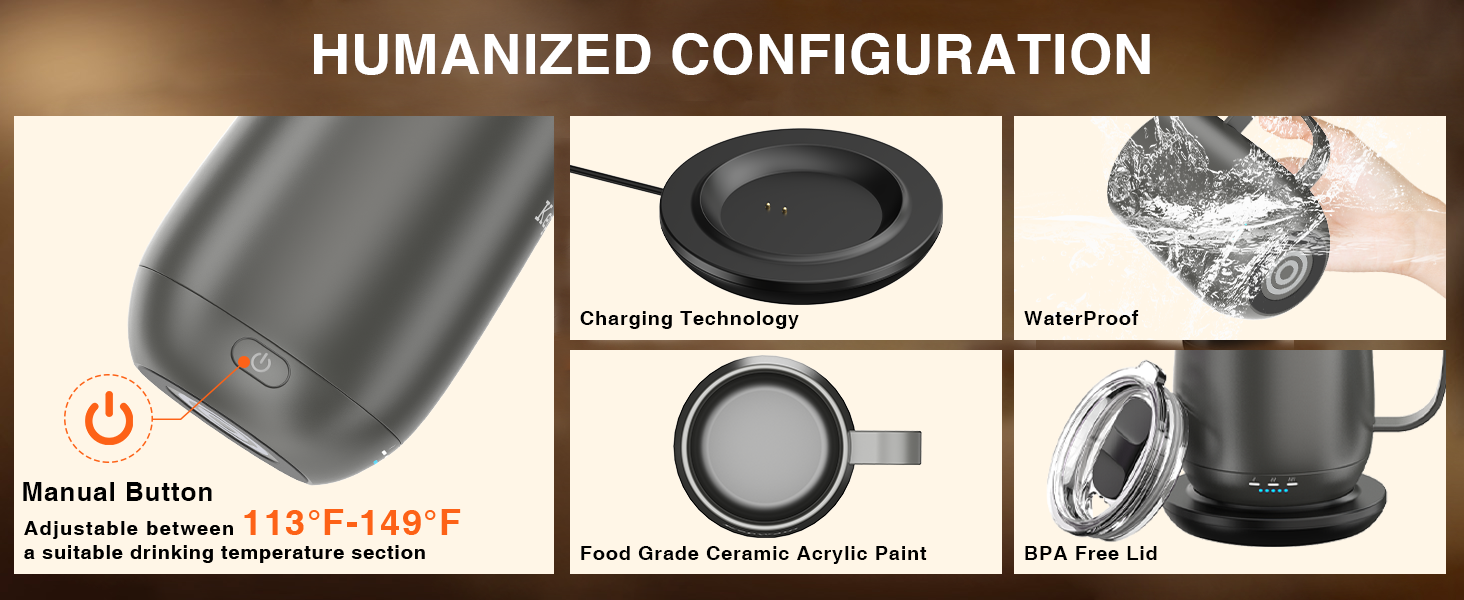
Figure 3: Visual guide for initial setup and use
5. Operating Instructions
The Kepwam Self Heating Coffee Mug T2 features a single button for all operations.
- Power On/Off: Press and hold the power button located on the side of the mug to turn the device on or off.
- Adjust Temperature: Once powered on, short press the power button to cycle through the available temperature settings. The smart display will indicate the selected temperature.
- Battery Indicator: The smart display also shows the current battery level, allowing you to monitor usage.

Figure 4: Power button and indicator lights
Video 2: Demonstration of the mug's operation, including power on/off, temperature settings, and charging.
6. Temperature Settings
The mug offers three distinct temperature settings to suit your preference:
- Warm: 113°F (45°C)
- Hot: 131°F (55°C)
- Piping: 149°F (65°C)
Select your desired temperature by pressing the power button until the corresponding indicator light is illuminated.

Figure 5: Temperature ranges for each setting
7. Battery Life and Charging
The mug is equipped with a 3000mAh Lithium Polymer battery. Battery life varies depending on the selected temperature setting and whether the lid is used.
| Temp. Setting | With Lid (Off Coaster) | Without Lid (Off Coaster) | With Lid (On Coaster) | Without Lid (On Coaster) |
|---|---|---|---|---|
| Warm (113°F/45°C) | 6h | 3h | Indefinite | Indefinite |
| Hot (131°F/55°C) | 4h | 2h | Indefinite | Indefinite |
| Piping (149°F/65°C) | 3h | 1.5h | Indefinite | Indefinite |
For best results, charge the heated coffee mug before each use. The mug can be kept warm indefinitely when placed on the included charging coaster.

Figure 6: Detailed battery life estimates
8. Care and Maintenance
- Hand Wash Only: The mug should only be hand washed. Do not submerge the electrical components.
- Avoid Extreme Heat: Do not clean with hot water that is excessively hot, place in a dishwasher, or use in a microwave.
- Drying: Ensure the mug's base and charging contacts are completely dry before placing it on the charging coaster.
9. Safety Instructions
Failure to follow these safety instructions may result in damage to the product, electrical hazards, or injury.
- Do not place the mug in a dishwasher.
- Do not use the mug in a microwave oven.
- Do not submerge the mug's electrical base in water.
- Use only the original charging coaster and power adapter provided with the mug.
- Keep out of reach of children.
- Do not attempt to disassemble or repair the mug or charging coaster.

Figure 7: Important safety warnings against using the mug in a microwave or dishwasher
10. Troubleshooting
- Mug not heating: Ensure the mug is powered on and has sufficient battery charge. If using the charging coaster, verify it is properly connected to a power source. Check that there is liquid in the mug, as it will not heat when empty.
- Battery not charging: Confirm the charging coaster is plugged in and the mug is correctly seated on the coaster. Ensure the charging contacts on both the mug and coaster are clean and dry.
- Temperature inconsistent: Verify the selected temperature setting. Ensure the lid is properly secured to maximize heat retention.
11. Specifications
| Feature | Specification |
|---|---|
| Model Number | TCM2 |
| Capacity | 16 ounces |
| Maximum Temperature | 149°F (65°C) |
| Battery Type | Lithium Polymer (included) |
| Material | Ceramic, Stainless Steel |
| Item Weight | 1.7 pounds (0.77 Kilograms) |
| Package Dimensions | 6.89 x 6.46 x 5.2 inches |
| Power Source | Battery Powered |
12. Warranty and Support
For warranty information or technical support, please contact Kepwam customer service directly. Refer to the product packaging or the official Kepwam website for contact details.