Introduction
Welcome to the user manual for your Yonblow JM16 Translation Earbuds. These innovative earbuds are designed to facilitate real-time communication across language barriers, offering seamless translation, music playback, and phone call capabilities. Featuring an intuitive LED touchscreen charging case and advanced AI semantic segmentation technology, the JM16 provides a versatile and comfortable audio experience for business, travel, and daily use. Please read this manual thoroughly to understand the full functionality and ensure optimal performance of your device.
What's in the Box
Upon unboxing, please verify that all the following components are included:
- 2 x Yonblow JM16 Translation Earbuds
- 1 x Smart LED Touchscreen Charging Case
- 1 x USB-C Charging Cable
- 1 x User Manual
- 1 x Product Box
Product Overview
The Yonblow JM16 Translation Earbuds combine cutting-edge technology with user-friendly design to provide a comprehensive audio and communication solution.

Image: The Yonblow JM16 Translation Earbuds and their smart LED touchscreen charging case, showcasing the sleek design and integrated display.
Key Features:
- Real-Time Translation: Supports 138 languages for seamless two-way communication.
- Three-in-One Functionality: Integrates translation, music playback, and phone call management.
- Smart LED Touchscreen Charging Case: Displays date, time, battery levels, Bluetooth status, and offers various control functions.
- Versatile Translation Modes: Includes Touch Mode, Listening Mode, and Speaker Mode for different scenarios.
- AI Semantic Segmentation Technology: Ensures smooth, instant translation by processing sentences in real-time, reducing delays.
- Ergonomic Design: Provides a secure and comfortable fit for extended wear.
- Long Battery Life: Up to 6 hours of playtime per charge, extended to 25 hours with the charging case.

Image: Illustration of the earbuds' three-in-one functionality: Translate, Music Playing, and Phone Calls, with accompanying app screenshots.
Setup
1. Charging the Earbuds and Case
Before first use, fully charge the earbuds and the charging case.
- Place the earbuds into the charging case. Ensure they are correctly seated.
- Connect the USB-C charging cable to the charging port on the case and plug the other end into a USB power adapter (not included).
- The LED touchscreen on the case will display the charging status. A full charge takes approximately 1.5 hours for the case.
- The earbuds provide up to 6 hours of playtime on a single charge, and the charging case extends this to a total of 25 hours.
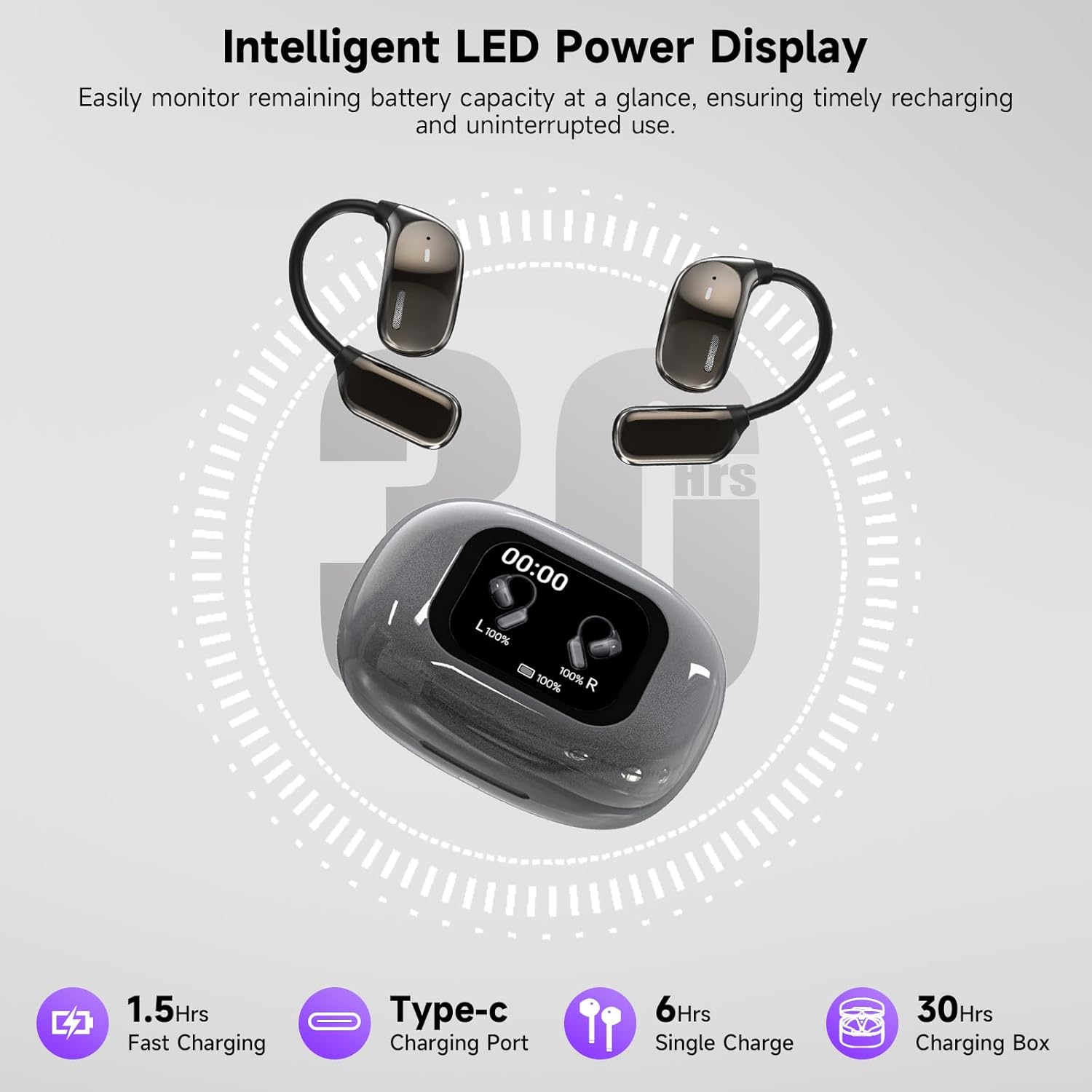
Image: The intelligent LED power display on the charging case, showing battery levels for both earbuds and the case, along with charging time indicators.
2. Pairing with Your Device
The earbuds will automatically enter pairing mode when taken out of the charging case.
- Open the charging case and remove both earbuds.
- On your smartphone or Bluetooth-enabled device, go to the Bluetooth settings.
- Search for "JM16" in the list of available devices and select it to connect.
- Once connected, the LED screen on the case will indicate a successful Bluetooth connection.
3. App Installation
For full translation functionality and advanced settings, download the dedicated Yonblow app.
- Scan the QR code provided in the quick start guide or search for "Yonblow Translator" (or similar, refer to product packaging) in your device's app store (iOS App Store or Google Play Store).
- Install the app and follow the on-screen instructions to link your JM16 earbuds.
Operating Instructions
Translation Modes
The JM16 earbuds offer three distinct translation modes to suit various communication needs. Select the desired mode via the companion app or the charging case touchscreen.

Image: An illustration showing the four tailored modes for various scenarios: Touch Mode, Free-speech Mode, Speaker Mode, and Offline Mode.
- Touch Mode: Ideal for one-on-one conversations. Each person wears one earbud. Tap your earbud to speak, and the other person will hear the translation in their earbud.

Image: Two individuals communicating with the aid of translation earbuds, demonstrating seamless language exchange.
- Listening Mode: For understanding spoken language around you. The phone automatically picks up speech and translates it into your language, playing it directly into your earbud. Useful for lectures or presentations.
- Speaker Mode: For quick, effortless conversations with multiple people or when you don't want to share an earbud. Use your smartphone's speaker or both earbuds to translate and broadcast the conversation.
- Offline Mode: (If supported by your app version) Allows translation without an internet connection for pre-downloaded language packs.
The advanced AI Semantic Segmentation Technology ensures that even during long conversations, the translation of the previous sentence is delivered seamlessly as the speaker continues, preventing delays and ensuring smooth understanding.

Image: A visual representation of the Revolutionary AI Semantic Segmentation Technology, showing real-time processing of speech for instant translation in a meeting setting.
Music Playback and Phone Calls
The JM16 earbuds also function as standard Bluetooth earbuds for audio and calls.
- Play/Pause: Single tap on either earbud.
- Next Track: Double tap the right earbud.
- Previous Track: Double tap the left earbud.
- Answer/End Call: Single tap on either earbud.
- Reject Call: Press and hold either earbud for 2 seconds.
- Activate Voice Assistant: Triple tap on either earbud (functionality depends on connected device).
LED Touchscreen Functions
The charging case features a full-color LED touchscreen for convenient control and information display.
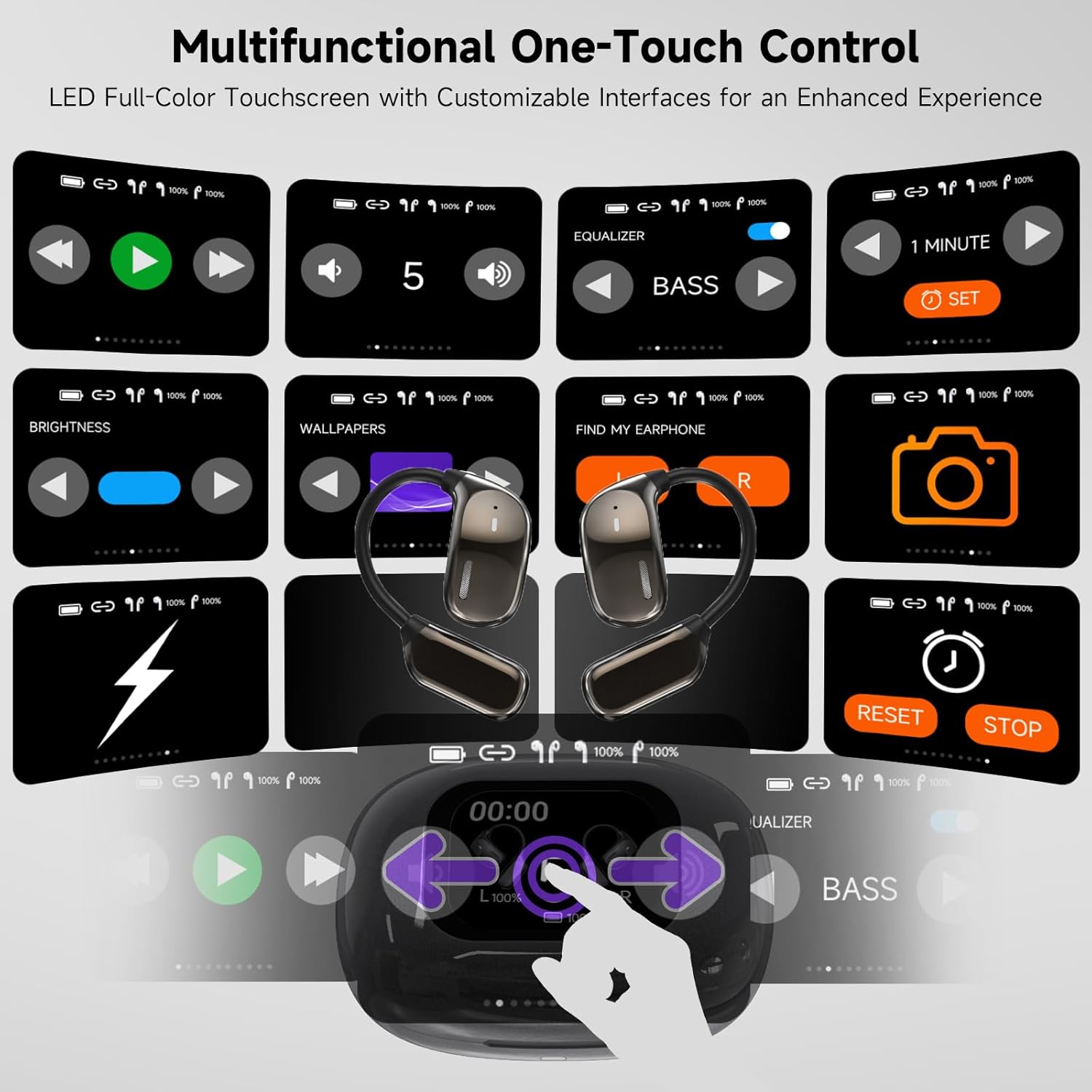
Image: A detailed view of the multifunctional one-touch control interface on the LED full-color touchscreen, showing various customizable options like equalizer, brightness, and find-my-earbuds.
Navigate the touchscreen by swiping and tapping. Functions include:
- Date & Time Display: View current date and time.
- Battery Levels: Monitor battery status of both earbuds and the charging case.
- Bluetooth Connection Status: Confirm connection to your device.
- Music Equalizer: Adjust audio profiles (e.g., Bass, Treble).
- Find-My-Earbuds Function: Locate misplaced earbuds (if within range).
- Photo Capture: Remotely trigger your phone's camera.
- Brightness Adjustment: Control screen brightness.
- Time Settings & Alarm Setup: Configure time and set alarms.
- Volume Control: Adjust playback volume.
- Song Skipping & Lyrics Display: Control music playback and view lyrics (if supported by music app).
Maintenance
Cleaning
Regular cleaning helps maintain the performance and longevity of your earbuds.
- Use a soft, dry, lint-free cloth to wipe the earbuds and charging case.
- For stubborn dirt, slightly dampen the cloth with water or a mild, non-abrasive cleaner. Avoid getting moisture into openings.
- Clean the charging contacts on both the earbuds and the case periodically with a dry cotton swab to ensure proper charging.
- Do not use harsh chemicals, aerosols, or abrasive cleaners.
Storage
When not in use, store the earbuds in their charging case to protect them and keep them charged.
- Store in a cool, dry place, away from direct sunlight and extreme temperatures.
- Avoid storing in dusty or dirty environments.
Troubleshooting
If you encounter issues with your Yonblow JM16 earbuds, refer to the following common problems and solutions:
| Problem | Possible Cause | Solution |
|---|---|---|
| Earbuds not charging | Poor contact with charging pins; dirty charging contacts; faulty cable/adapter. | Ensure earbuds are correctly seated. Clean charging contacts. Try a different USB-C cable and power adapter. |
| Cannot pair with device | Earbuds not in pairing mode; Bluetooth off on device; interference. | Ensure earbuds are out of case. Turn Bluetooth off/on on your device. Move closer to the device. Forget "JM16" and re-pair. |
| No sound or low volume | Volume too low; earbud placement; audio source issue. | Increase volume on both earbuds and connected device. Adjust earbud position. Check if audio is playing from the correct source. |
| Translation not working | App not open/connected; internet connection issue (for online modes); incorrect language settings. | Ensure the Yonblow app is open and connected. Check internet connection. Verify language settings in the app. Restart the app and earbuds. |
| Touchscreen unresponsive | Temporary software glitch; low battery. | Ensure the case is charged. Restart the case by closing and reopening it, or by connecting/disconnecting the charging cable. |
Specifications
| Feature | Detail |
|---|---|
| Model Name | JM16 |
| Brand | Yonblow |
| Connectivity Technology | Wireless (Bluetooth 5.4) |
| Bluetooth Range | Up to 10 meters (33 feet) |
| Battery Life (Earbuds) | Up to 6 hours per charge |
| Total Playtime (with Case) | Up to 25 hours |
| Charging Time (Case) | Approx. 1.5 hours |
| Control Type | Touch, Media Control |
| Noise Control | Sound Isolation |
| Water Resistance Level | Waterproof |
| Material | Acrylonitrile Butadiene Styrene (ABS), Plastic |
| Product Dimensions | 4.52 x 4.21 x 1.3 inches |
| Item Weight | 5.6 ounces |
| Included Components | 2 Translation Earbuds, 1 Charging Case, 1 Charging Cable, User Manual, 1 Box |
Warranty and Support
Your Yonblow JM16 Translation Earbuds are covered by a standard manufacturer's warranty. For specific warranty terms and conditions, please refer to the warranty card included in your product packaging or visit the official Yonblow website.
For technical support, troubleshooting assistance, or any inquiries regarding your product, please contact Yonblow customer service through the contact information provided on the official website or within the product packaging.
Online Resources: For the latest updates, FAQs, and additional support, please visit the official Yonblow support page.


