
truefree Truefree B1
truefree B1 Open-Ear Wireless Earbuds User Manual
Model: Truefree B1 | Brand: truefree
Introduction
The truefree B1 Open-Ear Wireless Earbuds offer an innovative audio experience with their unique clip-on design, spatial audio capabilities, and extended battery life. This manual provides detailed instructions for setup, operation, maintenance, and troubleshooting to ensure optimal performance and longevity of your earbuds.
What's in the Box
- Truefree B1 Wireless Earbuds (2)
- Charging Case (1)
- USB-C Charging Cable (1)
- User Manual (1)

The package includes the Truefree B1 wireless earbuds, their charging case, a USB-C charging cable, and this user manual.
Setup and Initial Use
1. Initial Activation and Pairing
Before first use, please remove the insulating film from the charging contacts on the earbuds. Place the earbuds back into the charging case to activate them.

The Truefree B1 earbuds are designed for open-ear wear, providing comfort and situational awareness.
- Open the charging case lid and take out the earbuds. The earbuds will power on automatically and enter pairing mode.
- On your device (smartphone, tablet, laptop), enable Bluetooth. Search for and select the Bluetooth device named TRUEFREE B1 to complete the connection.
- To switch to a different device later, disconnect or delete the pairing record for TRUEFREE B1 in the current device's pairing list. The earbuds will automatically re-enter pairing mode.
Video 1: How to Use Truefree B1 Clip on Earbuds. This video demonstrates the initial setup, pairing process, and basic operations of the Truefree B1 earbuds.
2. App Installation and Connection
For enhanced features and customization, install the TRUEFREE app.
- Search for and install the "TRUEFREE" app through your device's app market (e.g., Google Play Store, Apple App Store).
- Open the TRUEFREE app and log in using your registered email and password. (For unregistered users, tap "Register" on the interface to create an account.)
- After logging in, go to the main interface and tap "Connect Device" to pair. Once connected, you will enter the TRUEFREE B1 function interface.
3. Multipoint Connection
The Truefree B1 supports multipoint connection, allowing simultaneous pairing with two devices.
- Power on the earbuds and enter pairing mode, then connect to Device A.
- Turn off Bluetooth on Device A. The earbuds will re-enter pairing mode.
- Turn on Bluetooth on Device B and tap the earphone pairing name TRUEFREE B1 to complete the pairing.
- Turn on Bluetooth on Device A and select the previously paired earphones named TRUEFREE B1.
- Once paired successfully, the earphones will be connected to both devices simultaneously.

Multipoint connection allows seamless switching between two paired devices.
Operating Instructions
1. Wearing the Earbuds
The Truefree B1 earbuds feature an open-ear clip-on design for comfortable and secure fit.
- After wearing the earphones, adjust them to find the most comfortable position.
- Ensure that the earphone sound outlet is aligned with your ear canal to experience the best sound quality.
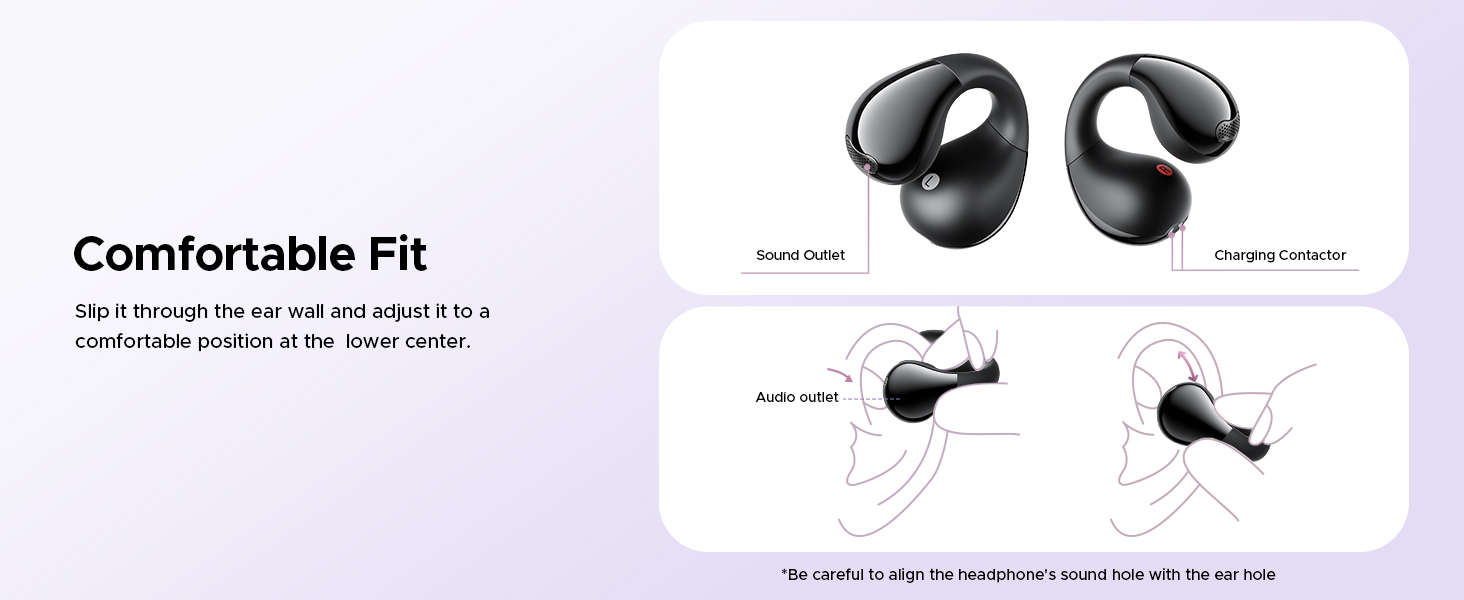
The ergonomic design ensures a stable and comfortable fit for extended wear.
Video 2: Truefree B1 Open Ear Clip. This video provides a visual demonstration of the open-ear clip design and how the earbuds are worn.
2. Touch Controls
The Truefree B1 earbuds feature intuitive touch controls. Customization is only effective when both earphones are connected and should be configured in non-call scenarios.
- Double-tap (L/R): Play/Pause music, Answer/End a call.
- Triple-tap (R): Play next track.
- Triple-tap (L): Activate voice assistant.
- Long press for 1.5 seconds (L/R): Reject an incoming call.

Control your audio and calls with simple taps on the earbuds.
3. App Features and Customization
The TRUEFREE app provides extensive customization options for your earbuds.
- Disable All Touch Controls: Turn off touch functionality.
- Game Mode: Experience low-latency gaming mode.
- Movie Mode: Enjoy 360° spatial sound effects.
- Find Earphones: If the earphones are connected but misplaced, activate this function to locate them.
- Custom Touch Control: Personalize touch gestures for a unique experience.
- Sound Presets: Choose from 9 sound styles to suit your preference.
- Adaptive EQ: Fine-tune the EQ settings to match your taste.
- Dynamic EQ: Disable this feature to extend battery life, though sound quality may decrease.
- Custom Prompt Volume Adjustment: Adjust prompt sounds; disabling can extend battery life but may reduce sound quality.

The Truefree app allows for personalized sound and control settings.
Charging
The Truefree B1 earbuds and charging case provide extended listening time.
- Up to 5.5 hours of playtime on a single charge.
- Up to 25 hours of total playtime with the charging case.
- A quick 10-minute charge provides 1 hour of use.
Charging the Case
- Connect a Type-C charging adapter to charge the case. (Charging current should not exceed 1A).
- If not in use for an extended period, charge the case at least once every three months.
- Insert the Type-C cable into the charging port of the case.
Earphones Charging Status Indicators:
- During charging: Red light is on
- Fully charged: Light off

The charging case provides multiple charges for extended use throughout the day.
Maintenance
1. Cleaning the Earbuds
Regular cleaning helps maintain optimal performance and hygiene.
- Regularly clean and disinfect the earphones and charging contacts using alcohol and a clean cotton swab.
- Avoid situations where the earphones cannot charge or power on due to long-term lack of cleaning.
2. Water Resistance
The Truefree B1 earbuds are IPX4 rated, meaning they are resistant to sweat and light rain.
- IPX4 rating makes them suitable for workouts, commutes, or outdoor use.
- The earbuds feature a vibration drainage function, effectively preventing damage caused by water accumulation inside the earbud.
- Please avoid using it in places that generate a lot of water vapor, such as saunas or bathrooms.

The IPX4 rating provides protection against splashes from any direction.
Troubleshooting
1. Clearing Pairing Records (Factory Reset)
This method is used when the earphones cannot connect properly or if you experience pairing issues.
- Ensure the earphones are not connected to any device.
- Within 30 seconds of removing the earphones from the charging case, tap the touch panel on the earphones 5 times.
- The white light will flash 5 times, indicating that the reset is complete.
- After the factory reset, use the first-time pairing method (Section: Setup and Initial Use) to reconnect and resume normal use.
Specifications
| Feature | Specification |
|---|---|
| Model Name | Truefree B1 |
| Brand | truefree |
| Connectivity Technology | Wireless (Bluetooth) |
| Bluetooth Version | 5.4 |
| Ear Placement | Open Ear |
| Driver Size | 10.8mm dual magnetic drivers |
| Total Playtime | Up to 25 hours (with charging case) |
| Playtime per Charge | Up to 5.5 hours |
| Fast Charging | 10-minute charge for 1 hour of use |
| Water Resistance | IPX4 |
| Control Type | Touch Control, App Control |
| Weight (per earbud) | 5g |
| Material | Nickel-titanium, Silicone, Plastic |
| Product Dimensions | 2.76 x 1.8 x 0.97 inches (Charging Case) |
Warranty and Support
For warranty information, technical support, or customer service inquiries, please refer to the official truefree website or contact their customer support directly. Keep your purchase receipt for warranty claims.
Official truefree Store: truefree Amazon Store
Related documentsTruefree B1


Ask a question about this manual
Ask about setup, troubleshooting, compatibility, parts, safety, or missing instructions. Manuals+ will review the question and use this page’s manual context to help answer it.